1. Product Overview & Key Features
The EF ECOFLOW Rapid Pro X Power Bank is a high-capacity portable charging solution designed for efficiency and versatility. With a 27,650mAh capacity and 300W total output, it can simultaneously charge multiple devices, including laptops and smartphones, at high speeds.
Key Features:
- 300W Total Output: Power up to 4 devices concurrently with 1 x 140W USB-C port and 2 x 65W USB-C ports.
- Integrated Retractable Cable: Includes a 2 ft retractable USB-C cable with a magnetic block for convenient charging on the go.
- Ultra-Fast Recharge: Achieve 80% charge in just 20 minutes with an EcoFlow 320W charging station. Single-port 140W input charges to 80% in 40 minutes, while 280W multi-port input reaches 80% in 26 minutes.
- High Capacity (27,650mAh): Capable of charging an iPhone 16 up to 4.5 times or a MacBook Air up to 1.3 times.
- TSA Compliant: At 99.54Wh, it meets TSA requirements for carry-on baggage.
- 3.9-Inch LCD Smart Display: Customize and monitor power usage data, standby patterns, clock themes, and animations via the display and companion app.
- X-Guard Advanced Safety Protection: Features UAV-grade battery cells, smart temperature control (reduces max temp by 46.4°F/8°C), and eco-mode to protect battery health.
2. Package Contents
- EF ECOFLOW Rapid Pro X Power Bank
3. Setup
3.1 Initial Charging of the Power Bank
Before first use, fully charge your EF ECOFLOW Rapid Pro X Power Bank. Connect the power bank to a suitable power source using a USB-C cable. For the fastest charging, use an EcoFlow 320W charging station (sold separately) or a 140W USB-C power adapter.
3.2 Connecting Devices
Use the appropriate USB-C ports or the integrated retractable USB-C cable to connect your devices to the power bank. The power bank will automatically detect and begin charging your connected devices.
4. Operating Instructions
4.1 Charging the Power Bank
To recharge the power bank, connect it to a power outlet using a compatible USB-C charger. The 3.9-inch LCD display will show the charging status, input wattage, and estimated time to full charge. For optimal speed, utilize the 140W single-port input or 280W multi-port input. An EcoFlow 320W charging station can achieve 80% charge in just 20 minutes.
4.2 Charging Your Devices
The power bank features 1 x 140W USB-C port, 2 x 65W USB-C ports, and a built-in 2 ft retractable USB-C cable. Connect your devices to the available ports. The power bank supports simultaneous charging of up to 4 devices with a total output of 300W. The smart display will indicate the output wattage for each port and the remaining runtime.

Image: EF ECOFLOW Rapid Pro X Power Bank simultaneously charging a laptop, smartphone, and other devices via its multiple USB-C ports and retractable cable.
4.3 Using the Smart Display
The 3.9-inch LCD screen provides real-time information about the power bank's status. You can view battery percentage, input/output wattage for each port, estimated remaining runtime, and battery temperature. Navigate through different display modes using the physical buttons on the device.
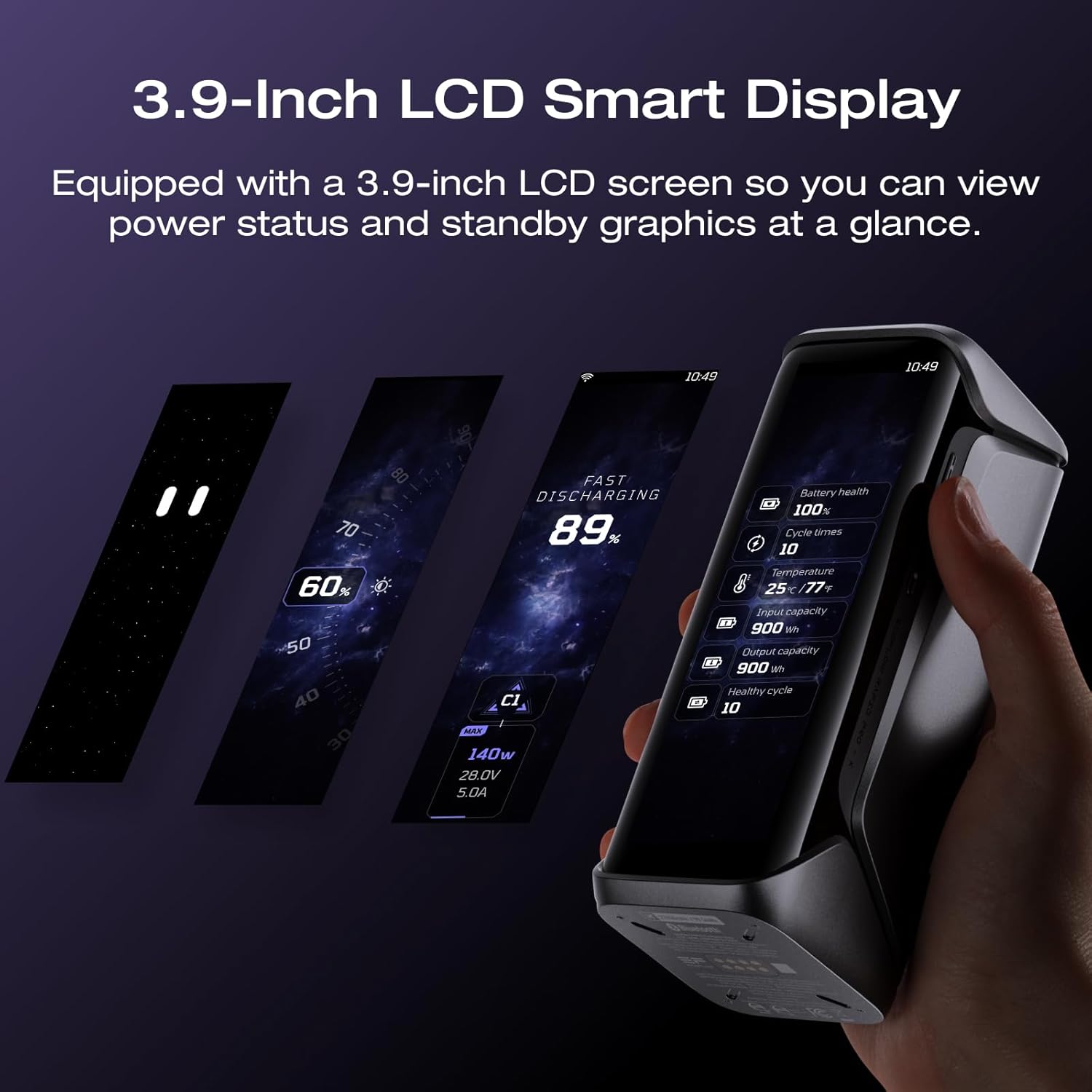
Image: Close-up of the EF ECOFLOW Rapid Pro X Power Bank's 3.9-inch LCD Smart Display showing various power status indicators and customizable standby graphics.
4.4 EcoFlow App Integration
Download the EcoFlow app to unlock advanced control and customization options. The app allows you to:
- Monitor power usage data in real-time.
- Create personalized standby patterns for the display.
- Adjust clock themes and activate the hourglass function.
- Enjoy dynamic animations while charging.
- Optimize charging settings and enable overheating protection for laptops via EcoFlow Power Manager software.
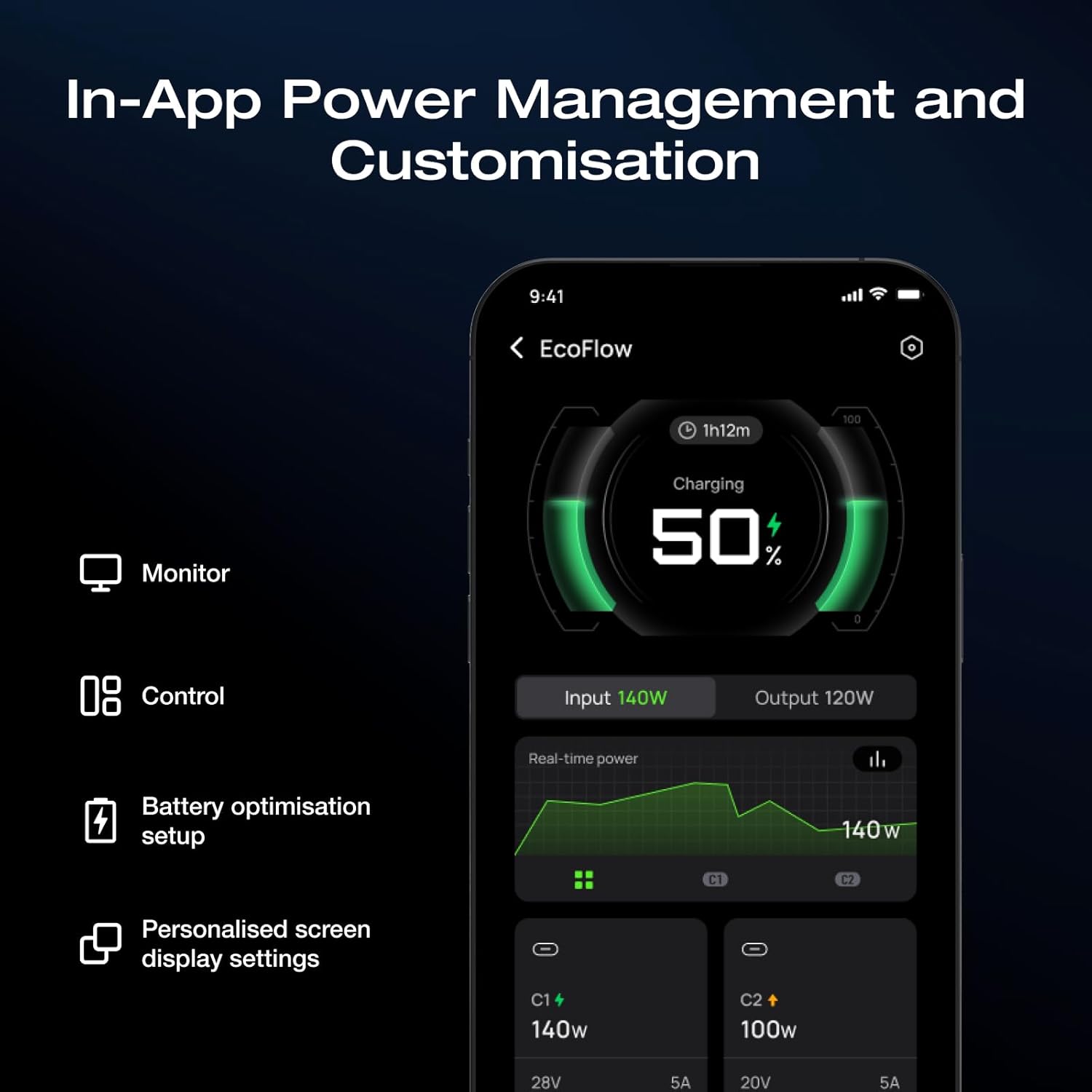
Image: Screenshot of the EcoFlow app interface showing real-time power monitoring, control options, battery optimization setup, and personalized screen display settings for the power bank.
5. Safety Features & X-Guard Protection
The EF ECOFLOW Rapid Pro X Power Bank is built with X-Guard Advanced Safety Protection to ensure maximum performance and device longevity.
- UAV-Grade Battery Cells: Equipped with high-quality battery cells for extended lifespan.
- Smart Temperature Control: Reduces maximum temperature by 46.4°F (8°C) during operation.
- Eco-Mode: The portable charger enters eco-mode at 111.2°F (44°C), stopping at 80% charge to protect battery health and prevent overheating.
- EcoFlow Power Manager Software: For laptops, use the dedicated software for optimized charging and overheating protection.
- Reduced Discharge Power & Slow-Charge Mode: Benefits other devices by preventing overcharging and ensuring stable power delivery.

Image: Diagram illustrating the X-Guard Advanced Safety Protection features, including 24/7 safety checks, 10 million daily temperature tests, V0-level fireproof shell, and Intelligent BMS & EMS systems.
6. Specifications
| Specification | Value |
|---|---|
| Model Number | EF-HB-140-X |
| Capacity | 27,650mAh (99.54Wh) |
| Total Output | 300W |
| USB-C Output (Port 1) | 140W |
| USB-C Output (Port 2 & 3) | 65W each |
| Built-in Cable | 2 ft Retractable USB-C with Magnetic Block |
| Recharge Input (Single-Port) | 140W (80% in 40 mins) |
| Recharge Input (Multi-Port) | 280W (80% in 26 mins) |
| Recharge Input (with EcoFlow 320W Charging Station) | 320W (80% in 20 mins) |
| Display | 3.9-inch LCD Smart Display |
| Dimensions | 6 x 2 x 2 inches |
| Weight | 2.68 pounds |
7. Troubleshooting
7.1 Power Bank Not Charging
- Ensure the charging cable is securely connected to both the power bank and the power source.
- Verify that the power source is active and providing power.
- Try using a different USB-C cable and power adapter to rule out faulty accessories.
- Check the power bank's display for any error messages.
7.2 Devices Not Charging from Power Bank
- Ensure the power bank has sufficient charge.
- Verify that the device is properly connected to the power bank's output ports or retractable cable.
- Try using a different port on the power bank or a different charging cable.
- Some devices may require specific charging protocols; ensure compatibility.
7.3 Display Not Working
- Press the power button briefly to activate the display.
- If the issue persists, try fully charging the power bank.
- If the display remains unresponsive, contact customer support.
8. Warranty and Support
The EF ECOFLOW Rapid Pro X Power Bank comes with a standard manufacturer's warranty. For detailed warranty information, product support, or to access the EcoFlow Power Manager software, please visit the official EF ECOFLOW website or contact their customer service.
Manufacturer: Jeckson Electric Co.,Ltd.(Huizhou Factory)
9. Product Videos
EcoFlow's 27k Power Bank - Best Power for the Money
Video: A detailed review of the EcoFlow 27k Power Bank, highlighting its features and value. This video is provided by a seller.
Should You Buy the EcoFlow Rapid Pro 3-in-1 Power Bank?
Video: An in-depth look at whether the EcoFlow Rapid Pro 3-in-1 Power Bank is the right choice for your needs. This video is provided by a seller.
A Power Bank That Keep All of My Gear Charged On the Go
Video: A short video demonstrating the convenience of the power bank for keeping multiple devices charged while mobile. This video is provided by a seller.
Charging the EcoFlow Rapid Pro 3-in-1 Power Bank
Video: A demonstration of how to charge the EcoFlow Rapid Pro 3-in-1 Power Bank. This video is provided by a seller.


