1. Introduction
Thank you for choosing the SONGMICS Electric Height-Adjustable Desk, model LSD028YD02. This manual provides essential information for the safe assembly, operation, and maintenance of your new desk. This ergonomic sit-stand desk is designed to promote a healthy working posture, featuring electric height adjustment, memory presets, a sedentary reminder function, and an integrated USB-C charging port.
Please read these instructions carefully before use and retain them for future reference.

Image 1.1: The SONGMICS Electric Height-Adjustable Desk in an office environment, showcasing its design and functionality.
2. Safety Instructions
- Ensure all components are present and undamaged before assembly. Do not use if any parts are missing or defective.
- Keep children and pets away from the desk during operation to prevent accidents.
- Do not place hands or objects near moving parts (legs, crossbar) during height adjustment to avoid pinching.
- Ensure the power cord is not pinched or damaged. Use only the provided power adapter.
- Do not overload the desk. Refer to the specifications section for the maximum weight capacity.
- Avoid placing liquids directly on the control panel or near electrical components.
- If the desk malfunctions, disconnect it from the power supply immediately and contact customer support.
- This desk is intended for indoor use only.
3. Package Contents
Before beginning assembly, verify that all parts listed in the assembly guide are present. The main components typically include:
- Desktop sections (multiple parts for 180x80cm model)
- Desk legs and feet
- Crossbar and support beams
- Control panel and power adapter
- Cable management accessories (grommets, ties)
- Storage pouch and hook
- Assembly hardware (screws, Allen keys)
- Instruction manual
4. Assembly Instructions
Assembly is designed to be straightforward with numbered parts and clear instructions. Follow the steps provided in the included assembly manual for detailed guidance.

Image 4.1: Easy assembly process, typically involving four main stages: attaching desktop sections, mounting legs, securing the crossbar, and adding accessories.
General Assembly Steps:
- Prepare the Desktop: Assemble the multiple desktop sections if applicable, ensuring they are securely joined.
- Attach Legs: Mount the desk legs to the desktop frame according to the instructions.
- Install Crossbar: Secure the crossbar between the legs to provide structural stability.
- Add Accessories: Install the control panel, cable management grommets, storage pouch, and hook.
- Connect Power: Once fully assembled, connect the power adapter to the control box and a power outlet.
5. Operating Instructions
5.1 Control Panel Overview

Image 5.1: The desk's control panel, illustrating height adjustment range and key functions.
The control panel features an LED display showing the current height, along with buttons for various functions:
- LED Screen: Displays the current desk height in centimeters.
- Up (▲) / Down (▼) Buttons: Press and hold to manually adjust the desk height.
- Memory Buttons (1, 2, 3, 4): Save and recall preferred desk heights.
- Sedentary Reminder Button (Clock Icon): Activates or deactivates the sedentary reminder.
- USB-C Port: For charging compatible devices.
5.2 Height Adjustment
To adjust the desk height manually, press and hold the Up (▲) or Down (▼) button until the desk reaches your desired height. Release the button to stop movement.
5.3 Setting Memory Presets
The desk allows you to save up to four preferred heights for quick adjustment.

Image 5.2: The 4-height memory function allows for personalized ergonomic settings.
- Adjust the desk to your desired height using the Up/Down buttons.
- Press the 'S' (Set) button (often represented by a gear icon or 'M' for Memory, depending on the model, but typically the fourth button from the right on the control panel). The LED display will show 'S-'.
- Within 3 seconds, press one of the memory buttons (1, 2, 3, or 4). The display will show 'S-1', 'S-2', etc., confirming the height is saved.
- To recall a saved height, simply press the corresponding memory button (1, 2, 3, or 4). The desk will automatically move to the saved position.
5.4 Sedentary Reminder Function
The sedentary reminder prompts you to change your posture at regular intervals. To activate or deactivate this function, press the Sedentary Reminder button (Clock Icon). When active, the desk will remind you to switch between sitting and standing positions every 15 minutes.
5.5 USB-C Charging Port
The integrated USB-C port provides convenient charging for your compatible devices.

Image 5.3: The USB-C port offers 15W fast charging for your devices.
Simply plug your USB-C compatible device into the port on the control panel to begin charging. The port supports 15W fast charging.
6. Features and Design
6.1 Ergonomic Flexibility
The desk's height adjustment range from 72 cm to 120 cm allows for seamless transitions between sitting and standing positions, promoting better posture and reducing discomfort during long work sessions. It is suitable for users between 150 cm and 190 cm tall.
6.2 Stable and Quiet Operation

Image 6.1: The desk features a stable steel frame, quiet motor, and has undergone extensive testing for durability.
The high-quality steel frame and motor ensure smooth and stable height adjustments, even with a load of up to 70 kg. The operating noise level is less than 48 dB, comparable to a quiet library, allowing you to maintain focus without distraction.

Image 6.2: Noise level comparison, highlighting the desk's quiet operation at less than 48 dB.
6.3 Integrated Cable Management and Accessories
The desk is equipped with features to help keep your workspace organized:
- Cable Grommets: Two integrated cable grommets allow for neat routing of power and data cables through the desktop.

Image 6.3: Two cable grommets for organized cable routing.
- Cable Ties: Three reusable cable ties are included to bundle and secure cables under the desk.

Image 6.4: Included cable ties for managing wires.
- Storage Pouch and Hook: A fabric pouch provides storage for small items, and a large hook is available for hanging bags or headphones.

Image 6.5: Convenient storage pouch and hook for accessories.
6.4 Desktop Construction
The desktop is constructed from engineered wood with quality reinforcements to prevent deformation and ensure long-term stability. A textured desk pad is also included to enhance mouse glide and protect the surface.

Image 6.6: Quality reinforcements ensure the desktop maintains its shape and stability over time.
7. Maintenance
- Cleaning: Wipe the desk surface with a soft, damp cloth. Avoid harsh chemicals or abrasive cleaners.
- Inspection: Periodically check all screws and connections to ensure they are tight. Retighten if necessary.
- Cable Management: Ensure cables are neatly organized and not interfering with the desk's movement.
- Power Cord: Regularly inspect the power cord for any signs of damage.
8. Troubleshooting
If you encounter issues with your desk, refer to the following common troubleshooting steps:
| Problem | Possible Cause | Solution |
|---|---|---|
| Desk does not move. | Power disconnected, motor overload, control panel error. | Check power connection. Disconnect power for 10 minutes, then reconnect. Reduce weight on desk. |
| Desk moves unevenly or makes unusual noise. | Uneven load, loose connections, obstruction. | Distribute weight evenly. Check all assembly connections. Remove any obstructions. |
| Memory function not working. | Incorrect setting procedure. | Refer to Section 5.3 for correct memory preset instructions. |
| USB-C port not charging. | Device incompatibility, cable issue, power issue. | Ensure device is USB-C compatible. Try a different cable. Check desk power. |
If the problem persists after attempting these solutions, please contact customer support for further assistance.
9. Specifications
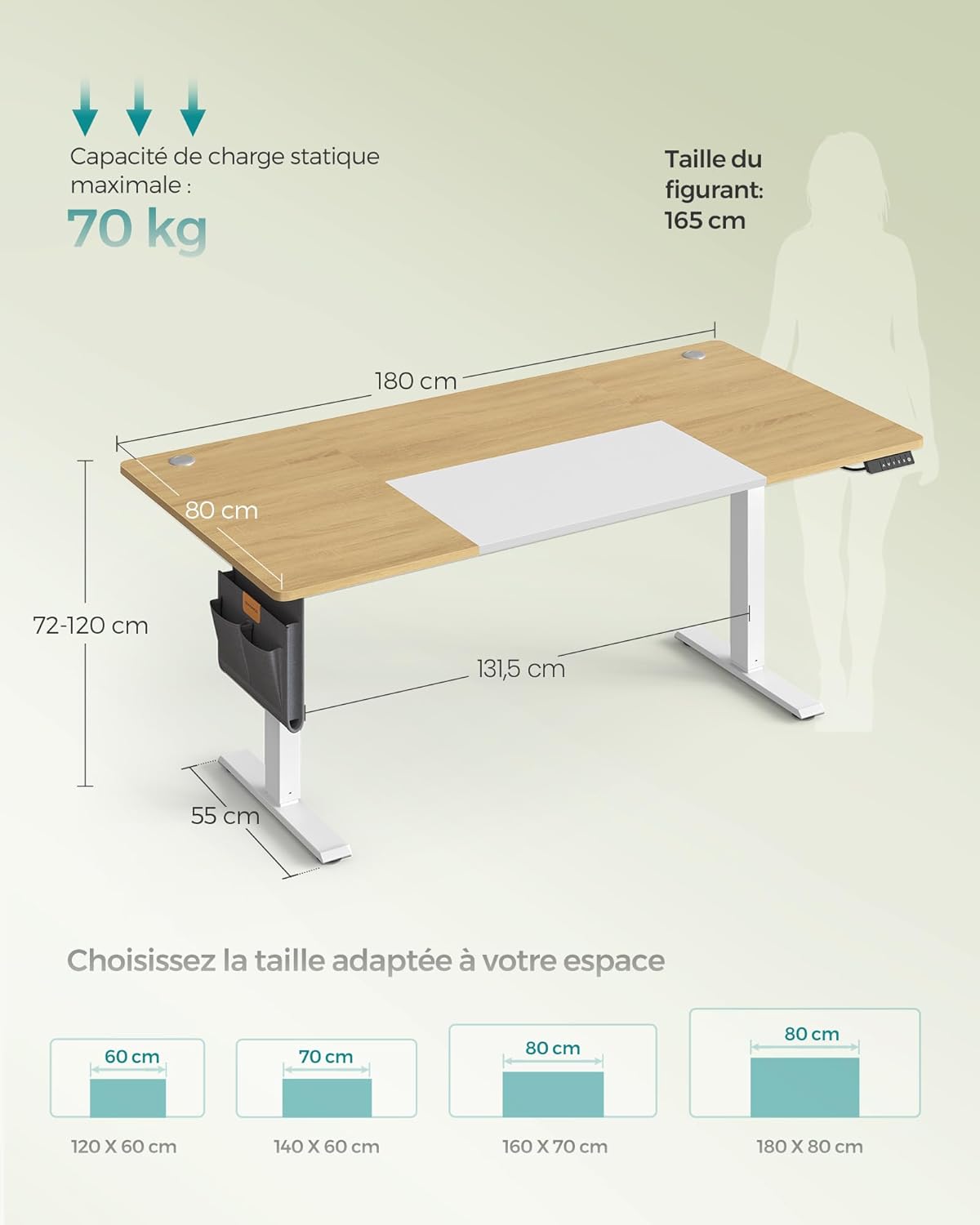
Image 9.1: Key dimensions and maximum load capacity of the desk.
| Feature | Detail |
|---|---|
| Model | LSD028YD02 |
| Dimensions (L x W x H) | 180 x 80 x 72-120 cm |
| Height Adjustment Range | 72 cm - 120 cm |
| Max. Static Load Capacity | 70 kg |
| Material | Engineered Wood (Particleboard), Steel |
| Weight | 28 kg |
| Noise Level | < 48 dB |
| USB-C Output | 15W Fast Charging |
| Special Features | Ergonomic, 4-Height Memory Function, Sedentary Reminder, USB-C Port, Cable Management |
10. Warranty and Support
SONGMICS products are designed for quality and durability. For warranty information, product support, or to report any issues, please refer to the contact details provided with your purchase or visit the official SONGMICS website. Please have your model number (LSD028YD02) and purchase information ready when contacting support.


