
Introduction
Thank you for choosing the Lerliuo Large Printer Stand. This manual provides essential information for the safe assembly, operation, and maintenance of your new printer stand. Please read these instructions carefully before assembly and retain them for future reference.
Safety Information
- Ensure all parts are present and undamaged before assembly. Do not use if any parts are missing or damaged.
- Assemble the stand on a soft, clean surface to prevent scratches.
- Do not overtighten screws during assembly to avoid damaging the material.
- Distribute weight evenly on the stand. Do not exceed the maximum weight capacity of 150 lbs per shelf.
- Keep small parts away from children during assembly.
- Always lock the casters when the stand is in a stationary position to prevent accidental movement.
Package Contents
Verify that all components are included in your package:
- Printer Stand Components (wooden boards, steel frames)
- Fabric Storage Bag
- Assembly Tools (e.g., Allen wrench)
- Assembly Instructions Manual
- Casters (4, with 2 lockable)
Setup and Assembly
Follow these steps for quick and stress-free assembly. It is recommended to have a second person assist with assembly.
- Unpack Components: Carefully remove all parts from the packaging. Lay them out on a clean, soft surface to prevent scratches.
- Identify Parts: Refer to the included assembly instructions and identify each component using the labeled parts.
- Attach Casters: Secure the four casters to the bottom frame of the stand. Ensure the two lockable casters are positioned at the front for easy access.
- Assemble Frame: Connect the steel frame components according to the assembly diagram, using the provided screws and tools. Do not fully tighten screws until the entire frame is assembled.
- Install Shelves: Place the wooden boards onto the assembled frame, ensuring they are properly aligned. Secure them with the remaining screws.
- Attach Fabric Bag: The detachable fabric storage bag can be installed on either side of the stand. Attach it securely using the designated hooks or fasteners.
- Final Tightening: Once all components are in place and aligned, carefully tighten all screws to ensure stability.

Operating Instructions
Placement and Usage
- Place the printer stand on a flat, stable surface.
- The top shelf is designed to accommodate large printers or other office equipment.
- The bottom shelf is suitable for shredders, PC towers, or additional storage.
- Utilize the fabric side bag for storing documents, books, or office supplies.

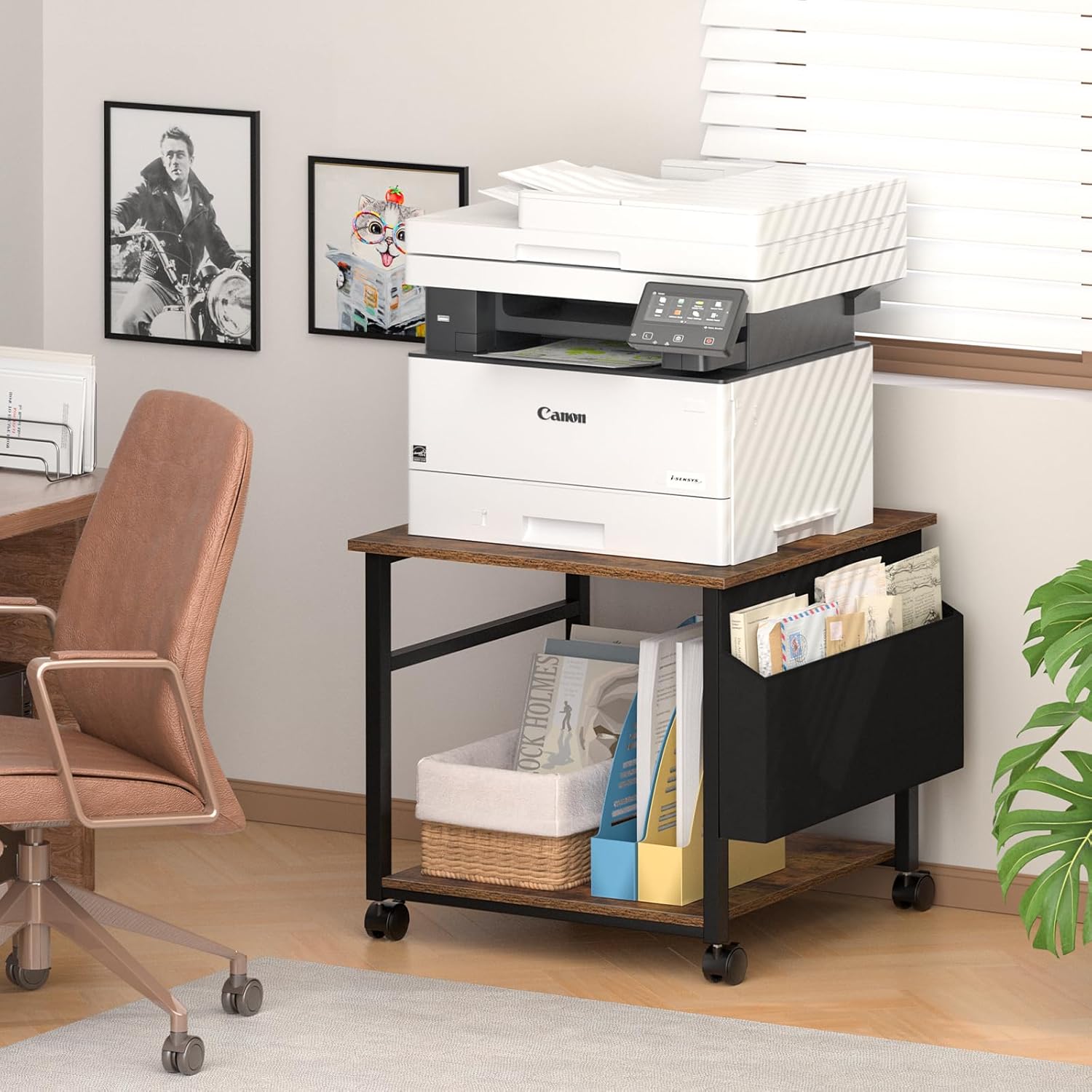
Mobility and Stability
- To move the stand, unlock the two lockable casters by flipping their levers to the "unlock" position.
- Gently push the stand to its desired location.
- Once in position, lock the two casters by flipping their levers to the "lock" position to ensure stability and prevent accidental movement.


Multi-purpose Functionality
Beyond office use, this stand can serve various functions in your home, such as a bedside table, nightstand, or a mobile mini-fridge stand, adapting to different living spaces.

Maintenance
- Cleaning: Wipe the wooden surfaces with a soft, damp cloth. Avoid harsh chemicals or abrasive cleaners. The fabric bag can be spot cleaned as needed.
- Inspection: Periodically check all screws and connections to ensure they remain tight. Retighten if necessary.
- Caster Care: Keep casters free of debris to ensure smooth movement.
Troubleshooting
| Problem | Possible Cause | Solution |
|---|---|---|
| Stand is wobbly. | Screws are loose; uneven floor surface; incorrect assembly. | Ensure all screws are fully tightened. Move the stand to a level surface. Review assembly instructions to confirm correct setup. |
| Casters do not roll smoothly. | Debris caught in casters; casters are locked. | Check casters for hair or debris and remove. Ensure lock levers are in the "unlock" position. |
| Casters do not lock. | Locking mechanism is obstructed or damaged. | Ensure no debris is preventing the lock from engaging. If damaged, contact customer support. |
| Fabric bag does not attach securely. | Incorrect attachment method; missing hooks/fasteners. | Refer to assembly instructions for correct attachment. Verify all necessary hooks/fasteners are present. |
Specifications
| Brand | Lerliuo |
| Model Number | B0FH9XPWD7 |
| Colour | Brown |
| Material | Industrial wood, Alloy Steel, Fabric fiber |
| Overall Dimensions (L x W x H) | 59.9 x 59.9 x 57.9 cm (23.6 x 23.6 x 22.8 inches) |
| Fabric Bag Dimensions (D x W x H) | Approx. 55.9 x 12.7 x 22.9 cm (22 x 5 x 9 inches) |
| Product Weight | Approx. 9.07 kg (20 lbs) |
| Weight Capacity (per layer) | Up to 68 kg (150 lbs) |
| Special Features | 360° rotating casters, 2 lockable casters, detachable fabric storage bag |
| Compatible Devices | Printers, Shredders, PC towers, Mini-fridges |
Warranty and Support
For any questions, concerns, or assistance with your Lerliuo Large Printer Stand, please contact our customer support team. While specific warranty details are not provided in this manual, please refer to your purchase documentation or the retailer's website for warranty information.
Customer Support: Please refer to the contact information provided by your retailer or on the official Lerliuo website.