
Introduction
This manual provides essential information for the safe assembly, operation, and maintenance of your OLAKIDS 12V Kids Ride-On Truck. Please read it thoroughly before first use and retain it for future reference. The truck features dual driving modes (child-operated or parental remote control), built-in music, LED lights, and robust construction for a safe and enjoyable experience.
Safety Information
- Age Recommendation: Suitable for children over 3 years old.
- Weight Capacity: Maximum weight limit is 77 lbs (35 kg).
- Adult Supervision: Always supervise children during operation.
- Seat Belt: Ensure the adjustable seat belt is securely fastened before each use.
- Soft Start Function: The vehicle is equipped with a soft start function for smoother acceleration and enhanced safety.
- Remote Control: Parents can use the 2.4GHz remote control to override child operation for safety. Requires 2 AAA batteries (not included).
- Compliance: Compliant with US CPSIA and ASTM Requirements. Made of non-toxic materials, free from BPA, PVC, Phthalates, Lead, Latex, and Formaldehyde. Passed tests for stability, asphyxiation, load, and shear.
- Electrical Safety: Compliant with DOE & CEC Requirements for electrical energy efficiency.

Image Description: A diagram illustrating the 'Low Start for Safety' feature, comparing a soft start function (blue line) with a non-soft start function (red line) over time, showing a gradual acceleration for safety.
Package Contents
Before assembly, ensure all parts listed below are present:
- 1 x Kids Ride-on Car (Main Body)
- 1 x Charger
- 1 x User Guide
- 1 x Remote Control (2 AAA batteries not included)
- Wheels (4)
- Steering Wheel
- Seat with Seat Belt
- Front Bumper Assembly with Lights
- Rear Bumper Assembly with Lights
- Windshield
- Side Mirrors (2)
- Roll Bar with Top Lights
- Spare Tire Cover (Decorative)
- Various Screws and Fasteners
Assembly Instructions
Follow these steps carefully for proper assembly. Refer to the provided video for visual guidance.
Assembly Video Guide
Video Description: This video provides a comprehensive step-by-step guide for assembling the ride-on truck, including attaching the chassis, wheels, steering wheel, and other components. It demonstrates the use of tools and proper connection of parts.
Step-by-Step Assembly
- Unpack Components: Carefully remove all parts from the packaging. Ensure no small parts are discarded with the packing materials.
- Attach Chassis Components: Secure the main chassis frame using the provided screws.
Image Description: A still frame from the assembly video showing a person attaching the metal support bars to the underside of the truck's main body using a screwdriver.
- Install Wheels: Attach the four wear-resistant wheels to the axles. Secure them with the appropriate fasteners.

Image Description: A close-up of the large, wear-resistant wheels of the OLAKIDS ride-on truck, highlighting their robust design suitable for various terrains like asphalt, brick, and wood floor.
- Connect Steering Wheel: Insert the steering column and connect the wiring harness from the steering wheel to the main body. Secure the steering wheel in place.
- Attach Windshield and Side Mirrors: Secure the windshield to the front of the truck and attach the rearview mirrors to the sides.
- Install Bumpers and Roll Bar: Attach the front and rear bumper assemblies, ensuring all lights are correctly positioned and wired. Secure the roll bar with the top lights.
- Connect Battery: Locate the battery compartment, connect the red terminal to the red wire and the black terminal to the black wire. Ensure connections are secure.
- Install Seat: Place the seat into position and secure it with the provided screws. Fasten the seat belt.
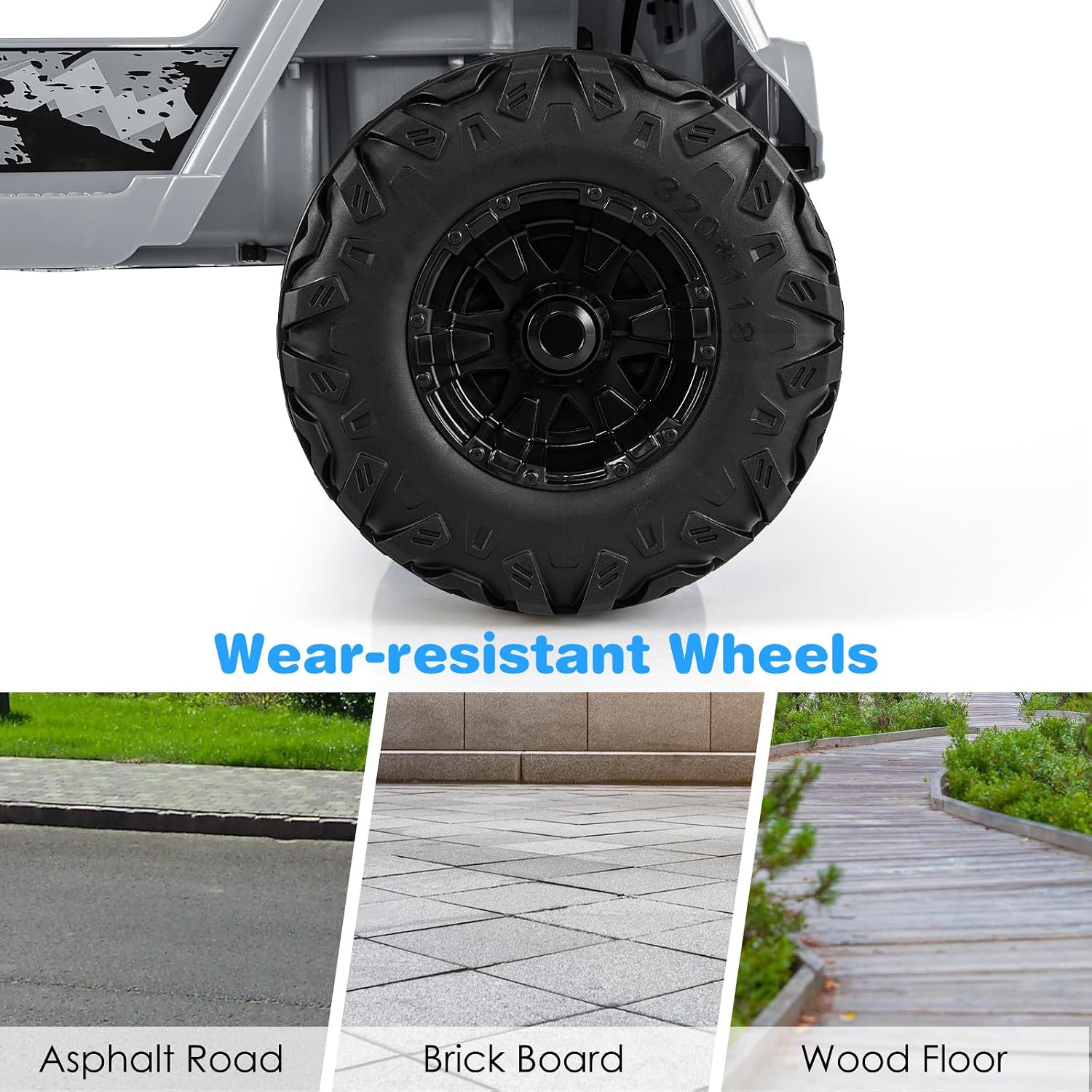
Image Description: A collage showing detailed design elements: a safety belt for child security, a foot pedal for control, and a rearview mirror for realistic driving experience.
- Final Checks: Before first use, ensure all screws are tightened, all connections are secure, and the truck is stable.

Operating Instructions
Your OLAKIDS Ride-On Truck offers two modes of operation:
1. Child Manual Control
- Power On: Press the power button on the dashboard.
- Start/Stop: Use the foot pedal to accelerate and release to brake.
- Direction: Use the steering wheel to steer left or right.
- Speed Selection: Use the "High Speed" or "Low Speed" buttons on the dashboard to adjust driving speed.
- Forward/Reverse: Use the gear selector switch for forward, stop, or reverse movement.
- Horn & Music: Press the horn button on the steering wheel for sound. Use the dashboard controls for built-in music, radio, Bluetooth, and USB playback.
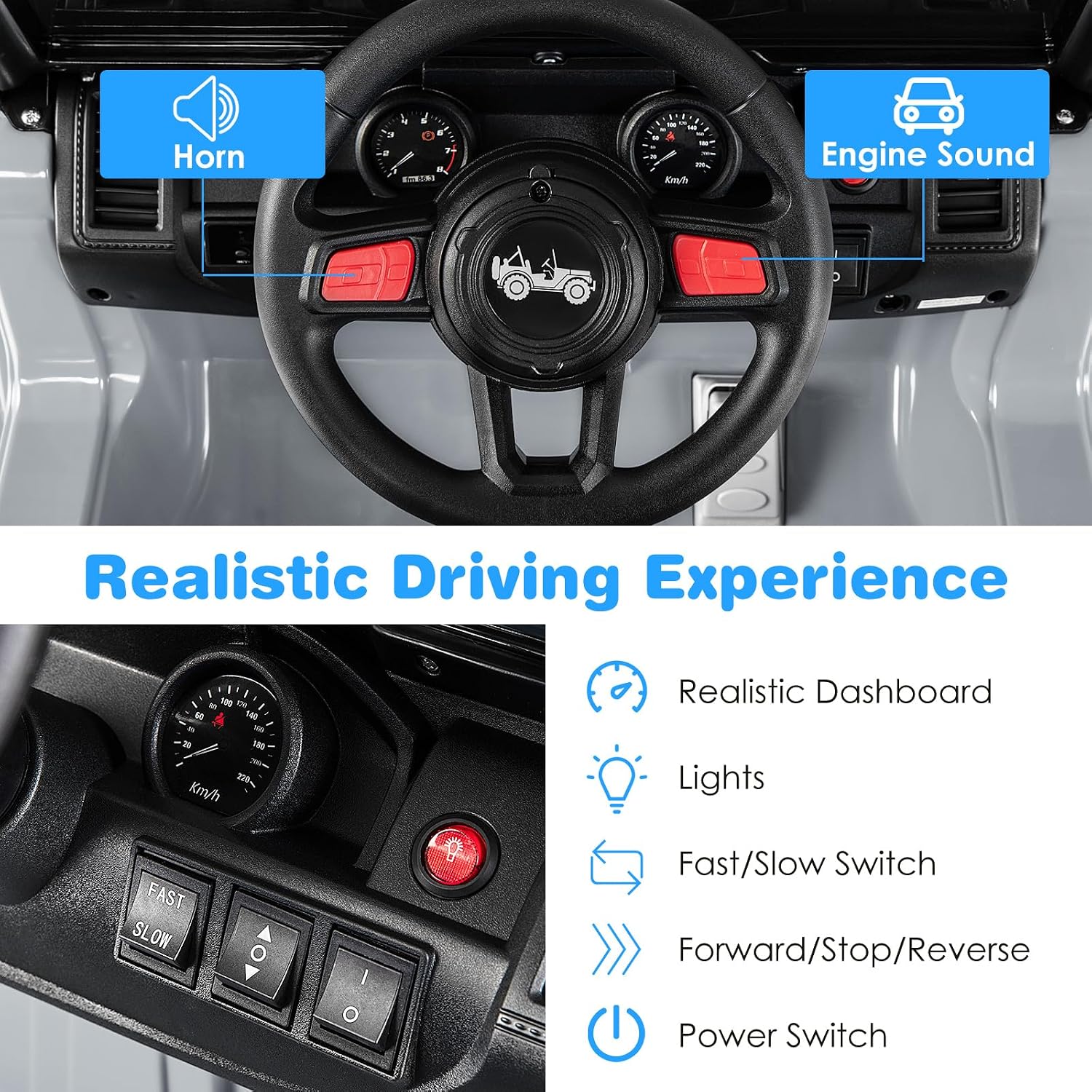
Image Description: A close-up of the truck's dashboard, showing the steering wheel, horn, engine sound buttons, lights, fast/slow speed switch, forward/stop/reverse selector, and power switch.
2. Parental Remote Control
- Pairing: Follow the instructions in the User Guide to pair the 2.4GHz remote control with the truck.
- Control: Use the remote to control forward/backward movement, steering (left/right), and speed. The remote can override child manual control for safety.
- Batteries: The remote control requires 2 AAA batteries (not included).
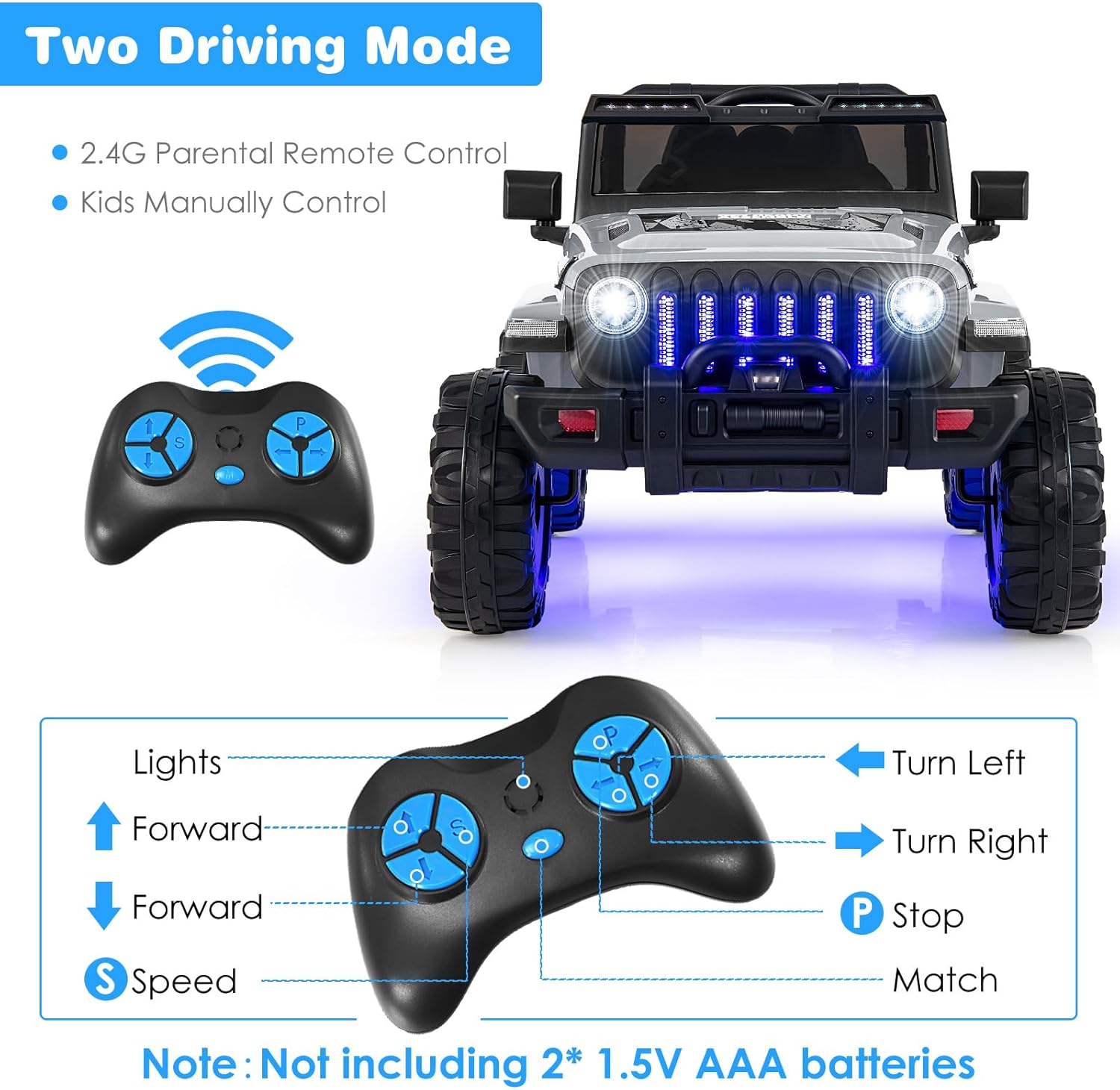
Image Description: An illustration showing the two driving modes: 2.4G Parental Remote Control and Kids Manually Control, with a diagram of the remote control buttons and their functions (Lights, Forward, Stop, Back, Speed, Turn Left, Turn Right, P Stop, Match).
Music and Entertainment Features
- Built-in Music: The truck comes with pre-loaded music.
- USB Port: Connect a USB device to play your own audio files.
- Bluetooth: Pair your smartphone or other Bluetooth-enabled device to stream music.
- Radio: Tune into FM radio stations.
- Volume Control: Adjust the volume using the dedicated controls on the dashboard.

Image Description: A close-up of the truck's media console, displaying icons for Battery Display, USB, Volume Adjustment, Radio, Bluetooth, and Music, indicating various entertainment options.
Charging Instructions
- Ensure the truck is turned OFF before charging.
- Locate the charging port (refer to the User Guide for exact location).
- Plug the charger into the charging port on the truck.
- Plug the charger into a standard wall outlet.
- Charge the battery for 8-12 hours for a full charge. Do not overcharge.
- Disconnect the charger once charging is complete.
Important: Only use the charger provided with your OLAKIDS Ride-On Truck. Using an incorrect charger may damage the battery or cause fire.
Maintenance
- Cleaning: Wipe the truck with a soft, damp cloth. Do not use abrasive cleaners or solvents.
- Storage: Store the truck in a dry, cool place away from direct sunlight. If storing for extended periods, charge the battery fully every 3 months to prolong its lifespan.
- Battery Care: Avoid completely draining the battery. Recharge promptly after each use.
- Inspection: Regularly check all screws, connections, and moving parts for wear or damage. Replace any damaged parts immediately.
Troubleshooting
If you encounter issues, refer to these common solutions:
- Truck does not move:
- Check battery connections.
- Ensure the battery is charged.
- Verify the power switch is ON.
- Check if the remote control is paired and not overriding manual control.
- Slow speed:
- Ensure the "High Speed" setting is selected (if applicable).
- Check battery charge level.
- Ensure the truck is not overloaded (max 77 lbs).
- Remote control not working:
- Replace AAA batteries in the remote.
- Re-pair the remote control with the truck according to the User Guide.
- No sound/music:
- Check volume level.
- Ensure external devices (USB/Bluetooth) are properly connected or paired.
For further assistance, please contact Olakids customer support.
Specifications
| Brand | Olakids |
| Model Number | TY328019 |
| Battery | 12V |
| Speed | 2.6-6 KM/H (approx. 1.6-3.7 MPH) |
| Maximum Weight Capacity | 77 lbs (35 kg) |
| Recommended Age | 3+ Years Old |
| Product Dimensions (L x W x H) | 44" x 30" x 26.5" (111.8 cm x 76.2 cm x 67.3 cm) |
| Material | PP (Polypropylene) + Steel |
| Charging Time | 8-12 hours |
Warranty and Support
For warranty information, returns, or customer support, please refer to your purchase documentation or contact the seller directly. Keep your proof of purchase for any warranty claims.
You can visit the official Olakids store for more information: Olakids Store


