
1. Introduction
Thank you for purchasing the Godox IT20-S Mini TTL Camera Flash. This compact and versatile flash unit is designed to provide powerful and precise lighting for your Sony camera system. Featuring smart TTL functionality, quick mode switching, and magnetic accessory compatibility, the IT20-S is an ideal tool for photographers seeking portable and efficient lighting solutions.
Please read this manual carefully before use to ensure proper operation and to maximize the performance of your flash unit. Keep this manual for future reference.
2. Safety Information
To prevent damage to the product or injury to yourself or others, read the following safety precautions completely before using this equipment.
- Do not disassemble or modify this product. If the product breaks down, it must be repaired by an authorized maintenance center.
- Keep this product dry. Do not handle with wet hands or immerse in water.
- Do not use the flash unit in the presence of flammable gases, chemicals, or other materials.
- Do not touch the flash tube after continuous firing to avoid burns.
- Keep out of reach of children.
- Use only the specified charging cable and power adapter.
3. Product Overview
The Godox IT20-S is a compact and lightweight flash designed for Sony cameras. Below is an illustration of the main components.

Figure 3.1: Godox IT20-S Mini TTL Camera Flash and accessories. This image displays the compact flash unit, various magnetic color filters, a diffuser, a USB-C charging cable, and a storage pouch.
- Flash Head
- Control Panel (Display, Mode Button, +/- Buttons)
- Hot Shoe Mount
- USB-C Charging Port
- Power Button
4. Setup
4.1 Charging the Battery
The IT20-S features a built-in rechargeable lithium battery. Before first use, fully charge the battery.
- Locate the USB-C charging port on the side of the flash unit.
- Connect the included USB-C cable to the flash unit and a compatible USB power adapter (not included) or a computer USB port.
- The charging indicator on the display will show the charging status. A full charge typically takes approximately 1.5 hours.
- Once fully charged, disconnect the USB-C cable.
Note: The flash provides over 700 full-power flashes on a single charge.
4.2 Mounting the Flash to Your Camera
The IT20-S is designed to mount directly onto your Sony camera's hot shoe.
- Ensure both the camera and the flash unit are powered off.
- Slide the flash's hot shoe mount into your camera's hot shoe slot until it clicks into place.
- Some cameras may have a locking mechanism; ensure it is secured if applicable.

Figure 4.2: The Godox IT20-S flash unit securely mounted on a Sony mirrorless camera, ready for use.
4.3 Powering On/Off
Press and hold the power button (usually located on the side or back) for a few seconds to turn the flash unit on or off. The display will illuminate when powered on.
5. Operating the Flash
5.1 Mode Switching (M/TTL)
The IT20-S allows for quick switching between TTL (Through-The-Lens) and Manual (M) modes.

Figure 5.1: The control panel of the Godox IT20-S, highlighting the dedicated button for switching between Manual (M) and TTL modes, and the clear display.
- TTL Mode: In this mode, the flash automatically adjusts its output based on the camera's metering system, providing optimal exposure. This is ideal for fast-paced shooting where lighting conditions may change rapidly.
- Manual Mode (M): In Manual mode, you have full control over the flash power output. Press the dedicated mode button to switch to Manual mode.
5.2 Adjusting Flash Power (Manual Mode)
When in Manual mode, use the + and - buttons to adjust the flash power output.
- The flash power can be adjusted across 6 stops, from 1/32 to 1/1 (full power).
- Adjustments are made in ±1/3-step increments, allowing for precise control over your lighting.
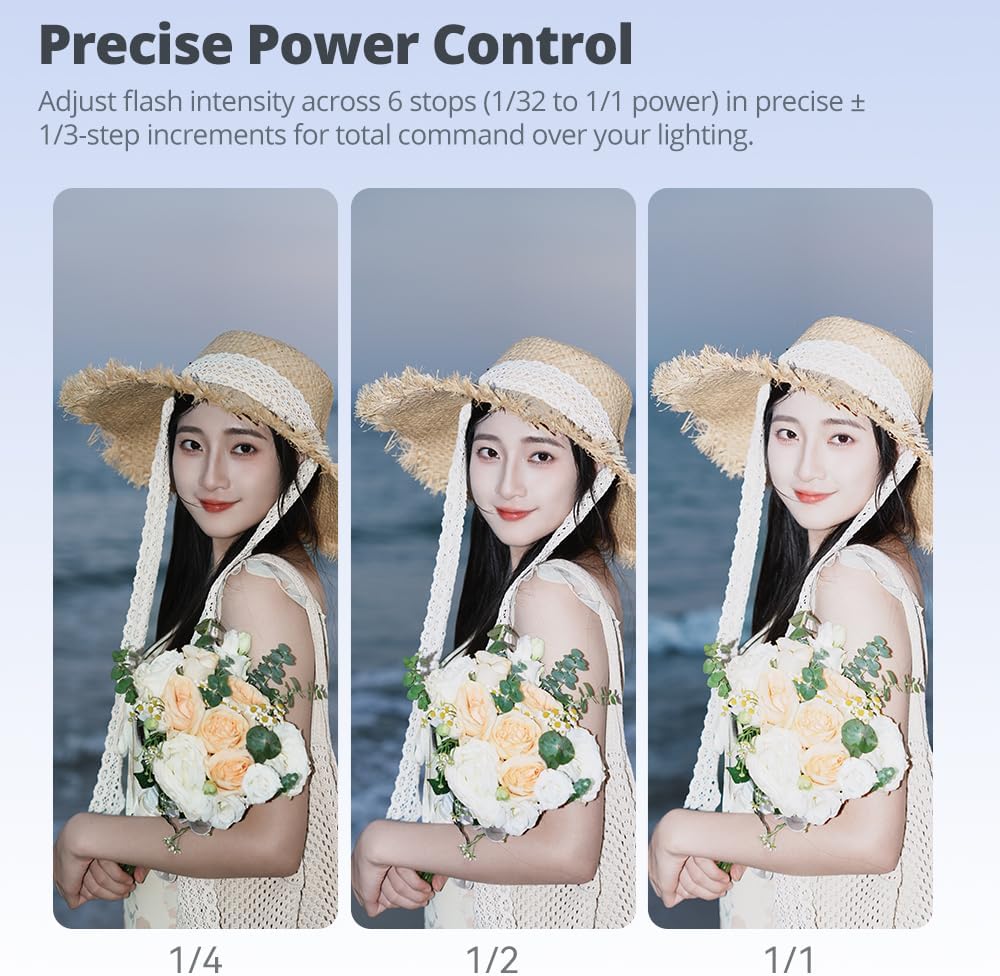
Figure 5.2: Visual representation of different flash power settings (1/4, 1/2, 1/1) and their effect on subject illumination.
5.3 Using Magnetic Accessories
The IT20-S comes with magnetic snap-on accessories to modify the light output.
- Diffuser: Attaches magnetically to soften the light and reduce harsh shadows.
- Color Filters (CTO/CTB): Use these to adjust the color temperature of the flash to match ambient light or create creative effects.
- Creative Gels & Honeycomb Grids: (Note: Some accessories may require separate purchase) These allow for further light shaping and creative control.
Simply align the magnetic accessory with the front of the flash head, and it will snap into place.

Figure 5.3: The Godox IT20-S flash unit demonstrating its compatibility with a range of magnetic accessories, including diffusers and color filters, for light modification.
5.4 Compatible Camera Mountings
The Godox IT20-S is designed for Sony cameras and is compatible with a wide range of models, including but not limited to:
- Sony Alpha 7 series: A7, A7 II, A7 III, A7 IV, A7R, A7R II, A7R III, A7R IV, A7R V, A7C, A7C II, A9, A9 III
- Sony Alpha 6000 series: A6000, A6100, A6300, A6400, A6500, A6700
- Other models: FX3, ZV-E10, A77, A77 II, A99, A350
6. Maintenance
- Cleaning: Use a soft, dry cloth to clean the flash unit. Do not use solvents or abrasive cleaners.
- Storage: Store the flash unit in a cool, dry place away from direct sunlight and excessive humidity. If storing for extended periods, ensure the battery is partially charged (around 50%) and recharge every few months to maintain battery health.
- Battery Care: Avoid fully discharging the battery frequently. Recharge promptly when the low battery indicator appears.
7. Troubleshooting
| Problem | Possible Cause | Solution |
|---|---|---|
| Flash does not fire. |
|
|
| Flash output is too weak/strong. |
|
|
| Flash recycle time is slow. |
|
|
8. Specifications
| Brand | GODOX |
| Model Number | IT20-S |
| Compatible Mountings | Sony A7, A7 II, A7 III, A7 IV, A7R, A7R II, A7R III, A7R IV, A7R V, A7C, A7C II, A9, A9 III, FX3, A6000, A6100, A6300, A6400, A6500, A6700, ZV-E10, A77, A77 II, A99, A350 |
| Flash Sync Speed | 1/8000s |
| Power Output | 1/32 to 1/1 (full power) in ±1/3-step increments |
| Recycle Time | Approx. 1.5 seconds (at full power) |
| Flashes per Charge | 700+ (at full power) |
| Battery Type | Built-in Lithium Battery |
| Charging Port | USB-C |
| Battery Life (Standby) | 6 Hours |
| Dimensions (L x W x H) | 7.8 x 7.59 x 4.9 cm |
| Weight | 91 g |
| Color | Black |
| Included Components | Camera Flash, Magnetic Diffuser, Magnetic Filters, USB-C Cable, Storage Pouch |
9. Warranty and Support
Godox products are designed and manufactured to the highest quality standards. For detailed warranty information, please refer to the warranty card included with your product or visit the official Godox website.
If you encounter any issues or require technical assistance, please contact your authorized Godox dealer or customer support. Provide your product model number (IT20-S) and purchase details when seeking support.