
Lemnoi S76
Contents
Lemnoi 4G LTE Cellular Security Camera S76 User Manual
Model: S76
1. Introduction
This manual provides detailed instructions for the installation, operation, and maintenance of your Lemnoi 4G LTE Cellular Security Camera (Model S76). Please read this manual thoroughly before using the product to ensure proper function and longevity.
The Lemnoi S76 is a solar-powered outdoor security camera designed for areas without Wi-Fi access. It features 4G LTE connectivity, 2K HD video, PTZ (Pan-Tilt-Zoom) capabilities, night vision, motion detection, and two-way audio, all within an IP66 waterproof housing.
2. Package Contents
Verify that all items are present in the package:
- Lemnoi Solar Camera
- 6W Solar Panel
- Integrated SIM Card (with 7 days unlimited data trial)
- 32GB SD Card
- Mounting Straps
- Mounting Bracket
- Instruction Manual
- Tweezers
- Mounting Screws
- Charging Cable

Image: Contents of the Lemnoi S76 Solar Camera package, including the camera, solar panel, SIM card, SD card, mounting hardware, and manual.
3. Setup Guide
3.1 SIM Card and SD Card Installation
- Locate the rubber cover on the camera body. Carefully open it to reveal the SIM card and SD card slots.
- Insert the provided 4G LTE SIM card into the SIM card slot. Ensure the SIM card is inserted correctly according to the diagram near the slot. Important: If using your own SIM card, disable the PIN code on your phone first and ensure the data plan is activated.
- Insert the provided 32GB SD card into the SD card slot. The camera supports up to 128GB SD cards.
- Close the rubber cover firmly to ensure waterproofing.

Image: Diagram showing the insertion of the SIM card and SD card into their respective slots under the protective rubber cover.
3.2 App Download and Account Registration
- Download the UBox app from your smartphone's app store.
- For iOS devices: UBox App on Apple App Store
- For Android devices: Search "UBox" in Google Play Store.
- Open the UBox app and follow the on-screen instructions to register a new account.

Image: QR code for downloading the UBox app, typically found on the product packaging or manual.
3.3 Device Pairing
- Ensure your camera is powered on. The camera will typically emit an audible prompt indicating it's ready for pairing.
- In the UBox app, tap the "+" icon to add a new device.
- Select the appropriate device type (e.g., "4G Camera").
- Follow the app's instructions to scan the QR code on the camera or manually enter the device ID.
- Once connected, you can name your camera and begin monitoring.
3.4 Mounting the Camera
The camera can be mounted using the provided mounting bracket and screws or the mounting straps.
- Location Selection: Choose a location with good 4G signal reception and sufficient direct sunlight for the solar panel. Avoid areas with dense foliage that might obstruct the solar panel or camera view.
- Solar Panel Placement: The 6W solar panel connects to the camera via a 3-meter cable, allowing flexible positioning for optimal sun exposure. Ensure the panel is angled to receive maximum sunlight throughout the day.
- Secure Mounting: Use the provided screws to attach the mounting bracket to a wall or tree, or use the straps to secure it around a pole or tree trunk. Ensure the camera is stable and securely fastened.

Image: The Lemnoi S76 camera and its solar panel mounted on a tree, illustrating outdoor installation.
4. Operation
4.1 Live View and PTZ Control
- Open the UBox app and select your camera to view the live feed.
- Use the on-screen controls to pan (355° horizontally) and tilt (100° vertically) the camera lens.
- The camera supports 4x digital zoom.
- Note: The camera does not support auto-tracking.

Image: Screenshot of the UBox app interface showing PTZ controls and live camera view over a wide outdoor area.
4.2 Night Vision Modes
The camera offers two night vision modes:
- Color Night Vision: In low-light conditions, the camera activates a spotlight to capture 2K HD full-color video.
- Infrared (IR) Night Vision: The IR light provides clear 2K HD black-and-white video in complete darkness.
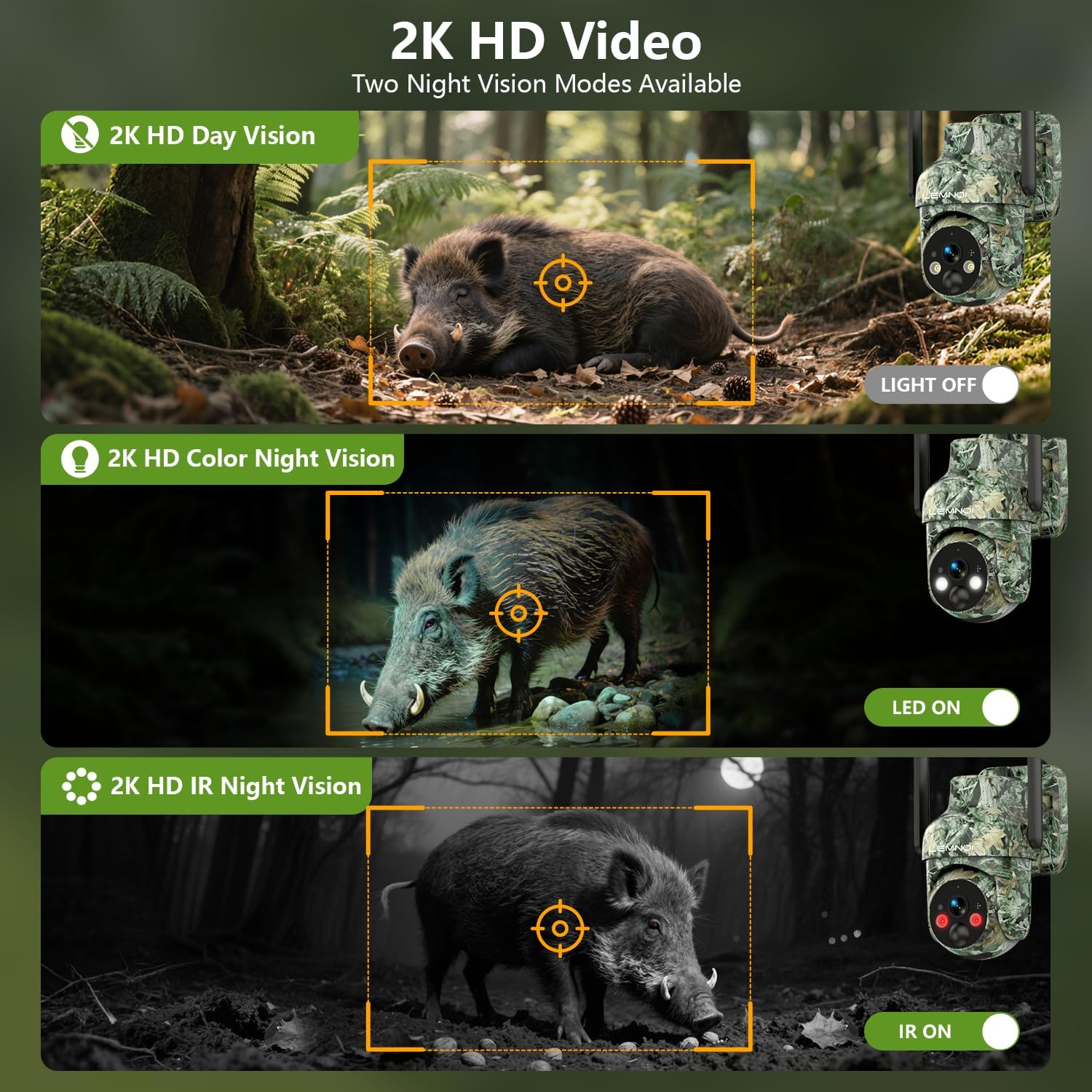
Image: Visual comparison of the camera's 2K HD day vision, 2K HD color night vision (with spotlight), and 2K HD infrared night vision (black and white).
4.3 Motion Detection and Alerts
- The camera features smart PIR motion detection with a detection range of 0-10 meters.
- Upon detecting motion, the camera sends instant alerts to your phone via the UBox app.
- It automatically records video clips to the SD card and cloud storage (1-month trial included, subscription required afterward).
- You can customize monitoring zones and alert schedules within the app to reduce false alarms.
- The camera also supports Intelligent AI Human Detection, which can be enabled to ignore other movements and only detect human activity for more accurate monitoring.
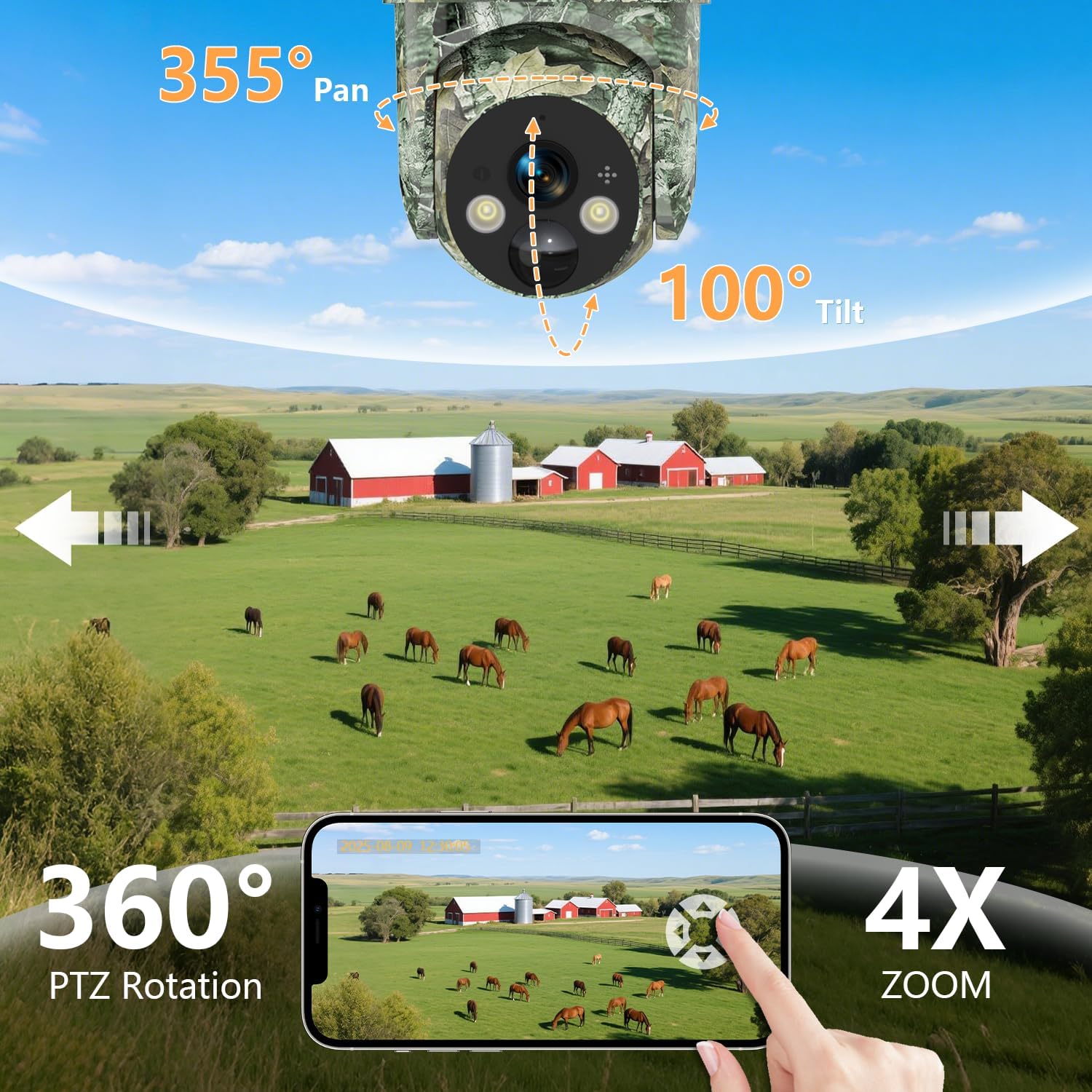
Image: A deer triggering motion detection, with a smartphone displaying an instant alert notification from the UBox app.
4.4 Two-Way Audio
The built-in microphone and speaker enable real-time two-way audio communication. You can speak through the camera using the UBox app to warn intruders or communicate with visitors.

Image: A person speaking into a smartphone, with a speech bubble indicating audio output from the camera, demonstrating the two-way audio function.
4.5 Video Storage and Playback
- Recordings are stored on the included 32GB SD card (expandable up to 128GB) and in cloud storage (1-month trial, then subscription).
- Access recorded footage and playback videos anytime, anywhere via the UBox app.
- You can download recordings to your phone or share them.

Image: A smartphone displaying live footage of a squirrel, with icons indicating SD card and cloud storage options, and a filmstrip showing various wildlife recordings.
4.6 Shared Monitoring Access
The UBox app allows you to share access to your camera with family and friends. Up to 3 users can view the live feed simultaneously.
5. Maintenance
5.1 Solar Panel Care
- Regularly clean the surface of the solar panel to remove dust, dirt, or debris that may reduce charging efficiency. Use a soft, damp cloth.
- Ensure the solar panel remains unobstructed by leaves, snow, or other objects.
5.2 Battery Information
- The camera is equipped with a built-in 10,400mAh rechargeable battery.
- With adequate sunlight, the 6W solar panel continuously recharges the battery, providing up to 365 days of continuous power.
- In periods of low sunlight, the battery can support independent operation for 5-7 days on a full charge.
5.3 Weather Resistance
The camera has an IP66 waterproof rating, making it resistant to rain, snow, dust, and wind. It is designed to operate in temperatures ranging from -20°C to 60°C (-4°F to 140°F).

Image: The Lemnoi S76 camera mounted on a tree, illustrating its IP66 weatherproof capabilities against rain, snow, dust, and wind, with an operating temperature range of -20°C to 50°C.
6. Troubleshooting
6.1 Camera Not Connecting to 4G Network
- Check SIM Card: Ensure the SIM card is correctly inserted and its PIN code is disabled. Verify that the data plan is active.
- Signal Strength: Relocate the camera to an area with better 4G LTE signal reception.
- Carrier Compatibility: Confirm your SIM card carrier is supported within Canada.
- Reboot Camera: Power off and then power on the camera.
6.2 Battery Not Charging
- Solar Panel Exposure: Ensure the solar panel receives direct sunlight for several hours daily. Clean any dirt or obstructions from the panel surface.
- Cable Connection: Verify that the solar panel cable is securely connected to the camera.
- Temperature: Extreme cold can affect battery performance. Ensure the camera is within its operating temperature range.
6.3 False Motion Alerts
- Adjust Sensitivity: Lower the motion detection sensitivity in the UBox app settings.
- Customize Zones: Define specific monitoring zones to exclude areas with frequent irrelevant motion (e.g., swaying branches).
- Enable AI Human Detection: If available in the app, enable this feature to filter out non-human movements.
6.4 Poor Video Quality
- Clean Lens: Gently clean the camera lens with a soft cloth.
- 4G Signal: Ensure strong 4G signal for optimal streaming quality.
- App Settings: Check video quality settings within the UBox app.
7. Specifications
| Feature | Detail |
|---|---|
| Model Number | S76 |
| Connectivity | 4G LTE Cellular (No Wi-Fi support) |
| Video Resolution | 2K HD (1080p effective) |
| Frame Rate | 15 frames per second |
| Viewing Angle | 130 Degrees |
| PTZ Rotation | 355° Pan, 100° Tilt |
| Night Vision | 2K HD Color Night Vision, 2K HD IR Night Vision (range up to 10 meters) |
| Motion Detection | PIR Smart Detection (range 0-10 meters), AI Human Detection |
| Audio | Two-Way Audio (built-in microphone and speaker) |
| Power Source | Solar Powered (6W solar panel) |
| Battery | 10,400mAh rechargeable battery (1 C battery included) |
| Storage | 32GB SD Card included (supports up to 128GB), Cloud Storage (1-month trial) |
| Weather Resistance | IP66 Waterproof |
| Operating Temperature | -20°C to 60°C (-4°F to 140°F) |
| Material | Plastic |
| Dimensions (L x W x H) | 10 x 7 x 5 cm |
| Weight | 1 kg |
| Included Components | Camera, Solar Panel, SIM Card, SD Card, Mounting Straps, Mounting Bracket, Instruction Manual, Tweezers, Mounting Screws, Charging Cable |
| Recommended Uses | Game & Trail, Outdoor Security |
8. Warranty and Support
Lemnoi is committed to providing high-quality products and customer satisfaction.
- Returns and Exchanges: 30 days for returns and exchanges.
- Instant Support: Quick response within 24 hours for inquiries.
- Lifetime Support: In-app support is available anytime for the product's lifetime.
For technical assistance or customer service, please contact Lemnoi support through the UBox app or refer to the contact information provided in your product packaging.

Image: Icons representing 30-day returns, instant support, and lifetime support.
Ask a question about this manual
Ask about setup, troubleshooting, compatibility, parts, safety, or missing instructions. Manuals+ will review the question and use this page’s manual context to help answer it.