
Introduction
This manual provides essential information for the assembly, operation, and maintenance of your KLMM Full Size Wood Gaming Loft Bed with Desk and Wardrobe. Please read these instructions carefully before beginning assembly or use to ensure safe and proper functionality of the product. Retain this manual for future reference.
Important Safety Information
Adherence to the following safety guidelines is crucial for preventing injury and damage to the product:
- Do not exceed the weight capacity of 551 pounds for the upper bed.
- Do not exceed the weight capacity of 110 pounds for the desk.
- Exercise caution when using the USB port and RGB LED light to prevent electrical hazards.
- Always follow the assembly instructions carefully to ensure the bed's stability and prevent collapse.
- Ensure all connections are secure and hardware is tightened periodically.
- Keep small parts away from children during assembly.
Product Features
The KLMM Full Size Wood Gaming Loft Bed is designed for functionality and space optimization, incorporating several key features:
- Built-In Gaming Station: The area beneath the bed includes a dedicated desk space suitable for monitors and consoles, with pre-drilled cable holes and space for a PC tower.
- USB Port: A convenient USB charging port is integrated into the desktop for easy device charging.
- RGB LED Strip Lighting: An RGB light strip is built underneath the bed, providing customizable lighting for an immersive environment.
- Multipurpose Design: Offers a spacious sleeping area on top and a functional gaming or working space below.
- Ample Storage: Features one open wardrobe, one enclosed wardrobe (both with hanging rods), two drawers, and overhead shelves for organized storage of clothing, accessories, and gear.
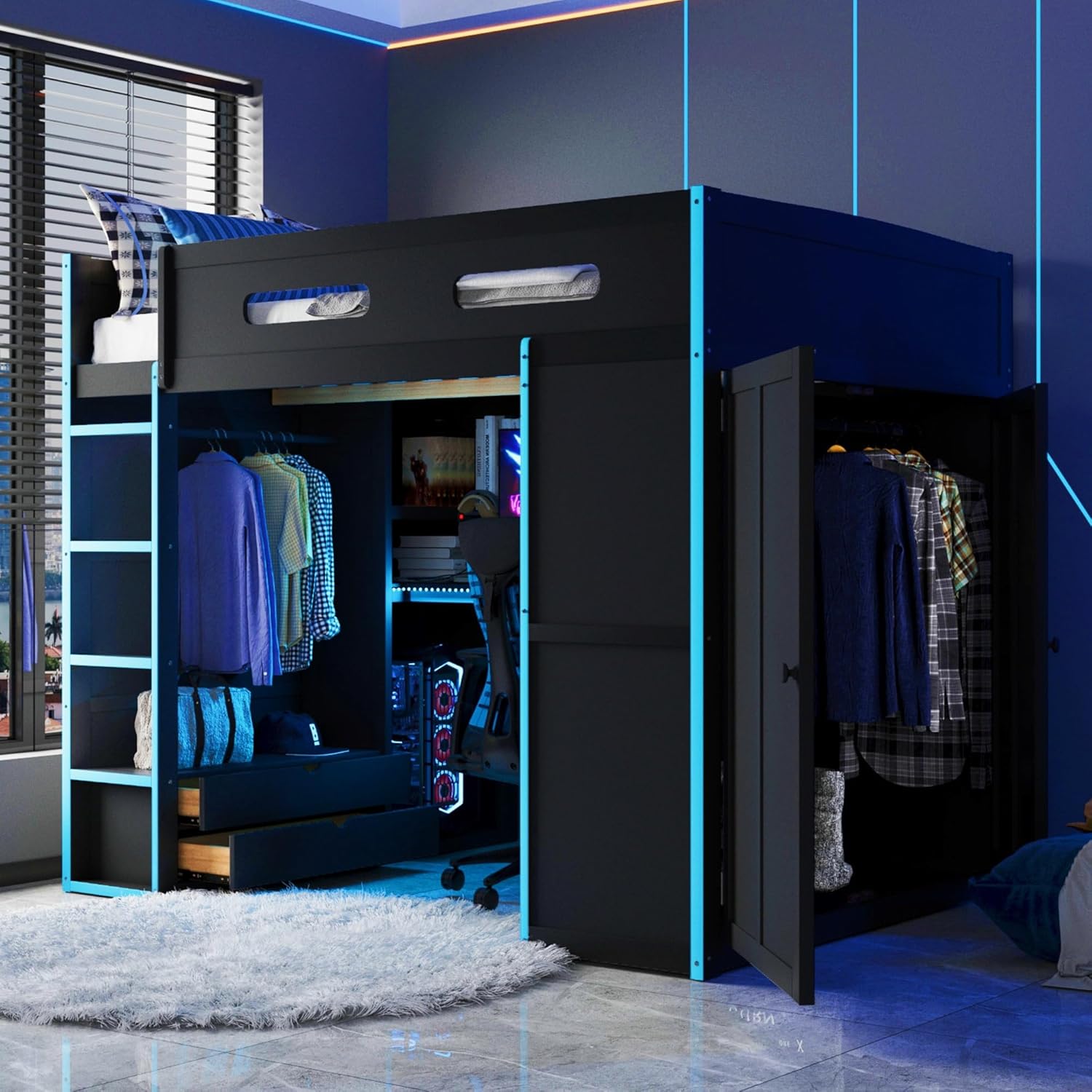
Image: Overview of the KLMM Full Size Wood Gaming Loft Bed, showcasing the integrated desk, wardrobe, and loft sleeping area.

Image: The gaming station area beneath the loft bed, featuring a monitor, chair, and active RGB LED lighting.

Image: The loft bed with its wardrobe doors open, revealing hanging space and storage drawers.
Setup and Assembly
This bed requires assembly. Detailed assembly instructions and all necessary tools are included with your purchase. Please follow the step-by-step guide provided in the separate assembly manual to ensure correct and safe construction. It is recommended to have at least two adults for assembly.
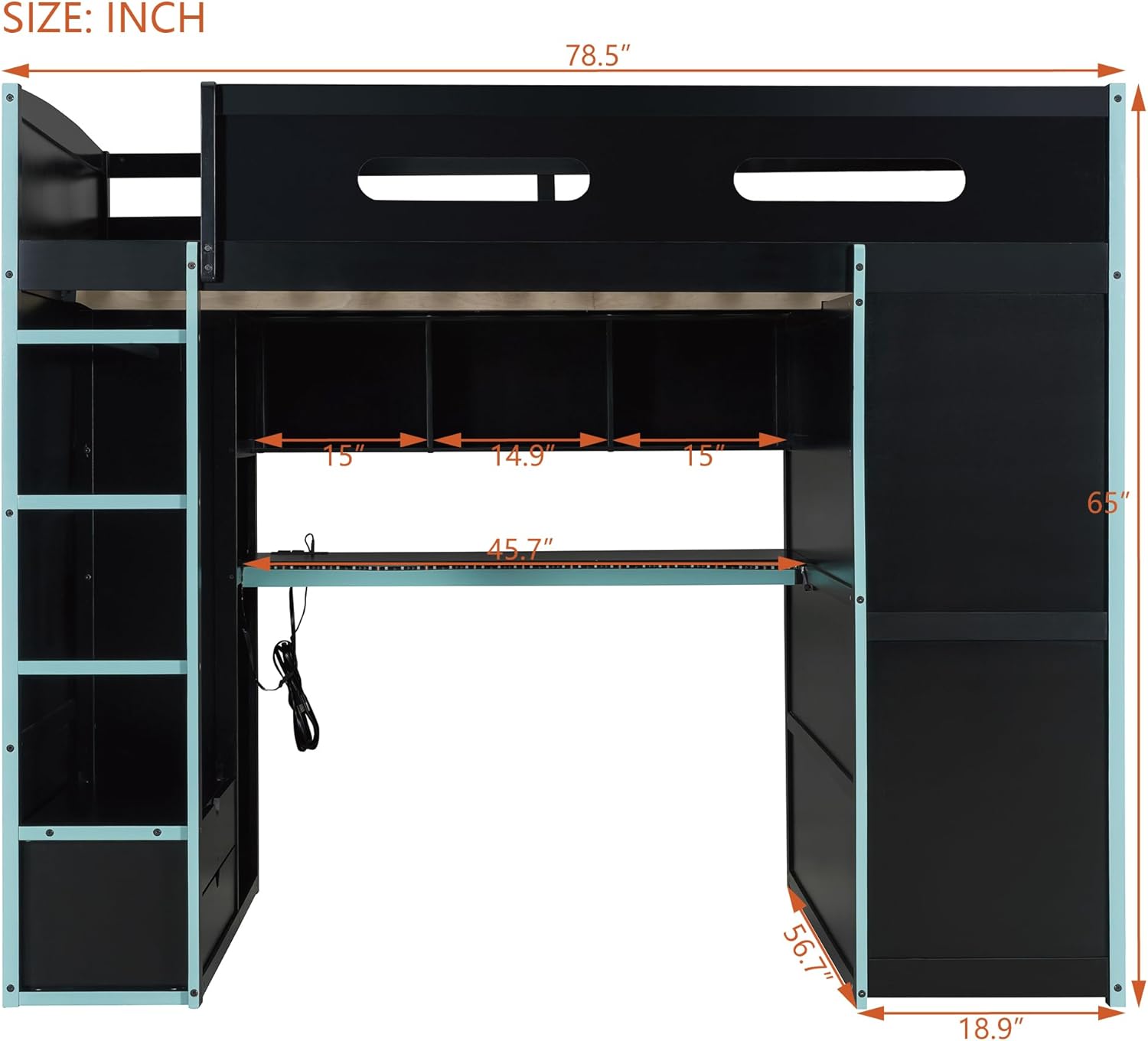
Image: A diagram illustrating the overall dimensions of the loft bed, including length, width, and height measurements.
Operating Instructions
USB Charging Port
The integrated USB port is located on the desktop. To use, simply connect your device's USB charging cable to the port. Ensure the bed's power supply is connected to a functional wall outlet for the USB port to operate.
RGB LED Light Strip
The RGB LED light strip is pre-installed underneath the bed. It is typically controlled via a remote control or a switch, which should be included in the packaging. Refer to the specific instructions provided with the LED light kit for details on changing colors, brightness, and modes.

Image: A detailed view of the USB charging port and the RGB LED light strip installed on the underside of the desk.
Maintenance
Regular maintenance helps prolong the life and appearance of your loft bed:
- Cleaning: Wipe surfaces with a soft, damp cloth. Avoid harsh chemicals or abrasive cleaners that may damage the finish.
- Hardware Check: Periodically inspect all bolts, screws, and fasteners to ensure they are tight. Re-tighten as necessary to maintain structural integrity.
- Weight Distribution: Ensure weight is evenly distributed on the bed and shelves to prevent stress on the frame.
- LED Lights: If the LED lights malfunction, check the power connection and any associated remote control batteries before contacting support.
Troubleshooting
If you encounter issues with your KLMM Gaming Loft Bed, consider the following common solutions:
- Bed Instability: Check all assembly hardware. Ensure every bolt and screw is securely tightened according to the assembly instructions.
- USB Port Not Working: Verify that the bed's power cord is properly plugged into a live electrical outlet. Test the USB port with a different device and cable.
- LED Lights Not Functioning: Confirm the power connection for the LED strip. If a remote is used, check its battery. Ensure no wires are pinched or damaged.
- Drawers Sticking: Inspect drawer slides for obstructions or misalignment. Ensure drawers are not overloaded.
For persistent issues or concerns not addressed here, please contact KLMM customer service for assistance.
Specifications
| Feature | Detail |
|---|---|
| Brand | KLMM |
| Model Number | Gaming Loft Bed |
| Size | Full |
| Product Dimensions | 78.5"L x 56.7"W x 65"H |
| Special Features | Desk, Wardrobe, USB Port, RGB LED Light |
| Color | Cloud Blue |
| Material | Engineered Wood, Wood |
| Assembly Required | Yes |
| Item Weight | 220 pounds |
| Upper Bed Weight Capacity | 551 pounds (approx.) |
| Desk Weight Capacity | 110 pounds (approx.) |
Warranty and Support
For information regarding product warranty, please refer to the documentation included with your purchase or contact KLMM customer service directly. If you require assistance with assembly, parts, or have any questions about your product, please reach out to the manufacturer's support team. Contact details are typically found on the product packaging or the KLMM official website.