
GardePro E8 2.0 Pro
Contents
GardePro E8 2.0 Pro WiFi Trail Camera User Manual
Model: E8 2.0 Pro
1. Introduction
The GardePro E8 2.0 Pro is an advanced WiFi trail camera designed for capturing high-quality images and videos of wildlife or for property surveillance. It features 4K Ultra HD video recording, 64MP image clarity, dual antennas for extended WiFi range, and app control for convenient management. This manual provides detailed instructions for setting up, operating, and maintaining your camera.

Video 1: GardePro E8 2.0 Series Product Introduction. This video provides an overview of the camera's features and capabilities.
2. Package Contents and Setup
2.1. What's in the Box
Upon opening your GardePro E8 2.0 Pro package, verify that all components are present:
- GardePro E8 2.0 Pro WiFi Trail Camera
- 7800mAh Rechargeable Battery Pack
- 64GB Industrial-Grade SD Card
- USB-C Charging Cable
- Mounting Strap
- User Manual (this document)

Figure 1: The GardePro E8 2.0 Pro camera along with its rechargeable battery, 64GB SD card, USB-C cable, and mounting strap.
2.2. Battery Installation and Charging
The E8 2.0 Pro comes with a built-in 7800mAh rechargeable battery. Before first use, ensure the battery is fully charged using the provided USB-C cable and a compatible power adapter (not included). The battery pack is designed for long-lasting performance, potentially requiring only one charge per year under typical usage conditions (20 daytime + 20 nighttime photos/day).
- Open the camera's housing latch.
- Insert the 7800mAh rechargeable battery pack into the designated compartment, ensuring correct orientation.
- Close the housing latch securely to maintain the camera's waterproof seal.
- To charge, connect the USB-C cable to the camera's charging port and to a USB power source.

Figure 2: The 7800mAh rechargeable battery pack being inserted into the camera's battery compartment. The camera is shown mounted on a tree.
2.3. SD Card Installation
A 64GB industrial-grade SD card is included for reliable 4K video recording and photo storage.
- Locate the SD card slot inside the camera's housing.
- Insert the 64GB SD card into the slot until it clicks into place. Ensure the card is inserted with the correct orientation.
- It is recommended to format the SD card using the camera's menu settings before first use and periodically thereafter to ensure optimal performance.

Figure 3: A hand inserting the 64GB GardePro SD card into the camera's dedicated slot. The camera's internal screen and control buttons are visible.
2.4. Mounting the Camera
The GardePro E8 2.0 Pro is designed for outdoor use and can be securely mounted using the included strap or its dual copper mounting posts.
- Strap Mounting: Thread the provided mounting strap through the camera's strap guides and secure it around a tree or pole.
- Screw Mounting: Utilize the dual copper mounting posts (top and bottom) for more permanent or specific installations with compatible mounts (not included).
2.5. App Installation and Connection
The GardePro E8 2.0 Pro features built-in WiFi and Bluetooth for seamless control via the GardePro Mobile App.
- Download the 'GardePro Mobile' app from your smartphone's app store (Android or iOS).
- Enable Bluetooth and WiFi on your smartphone.
- Open the GardePro app and follow the on-screen instructions to connect to your camera. The camera's dual antennas provide an industry-leading 165ft (50m) wireless range in open areas, allowing for reliable connection from a distance.
- Once connected, you can access and download original photos and videos, adjust camera settings, or use Live View to aim the camera and monitor in real-time.

Figure 4: An illustration demonstrating the camera's 165ft WiFi range, allowing a user to connect and view footage from a distance.

Figure 5: The GardePro app interface displaying multiple camera locations on a map, allowing users to easily track their devices.
3. Operating the Camera
3.1. Powering On/Off
To power on the camera, slide the power switch to the 'ON' position. To power off, slide the switch to 'OFF'.
3.2. Image and Video Capture
The E8 2.0 Pro captures stunning 4K Ultra HD videos and up to 64MP still images. It features a 0.1-second lightning-fast trigger speed and a 120° wide-angle PIR sensor to ensure you capture every moment.
- Resolution: Select between 4K for video and up to 64MP for photos in the camera settings via the app.
- Trigger Speed: The camera activates in just 0.1 seconds upon detecting motion.
- Detection Angle: The 120° wide-angle PIR sensor covers a broad area, minimizing blind spots.
- Photo Bursts: Capture up to 5 photos in a single burst for comprehensive event coverage.

Figure 6: A smartphone screen showing a high-quality 4K video captured by the camera, featuring a fox in a backyard setting.
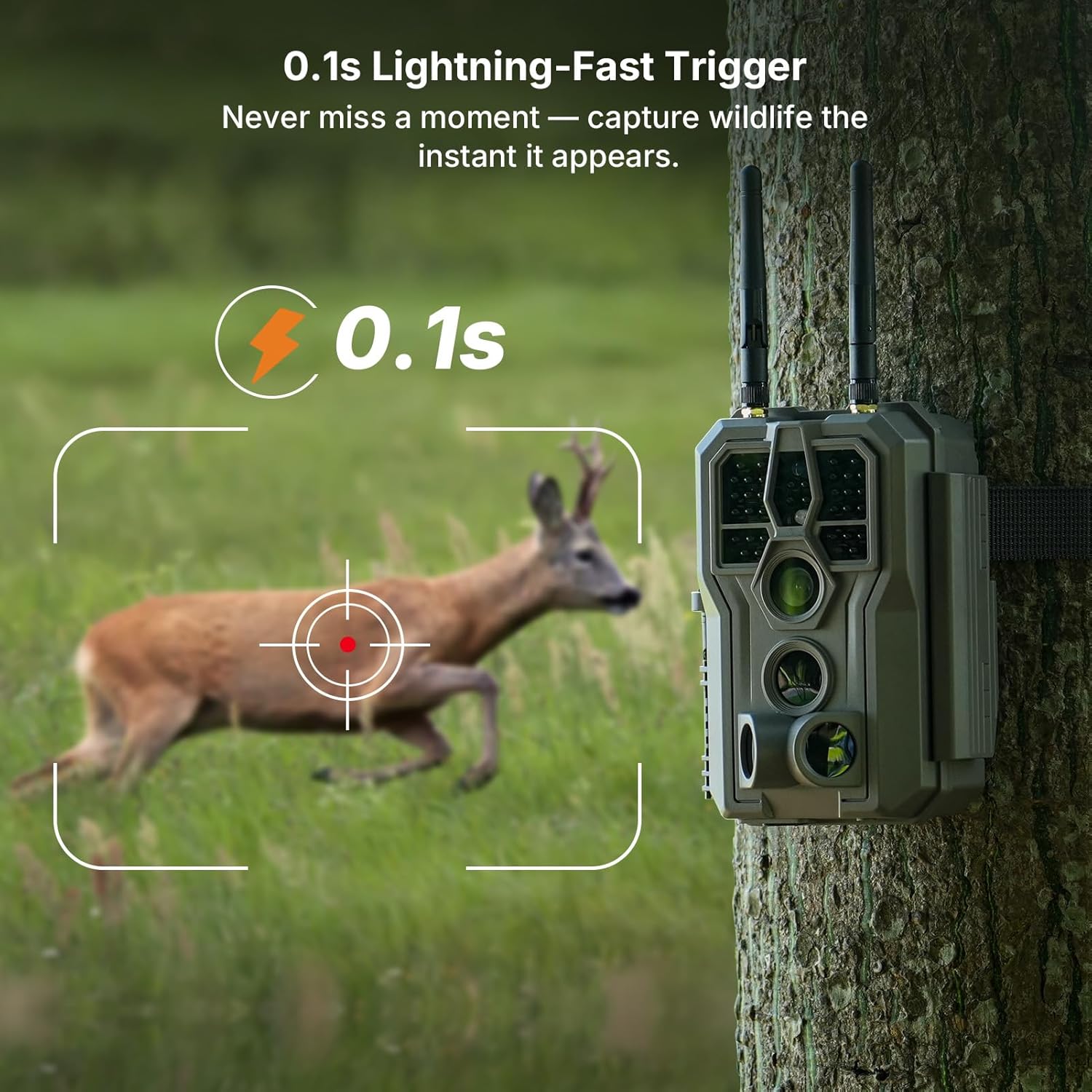
Figure 7: An illustration highlighting the camera's 0.1-second trigger speed, showing it capturing a fast-moving deer.

Figure 8: A visual representation of the camera's 120-degree wide-angle motion detection, effectively covering a large area with multiple deer.
3.3. Night Vision
The camera is equipped with 940nm No Glow Infrared LEDs, providing clear black-and-white night footage without emitting a visible flash that could alert wildlife or intruders. This ensures discreet monitoring.

Figure 9: A clear black-and-white image captured at night using the camera's 940nm No Glow infrared, showing a fox in a garden.
4. Maintenance
4.1. Battery Care
To maximize the lifespan of your rechargeable battery, avoid extreme temperatures and recharge it when the battery indicator shows low levels. For continuous outdoor power, the camera also supports solar panel connection (optional accessory).
4.2. SD Card Management
Regularly check the SD card capacity. It is recommended to back up important footage and format the SD card every few months to maintain optimal recording performance and prevent data corruption.
4.3. Cleaning the Camera
Wipe the camera lens and PIR sensors with a soft, dry cloth to remove dirt, dust, or moisture. Do not use abrasive cleaners or solvents. Ensure the housing latch is always securely closed when the camera is deployed outdoors to maintain its IP66 waterproof rating.
5. Troubleshooting
If you encounter issues with your GardePro E8 2.0 Pro, refer to the following common problems and solutions:
| Problem | Possible Cause | Solution |
|---|---|---|
| Camera not powering on | Low or depleted battery; Incorrect battery installation. | Charge the rechargeable battery fully. Ensure the battery pack is inserted correctly. |
| No images/videos captured | SD card full or corrupted; Incorrect settings (e.g., sensitivity, detection delay); PIR sensor obstructed. | Format the SD card. Check and adjust motion sensitivity and detection delay settings in the app. Ensure no obstructions are in front of the PIR sensor. |
| Poor WiFi connectivity/range | Obstructions between camera and phone; Excessive distance. | Reduce distance between camera and phone. Minimize physical obstructions (e.g., thick walls, dense foliage). Ensure dual antennas are unobstructed. |
| Night vision images are unclear | Lens or IR LEDs are dirty; Object too close or too far for optimal IR illumination. | Clean the lens and IR LEDs. Adjust camera placement for optimal distance to target area (Night Vision Range: 100 Feet). |
| App connection issues (e.g., not connecting to home WiFi) | Camera is designed for direct WiFi/Bluetooth connection, not home network integration. | The camera connects directly to your smartphone via its built-in WiFi/Bluetooth for local access. It does not support connection to a home WiFi network for remote access. |
6. Specifications
Detailed technical specifications for the GardePro E8 2.0 Pro WiFi Trail Camera:
| Feature | Specification |
|---|---|
| Model Name | E8 2.0 Pro SD |
| Indoor/Outdoor Usage | Outdoor |
| Power Source | Battery Powered (7800mAh rechargeable battery included) |
| Connectivity Protocol | Bluetooth, Wi-Fi |
| Controller Type | Android, iOS (via GardePro Mobile App) |
| Mounting Type | Tree Mount (dual copper mounting posts) |
| Video Capture Resolution | 4K |
| Effective Still Resolution | 64 MP |
| Night Vision Range | 100 Feet (940nm No Glow Infrared) |
| Trigger Speed | 0.1 seconds |
| PIR Detection Angle | 120 degrees |
| Wireless Communication Technology | Bluetooth, Wi-Fi (165ft/50m range in open areas) |
| International Protection Rating | IP66 (Waterproof) |
| Item Weight | 1.3 pounds |
| Package Dimensions | 7.6 x 4.9 x 3.4 inches |
7. Warranty and Support
For warranty information, technical support, or service inquiries regarding your GardePro E8 2.0 Pro WiFi Trail Camera, please contact GardePro customer service directly. Refer to the product packaging or the official GardePro website for the most current contact details.
Documents and downloads
Ask a question about this manual
Ask about setup, troubleshooting, compatibility, parts, safety, or missing instructions. Manuals+ will review the question and use this page’s manual context to help answer it.