
1. General Safety Information
Please read this manual carefully before using the appliance. Keep it for future reference. Failure to follow these instructions may result in injury or damage.
- Electrical Safety: Ensure the appliance is correctly earthed and connected to a suitable power supply. Do not use extension cords.
- Child Safety: Keep children away from the appliance during operation and when it is cooling down.
- Hot Surfaces: The oven and its accessories become very hot during use. Always use oven mitts.
- Proper Use: This appliance is designed for domestic cooking purposes only. Do not use it for other purposes.
- Maintenance: Disconnect the appliance from the power supply before performing any maintenance or cleaning.
2. Product Description
The Smeg SF6400S1PZB is a 65-liter built-in electric ventilated oven, designed for efficient and versatile cooking. It features a sleek black finish and intuitive controls.

Image 2.1: Smeg SF6400S1PZB Built-in Electric Ventilated Oven. This image shows the front view of the black built-in oven installed in a kitchen cabinet.
Key Features:
- Oven Capacity: 65 Liters (Medium size)
- Oven Type: Electric, Ventilated
- Energy Efficiency Class: A
- Cooking Functions: 9 programs, including Steam Cooking, Pizza Function, and Static Cooking.
- Cleaning Type: Steam (AquaClean)
- Controls: Knob and Touch controls with an integrated LED display.
- Design: Built-in appliance with a black finish and stainless steel handle/knobs.
- Internal Light: Halogen lamp (40W)
3. Setup and Installation
Proper installation is crucial for the safe and efficient operation of your oven. It is recommended that installation be performed by a qualified technician.
Unpacking the Oven:
Carefully remove the oven from its packaging. Inspect for any damage. Remove all internal packaging materials and accessories from inside the oven cavity.
Image 3.1: Unpacking the oven from its protective foam. This image shows a person carefully removing the oven from its packaging, highlighting the protective foam.
Electrical Connection:
Ensure the electrical supply matches the voltage and frequency specified on the appliance's rating plate. The oven must be correctly earthed. If the power cable is damaged, it must be replaced by the manufacturer, its service agent, or similarly qualified persons to avoid a hazard.
Mounting the Oven:
Slide the oven into the prepared cabinet opening. Secure it using the screws provided, typically located on the sides of the oven frame. Ensure the oven is level and flush with the cabinet. Refer to the detailed diagrams in the full manual for precise measurements and screw locations.
Video 3.2: Electrolux Oven Column Installation. This video demonstrates the step-by-step process of installing a built-in oven into a kitchen column cabinet, including unpacking, connecting the power, and securing the oven.
4. Operating Instructions
Your Smeg SF6400S1PZB oven offers various cooking functions and settings for optimal results.
Control Panel Overview:
The oven features a combination of rotary knobs and touch controls with an LED display. The left knob selects the cooking function, while the right knob adjusts temperature or time. The central touch display shows current settings and allows for fine-tuning.
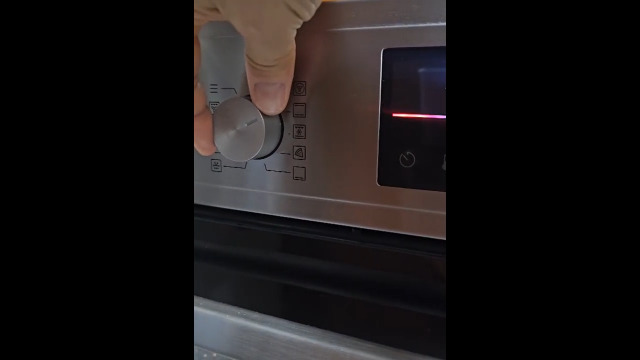
Image 4.1: Oven Control Panel and Display. This image provides a close-up view of the oven's control panel, showing the rotary knobs, touch buttons, and LED display.
Setting the Time:
Upon first use or after a power outage, the clock will flash. Use the '+' and '-' touch buttons to set the current time, then press 'OK' to confirm. The clock can also be adjusted via the menu settings.
Selecting Cooking Functions:
Turn the left rotary knob to select your desired cooking function (e.g., Conventional, Fan Assisted, Grill, Pizza, Steam). Once a function is selected, use the right rotary knob to set the temperature. Additional settings like cooking duration or delayed start can be adjusted via the touch display.


