
Introduction
Thank you for choosing the AIDTIPS T18 Battery Replacement. This battery is specifically designed to be compatible with the T18 cordless stick vacuum cleaner, providing reliable power for your cleaning needs. This manual will guide you through the proper installation, usage, and care to ensure optimal performance and longevity of your new battery.
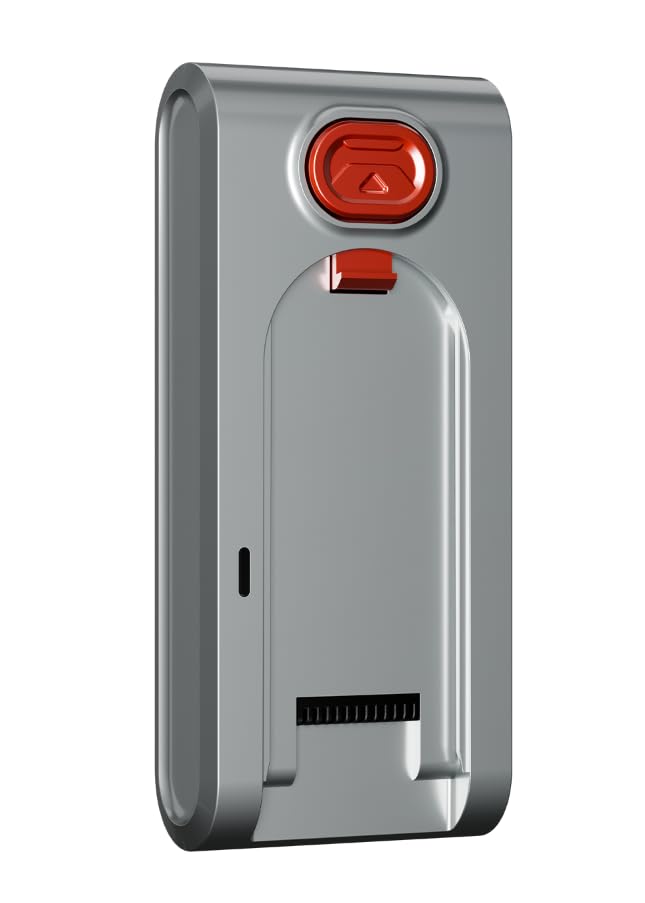
Image: The AIDTIPS T18 Battery Replacement unit.
Safety Information
Please read and understand all safety instructions before using the battery. Failure to follow these instructions may result in electric shock, fire, or serious injury.
- Do not disassemble, open, or shred the battery pack.
- Do not expose the battery to heat or fire. Avoid storage in direct sunlight.
- Do not short-circuit a battery pack.
- Do not subject the battery pack to mechanical shock.
- In the event of a battery leaking, do not allow the liquid to come into contact with the skin or eyes. If contact has been made, wash the affected area with copious amounts of water and seek medical advice.
- Keep the battery pack clean and dry.
- Recharge only with the charger specified by the manufacturer.
- Dispose of the battery properly according to local regulations.
What's in the Box
Your AIDTIPS T18 Battery Replacement package includes:
- 1 x AIDTIPS T18 Battery Replacement
- Accessory Kit (specific contents may vary)
Setup: Battery Installation
Follow these steps to safely install your new AIDTIPS T18 Battery Replacement into your T18 cordless stick vacuum cleaner.
- Ensure Power is Off: Before beginning, ensure your T18 cordless stick vacuum cleaner is turned off and disconnected from any charging source.
- Locate the Battery: The battery pack is typically located on the main body of the vacuum cleaner, often near the handle or dustbin. Refer to your original T18 vacuum manual if you have difficulty locating it.
- Remove the Old Battery:
- Identify any release buttons or latches securing the battery. These are often red or clearly marked.
- Press the release button(s) and carefully slide or pull the old battery pack out of its compartment.
- Insert the New Battery:
- Align the new AIDTIPS T18 Battery Replacement with the battery compartment. Ensure the connectors are correctly oriented.
- Gently slide the new battery into place until it clicks securely. You should hear or feel a click, indicating it is properly latched.
- Verify Installation: Once installed, gently tug on the battery to ensure it is firmly seated and does not wobble.

Image: The main body (host) of the T18 cordless stick vacuum cleaner, where the battery is installed.
Operating: Charging and Usage
Proper charging and usage practices will maximize the performance and lifespan of your AIDTIPS T18 Battery.
Initial Charge
For optimal performance, fully charge the new battery before its first use. Connect your T18 vacuum cleaner to its original charging adapter and allow it to charge until the battery indicator shows a full charge.
Regular Charging
- Always use the original T18 vacuum charger or a compatible charger specified by AIDTIPS.
- Avoid overcharging the battery by disconnecting the charger once it is fully charged.
- It is recommended to charge the battery when its power level is low, rather than waiting for it to be completely depleted.
Battery Indicators
The T18 vacuum cleaner typically features an LED display or indicator lights to show the battery's charge status. Refer to your T18 vacuum's user manual for specific details on interpreting these indicators.
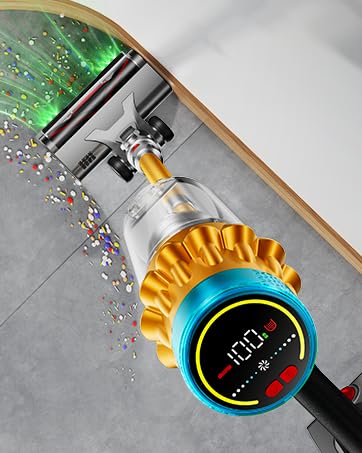
Image: A T18 vacuum cleaner showing its digital display, which indicates battery level and operating mode.
Maintenance
Proper maintenance helps extend the life and efficiency of your battery.
- Storage: Store the battery in a cool, dry place away from direct sunlight and extreme temperatures. If storing for an extended period, ensure the battery is partially charged (around 50%) to prevent deep discharge.
- Cleaning: Keep the battery contacts clean and free from dust or debris. Use a dry, soft cloth to wipe them if necessary.
- Temperature: Avoid operating or charging the battery in extremely hot or cold environments, as this can affect performance and lifespan.
Troubleshooting
If you encounter issues with your AIDTIPS T18 Battery Replacement, refer to the following common problems and solutions.
| Problem | Possible Cause | Solution |
|---|---|---|
| Battery not charging |
|
|
| Short operating time |
|
|
| Vacuum not turning on |
|
|
If the problem persists after trying these solutions, please contact AIDTIPS customer support for further assistance.
Specifications
Key technical specifications for the AIDTIPS T18 Battery Replacement:
- Brand: AIDTIPS
- Model Name: AIDTIPS T18 Battery Replacement
- Model Number: AIDTIPS Battery Replacement
- Battery Cell Composition: Lithium Ion
- Battery Cell Type: Lithium Ion
- Voltage: 29.6 Volts
- Number of Batteries: 1 (AAA batteries required for other components, if any, are included)
- Battery Weight: 450 Grams
- Item Weight: 8 ounces
- UPC: 796520024533
- GTIN: 796520024533
- Manufacturer: AIDTIPS
Warranty and Support
AIDTIPS is committed to providing high-quality products and excellent customer service. Your AIDTIPS T18 Battery Replacement comes with the following assurances:
- 2 Years Warranty Service: Enjoy peace of mind with a comprehensive two-year warranty covering manufacturing defects.
- 30 Days Return and Exchange: If you are not completely satisfied, you may return or exchange the product within 30 days of purchase.
- 7*24H Online After-Sales Support: Our dedicated customer support team is available 24/7 to assist you with any questions or issues.
- 100% Satisfaction Guarantee: We strive for your complete satisfaction with our products and services.

Image: Visual representation of AIDTIPS customer service commitments.
For support, please visit the official AIDTIPS website or contact our customer service team directly.