
1. Introduction
The MORAYELEC ME202R is a wireless ultrasonic liquid level sensor designed for accurate and remote monitoring of liquid levels in various tanks. This device utilizes ultrasonic technology to measure liquid depth and transmits data via Wi-Fi to a smartphone application, allowing users to monitor tank levels from anywhere. It is suitable for a wide range of applications, including water tanks, oil/diesel tanks, and other liquid storage containers in both simple and complex environments.
2. Package Contents
Please verify that all the following components are included in your package:
- Ultrasonic Sensor Unit
- RE433 Gateway (Receiver Unit)
- Power Adapter (US Type)
- USB Cable
- Mounting Screws
- Instruction Manual

Figure 2.1: All components included in the MORAYELEC ME202R package.
3. Product Features
- Long Measurement Distance: Measures liquid levels from 10 cm up to 5 meters, accommodating various tank sizes.
- Remote Monitoring: Check tank levels from your smartphone anytime, anywhere, eliminating the need for manual inspections.
- Full and Low Level Alerts: Receive customizable message alerts when liquid levels reach predefined full or low thresholds.
- Multi-Tank Monitoring: The application supports monitoring up to 10 sensors simultaneously, allowing easy management of multiple tanks.
- Easy Installation: Designed for simple top-mount installation using a provided nut.
- Robust Design: Features an IP65 waterproof rating, ensuring durability in various environmental conditions.
- Wide Operating Temperature: Functions reliably in temperatures ranging from -20°C to +70°C.
- Certifications: CE, RoHS, and Reach certified for safety and reliability.
- Power Adapter: Input: 100-240V AC, Output: 5V DC.
- Wi-Fi Connectivity: Connects to a 2.4G Wi-Fi router with a range of up to 30m in open areas.
4. Setup Instructions
4.1 Physical Installation
- Mount the Sensor: Install the ultrasonic sensor unit on the top of your liquid tank. Ensure the sensor has a clear path to the liquid surface for accurate readings. Use the provided nut to secure it.
- Position the Gateway: Place the RE433 Gateway unit in a location where it can receive a strong signal from the sensor and connect to your 2.4G Wi-Fi network.
- Connect Power: Connect the power adapter to the RE433 Gateway and plug it into a standard electrical outlet.
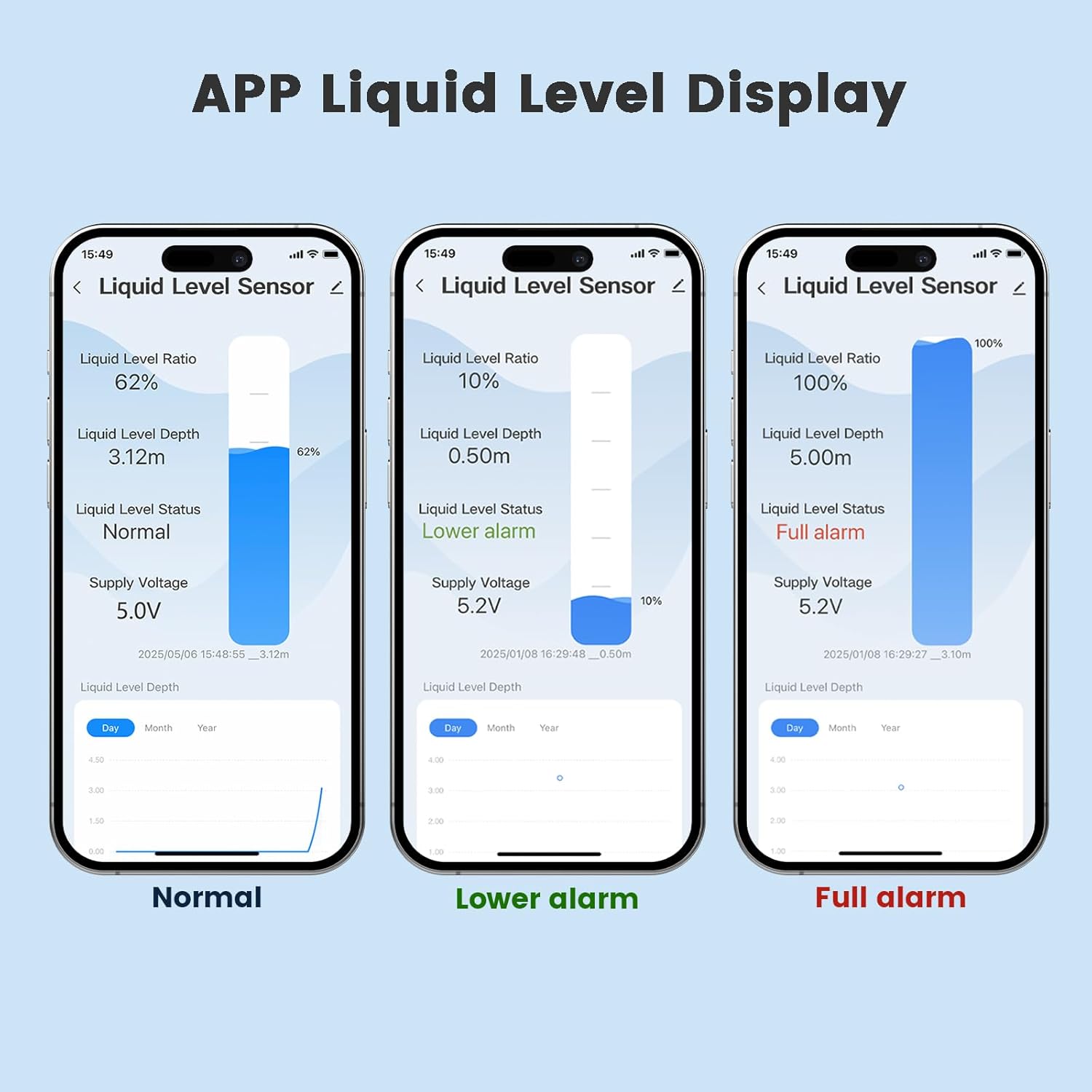
Figure 4.1: Example of the ME202R sensor installed on a water tank with app monitoring.
4.2 App Installation and Configuration
The MORAYELEC ME202R operates with the Tuya Smartlife application. Follow these steps to set up the app:
- Download the App: Search for "Tuya Smart" or "Smart Life" in your smartphone's app store (iOS App Store or Google Play Store) and download it.
- Register/Log In: Open the app and register for a new account or log in if you already have one.
- Add Device: Tap the "+" icon or "Add Device" button in the app.
- Select Device Type: Choose the appropriate device category, typically under "Sensors" or "Water Sensor" and locate the ME202R or a similar tank level sensor.
- Connect to Wi-Fi: Follow the on-screen instructions to connect the device to your 2.4G Wi-Fi network. You will need to enter your Wi-Fi network name and password. Ensure your phone is also connected to the 2.4G network during this process.
- Pairing: The app will guide you through the pairing process. This may involve resetting the device or confirming a blinking indicator light on the gateway.
- Device Added: Once successfully paired, the device will appear in your app's device list. You can rename it for easier identification.

Figure 4.2: Step-by-step guide for app installation and device pairing.
5. Operating Instructions
5.1 Monitoring Liquid Levels
After successful setup, open the Tuya Smart or Smart Life app on your smartphone. Select your ME202R device from the list to view real-time liquid level data.
- Liquid Level Ratio: Displays the percentage of the tank filled.
- Liquid Level Depth: Shows the actual measured depth of the liquid in meters or other configured units.
- Liquid Level Status: Indicates the current status (e.g., Normal, Lower Alarm, Full Alarm).
- Supply Voltage: Displays the current voltage of the device.
- Temperature: Shows the ambient temperature around the sensor.
- Historical Data: The app often provides graphs to view historical liquid level data over time (Day, Month, Year).

Figure 5.1: Examples of liquid level display in the smartphone application, showing normal, low, and full states.
5.2 Alarm Settings
You can configure custom alarm thresholds within the app:
- Navigate to the device settings within the app.
- Locate the "Alarm Settings" or "Notification Settings" option.
- Set desired percentages or depths for "Low Level Alarm" and "Full Level Alarm."
- Ensure notifications are enabled for the app on your smartphone to receive timely alerts.

Figure 5.2: Example of a full level alarm notification received on a smartphone.
6. Maintenance
- Cleaning: Periodically wipe the exterior of the sensor and gateway units with a soft, damp cloth. Do not use harsh chemicals or abrasive cleaners.
- Environmental Protection: The sensor unit has an IP65 waterproof rating, making it resistant to dust and water jets. However, avoid submerging the unit or exposing it to extreme pressure washing.
- Temperature: Ensure the device operates within its specified temperature range of -20°C to +70°C to maintain optimal performance and longevity.
- Firmware Updates: Check the Tuya Smart/Smart Life app periodically for any available firmware updates for your device. Install updates to ensure the best performance and security.
7. Troubleshooting
- Device Not Connecting to Wi-Fi:
- Ensure your Wi-Fi network is 2.4GHz. The device does not support 5GHz networks.
- Verify the Wi-Fi password entered in the app is correct.
- Place the RE433 Gateway closer to your Wi-Fi router to improve signal strength.
- Restart your Wi-Fi router and the ME202R device.
- Inaccurate Liquid Level Readings:
- Check that the ultrasonic sensor is mounted correctly and has a clear, unobstructed path to the liquid surface.
- Ensure there are no objects or debris directly below the sensor that could interfere with readings.
- Verify the tank dimensions or calibration settings in the app, if applicable.
- No App Notifications/Alerts:
- Confirm that alarm thresholds (low/full levels) are correctly set in the app.
- Check your smartphone's notification settings to ensure the Tuya Smart/Smart Life app is allowed to send notifications.
- Ensure the device is connected to Wi-Fi and reporting data to the app.
- App Not Displaying Data:
- Verify the ME202R device is powered on and connected to your Wi-Fi network.
- Check your smartphone's internet connection.
- Try closing and reopening the app, or restarting your smartphone.
8. Specifications
| Feature | Specification |
|---|---|
| Model Number | ME202R |
| Brand | MORAYELEC |
| Sensor Technology | Ultrasonic |
| Maximum Measurement Range | 5 Meters |
| Minimum Measurement Distance | 10 cm |
| Control Method | Remote Control (via App) |
| Mounting Type | Top Mount |
| Power Input | 100-240V AC |
| Power Output | 5V DC |
| Wattage | 100 milliamp-hours |
| Wi-Fi Frequency | 2.4G |
| Wi-Fi Range | 30m (unobstructed) |
| Operating Temperature | -20°C to +70°C |
| Waterproof Rating | IP65 |
| Product Dimensions (Gateway) | 86 x 122 x 55.5 mm |
| Product Weight | 1.2 kg (approx. 2.65 lbs) |
| UPC | 758065501443 |

Figure 8.1: Detailed dimensions of the MORAYELEC ME202R monitor unit.
9. Warranty and Support
9.1 Warranty Information
The MORAYELEC ME202R Wireless Ultrasonic Water Tank Level Sensor comes with a 1-year warranty from the date of purchase. This warranty covers manufacturing defects and ensures long-term service reliability. Please retain your proof of purchase for warranty claims.
9.2 Customer Support
For any technical assistance, troubleshooting, or warranty inquiries, please contact MORAYELEC customer support. MORAYELEC is committed to providing 24-hour online one-to-one support to ensure customer satisfaction.
Refer to the contact information provided on the product packaging or the official MORAYELEC website for the most up-to-date support channels.

