1. Introduction
Thank you for purchasing the Vagusicc Nightstand with Charging Station and LED Lights. This narrow side table is designed to provide convenient storage and charging capabilities, along with ambient LED lighting, for your bedroom or living space. Please read this manual carefully before assembly and use to ensure proper function and safety.
2. Safety Information
- Ensure all components are present and undamaged before assembly.
- Do not overtighten screws during assembly to avoid damaging the material.
- Place the nightstand on a flat, stable surface to prevent tipping.
- Keep liquids away from the charging station to prevent electrical hazards.
- Avoid repeated assembly and disassembly, as this may compromise the structural integrity of the unit.
- Do not exceed the maximum weight recommendation of 80 pounds for the tabletop.
- Keep small parts and packaging materials away from children.
3. Package Contents
Please verify that all the following components are included in your package:
- Assembly Guide
- Charging Station (pre-installed or separate unit)
- Installation Tool (e.g., screwdriver)
- LED Lights (strip and remote)
- Tabletop Panel
- Middle Shelf Panel
- Metal Frame Components
- Fabric Drawers (2 units)
- Adjustable Feet (4 units)
- Corner Protectors (4 units)
- Hardware Pack (screws, bolts, etc.)

Figure 3.1: Overview of included components and features like the USB & Power Outlet, Corner Guard, and Adjustable Foot Pad.
4. Assembly Instructions
Assembly typically takes approximately 15 minutes. Follow the steps below and refer to the included assembly guide for detailed diagrams.
- Unpack and Identify Parts: Carefully remove all components from the packaging. Lay them out and compare them with the parts list in your assembly guide to ensure everything is present.
- Assemble the Metal Frame: Connect the metal frame components using the provided screws and the installation tool. Ensure all connections are secure but do not fully tighten until the entire frame is assembled.
- Attach Panels: Secure the tabletop panel and the middle shelf panel to the assembled metal frame. Tighten all screws once the panels are in place.
- Install Charging Station: If the charging station is not pre-installed, follow the instructions in your assembly guide to secure it to the designated area on the tabletop.
- Apply LED Lights: Adhere the LED light strip to the underside of the tabletop or the designated area as per the assembly guide. Connect it to the power source.
- Insert Fabric Drawers: Slide the two fabric drawers into their respective compartments.
- Attach Adjustable Feet: Screw the adjustable plastic feet into the bottom of the metal frame. Adjust them to ensure the nightstand is stable on uneven surfaces.
- Apply Corner Protectors: Place the smooth-edged plastic corner protectors on the corners of the tabletop to prevent injuries.
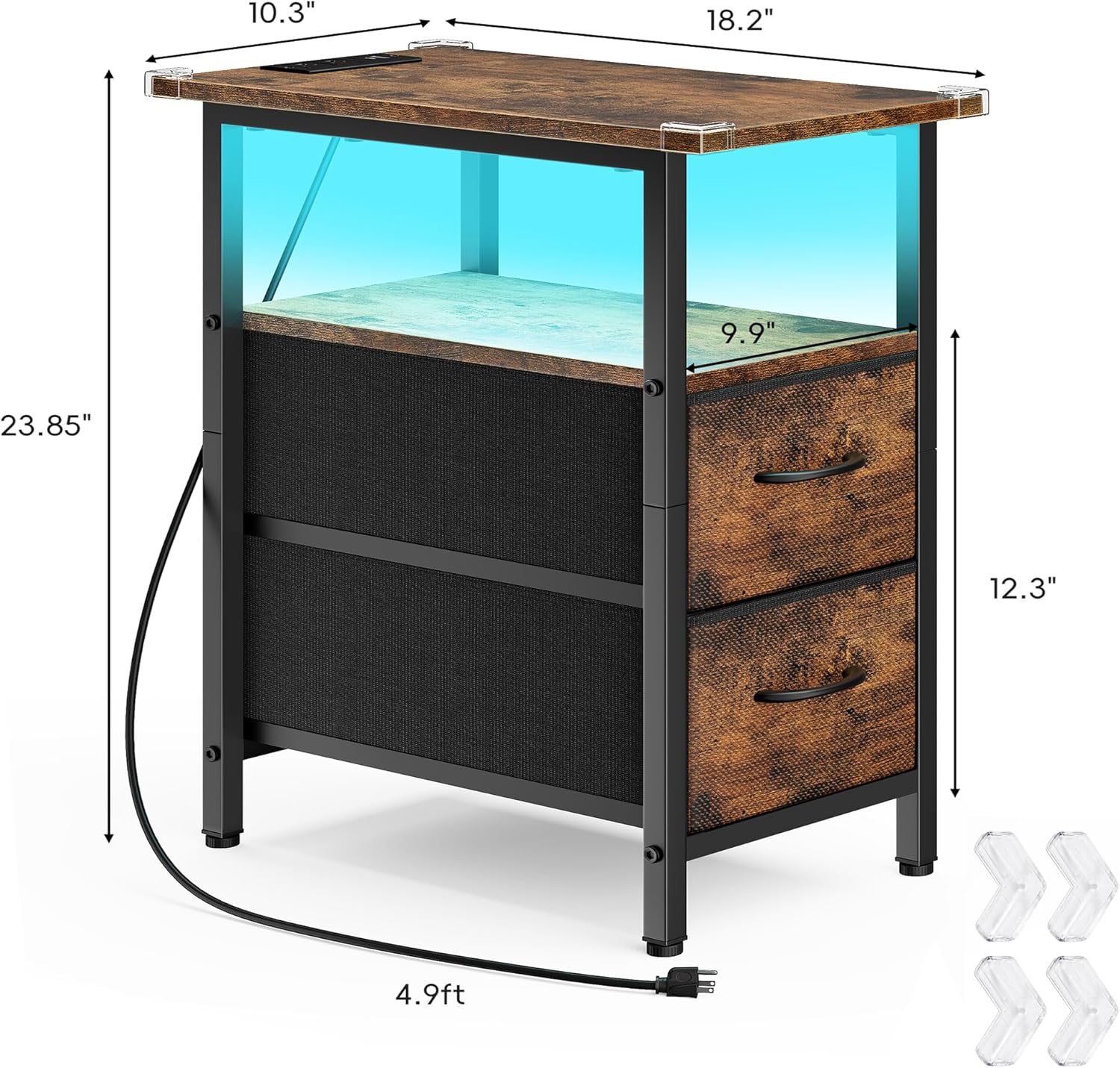
Figure 4.1: Product dimensions and power cord length for assembly planning.
5. Operating Instructions
5.1 Charging Station
The integrated charging station provides convenient power access for your electronic devices.
- Plug the nightstand's 4.9-foot power cord into a standard 120V AC wall outlet.
- Use the two AC outlets (125V/12A) to power lamps, laptops, or other small appliances.
- Use the two USB ports (5V/2A) to charge smartphones, tablets, smartwatches, and other USB-powered devices. One port is Type-C, and the other is standard USB-A.

Figure 5.1: Detail of the charging station with AC outlets and USB ports.
5.2 LED Lights
The integrated LED lights provide customizable ambient lighting for your space.
- Ensure the LED light strip is properly connected to its power source.
- Use the provided remote control to operate the LED lights.
- The lights offer 20 color options, 19 dynamic modes, 10 speed settings, and 5 brightness modes. Refer to the LED remote's specific instructions for detailed control functions.

Figure 5.2: LED light features and remote control.
6. Maintenance
- Cleaning: Wipe the wooden tabletop and metal frame with a soft, damp cloth. Avoid harsh chemicals or abrasive cleaners.
- Fabric Drawers: The non-woven fabric drawers can be spot cleaned with a mild detergent and air-dried. Do not machine wash.
- Power Cord: Regularly inspect the power cord for any signs of damage. If damaged, discontinue use and contact customer support.
- Stability: Periodically check all screws and connections to ensure they remain tight. Re-tighten if necessary.
7. Troubleshooting
| Problem | Possible Cause | Solution |
|---|---|---|
| Nightstand is wobbly. | Uneven floor or loose adjustable feet. | Adjust the plastic feet at the bottom of the frame until the nightstand is stable. Ensure all assembly screws are tightened. |
| Charging station not working. | Power cord not plugged in, wall outlet not active, or charging station malfunction. | Ensure the power cord is securely plugged into a working wall outlet. Test the outlet with another device. If the issue persists, contact customer support. |
| LED lights not turning on or responding to remote. | LED strip not properly connected, remote battery dead, or remote not paired. | Check the connection of the LED strip to its power source. Replace the remote battery. Refer to the LED light instructions for remote pairing procedures. |
| Drawers do not slide smoothly. | Drawers are overloaded or misaligned. | Reduce the weight in the drawers. Ensure the fabric drawers are inserted correctly and not obstructed. |
8. Specifications
| Brand: | Vagusicc |
| Model Name: | Nightstand-01 |
| Product Dimensions (D x W x H): | 18.2"D x 10.3"W x 23.9"H |
| Item Weight: | 8.8 Pounds |
| Maximum Weight Recommendation: | 80 Pounds |
| Frame Material: | Metal |
| Top Material Type: | Engineered Wood |
| Color: | Rustic Brown |
| Number of Drawers: | 2 |
| Power Cord Length: | 4.9 feet |
| AC Outlets: | 2 (125V/12A) |
| USB Ports: | 2 (5V/2A - 1 Type-C, 1 USB-A) |
| LED Light Features: | 20 colors, 19 dynamic modes, 10 speed settings, 5 brightness modes |
9. Warranty and Support
For warranty information or technical support, please contact Vagusicc customer service through the retailer where the product was purchased. Please have your model number (Nightstand01) and purchase date available when contacting support.
You can also visit the official Vagusicc store for more information: Vagusicc Store