
1. Introduction
Thank you for choosing the Apowking E300 Portable Power Station. This manual provides essential information for the safe and efficient operation, maintenance, and troubleshooting of your device. Please read this manual thoroughly before using the product and retain it for future reference.
2. Safety Instructions
- Do not disassemble, repair, or modify the unit.
- Do not expose the product to fire or high temperatures.
- Do not use or store the product in direct sunlight or high humidity environments.
- Keep out of reach of children.
- Ensure proper ventilation during use and charging.
- Avoid dropping or subjecting the unit to strong impacts.
- Do not insert foreign objects into the ports.
- Use only approved accessories and chargers.
3. Product Overview
The Apowking E300 is a compact and portable power station designed to provide reliable power for various devices. It features a durable LiFePO4 battery and multiple output ports.
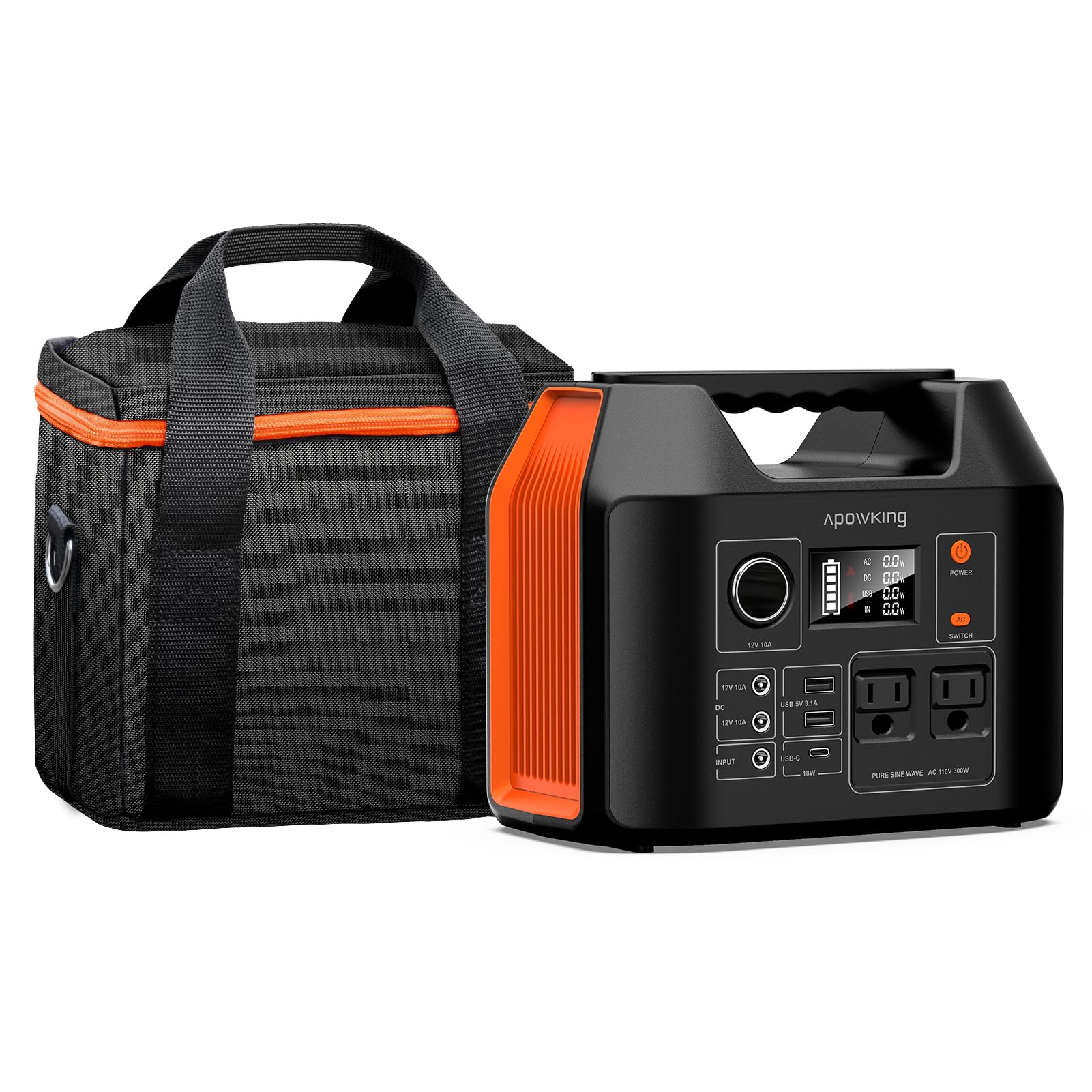
Figure 3.1: Internal structure highlighting the LiFePO4 battery and BMS for reliability and longevity.
Key Features:
- 256Wh LiFePO4 Battery Capacity
- 300W Pure Sine Wave AC Output (600W Peak)
- Multiple DC, USB-A, and USB-C QC3.0 Outputs
- Integrated LED Light
- Compact and Lightweight Design (6.5 lbs)

Figure 3.2: Front panel of the Apowking E300 showing all available output ports and their types.
Package Contents:
- 1x Apowking E300 Portable Power Station 300W
- 1x Apowking E300 Portable Power Station Bag
- 1x AC Adapter (for charging)
- 1x Car Charger Cable (for charging)
- 1x User Manual
4. Setup
Before first use, fully charge your Apowking E300 Portable Power Station.
4.1 Charging the Power Station
The E300 can be charged via AC wall outlet, car charger, or solar panel (sold separately).
- AC Wall Charging: Connect the provided AC adapter to the DC input port on the power station and plug it into a standard wall outlet. The charging indicator on the display will illuminate.
- Car Charging: Use the provided car charger cable to connect the power station to your vehicle's 12V cigarette lighter socket.
- Solar Charging: Connect a compatible solar panel (DC 12-24V, 60W-100W recommended) to the DC input port. Ensure the solar panel is placed in direct sunlight for optimal charging.
A full charge typically takes approximately 5-6 hours using the AC adapter.
5. Operating Instructions
5.1 Powering On/Off
Press and hold the main power button for 3 seconds to turn the unit on or off. The LCD display will activate.
5.2 Using AC Outlets
The E300 features two 110V AC pure sine wave outlets, providing a continuous output of 300W and a peak output of 600W.

Figure 5.1: Detail of the 110V AC output ports.
- Press the "AC" button to activate the AC outlets. The AC indicator on the display will light up.
- Plug your device into one of the AC outlets.
- Ensure the total power consumption of your devices does not exceed 300W.
- Press the "AC" button again to turn off the AC outlets when not in use to conserve battery.
Warning: Do not connect appliances that exceed 300W continuous power or 600W peak power to avoid overloading the unit.
5.3 Using USB Ports
The E300 includes two USB-A outputs and one USB-C QC3.0 output.
- The USB ports are typically active when the unit is powered on.
- Connect your USB-powered devices (e.g., smartphones, tablets) to the appropriate USB port.
- The USB-C QC3.0 port provides faster charging for compatible devices.
5.4 Using DC Outputs
The E300 provides three DC outputs for 12V devices.
- Press the "DC" button to activate the DC outputs. The DC indicator on the display will light up.
- Connect your 12V DC devices.
- Press the "DC" button again to turn off the DC outputs when not in use.
5.5 LED Light Operation
The power station features a large LED light on the back for illumination.
- Press the "Light" button once to turn on the LED light.
- Press the "Light" button again to cycle through different brightness modes or SOS mode (if available).
- Press and hold the "Light" button to turn off the LED light.
6. Maintenance
6.1 Cleaning
- Wipe the exterior with a dry, soft cloth.
- Do not use abrasive cleaners or solvents.
6.2 Storage
- Store the power station in a cool, dry place, away from direct sunlight and extreme temperatures.
- For long-term storage, charge the unit to 50-80% every 3-6 months to maintain battery health.
- The included Apowking E300 Portable Power Station Bag provides protection against dust, dirt, moisture, and scratches.

Figure 6.1: The Apowking E300 Portable Power Station Bag for protective storage.

Figure 6.2: Dimensions of the Apowking E300 Portable Power Station Bag.
7. Troubleshooting
| Problem | Possible Cause | Solution |
|---|---|---|
| Unit does not power on. | Battery is depleted. | Charge the power station using the AC adapter, car charger, or solar panel. |
| AC outlets not working. | AC output not activated. Device power exceeds 300W. | Press the "AC" button to activate. Check device wattage; use lower power devices. |
| USB ports not charging. | Unit is off. Cable is faulty. | Ensure the unit is powered on. Try a different USB cable. |
| Slow charging. | Using a low-power charger or solar panel. | Use the provided AC adapter for fastest charging. Ensure solar panel is in direct sunlight. |
8. Specifications
| Feature | Detail |
|---|---|
| Model | E300 |
| Battery Type | LiFePO4 |
| Capacity | 256Wh / 80000mAh |
| AC Output | 2x 110V Pure Sine Wave, 300W Rated, 600W Peak |
| USB-A Output | 2x (Specifications not detailed, typically 5V/2.4A) |
| USB-C Output | 1x QC3.0 (Specifications not detailed, typically 5V/3A, 9V/2A, 12V/1.5A) |
| DC Output | 3x (Specifications not detailed, typically 12V/10A total) |
| DC Input (Charging) | 12-24V (for AC adapter, car charger, solar panel) |
| Dimensions | 9 x 7.5 x 5.5 inches (22.86 x 19.05 x 13.97 cm) |
| Weight | 6.5 lbs (2.95 kg) |

Figure 8.1: The compact and lightweight design of the Apowking E300.

Figure 8.2: Examples of devices compatible and incompatible with the Apowking E300.
9. Warranty and Support
Apowking provides a 1-year service warranty for the E300 Portable Power Station, as indicated by the LiFePO4 battery image. For technical support, warranty claims, or any inquiries, please contact Apowking customer service through the retailer where the product was purchased or visit the official Apowking website.
Please have your purchase receipt and product model number (E300) ready when contacting support.