
KOSPET PLUSE
Contents
KOSPET Pulse Smart Watch User Manual
Model: PLUSE
Introduction
The KOSPET Pulse Smart Watch is a versatile and durable device designed to enhance your daily life and fitness journey. Featuring a vibrant 1.96" AMOLED display, comprehensive health tracking, and a long-lasting battery, it serves as your personal assistant and fitness companion. This manual provides detailed instructions on how to set up, operate, and maintain your KOSPET Pulse Smart Watch to ensure optimal performance.

Image: KOSPET Pulse Smart Watch, showcasing its sleek design and display.
What's in the Box
Upon unboxing your KOSPET Pulse Smart Watch, verify that all the following items are included:
- 1 x KOSPET Pulse Smart Watch
- 1 x Charging Cable
- 1 x User Manual

Image: Diagram showing the KOSPET Pulse Smart Watch, its dimensions, and the contents of the retail packaging.
Setup
1. Charging the Device
Before first use, fully charge your KOSPET Pulse Smart Watch. Connect the magnetic charging cable to the charging contacts on the back of the watch and plug the USB end into a power adapter (not included) or a computer's USB port.
- A full charge typically takes approximately 2 hours.
- The watch can last up to 25 days in standby mode, 11 days with heavy use, and 5 days in Always-On Display (AOD) mode.

Image: The KOSPET Pulse Smart Watch connected to its magnetic charging cable, illustrating typical, heavy, and standby battery life durations.
2. Downloading and Connecting to the Apexmove App
The KOSPET Pulse Smart Watch requires the Apexmove app for full functionality, data synchronization, and personalized settings. The app is compatible with iOS 10.0+ and Android 5.1+ devices.
- Download the "Apexmove" app from the Apple App Store (for iOS) or Google Play Store (for Android).
- Open the Apexmove app and follow the on-screen instructions to create an account or log in.

Image: Icons for downloading the Apexmove app from the Apple App Store and Google Play Store.
3. Pairing with Your Phone
To pair your watch with the Apexmove app:
- Ensure Bluetooth is enabled on your smartphone.
- Open the Apexmove app. Go to "Device" and click "Add a new device".
- The app will search for your KOSPET Pulse. Select your watch from the list of found devices.
- Confirm the pairing request on both your watch and your phone.
- Allow necessary permissions for the app to function correctly.

Image: A step-by-step visual guide on how to connect the KOSPET Pulse Smart Watch to a smartphone via the Apexmove app, including Bluetooth pairing and notification permissions.
4. Receiving Notifications
To receive message and app notifications on your watch, ensure the Apexmove app is running in the background and has the necessary permissions.
For iOS Devices:
- Connect your watch and phone via Bluetooth.
- Go to "Device" in the Apexmove app and open "SMS Reminder".
- Go to "Device" and click "App", then enable for desired apps.
- Go to your phone's "Settings" to allow "Apexmove" to access "Notifications".

Image: Visual instructions for setting up message and app notifications on iOS devices for the KOSPET Pulse Smart Watch.
For Android Devices:
- Connect your watch and phone via Bluetooth.
- Go to "Device" in the Apexmove app and open "SMS Reminder".
- Go to "Device" and click the NOTE to allow "Apexmove" to access "Notifications".
- Go to "Device" and click "App Reminder", then enable for desired apps.

Image: Visual instructions for setting up message and app notifications on Android devices for the KOSPET Pulse Smart Watch.
Operating Instructions
1. Basic Navigation
- Touchscreen: Swipe left/right, up/down to navigate through menus and widgets. Tap to select.
- Rotating Crown: Rotate the crown to scroll through lists or adjust settings. Press the crown to return to the watch face or confirm selections.

Image: Detailed view of the KOSPET Pulse Smart Watch highlighting its 1.96" AMOLED display, Corning Gorilla Glass, high-sensitivity rotating crown, aluminum alloy bezel, and liquid silicone strap.
2. Sports Modes
The KOSPET Pulse supports over 175 sports modes, including automatic recognition for six common activities like walking, running, cycling, and elliptical. Access sports modes from the main menu to track your workouts.
- Select your desired sport mode before starting an activity.
- The watch will track metrics such as calories burned, steps taken, and distance covered.
- Synchronize data with the Apexmove app for detailed analysis and personalized training plans.

Image: Individuals engaged in various sports activities (elliptical, cycling, running) while wearing the KOSPET Pulse Smart Watch, demonstrating its use for fitness tracking and integration with the Apexmove app for workout records.
3. Health Monitoring
Your KOSPET Pulse Smart Watch provides 24/7 health tracking to help you monitor your well-being.
- Heart Rate Monitoring: Continuously tracks your heart rate throughout the day.
- Blood Oxygen (SpO₂) Monitoring: Measures your blood oxygen saturation levels.
- Sleep Tracking: Monitors your sleep stages (deep, light, REM) and provides insights into your sleep quality.
- Stress and Mood Tracking: Helps you understand your stress levels and mood patterns.
- Menstrual Cycle Tracking: Provides personalized insights and smart reminders for daily health and wellness.

Image: Visual representation of the KOSPET Pulse Smart Watch's health monitoring capabilities, including heart rate monitoring, blood oxygen monitoring, sleep tracking, and menstrual cycle tracking.
4. Communication and Smart Features
- Bluetooth Calling: Make and receive calls directly from your watch when connected to your phone.
- Music Control: Control music playback on your smartphone (play, pause, skip tracks).
- App & SMS Reminders: Receive notifications from your favorite apps and SMS messages.
- Voice Assistant: Utilize your phone's voice assistant directly from the watch.
- Other Features: Includes alarm, calculator, sedentary reminder, weather forecast, stopwatch, and remote photo capture.
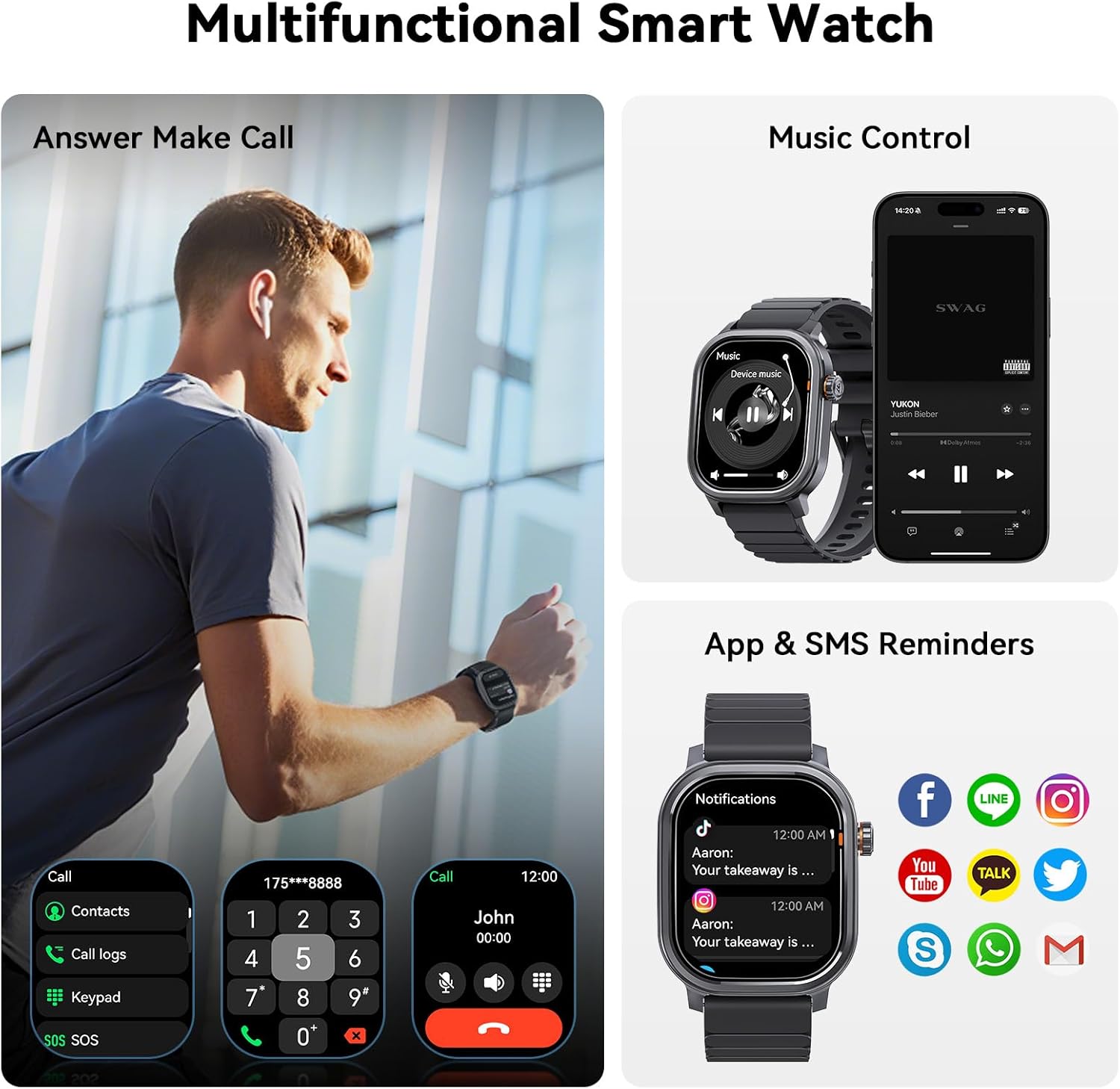
Image: The KOSPET Pulse Smart Watch demonstrating its multifunctional capabilities, including answering calls, music control, and displaying app and SMS notifications.
Maintenance
1. Water Resistance (IP68)
The KOSPET Pulse Smart Watch is IP68 waterproof, meaning it is resistant to dust and can withstand immersion in water up to 1.5 meters for 30 minutes. It is suitable for daily use, including hand washing and light rain. However, it is not recommended for swimming, diving, or hot water activities (e.g., showers, saunas) as steam can damage the seals.
- Avoid exposing the watch to high-pressure water or strong impacts.
- If the watch gets wet, wipe it dry with a soft cloth before charging or using the crown/buttons.

Image: The KOSPET Pulse Smart Watch being splashed with water, illustrating its IP68 waterproof rating and suitability for everyday water exposure.
2. Cleaning and Care
- Regularly clean your watch and strap with a soft, damp cloth.
- Avoid using harsh chemicals, abrasive cleaners, or solvents.
- Ensure the charging contacts are clean and dry before charging to prevent corrosion.
- Store the watch in a cool, dry place when not in use.
Troubleshooting
| Problem | Possible Solution |
|---|---|
| Watch does not turn on. | Ensure the watch is fully charged. Connect it to the charger for at least 30 minutes. |
| Cannot pair with phone. |
|
| Notifications not received. |
|
| Inaccurate health data. |
|
| Short battery life. |
|
Specifications
| Feature | Detail |
|---|---|
| Model Number | PLUSE |
| Display | 1.96" AMOLED, 410x502 Resolution, Corning Gorilla Glass |
| Battery Capacity | 350 mAh Lithium Ion |
| Battery Life | Up to 25 days (standby), 11 days (heavy use), 5 days (AOD) |
| Water Resistance | IP68 |
| Connectivity | Bluetooth 5.3 |
| Compatibility | Android 5.1+ / iOS 10.0+ |
| Sports Modes | 175+ (including 6 auto-recognition) |
| Health Monitoring | Heart Rate, SpO₂, Sleep, Stress, Menstrual Cycle |
| Weight | 44.5g (watch body only), 5.9 ounces (item weight) |
| Dimensions | 4.45 x 4.25 x 2.05 inches (Package) |
Warranty and Support
For warranty information and technical support, please refer to the official KOSPET website or contact KOSPET customer service directly. Details can typically be found on the product packaging or the KOSPET official support page.
Online Support: Visit the KOSPET official website for FAQs, troubleshooting guides, and software updates.
Customer Service: Contact information for KOSPET customer service can be found on their official website or in the warranty card included with your product.
Ask a question about this manual
Ask about setup, troubleshooting, compatibility, parts, safety, or missing instructions. Manuals+ will review the question and use this page’s manual context to help answer it.