
1. Product Overview
The AEROZY Windowless Portable Evaporative Cooler (Model BUMAITS05) is designed to provide a comfortable indoor environment by cooling and humidifying the air. This unit is suitable for various spaces such as bedrooms, offices, and dorms, offering a convenient cooling solution without requiring window installation or exhaust hoses.
Key Features:
- Windowless Design: No window or exhaust required, ideal for enclosed spaces.
- Multiple Fan Speeds & Modes: Features 3 fan speeds and 4 operating modes (Cool, Eco, Natural, Sleep) for customized comfort.
- Large Water Tank: Equipped with a 1.06-gallon (4-liter) water tank for extended operation.
- Space-Efficient Design: Tall and slim vertical build (45.08 inches) to maximize airflow while fitting into compact areas.
- Ice Packs Included: Comes with 4 ice packs to enhance evaporative cooling performance.
- Digital Display & Remote Control: Easy operation via an intuitive digital display and a convenient remote control.
- 12-Hour Timer: Programmable timer for automatic shut-off.
- Oscillation Function: Provides wide-angle air distribution for room-wide refreshment.
Package Contents:
- AEROZY Evaporative Cooler Unit (Model BUMAITS05) x 1
- User Manual x 1
- Ice Box x 2 (Note: Product specifications mention 2 ice boxes, while feature bullets mention 4 ice packs. Please use the provided ice boxes for optimal performance.)
- Remote Control x 1
2. Important Safety Instructions
Please read all safety instructions carefully before operating the appliance. Failure to follow these instructions may result in electric shock, fire, or injury.
- Always place the unit on a stable, level surface to prevent tipping and water spillage.
- Do not operate the unit with a damaged cord or plug. If the cord or plug is damaged, contact customer support for assistance.
- Ensure the power outlet voltage matches the unit's requirements.
- Do not immerse the unit, cord, or plug in water or other liquids.
- Unplug the unit from the power outlet before cleaning, refilling the water tank, or performing any maintenance.
- Keep the unit away from children and pets.
- Do not block the air inlet or outlet vents.
- Do not use the unit near flammable materials or in environments with explosive gases.
- Only use clean tap water in the water tank. Do not add any chemicals or additives other than the provided ice packs.
- Avoid direct exposure to the water mist for prolonged periods.
- If water leakage occurs, immediately unplug the unit and address the issue.
3. Setup Guide
3.1 Unpacking
- Carefully remove the evaporative cooler and all accessories from the packaging.
- Retain the packaging materials for future storage or transport.
- Inspect the unit for any signs of damage. If damaged, do not operate and contact customer support.
3.2 Base Assembly
The unit features tool-free assembly for the base. Align the base with the bottom of the main unit and push firmly until it snaps securely into place.

Image Description: This image displays various features of the AEROZY evaporative cooler. It highlights the integrated handle for portability, the dual water tank design for easy refilling, the tool-free assembly mechanism for the base, and the clear digital display on top of the unit.
3.3 Filling the Water Tank
- Ensure the unit is unplugged from the power outlet.
- Locate the water tank. The unit features a dual water tank design for convenience.
- Carefully pull out the water tank or open the water inlet cover.
- Fill the tank with clean tap water up to the 'MAX' fill line. Do not overfill.
- Securely close the water tank or reinsert it into the unit.
3.4 Inserting Ice Packs
For enhanced cooling performance, you can use the provided ice boxes (ice packs).
- Place the ice boxes in a freezer until they are completely frozen.
- Once frozen, place the ice boxes into the water tank along with the water.
- Ensure the ice boxes do not obstruct the water pump or other internal components.
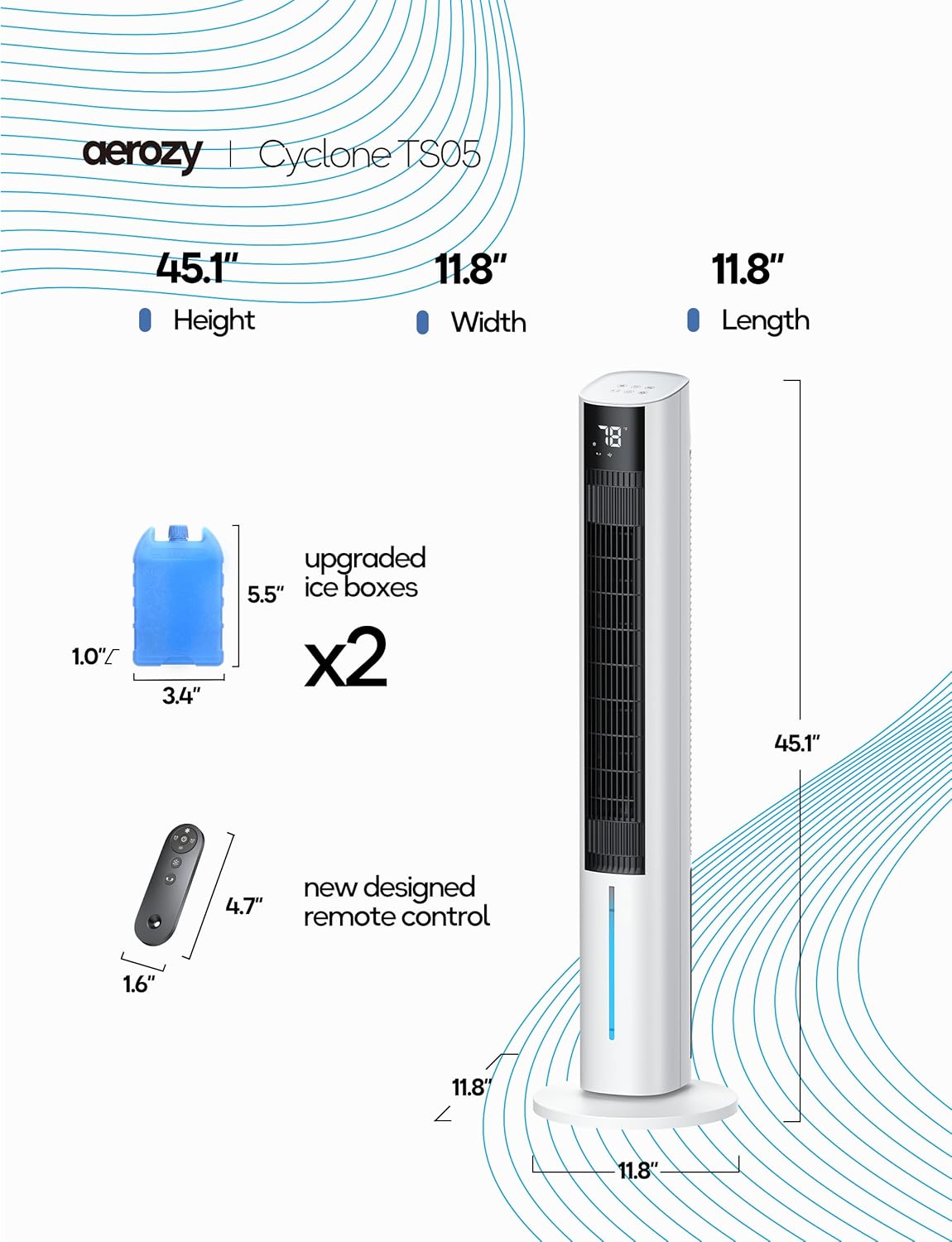
Image Description: This image provides a detailed view of the AEROZY evaporative cooler's dimensions (45.1" H x 11.8" W x 11.8" L), illustrates the two upgraded ice boxes (5.5" x 3.4" x 1.0"), and shows the new designed remote control (4.7" x 1.6").
3.5 Power Connection
After filling the water tank and assembling the base, plug the power cord into a standard electrical outlet.
4. Operating Instructions
The evaporative cooler can be operated using the control panel on top of the unit or the included remote control.

Image Description: This image depicts the AEROZY evaporative cooler in a modern living space. Overlaid graphics highlight the unit's control options, including three fan speeds (1, 2, 3), four operational modes (Natural, Normal, Cooling, Sleep), and additional functions such as power on/off, oscillation, and timer settings, accessible via both the top panel and the remote control.
4.1 Control Panel and Remote Control Functions
- Power Button (⏻): Press to turn the unit ON or OFF.
- Fan Speed Button (⁕): Cycle through 3 fan speeds: Low, Medium, High. The current speed will be indicated on the digital display.
- Mode Button (☰): Select from 4 operating modes:
- Normal Mode: Constant airflow at the selected speed.
- Natural Mode: Simulates natural breeze with varying fan speeds.
- Sleep Mode: Operates quietly with reduced fan speed and dimmed display for undisturbed rest.
- Cool Mode: Activates the evaporative cooling function, circulating water over the cooling pad.
- Oscillation Button (⟳): Press to activate or deactivate the oscillation function, which rotates the unit to distribute air across a wider area.
- Timer Button (⏱): Set the operating timer for automatic shut-off. Press repeatedly to select desired hours (up to 12 hours).

Image Description: This image features the AEROZY evaporative cooler operating in a room at night, with a prominent graphic displaying '12 hrs', emphasizing the unit's 12-hour programmable timer function for convenient, set-and-forget operation.
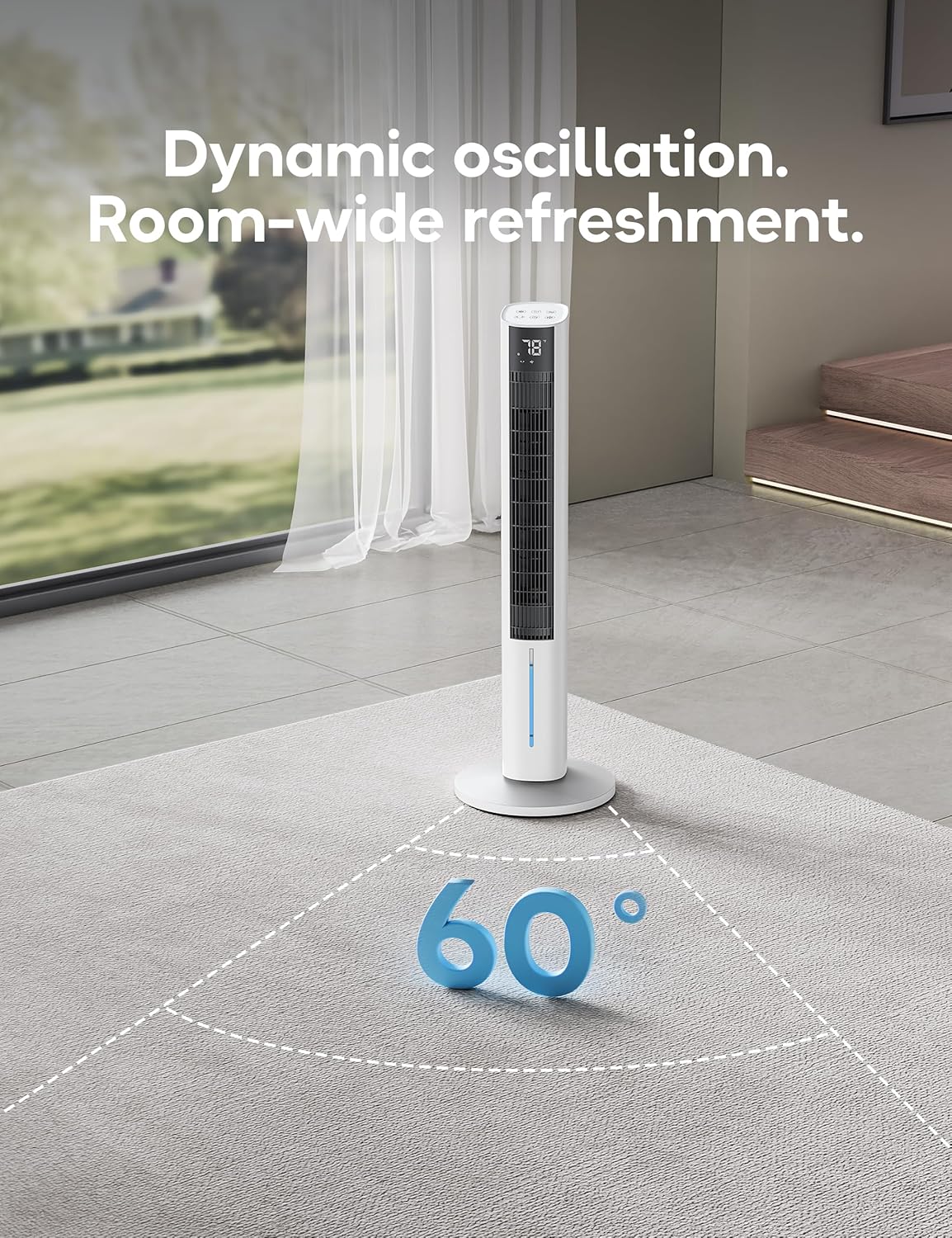
Image Description: This image illustrates the AEROZY evaporative cooler positioned in a spacious room, with a graphic showing a 60-degree arc, highlighting its dynamic oscillation feature for broad air distribution and room-wide refreshment.
5. Maintenance and Care
Regular maintenance ensures optimal performance and extends the lifespan of your evaporative cooler. Always unplug the unit before cleaning.
5.1 Cleaning the Exterior
Wipe the exterior surfaces of the unit with a soft, damp cloth. Do not use abrasive cleaners, waxes, or solvents, as these may damage the finish.
5.2 Cleaning the Water Tank
To prevent mold and mildew growth, clean the water tank regularly, especially if the unit is used frequently.
- Unplug the unit and remove the water tank.
- Empty any remaining water.
- Clean the tank with a mild detergent and a soft brush or cloth. Rinse thoroughly with clean water.
- Allow the tank to air dry completely before reinserting it into the unit.
5.3 Cleaning the Cooling Pad (Honeycomb Filter)
The cooling pad should be cleaned periodically to maintain airflow and cooling efficiency.
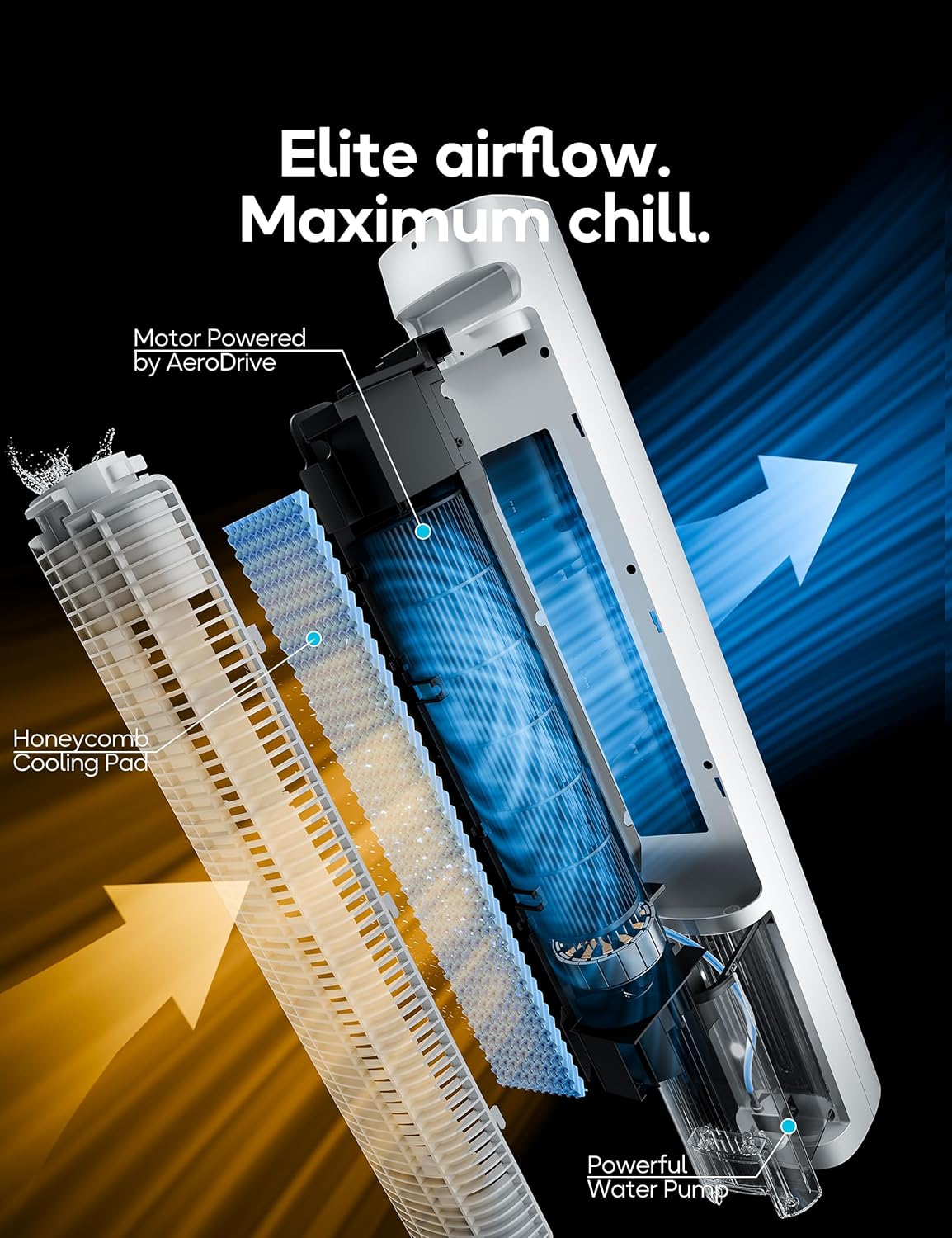
Image Description: This cutaway view of the AEROZY evaporative cooler reveals its internal structure, highlighting the honeycomb cooling pad, the powerful water pump, and the path of air movement, illustrating how the unit achieves its cooling effect.
- Unplug the unit.
- Refer to the unit's design to access and carefully remove the cooling pad.
- Rinse the cooling pad under running water to remove dust and mineral deposits. For stubborn deposits, soak in a mild descaling solution (e.g., vinegar and water) for 30 minutes, then rinse thoroughly.
- Allow the cooling pad to dry completely before reinstalling.
5.4 Storage
When not in use for an extended period:
- Empty and clean the water tank and cooling pad. Ensure all parts are dry.
- Store the unit in a cool, dry place, preferably in its original packaging.
6. Troubleshooting Guide
Before contacting customer support, please refer to the following troubleshooting table for common issues.
| Issue | Possible Cause | Solution |
|---|---|---|
| Unit does not power on | Power cord not securely plugged in No power from outlet Unit is off | Ensure power cord is fully inserted. Test outlet with another appliance. Press the Power button on the unit or remote. |
| No cooling effect or weak airflow | Water tank is empty Cooling pad is dry or clogged Ice packs not used or frozen Room humidity is too high Unit is operating in Fan-only mode | Refill water tank. Ensure cooling pad is wet; clean if clogged. Freeze and insert ice packs into water tank. Evaporative coolers are less effective in high humidity. Select 'Cool Mode' using the Mode button. |
| Water leakage | Water tank overfilled Unit not on a level surface Water tank not properly seated Internal component issue | Do not fill water above the 'MAX' line. Place the unit on a flat, stable surface. Ensure the water tank is correctly inserted and sealed. If leakage persists, discontinue use and contact customer support. |
| Excessive noise | Unit not on a level surface Water pump noise Obstruction in fan blades Oscillation mechanism noise | Ensure the unit is on a flat, stable surface. This is normal during water circulation; ensure water level is adequate. Unplug and check for any foreign objects. If none, contact support. Some minor noise during oscillation is normal. If excessive, contact support. |
| Remote control not working | Batteries are dead or incorrectly inserted Obstruction between remote and unit | Replace batteries (requires 2 AAA batteries, not included). Ensure correct polarity. Remove any objects blocking the signal path. |
7. Product Specifications
| Feature | Specification |
|---|---|
| Brand | AEROZY |
| Model Name | BUMAITS05 (TS05) |
| Mounting Type | Freestanding |
| Color | White |
| Controls Type | Remote, Digital Display |
| Product Dimensions (D x W x H) | 8.86"D x 8.86"W x 45.08"H (approx. 22.5cm D x 22.5cm W x 114.5cm H) |
| Item Weight | 15.52 pounds (approx. 7.04 kg) |
| Water Tank Capacity | 1.06 gallons (approx. 4 liters) |
| Operation Modes | Cool, Eco, Natural, Sleep |
| Fan Speeds | 3 (Low, Medium, High) |
| Timer | Up to 12 hours |
| Batteries Required (for remote) | Yes (2x AAA, not included) |
| UPC | 730945277822 |
8. Warranty and Customer Support
8.1 Warranty Information
This AEROZY product comes with a 1-Year Warranty from the date of purchase. This warranty covers manufacturing defects and malfunctions under normal use. It does not cover damage caused by misuse, accident, unauthorized modification, or improper maintenance.
Please retain your proof of purchase for warranty claims.
8.2 Customer Support
For any questions, technical assistance, or warranty claims, please contact AEROZY customer support. You can find more information and contact details by visiting the official AEROZY store: