
1. Introduction
Thank you for choosing the Lumary Smart Landscape Lights Pro. This manual provides detailed instructions for the installation, operation, and maintenance of your new smart outdoor lighting system. Please read this manual thoroughly before use to ensure proper functionality and safety.
The Lumary Smart Landscape Lights Pro system offers advanced features including RGBAICW color changing capabilities, app control, voice control, and remote control, designed to enhance your outdoor living spaces.
2. Key Features
- Upgrade Pro Version: Total 3000lm brightness and 36W output. RGBAICW 2200K-6500K, 1-100% adjustable brightness.
- Multi-Color Display: RGBAI technology for 16 million color options and various preset/custom scenes.
- Individual Light Control: Each spotlight can be controlled independently via the APP for color, on/off, and brightness.
- Multiple Control Methods: Lumary APP (2.4 GHz Wi-Fi only), Amazon Alexa, Google Assistant, SmartThings, RF remote controller, and control box.
- Durable & Waterproof: IP65 waterproof rating with an upgraded metal body and 22AWG sturdy cable. ETL-certified adapter.
3. Package Contents
Please check the package for the following items:
- Lumary Smart Landscape Spotlights (6 units)
- Power Adapter
- Control Box
- RF Remote Controller (AAA Batteries not included)
- Ground Stakes
- User Manual
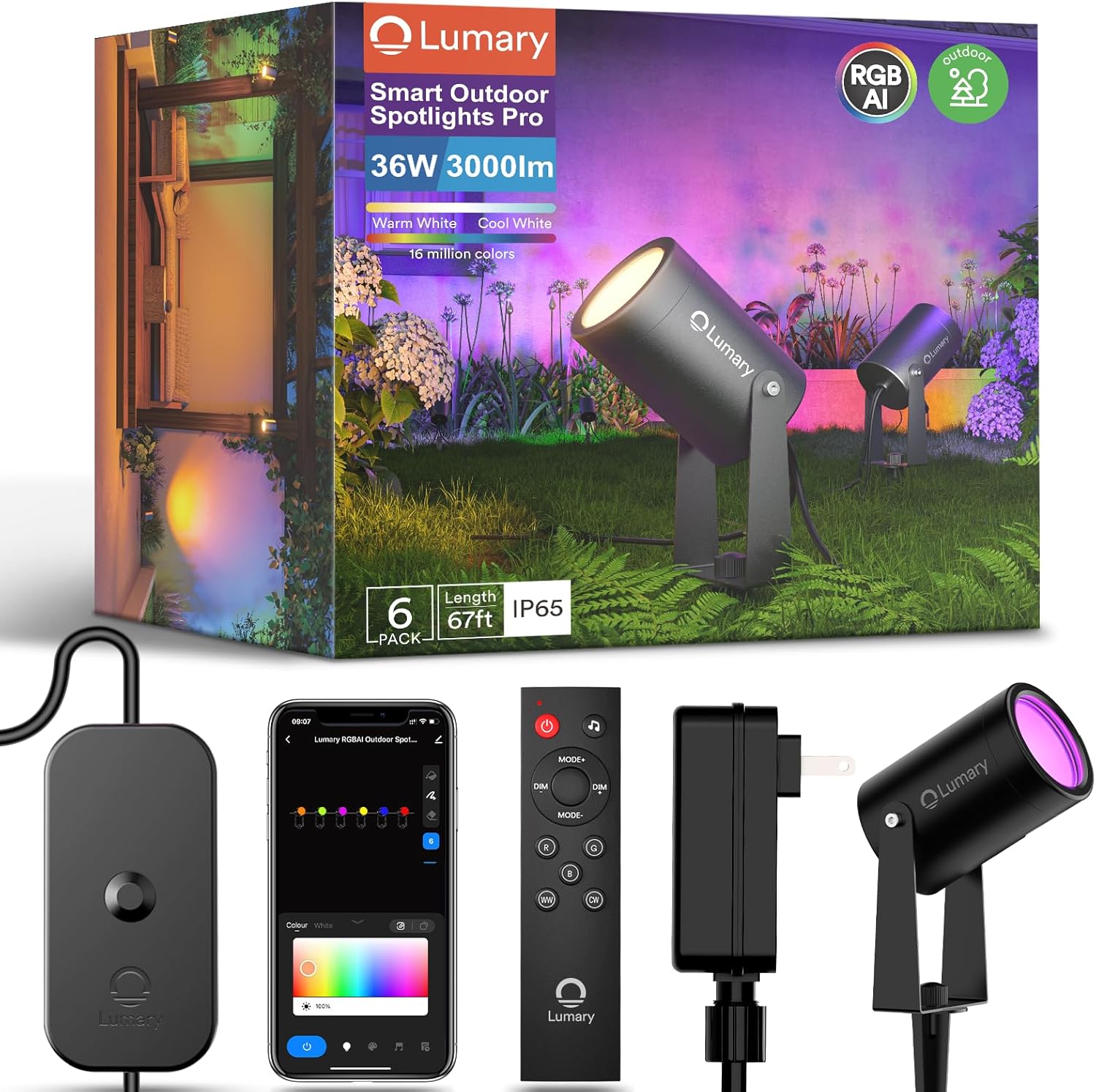
Image: Overview of the Lumary Smart Landscape Lights Pro package contents, showing the spotlights, control unit, remote control, and power supply.
4. Safety Information
- Ensure the power supply is disconnected before installation or maintenance.
- Do not immerse the control box or power adapter in water. The spotlights are IP65 rated for outdoor use, but the power components require protection from direct water exposure.
- Use only the provided power adapter. Using unauthorized adapters may damage the product and void the warranty.
- Keep children and pets away from electrical components during installation.
- Do not attempt to disassemble or repair the product yourself. Contact customer support for assistance.
- Ensure all connections are secure to prevent electrical hazards.
5. Setup and Installation
- Unpack Components: Carefully remove all items from the packaging and verify against the package contents list.
- Assemble Spotlights: Attach the ground stakes to the bottom of each spotlight. Ensure they are securely fastened.
- Position Lights: Place the spotlights in your desired outdoor locations. Ensure the cable length is sufficient to reach the control box and power outlet.
- Connect Lights to Control Box: Connect each spotlight's cable to the corresponding ports on the control box. Ensure a firm connection.
- Connect Power Adapter: Plug the power adapter into the control box, then plug the adapter into a suitable outdoor power outlet. Ensure the outlet is protected from weather elements.
- Power On: Once all connections are secure, plug the power adapter into the main power supply. The lights should illuminate.

Image: Lumary Smart Landscape Lights Pro installed in an outdoor setting, demonstrating their ability to illuminate different areas with various colors.
6. Operating Instructions
6.1 Lumary App Control
- Download App: Search for "Lumary" in your smartphone's app store (iOS or Android) and download the application.
- Register/Login: Open the app and create an account or log in if you already have one.
- Add Device: Follow the in-app instructions to add your Smart Landscape Lights Pro. Ensure your phone is connected to a 2.4 GHz Wi-Fi network.
- Control Features:
- Color Selection: Choose from 16 million colors using the color wheel.
- Brightness Adjustment: Adjust brightness from 1% to 100%.
- Scene Modes: Select from various preset scenes or create custom lighting effects.
- Individual Light Control: Tap on individual light icons within the app to control each spotlight independently.
- Scheduling: Set timers and schedules for automatic on/off and scene changes.
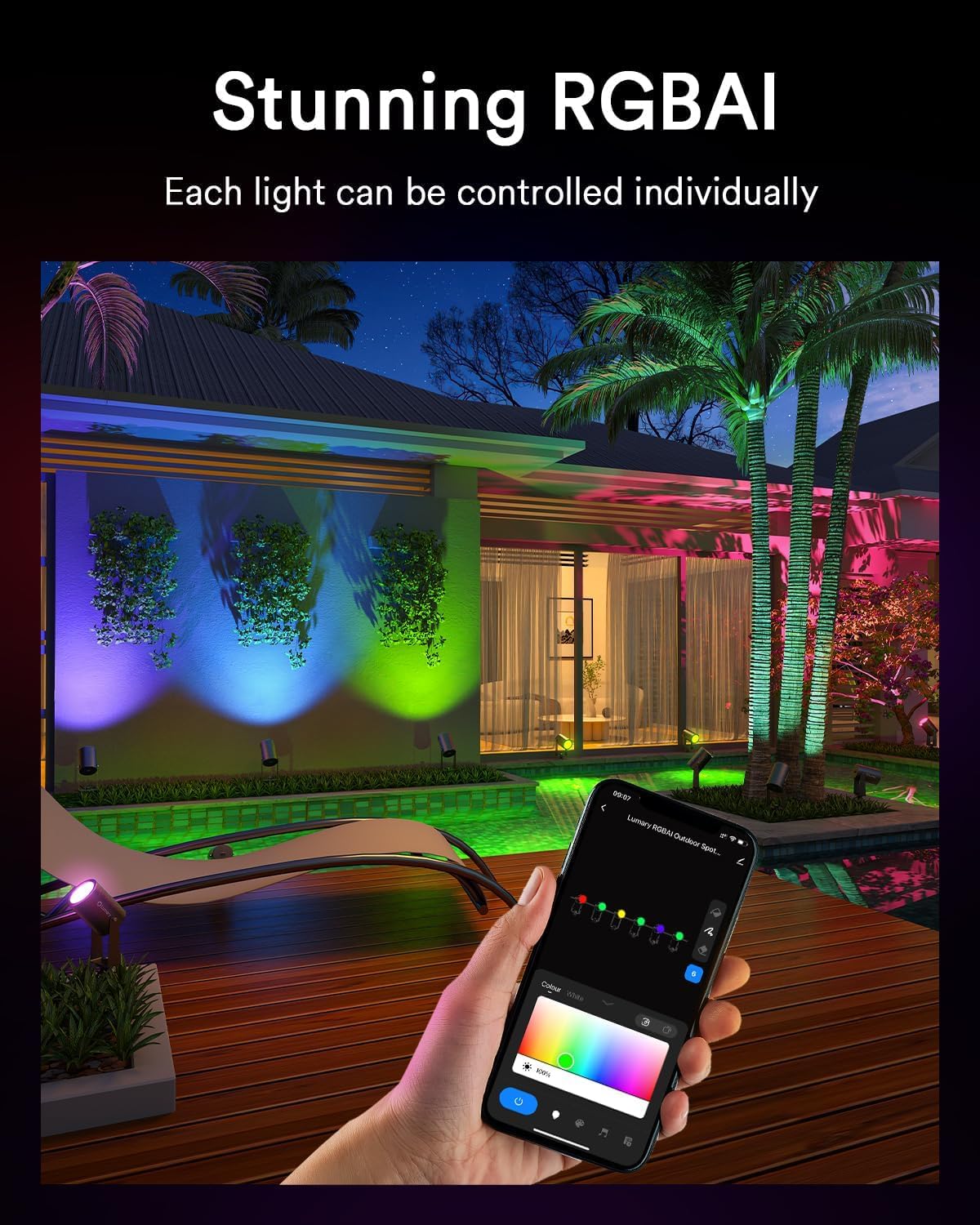
Image: A smartphone displaying the Lumary application, illustrating the interface for individual light control and color selection.
6.2 Voice Control (Alexa/Google Assistant)
- Link Account: In your Alexa or Google Home app, enable the "Lumary" skill/service and link your Lumary account.
- Discover Devices: Ask your voice assistant to "Discover devices" or manually add them through the app.
- Voice Commands: Use commands such as:
- "Alexa, turn on the garden lights."
- "Hey Google, set the patio lights to blue."
- "Alexa, dim the landscape lights to 50%."
6.3 Remote Control
Insert 2x AAA batteries (not included) into the RF remote controller. The remote can be used to control basic functions such as:
- Power On/Off
- Brightness Adjustment
- Color Cycling/Selection
- Mode Selection
Image: The RF remote controller and the control box for the Lumary Smart Landscape Lights Pro, showing various buttons for light control.
7. Maintenance
- Cleaning: Periodically wipe the spotlights with a soft, damp cloth to remove dirt and debris. Do not use harsh chemicals or abrasive cleaners.
- Cable Inspection: Regularly inspect the cables for any signs of damage, fraying, or wear. Replace damaged cables immediately.
- Connections: Ensure all connections remain tight and free from corrosion.
- Firmware Updates: Check the Lumary app periodically for firmware updates to ensure optimal performance and access to new features.
8. Troubleshooting
| Problem | Possible Cause | Solution |
|---|---|---|
| Lights not turning on. | No power, loose connection, faulty adapter. | Check power outlet, ensure all cables are securely connected, test with another outlet if possible. |
| Cannot connect to Wi-Fi. | Incorrect Wi-Fi band, weak signal, incorrect password. | Ensure your router is 2.4 GHz, move closer to the router, re-enter Wi-Fi password carefully. |
| Remote control not working. | Dead batteries, out of range, interference. | Replace AAA batteries, ensure line of sight to the control box, reduce interference. |
| Lights flickering or inconsistent. | Loose connection, power fluctuations, faulty unit. | Check all cable connections, ensure stable power supply. If problem persists, contact support. |
9. Specifications
- Model: B0FH669H6K
- Brand: Lumary
- Brightness: 3000lm (total)
- Output: 36W
- Color Temperature: RGBAICW 2200K-6500K
- Brightness Adjustment: 1-100%
- Waterproof Rating: IP65
- Cable Gauge: 22AWG
- Adapter: ETL-certified
- Lifespan: Up to 15,000 hours
- Connectivity: 2.4 GHz Wi-Fi
10. Warranty and Support
Lumary products come with a standard manufacturer's warranty. Please refer to the warranty card included in your package or visit the official Lumary website for detailed warranty terms and conditions.
For technical support, troubleshooting assistance, or warranty claims, please contact Lumary customer service:
- Website: Visit the Lumary Store on Amazon
- Email: [Insert Customer Support Email Here, if available]
- Phone: [Insert Customer Support Phone Number Here, if available]
When contacting support, please have your product model (B0FH669H6K) and purchase date ready.
