
Introduction
This manual provides essential instructions for the proper setup, operation, and maintenance of your Yokomo RPX4 Competition Electronic Speed Controller (ESC). The RPX4 is designed for high-performance racing applications, offering advanced power delivery and precise control. It features state-of-the-art power MOS FET output characteristics and is engineered for both stock and modified motors.
Please read this manual thoroughly before using the product to ensure safe and optimal performance.
Package Contents
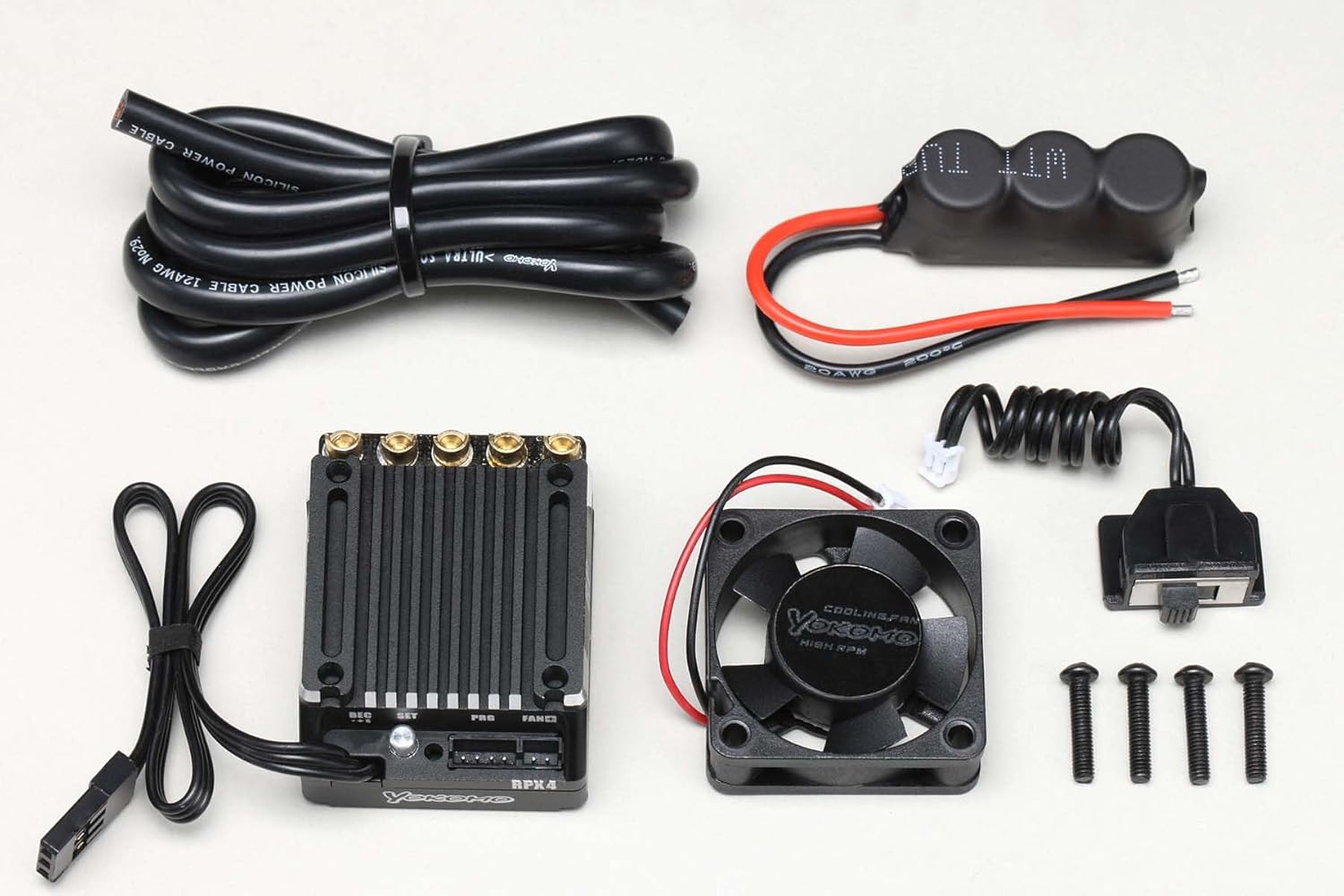
Image 1: Contents of the Yokomo RPX4 Competition ESC package. This includes the RPX4 ESC unit, silicone power cables (12AWG), a capacitor module, a cooling fan, a receiver connection cable, and mounting screws.
Verify that all items listed below are present in your package:
- Yokomo RPX4 Electronic Speed Controller (ESC) Unit
- Silicone Power Cables (12AWG)
- Capacitor Module
- Cooling Fan (High RPM)
- Receiver Connection Cable
- Mounting Screws (4 pcs)
Note: Fuel, batteries, paint, glue, oil, grease, and tools are not included and must be purchased separately.
Setup
1. Mounting the ESC
- Choose a suitable location on your chassis that allows for good airflow and easy access to connections.
- Secure the ESC using double-sided tape or the provided mounting screws, ensuring it is firmly attached to prevent movement during operation.
2. Wiring Connections
Proper wiring is crucial for performance and safety.
- Motor Connection: Connect the three motor wires from the ESC to your brushless motor. Ensure correct phase matching (A-A, B-B, C-C). If the motor rotates in the wrong direction, swap any two of the motor wires.
- Battery Connection: Solder appropriate battery connectors (not included) to the provided silicone power cables. Connect the positive (+) lead (red) and negative (-) lead (black) from the ESC to your battery pack. Ensure polarity is correct to avoid damage.
- Receiver Connection: Plug the receiver connection cable from the ESC into the throttle channel (usually Channel 2) of your RC receiver.
- Capacitor Module: Connect the capacitor module to the designated port on the ESC. This helps stabilize power delivery.
- Cooling Fan: Connect the cooling fan to the "FAN" port on the ESC. Ensure the fan is oriented to draw air over the ESC for optimal cooling.
3. Transmitter Calibration
Before initial use, calibrate the ESC with your radio transmitter to ensure proper throttle range recognition. Refer to your transmitter's manual for specific calibration procedures. Generally, this involves:
- Turn on your transmitter.
- Hold the throttle at full forward, then power on the ESC.
- Wait for the ESC to beep, then move the throttle to full reverse.
- Wait for the ESC to beep again, then return the throttle to neutral.
- Wait for the final beep, indicating successful calibration.
Operating Instructions
Powering On/Off
- To power on, ensure your transmitter is on, then connect the battery to the ESC.
- To power off, disconnect the battery from the ESC.
Programming
The RPX4 ESC features programmable parameters to fine-tune its performance for different racing conditions and motor types.
- Preset Programs: The ESC comes with preset programmed data optimized for various categories, making initial setup straightforward.
- External Programmer: For advanced adjustments, an external programmer from the BL-R26P series can be used. Ensure the programmer's firmware is updated to support the RPX4.
- Adjustable Parameters: Parameters typically include throttle response, brake force, timing, boost, turbo, and various protection settings. Refer to the specific programmer's manual for detailed instructions on adjusting these settings.
Maintenance
- Cleaning: Regularly clean the ESC and cooling fan to remove dirt, dust, and debris. Use a soft brush or compressed air. Ensure no moisture enters the unit.
- Inspection: Periodically inspect all wires and connectors for signs of wear, damage, or loose connections. Replace any damaged components immediately.
- Storage: When not in use, store the ESC in a dry, cool place away from direct sunlight and extreme temperatures.
Troubleshooting
| Problem | Possible Cause | Solution |
|---|---|---|
| ESC does not power on | Incorrect battery connection, faulty battery, damaged power switch/cable. | Check battery polarity and connection. Test with a different battery. Inspect power cables for damage. |
| Motor not responding or erratic behavior | Incorrect motor wiring, improper transmitter calibration, faulty receiver connection. | Verify motor wire connections. Recalibrate transmitter. Check receiver cable connection. |
| ESC or motor overheating | Incorrect gear ratio, excessive timing/boost settings, insufficient cooling, damaged motor. | Adjust gear ratio. Reduce timing/boost. Ensure cooling fan is working and clear of obstructions. Inspect motor for damage. |
| No throttle response after calibration | Throttle trim not at neutral, throttle channel reversed on transmitter. | Ensure throttle trim is centered. Check transmitter's servo reverse settings for the throttle channel. |
Specifications
| Feature | Detail |
|---|---|
| Model Number | BL-RPX4 |
| Product Dimensions | 3.94 x 3.94 x 3.94 inches |
| Item Weight | 6.3 ounces |
| Manufacturer | Yokomo |
| Recommended Age | 15 years and up |
| Power Cables | 12AWG Silicone Power Cable |
| Cooling | High RPM Cooling Fan |
Warranty and Support
For warranty information and technical support, please refer to the official Yokomo website or contact your authorized Yokomo dealer. Keep your purchase receipt as proof of purchase.
