
1. Introduction
Thank you for choosing the HONOR Choice X7e True Wireless Semi-Open Stereo Earbuds. These earbuds are designed to provide a superior audio experience with advanced features such as Semi-Open Active Noise Cancellation, extended battery life, and immersive spatial audio. This manual will guide you through the setup, operation, maintenance, and troubleshooting of your new earbuds.
Key Features:
- Semi-Open Active Noise Cancellation: Intelligently reduces ambient noise while maintaining situational awareness.
- Up to 40 Hours Total Playtime: Enjoy extended listening with the charging case.
- Dual-Magnet Driver & Spatial Audio: Delivers deep bass, clear highs, and an immersive 3D-like sound experience.
- Clear Calls with Triple Microphone Setup: Ensures excellent voice clarity even in noisy environments.
- IP54 Water & Dust Resistance: Protects against sweat, splashes, and dust for active use.
- Smart Touch Controls: Intuitive controls for media playback and call management.
2. Package Contents
Please check the package contents to ensure all items are present:
- HONOR Choice X7e Earbuds (Left and Right)
- Charging Case
- USB Type-C Charging Cable (may vary by region)
- User Manual
3. Setup
3.1 Initial Charging
Before first use, fully charge the earbuds and the charging case.
- Place both earbuds into the charging case.
- Connect the USB Type-C charging cable to the charging port on the case and to a power adapter (not included) or a computer's USB port.
- The indicator light on the charging case will show the charging status. Once fully charged, the indicator will typically turn solid or off.
A full charge provides up to 6 hours of listening time for the earbuds, and the charging case extends this to a total of 40 hours.
3.2 Pairing with a Device
To pair your HONOR Choice X7e earbuds with a new device:
- Ensure the earbuds are in the charging case and the case lid is open.
- On your device (smartphone, tablet, etc.), enable Bluetooth.
- In the Bluetooth settings, search for available devices.
- Select "HONOR Choice X7e" from the list of found devices.
- Once connected, a confirmation message will appear on your device, and the earbuds will be ready for use.
The earbuds will automatically connect to the last paired device when taken out of the case, provided Bluetooth is enabled on the device.
3.3 Wearing the Earbuds
For optimal sound quality and comfort, ensure the earbuds are properly fitted.
- Identify the left (L) and right (R) earbuds.
- Gently insert each earbud into your ear canal.
- Rotate the earbud slightly until it feels secure and comfortable.
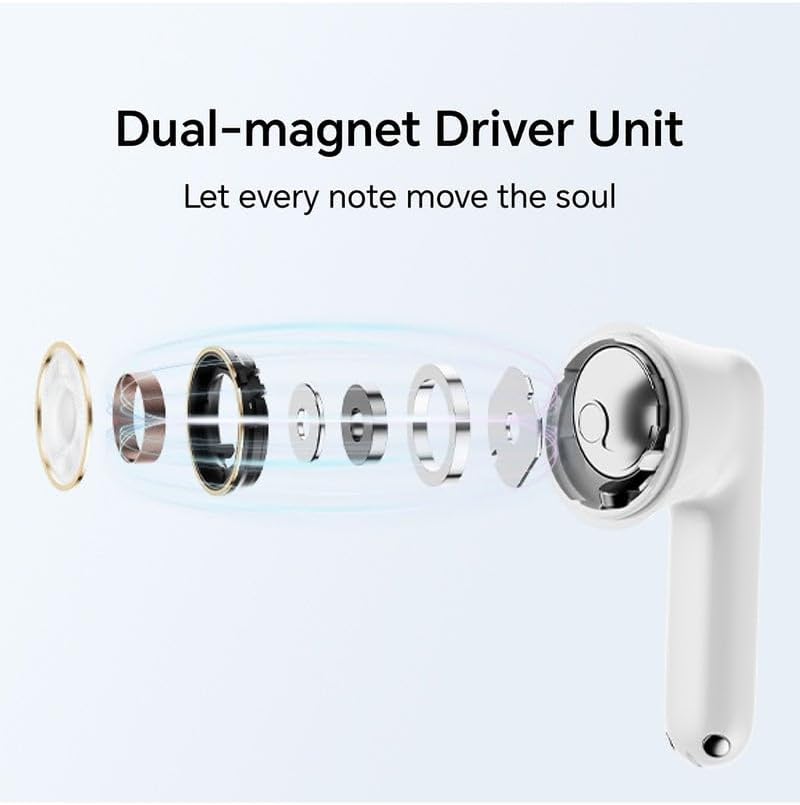
Image: HONOR Choice X7e Earbuds in their open charging case, showing the sleek white design.
4. Operating Instructions
4.1 Power On/Off
- Power On: Open the charging case, and the earbuds will automatically power on.
- Power Off: Place the earbuds back into the charging case and close the lid. They will automatically disconnect and power off.
4.2 Touch Controls
The HONOR Choice X7e earbuds feature intuitive touch controls on each earbud. The specific functions may vary slightly depending on your device and app settings.
| Action | Function |
|---|---|
| Single Tap (Left/Right) | Play/Pause Music, Answer/End Call |
| Double Tap (Left/Right) | Next Track (Right), Previous Track (Left) |
| Long Press (Left/Right) | Switch Noise Cancellation Modes (ANC On/Awareness/Off), Reject Call |
| Triple Tap (Left/Right) | Activate Voice Assistant |
4.3 Noise Cancellation Modes
The earbuds support Semi-Open Active Noise Cancellation (ANC) and Awareness Mode. Long press on either earbud to cycle through the modes:
- ANC On: Reduces ambient noise for an immersive listening experience.
- Awareness Mode: Allows you to hear your surroundings while still enjoying your audio.
- Off: Disables both ANC and Awareness Mode.

Related documentsX7e


Ask a question about this manual
Ask about setup, troubleshooting, compatibility, parts, safety, or missing instructions. Manuals+ will review the question and use this page’s manual context to help answer it.