
1. Introduction
The EMPIRE GAMING ECL251 is a high-performance Mid-Tower PC case designed for gaming enthusiasts. It features a sleek design with triple tempered glass panels, pre-installed ARGB PWM fans, and comprehensive compatibility for various motherboard form factors and components. This manual provides detailed instructions for setup, operation, maintenance, and troubleshooting to ensure optimal performance and longevity of your PC case.
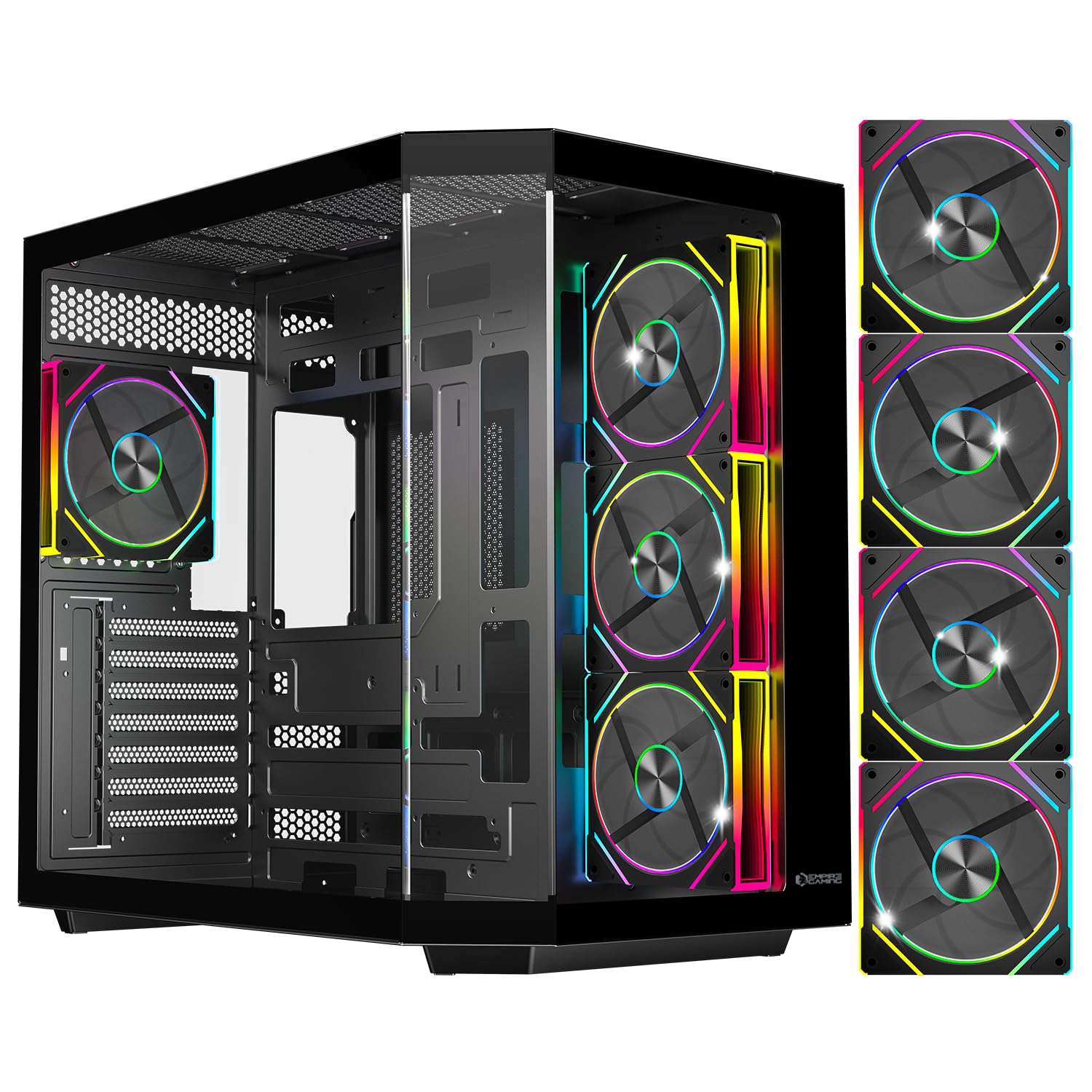
Figure 1: EMPIRE GAMING ECL251 Mid-Tower Gaming PC Case (Black)
2. Key Features
- Motherboard Compatibility: Supports E-ATX, ATX, Micro-ATX, and ITX motherboards.
- Pre-installed ARGB Fans: Includes 4 x 120mm PWM ARGB fans with a pre-installed HUB controller for optimal cooling and customizable lighting.
- Watercooling Ready: Compatible with radiators of 120mm, 240mm, 280mm, and up to 360mm on the front.
- Ample Component Space: Accommodates graphics cards up to 420mm in length and CPU coolers up to 155mm in height.
- Storage Options: Features 2 x 3.5" HDD slots and 3 x 2.5" SSD slots.
- Elegant Design: Triple tempered glass panels showcase your RGB setup, available in black or white.
- Dust Filters: Integrated dust filters for improved system longevity and easier maintenance.
- USB Type-C: Front panel includes a USB Type-C port for modern connectivity.
3. Specifications
| Feature | Specification |
|---|---|
| Brand | EMPIRE GAMING |
| Model Name | ECL251 |
| Case Type | Mid Tower |
| Motherboard Compatibility | E-ATX, ATX, Micro ATX, ITX |
| Material | Metal, Tempered Glass |
| Color | Black |
| Cooling Method | Air |
| Pre-installed Fans | 4 x 120mm PWM ARGB Fans |
| Included Controller | HUB with PWM function |
| Radiator Support | 120mm, 240mm, 280mm, up to 360mm (front) |
| Max GPU Length | 420mm |
| Max CPU Cooler Height | 155mm |
| Storage Bays | 2 x 3.5" HDD, 3 x 2.5" SSD |
| Power Supply Mounting | Bottom Mount |
| Front I/O Ports | 1 x USB 3.0, USB Type-C, Audio Jacks |
| Dimensions (DxWxH) | 44.3P x 27.7l x 42.6H cm |
| Item Weight | 7.59 Kilograms |

Figure 2: EMPIRE GAMING ECL251 PC Case Dimensions
4. Setup and Installation
Follow these steps to install your components into the EMPIRE GAMING ECL251 PC case:
- Accessing the Interior: The tempered glass side panels are easily removable for convenient access to the interior. Carefully detach them by unscrewing the thumb screws or releasing the latch mechanisms, if present.
- Motherboard Installation: Install your E-ATX, ATX, Micro-ATX, or ITX motherboard onto the standoffs. Ensure proper alignment and secure it with screws.
- Power Supply Unit (PSU) Installation: Mount your PSU in the bottom compartment. The dual-chamber structure separates the PSU and storage from the main components, improving cable management and airflow.
- Storage Drive Installation: Utilize the 2 x 3.5" HDD slots and 3 x 2.5" SSD slots. The case is designed for smooth and simple installation of storage devices.
- Graphics Card and CPU Cooler: Install your graphics card (up to 420mm) and CPU cooler (up to 155mm). The case offers ample space for high-performance hardware.
- Fan and Radiator Setup: The case comes with 4 pre-installed 120mm ARGB PWM fans. Additional mounting points are available for more fans or liquid cooling radiators (120mm, 240mm, 280mm, up to 360mm on the front) to create an effective airflow.
- Cable Management: Utilize the numerous cable routing channels and tie-down points to maintain a clean and organized interior, which also improves airflow.

Figure 3: Easily removable glass panel for interior access
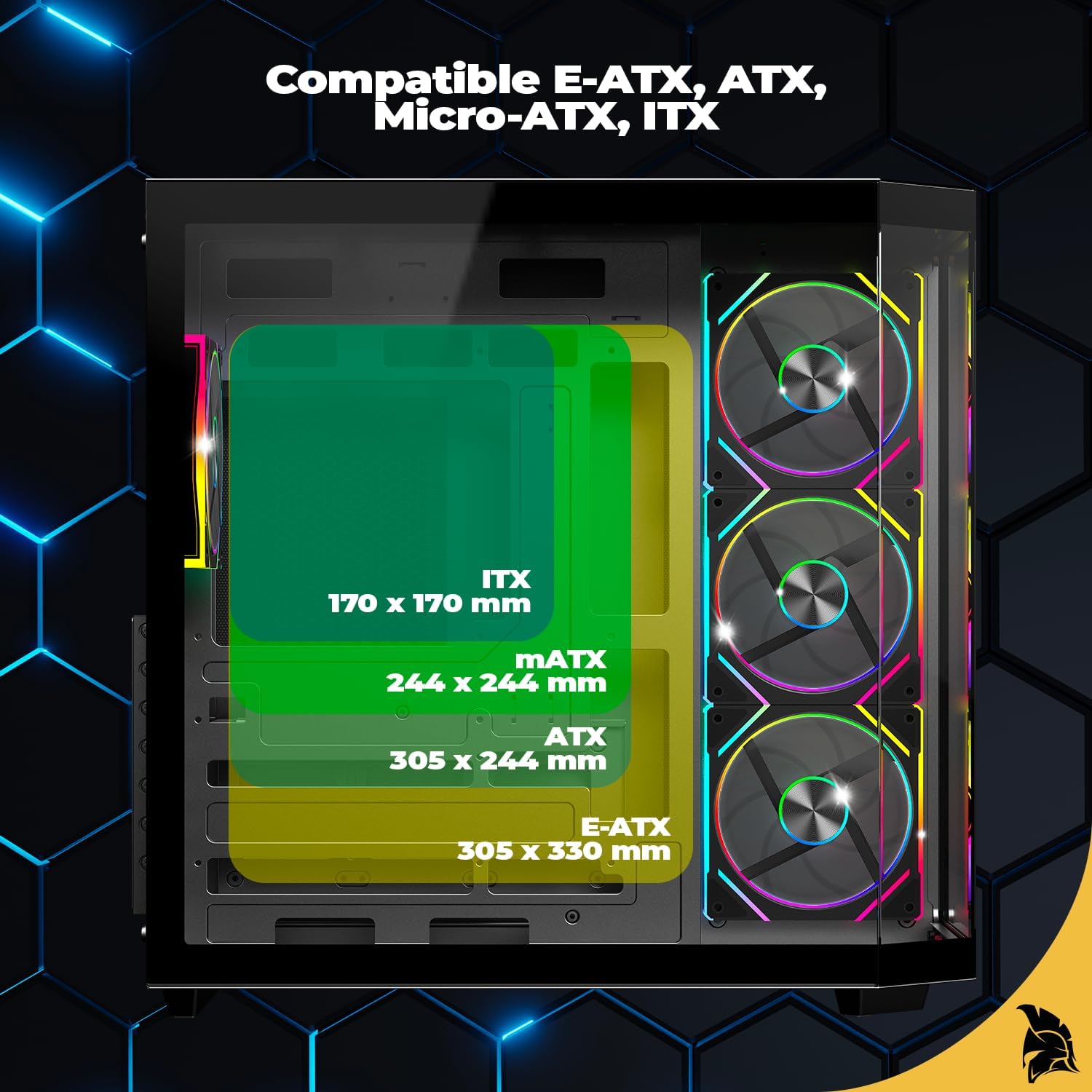
Figure 4: Motherboard compatibility for ECL251

Figure 5: Internal layout for PSU and storage installation

Figure 6: Centralized HUB for fan connections
5. Operating the ARGB Fans and Front Panel
The ECL251 features 4 pre-installed ARGB PWM fans and a HUB controller for managing lighting and fan speed.
- ARGB Lighting Control: The pre-installed HUB controller allows you to manage the ARGB lighting effects. Connect the HUB to your motherboard's ARGB header (if available) to synchronize lighting with other components, or use the integrated controls on the case.
- PWM Fan Speed Control: The HUB also supports PWM functionality, allowing you to adjust fan speeds based on system temperature or manual settings for optimal cooling and noise levels.
- Front Panel Connectivity: The top I/O panel provides convenient access to 1 x USB 3.0 port, a USB Type-C port, and audio jacks for headphones and microphone.

Figure 7: ECL251 with 4 pre-installed ARGB fans

Figure 8: Dynamic RGB lighting effects
6. Maintenance
Regular maintenance helps ensure the longevity and optimal performance of your PC case:
- Dust Filter Cleaning: The ECL251 includes dust filters to prevent dust buildup. Regularly remove and clean these filters to maintain optimal airflow and prevent overheating.
- Tempered Glass Cleaning: Use a soft, lint-free cloth and a glass cleaner (or water) to clean the tempered glass panels. Avoid abrasive materials that could scratch the surface.
- Interior Dust Removal: Periodically use compressed air to remove dust from inside the case, especially from fans, heatsinks, and other components.

Figure 9: Top surface mesh for dust filtration

Figure 10: Side surface mesh for dust filtration
7. Troubleshooting
If you encounter issues with your EMPIRE GAMING ECL251 PC case, consider the following common troubleshooting steps:
- No Power: Ensure all power cables (PSU to wall, PSU to motherboard, CPU, GPU, etc.) are securely connected. Check the power switch on the PSU.
- Fans Not Spinning/RGB Not Working: Verify that the fans are correctly connected to the fan HUB and that the HUB is powered and connected to the motherboard. Check your motherboard's BIOS/UEFI settings or RGB software for fan and lighting control.
- Overheating: Ensure all fans are spinning correctly and are oriented to create proper airflow (intake/exhaust). Clean dust filters and internal components. Verify CPU cooler and GPU heatsink are properly seated.
- Front Panel Ports Not Working: Check that the front panel cables (USB, audio) are correctly connected to the corresponding headers on your motherboard.
- Noise Issues: Identify the source of the noise. It could be loose cables, vibrating components, or fans running at high RPM. Adjust fan speeds via PWM control if necessary.
8. Warranty and Support
The EMPIRE GAMING ECL251 PC case comes with a 2-year manufacturer's warranty. Please retain your proof of purchase for warranty claims.
For technical support, warranty inquiries, or further assistance, please contact EMPIRE GAMING customer service through their official website or the retailer where you purchased the product.


