
1. Introduction
This manual provides detailed instructions for the safe and effective use of your hygger LED Aquarium Light with Timer, Model HG. This 25W full spectrum lamp is designed to promote plant growth and enhance the visual appeal of your freshwater aquarium by simulating natural light cycles.
2. Product Features
- 24/7 Mode: Simulates natural sunrise and sunset, transitioning from warm orange to full spectrum light, and then to starry blue for nighttime. This mode helps reduce fish stress and supports plant growth.
- Full Spectrum LED Plant Growth: Equipped with premium 5050/2835 LEDs, providing 6500K white, 665nm red, and 460nm blue wavelengths. With a Color Rendering Index (CRI) greater than 92, this light maximizes photosynthesis for lush plants and healthier fish.
- Dual Mode Pre-programmed Day-L and Moon-L:
- Color Cycling: Offers 10 colors and 5 brightness levels (10%–100%).
- Moon-L: Custom color and timer options (4H/6H/8H/12H) for nocturnal viewing.
- Day-L: Automated daylight cycle with programmable timers (2H/4H/6H/8H/10H/12H) and a 15-minute gradual transition to prevent sudden light changes, ensuring fish are not startled.
- Adjustable Bracket & Durable Design: Extendable brackets fit tanks from 24 to 30 inches (60 to 75 cm). The sturdy aluminum alloy housing ensures efficient heat dissipation and a long lifespan of over 20,000 hours. Compatible with most rimmed, rimless, glass, or acrylic tanks.
- Memory Function & Splash-proof: Features Power-Off Memory to retain settings after power outages. Built with IPX4 splash-proof rating and supports 100–240V worldwide voltage. The ultra-thin aluminum alloy shell is splash-resistant, easy to clean, and durable.
3. Package Contents
Verify that all components are present upon unpacking:
- hygger LED Aquarium Light fixture
- AC/DC power adapter
- Extendable mounting brackets (2)
- User manual

4. Setup Instructions
- Unpack Components: Carefully remove all items from the packaging. Inspect for any damage.
- Attach Brackets: Insert the extendable brackets into the ends of the light fixture. Adjust the brackets to fit your aquarium's width. The light is designed for tanks between 24 and 30 inches.
- Position Light: Place the light fixture securely on top of your aquarium. Ensure it is stable and centered for even light distribution.
- Connect Power: Connect the power adapter to the light fixture's controller cable, then plug the adapter into a suitable power outlet (100-240V).

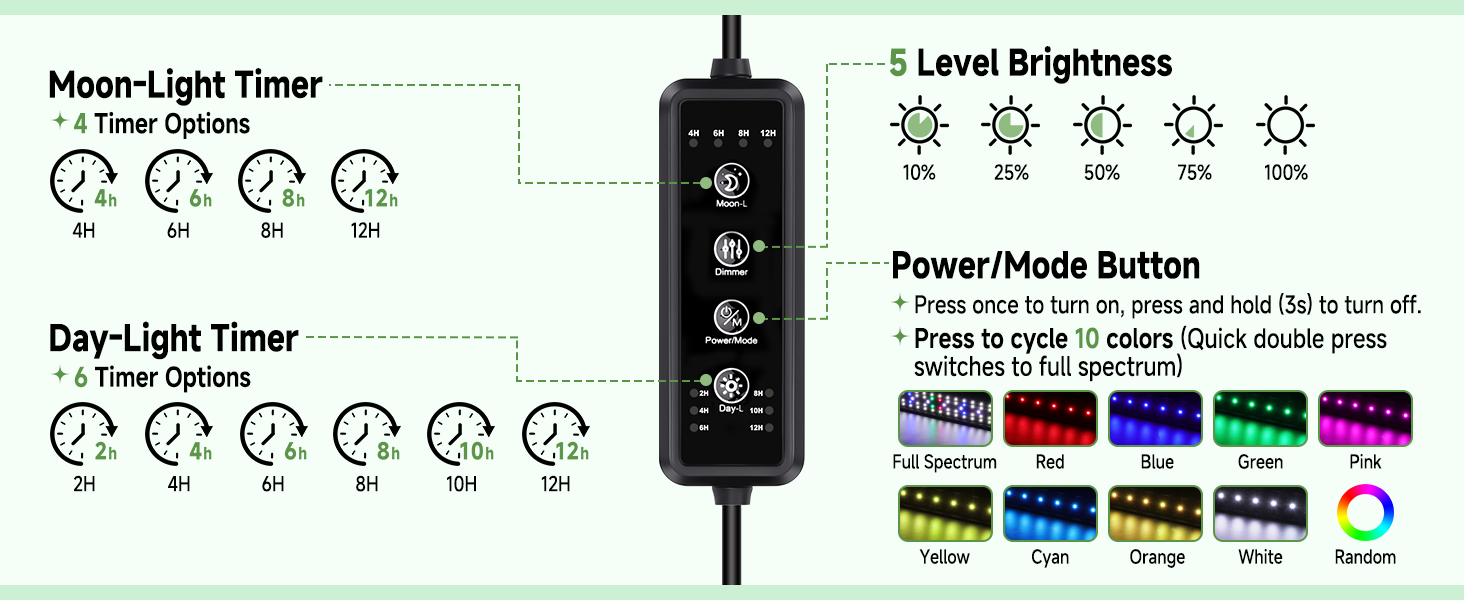
5. Operating Instructions
The hygger LED Aquarium Light features an integrated controller for easy operation. Familiarize yourself with the buttons:
- Power/Mode Button: Press once to turn the light on. Press and hold for 3 seconds to turn it off. Double-press quickly to cycle through 10 colors (Full Spectrum, Red, Blue, Green, Pink, Yellow, Cyan, Orange, White, Random).
- Dimmer Button: Adjusts brightness through 5 levels (10%, 25%, 50%, 75%, 100%).
- Moon-L Button: Activates Moon-L mode. Press to select desired duration (4H/6H/8H/12H).
- Day-L Button: Activates Day-L mode. Press to select desired duration (2H/4H/6H/8H/10H/12H).
5.1. Setting 24/7 Mode (Automated Day-Night Cycle)
This mode simulates a natural 24-hour cycle with gradual sunrise and sunset effects.
- Set Current Time: The light's internal clock starts when powered on. To synchronize with your desired cycle, plug in the light at the exact time you want the cycle to begin.
- Activate Day-L: Press the 'Day-L' button to select your desired daylight duration (e.g., 8H for 8 hours of daylight). The light will gradually brighten over 15 minutes to full spectrum, maintain full brightness for the selected duration, then gradually dim over 15 minutes to simulate sunset.
- Activate Moon-L: After the Day-L cycle completes, the Moon-L mode will automatically activate. You can press the 'Moon-L' button to select your desired moonlight duration (e.g., 4H for 4 hours of moonlight). The light will transition to a blue hue, maintain it, and then turn off.
- The 24/7 cycle will repeat daily based on your initial settings. The Power-Off Memory function ensures settings are retained after power interruptions.

5.2. Manual Color and Brightness Adjustment
- Turn On: Press the 'Power/Mode' button once to turn on the light.
- Change Color: Double-press the 'Power/Mode' button quickly to cycle through the 10 available colors.
- Adjust Brightness: Press the 'Dimmer' button to cycle through the 5 brightness levels (10% to 100%).

5.3. Official Product Video: HG221 LED Aquarium Light with Timer
Video 1: Official demonstration of the hygger HG221 LED Aquarium Light with Timer, showcasing its features and operation.
6. Maintenance
Regular maintenance ensures the longevity and optimal performance of your aquarium light.
- Cleaning: The aluminum alloy shell is easy to clean. Use a soft, damp cloth to wipe the surface. Do not use abrasive cleaners or immerse the light in water.
- Inspection: Periodically check the power cord and connections for any signs of damage. If any damage is found, discontinue use and contact customer support.
- Water Contact: The light is IPX4 splash-proof, meaning it can withstand splashes of water. However, it is not waterproof and should not be submerged.
7. Troubleshooting
| Problem | Possible Cause | Solution |
|---|---|---|
| Light does not turn on. | Power not connected or faulty adapter. | Check power connections. Ensure adapter is securely plugged in. Try a different outlet. |
| Timer settings are not working as expected. | Incorrect setup of Day-L or Moon-L modes. | Ensure you set the timer at the exact desired start time for the cycle. Refer to Section 5.1 for detailed instructions. The timer resets upon power disconnect or duration adjustment. |
| Light housing feels warm. | Normal operation for LED lights. | The aluminum housing is designed for heat dissipation. This is normal and not a safety concern unless it becomes dangerously hot to touch. Ensure adequate ventilation around the fixture. |
| Colors are not changing. | Incorrect button press for color cycling. | Double-press the 'Power/Mode' button quickly to cycle through colors. A single press turns the light on/off. |
8. Specifications
| Feature | Detail |
|---|---|
| Model Name | HG |
| Wattage | 25 Watts |
| Suitable Tank Size | 24-30 inch (60-75 cm) |
| Light Source Type | LED (5050/2835) |
| Color Temperature | 6500K White, 665nm Red, 460nm Blue |
| Color Rendering Index (CRI) | >92 |
| Material | Aluminum Alloy |
| Water Resistance | IPX4 Splash-proof |
| Power Source | Corded Electric (100-240V) |
| Product Dimensions | 22.2"L x 3"W x 2.1"H |
| Item Weight | 1.35 pounds |

9. Warranty & Support
This hygger LED Aquarium Light comes with a 2-year manufacturer's warranty. For any product inquiries, technical assistance, or warranty claims, please contact hygger customer support. Keep your purchase receipt as proof of purchase.
For further assistance, please refer to the contact information provided in your product packaging or visit the official hygger website.


