
1. Introduction
This manual provides detailed instructions for the installation, operation, and maintenance of your Uckazy 12.3 Inch Android 14 Car Radio. This system is designed to upgrade your Mercedes-Benz W212 or S212 (2009-2012) with NTG 4.0 system, offering advanced features like Android 14, wireless CarPlay, and Android Auto. Please read this manual thoroughly before installation and use.
2. Product Features
- Plug and Play Compatibility: Designed for Mercedes-Benz W212 S212 (2009-2012) NTG 4.0 System.
- High-Resolution Display: 12.3-inch HD (1920*720) IN-CELL screen with full lamination technology for enhanced clarity and reduced reflection.
- Advanced Android System: Android 14 with MediaTek Octa-core processor (4*Cortex A72 2.2GHz + 4*Cortex A51 1.8GHz), 4GB RAM + 64GB ROM.
- Superior Audio Control: Built-in DSP with 16 EQ segments for advanced audio tuning and sound customization.
- Seamless Smartphone Integration: Supports wireless Apple CarPlay and Android Auto for navigation, music, and voice assistant access.
- Original System Retention: Retains original iDrive system control and functions, allowing access to both original and Android system features.
3. Compatibility
This device is specifically designed for Mercedes-Benz W212 S212 models from 2009-2012 with the NTG 4.0 System. It is suitable for four-door cars only. Please verify your vehicle's NTG system before installation to ensure proper compatibility.

This image illustrates how to identify the correct NTG 4.0 system by checking the original radio's button layout. Ensure your vehicle matches the NTG 4.0 configuration for proper compatibility.
4. Package Contents
Before installation, please ensure all components are present in the package:
- 12.3-inch Display Unit
- Benz E-CLASS Frame
- AUX Cable
- AMI Cable
- Power Cable / USB Cable
- Installation Tools
- Touch Pen

The package includes the 12.3-inch display unit, a Benz E-CLASS frame, an AUX cable, an AMI cable, a power cable/USB cable, installation tools, and a touch pen.
5. Setup and Installation
Important: Professional installation is highly recommended. Disconnect the car battery before starting any installation procedures to prevent electrical damage.
5.1 Fiber Optic Cable Transfer
The original car system may use fiber optic cables for audio transmission. These cables need to be transferred to the new power harness.
This video demonstrates the process of transferring fiber optic cables during the installation of the car radio. It shows how to carefully remove the fiber optic cable from the original connector and insert it into the new power cable connector.
5.2 Power Cable Connection
After transferring the fiber optic cable, connect the new power cable to the original car's power cable. Ensure all connections are secure and correctly aligned. Pay close attention to the correct interface as shown in the video.
5.3 Display Unit Installation
Mount the new 12.3-inch display unit into the Benz E-CLASS frame and secure it in the dashboard. Connect all necessary cables (AUX, AMI, USB) to their respective ports.

This image shows the Uckazy 12.3-inch Android 14 Car Radio installed in a Mercedes-Benz W212 dashboard, demonstrating the integrated appearance.

A visual comparison of the car's dashboard before and after the installation of the Uckazy 12.3-inch Android 14 Car Radio, highlighting the display upgrade.
6. Operating Instructions
6.1 Basic Operation
The system can be controlled via the responsive touchscreen or by utilizing the original iDrive controller. Navigate through menus and applications by tapping, swiping, or using the iDrive knob.
6.2 Wireless CarPlay and Android Auto
Connect your smartphone wirelessly to access Apple CarPlay or Android Auto. This allows you to use navigation apps, stream music, make calls, and send messages directly from the car radio display.

The system supports wireless Apple CarPlay and Android Auto, allowing seamless integration of smartphone features like navigation, music, and messaging. Use the touchscreen or voice commands for control.
6.3 Voice Control
Activate Siri (for CarPlay) or Google Voice Assistant (for Android Auto) by saying "Hey Siri" or "OK Google" to perform various functions hands-free, such as setting navigation destinations or playing specific songs.
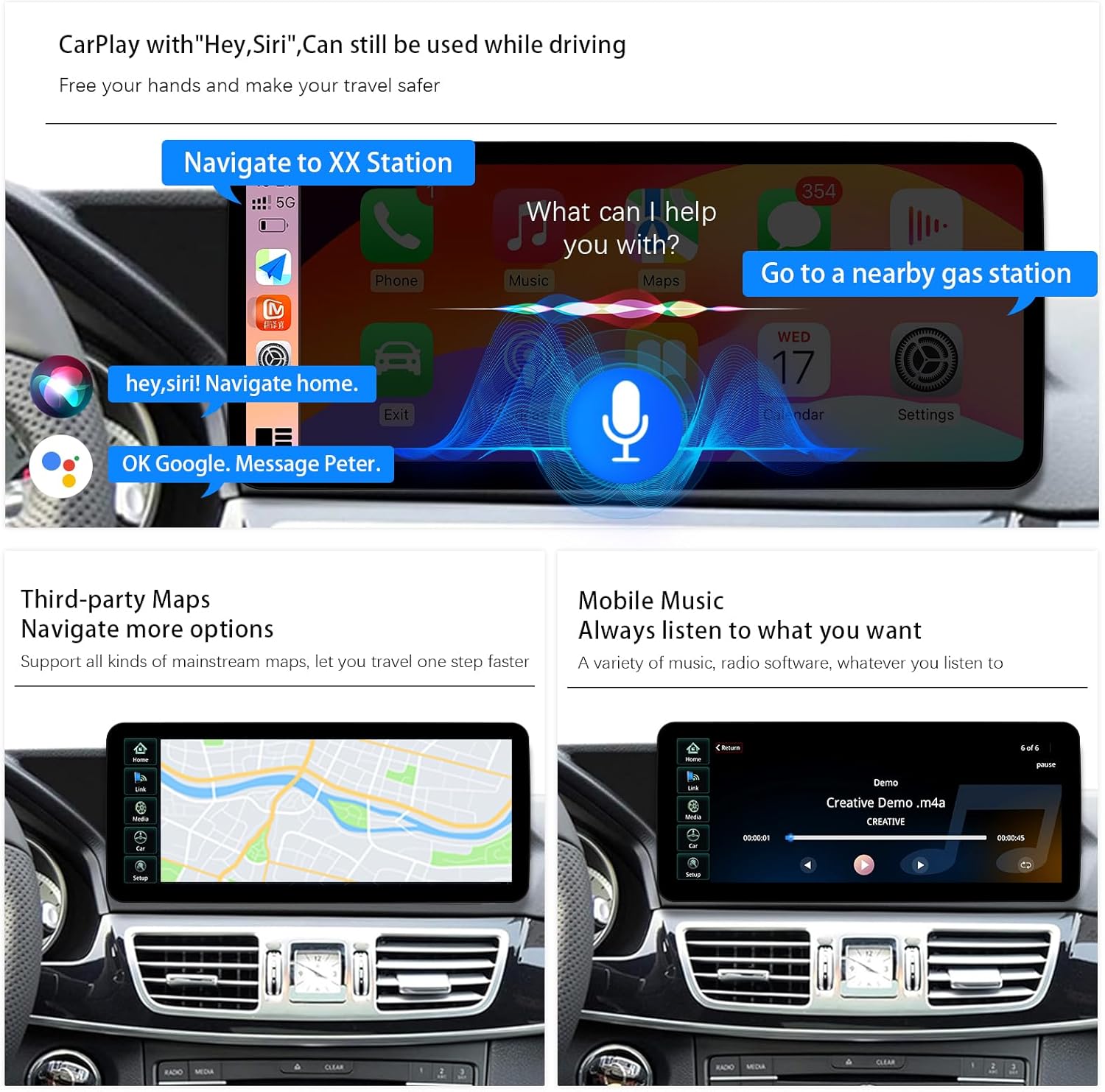
Utilize voice assistants like Siri or Google Voice Assistant for hands-free operation, including navigation, making calls, and playing music, enhancing driving safety.
6.4 Digital Sound Processor (DSP)
Access the built-in DSP settings to customize your audio experience. The 16-segment equalizer allows for precise adjustments to sound quality, speaker positioning, and overall audio output.

Access the built-in Digital Sound Processor (DSP) to fine-tune audio settings. The 16-segment equalizer allows for precise adjustments to sound quality, speaker positioning, and overall audio experience.
7. Maintenance
7.1 Cleaning the Screen
Use a soft, dry, lint-free cloth to gently wipe the screen. For stubborn smudges, slightly dampen the cloth with water or a screen-safe cleaner. Avoid using abrasive cleaners, alcohol, or ammonia-based products, as these can damage the screen coating.
7.2 Software Updates
Periodically check for system software updates through the device's settings menu. Updates can provide new features, performance improvements, and bug fixes. Ensure a stable internet connection during updates.
8. Troubleshooting
- No Sound:
- Ensure fiber optic cables are correctly transferred and securely connected.
- Check audio settings in both the original car system and the Android system.
- Verify volume levels on both the unit and the car's original audio system.
- Screen Not Turning On:
- Check all power cable connections.
- Ensure the car battery is properly connected and has sufficient charge.
- If the issue persists, contact customer support.
- Touchscreen Unresponsive:
- Restart the system by turning off and on the car ignition.
- If the issue continues, a factory reset might be necessary (refer to advanced settings, note this will erase user data).
- Compatibility Issues:
- Double-check your Mercedes-Benz model, year, and NTG system version against the product specifications.
- Ensure your vehicle is a four-door model.
- Contact customer support with your vehicle details for further assistance.
9. Specifications
| Brand | Uckazy |
| Model | NTG 4.0 System 4+64G |
| Screen Size | 12.3 inches |
| Resolution | HD 1920*720 |
| Operating System | Android 14 |
| Processor | MediaTek Octa-core (4*Cortex A72 2.2GHz + 4*Cortex A51 1.8GHz) |
| RAM | 4GB |
| ROM | 64GB |
| Connectivity | Bluetooth, 2.4G/5.0G WiFi |
| Special Features | Touchscreen, Wireless CarPlay, Wireless Android Auto, Built-in DSP with 16 EQ segments, Retains iDrive control |
| Compatible Devices | Smartphone |
| Connector Type | Stereo Audio |
10. Warranty and Support
10.1 Warranty Information
This Uckazy product comes with a 1-year manufacturer's warranty from the date of purchase. This warranty covers defects in materials and workmanship under normal use. It does not cover damage caused by improper installation, accident, misuse, abuse, unauthorized modifications, or normal wear and tear.
10.2 Customer Support
For technical assistance, troubleshooting, or warranty claims, please contact Uckazy customer support. You can typically find contact information through the retailer where you purchased the product or on the official Uckazy website. Please have your product model and purchase details ready when contacting support.


