1. Introduction
This manual provides essential instructions for the safe operation and maintenance of your FAKJANK F417 Pro Drone. Please read this manual thoroughly before operating the drone to ensure proper function and to prevent damage or injury. The F417 Pro is a foldable quadcopter equipped with a 1080P HD camera, an LCD screen remote control for real-time FPV, and features like Headless Mode, Altitude Hold, Optical Flow Positioning, and multiple speed modes, designed for both beginners and experienced users.

Image 1.1: The FAKJANK F417 Pro Drone and its integrated LCD screen remote control.
2. Safety Guidelines
Adhering to these safety guidelines is crucial for preventing accidents, injuries, and damage to the drone or property.
- Pre-Flight Check: Always inspect the drone, propellers, and remote control for any damage before each flight. Ensure batteries are fully charged and securely installed.
- Environmental Conditions: Fly in open areas, away from people, animals, buildings, and trees. Avoid flying in strong winds, rain, snow, or fog.
- Line of Sight: Maintain visual line of sight with the drone at all times. Do not rely solely on the FPV feed.
- Age Recommendation: This product is recommended for users aged 14 and above. Adult supervision is advised for younger users.
- Battery Safety: Use only the provided charger and batteries. Do not overcharge or puncture batteries. Discontinue use if batteries show signs of swelling or damage.
- Propeller Safety: Keep hands, face, and loose clothing away from rotating propellers. Always power off the drone before handling propellers.
- Respect Privacy: Be mindful of privacy laws and personal space when using the camera feature.
3. Package Contents and Component Identification
3.1 Package Contents
Verify that all items are present in your package:
- 1x FAKJANK F417 Pro Drone
- 1x Remote Control with LCD Screen
- 1x Drone Battery (3.7V 1800mAh)
- 4x Spare Propellers
- 4x Protective Frames
- 1x Screwdriver
- 1x USB Charging Cable
- 1x Carrying Case
- 1x Instruction Manual

Image 3.1: Illustration of the FAKJANK F417 Pro Drone and its included accessories.
3.2 Drone Components
- Propellers
- Motors
- LED Lights (RGB)
- 1080P HD Camera
- Optical Flow Sensor
- Battery Compartment
- Power Button
3.3 Remote Control Components
- Control Sticks (Left: Throttle/Yaw, Right: Pitch/Roll)
- LCD Display Screen
- Power Button
- One-Key Takeoff/Landing Button
- Headless Mode Button
- Speed Mode Switch
- Photo/Video Button
- Trim Controls
- Gesture Control Activation
- Gravity Control Activation
4. Setup Guide
4.1 Charging Batteries
Ensure both the drone battery and remote control battery are fully charged before first use.
- Drone Battery: Connect the drone battery to the USB charging cable, then plug the cable into a USB power adapter (not included). The indicator light on the cable will show charging status. Charging time is approximately 60-90 minutes.
- Remote Control Battery: The remote control has an internal rechargeable battery. Connect the USB charging cable to the remote control's charging port and a USB power adapter. The remote's indicator lights will show charging status.
4.2 Installing Drone Battery
- Unfold the drone arms.
- Open the battery compartment cover on the drone.
- Insert the fully charged battery into the compartment, ensuring it clicks into place.
- Close the battery compartment cover securely.
4.3 Attaching Propellers and Protective Frames
If not already installed, attach the propellers and protective frames.
- Propellers: Match the 'A' and 'B' markings on the propellers with the corresponding motor shafts. Use the provided screwdriver to secure them. Ensure they are firmly attached but not overtightened.
- Protective Frames: Snap the protective frames onto the drone's motor arms. These help prevent damage during collisions.
4.4 Powering On and Pairing
- Place the drone on a flat, level surface.
- Press and hold the drone's power button until the LED lights illuminate.
- Press the power button on the remote control. The remote will emit a beep, and its indicator lights will flash.
- Push the left control stick (throttle) all the way up, then all the way down. The remote will beep again, and the drone's lights will become solid, indicating successful pairing.
5. Operating Instructions
5.1 Calibration
After pairing, calibrate the drone for stable flight:
- Gyro Calibration: Push both control sticks down and to the right simultaneously for 2-3 seconds. The drone's lights will flash rapidly and then become solid, indicating successful calibration.
5.2 Takeoff and Landing

Image 5.1: Visual representation of One Key Start/Land, Altitude Hold, and Headless Mode functions.
- One-Key Takeoff: Press the One-Key Takeoff/Landing button. The drone will automatically ascend to a stable altitude.
- Manual Takeoff: Push both control sticks down and outwards to start the propellers. Then, slowly push the left control stick (throttle) upwards to ascend.
- One-Key Landing: Press the One-Key Takeoff/Landing button again. The drone will automatically descend and land gently.
- Manual Landing: Slowly pull the left control stick (throttle) downwards until the drone lands. Once landed, pull both sticks down and outwards to stop the propellers.
5.3 Flight Controls
- Left Stick (Throttle/Yaw): Up/Down controls altitude. Left/Right controls rotation (yaw).
- Right Stick (Pitch/Roll): Up/Down controls forward/backward movement (pitch). Left/Right controls left/right movement (roll).
- Altitude Hold: The drone automatically maintains its current altitude, allowing for stable hovering. This feature is active by default.
- Headless Mode: Press the Headless Mode button. In this mode, the drone's orientation is relative to the pilot, regardless of the drone's front direction. Press again to exit.
- 3 Speed Modes: Press the Speed Mode Switch button to cycle through low, medium, and high speeds. Adjust according to your skill level and environmental conditions.

Image 5.2: The FAKJANK F417 Pro Drone operating in its three distinct speed modes.
5.4 Camera Operation and FPV
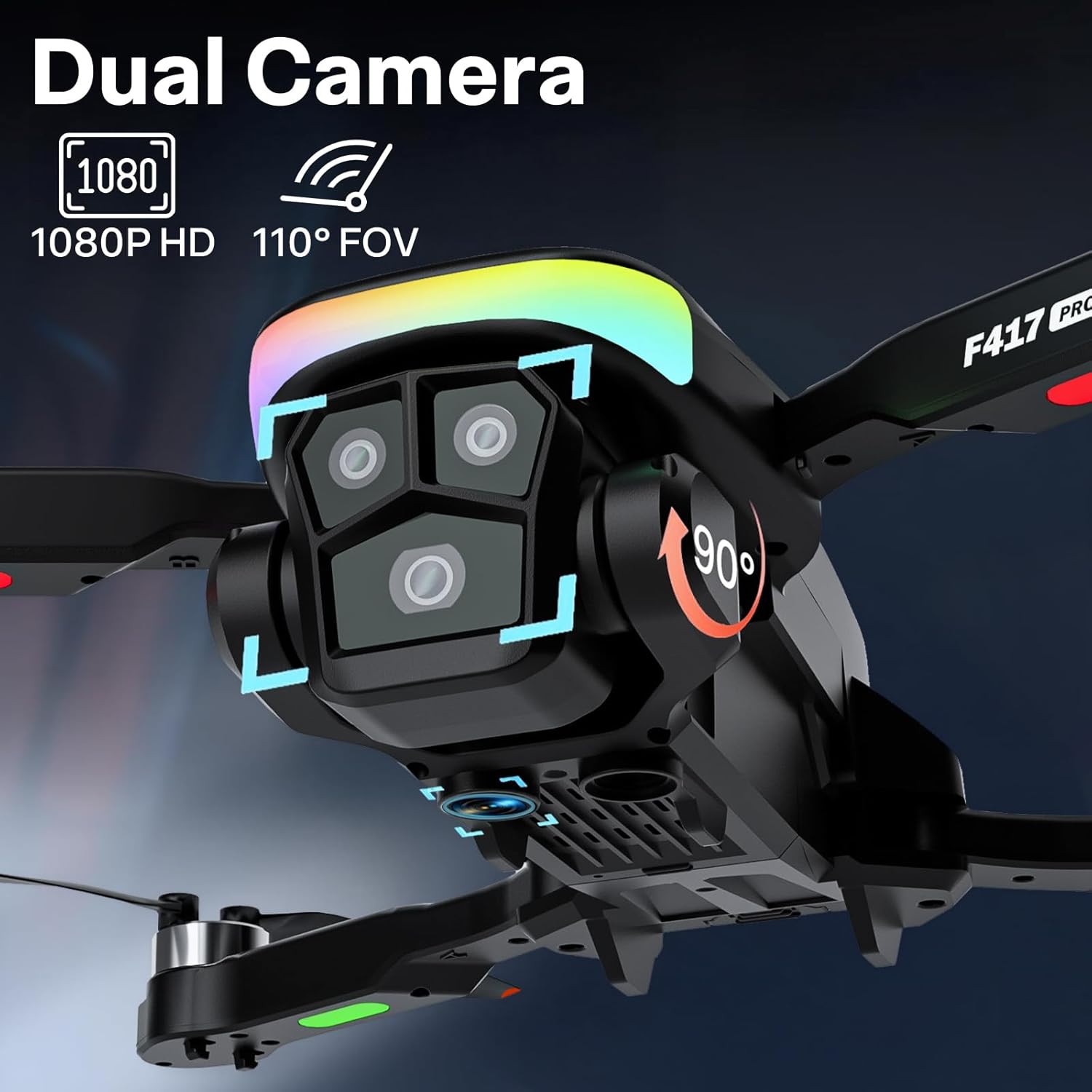
Image 5.3: Detailed view of the FAKJANK F417 Pro Drone's dual 1080P HD camera system.
- 1080P HD Camera: The drone captures high-definition photos and videos.
- Real-time FPV: The remote control's integrated LCD screen displays the drone's camera feed in real-time, allowing for a first-person view experience.
- Taking Photos: Press the Photo button on the remote control. A single beep indicates a photo has been taken.
- Recording Videos: Press the Video button on the remote control. A continuous beep indicates video recording is in progress. Press again to stop.
- Gesture Control: Activate Gesture Control via the remote. Form a 'V' sign with your fingers to take a photo, or show an open palm to start/stop video recording.

Image 5.4: Demonstrating gesture control for photo and video capture.
5.5 Advanced Features
- Optical Flow Positioning: This feature uses a downward-facing sensor to track surface patterns, providing enhanced stability and precise hovering, especially indoors or at low altitudes.

Image 5.5: The drone utilizing optical flow positioning for stable flight.
- RGB LED Light: The drone features vibrant RGB LED lights, enhancing visibility and providing a visual spectacle during flights, particularly in low-light conditions.
- 3D Flips: To perform a 3D flip, fly the drone to a height of at least 3 meters. Press the 3D Flip button on the remote, then push the right control stick in any direction. The drone will perform a flip in that direction.
- Gravity Control: Activate Gravity Control via the remote. Tilt the remote control itself to steer the drone, providing an intuitive flight experience.

Image 5.6: Illustrating the use of gravity control for drone steering.
6. Maintenance
Regular maintenance ensures the longevity and optimal performance of your drone.
- Cleaning: Use a soft, dry cloth to clean the drone and remote control. Avoid using water or chemical cleaners. Ensure the camera lens is clean for clear images.
- Propeller Inspection: Regularly check propellers for cracks, bends, or damage. Replace any damaged propellers immediately using the provided spare parts and screwdriver.
- Battery Care: Store batteries in a cool, dry place. Do not leave batteries fully discharged for extended periods. If storing for a long time, charge them to about 50% capacity.
- Storage: When not in use, store the drone and remote control in the provided carrying case to protect them from dust and physical damage.
7. Troubleshooting
Refer to this section for solutions to common issues.
| Problem | Possible Cause | Solution |
|---|---|---|
| Drone does not respond to remote. | Not paired; low battery; out of range. | Re-pair the drone and remote. Charge batteries. Ensure drone is within operating range. |
| Drone drifts during flight. | Not calibrated; uneven surface at takeoff; wind interference. | Perform gyro calibration on a flat surface. Avoid flying in strong winds. Use trim controls for fine adjustment. |
| Propellers do not spin. | Not powered on; propellers obstructed; motor damage. | Ensure drone is powered on and paired. Check for obstructions. Contact support if motors are damaged. |
| Poor camera image quality. | Dirty lens; insufficient lighting; drone vibration. | Clean the camera lens. Fly in well-lit conditions. Ensure propellers are balanced and undamaged. |
| Short flight time. | Battery not fully charged; old battery; aggressive flying. | Ensure battery is fully charged. Consider replacing old batteries. Fly more conservatively. |
8. Specifications
| Feature | Detail |
|---|---|
| Brand | FAKJANK |
| Model Name | F417 Pro (FJMY2025070902) |
| Color | Black |
| Video Capture Resolution | 1080p |
| Connectivity Technology | Wi-Fi, Bluetooth |
| Skill Level | Beginner |
| Item Weight | 145 Grams (5.1 ounces) |
| Drone Battery Capacity | 1800 Milliamp Hours (3.7V) |
| Max Flight Time | Up to 20 minutes |
| Special Features | 360 Degree Flip, Compact, Speed Adjustment, RGB LED Light, Headless Mode, Altitude Hold, Optical Flow Positioning, One Key Start/Land, Gesture Control, Gravity Control |
| Material | Plastic |
| Product Dimensions | 6"L x 2"W x 8"H (Folded dimensions may vary) |
| Battery Cell Composition | Lithium Ion |
| Optical Sensor Technology | CMOS |
9. Warranty and Support
FAKJANK provides customer support for its products. For any questions, technical assistance, or warranty claims, please contact us through the following channels:
- Email: fakjank@gmail.com
- Online Support: Visit the official FAKJANK store on Amazon for FAQs and additional resources.
Please have your model name (F417 Pro) and purchase details ready when contacting support.

Image 9.1: FAKJANK customer support is available for assistance.


