
Flrrtenv F-Z-3906-39-VT
Flrrtenv 52 Inch Office Desk Instruction Manual
Model: F-Z-3906-39-VT
Introduction
This manual provides comprehensive instructions for the assembly, operation, and maintenance of your Flrrtenv 52 Inch Office Desk. Please read this manual thoroughly before beginning assembly or use to ensure proper function and safety. Keep this manual for future reference.
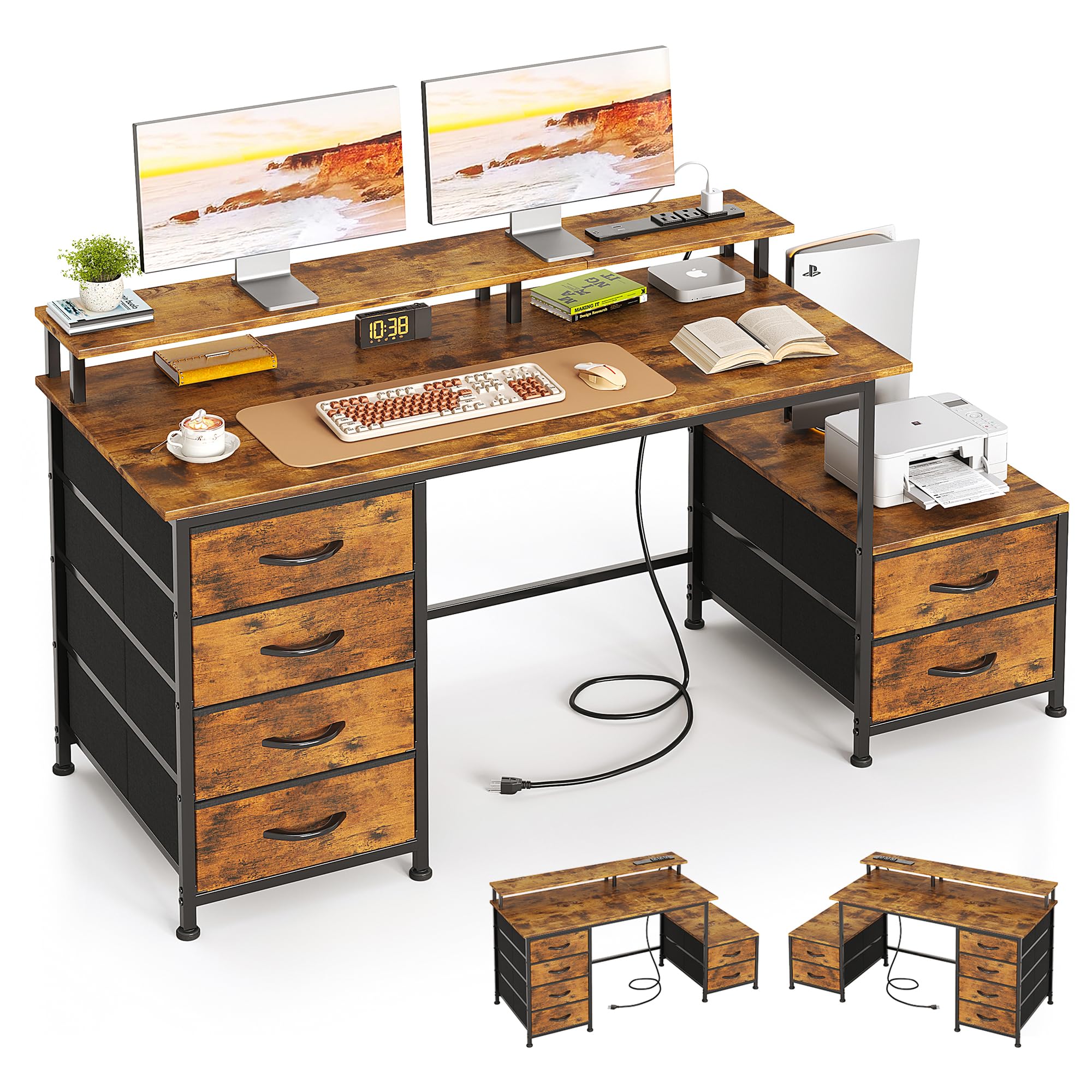
Image: The Flrrtenv 52 Inch Office Desk in a home office setting, showcasing its monitor stand, power outlets, and storage drawers.
Important Safety Information
- Always assemble the desk on a stable, level surface.
- Do not exceed the weight capacity of the desk.
- Keep the power outlets dry and away from heat sources.
- Always unplug the power cord when not in use or when performing maintenance.
- Do not use the desk near water or other flammable materials.
- Always follow the manufacturer's instructions for assembly and use.
Package Contents
Before assembly, verify that all components are present and undamaged. If any parts are missing or damaged, contact customer support.
- Desk Panels (Main desktop, monitor stand shelf, side shelf)
- Metal Frame Components
- Fabric Drawers (6 units)
- Drawer Handles and Fasteners
- Integrated Power Strip (with 3 AC outlets, 1 USB port, 1 Type-C port)
- Assembly Hardware (screws, bolts, Allen wrench)
- Instruction Manual
Assembly Instructions
Assembly is required for this product. Please follow the detailed instructions provided in the included assembly guide. A general overview of the steps is provided below.
- Unpack and Identify Parts: Carefully remove all components from the packaging. Lay them out on a clean, soft surface to prevent scratches. Refer to the parts list in your separate assembly guide to identify each piece.
- Assemble the Main Frame: Connect the metal frame components according to the diagrams in the assembly guide. Ensure all connections are secure but do not fully tighten screws until instructed.
- Attach Desktop Panels: Secure the main desktop panel to the assembled frame.
- Install Reversible Side Unit: The side shelf with two drawers can be installed on either the left or right side of the main desk. Choose your preferred orientation and attach the side unit frame to the main desk frame.
- Assemble and Insert Fabric Drawers: Fold and assemble the six fabric drawers. Attach the handles to each drawer. Slide the assembled drawers into their respective compartments.
- Attach Monitor Stand: Secure the monitor stand shelf to the designated area on the desktop.
- Install Power Outlets: Integrate the power strip into the designated slot on the desktop. Ensure it is securely fastened.
- Final Tightening: Once all components are in place and aligned, fully tighten all screws and bolts.

Image: An exploded view diagram illustrating the assembly steps for the Flrrtenv 52 Inch Office Desk, showing various components and their connections.

Image: A detailed diagram showing the dimensions of the Flrrtenv 52 Inch Office Desk, including the main desktop, monitor stand, and side storage unit.

Image: Two configurations of the Flrrtenv 52 Inch Office Desk, demonstrating how the side storage unit can be installed on either the left or right side of the main desk.
Operating Instructions
Your Flrrtenv Office Desk is designed for versatile use in a home or office environment. Utilize its features as described below.
- 6 Fabric Drawers: The desk includes six spacious fabric drawers for organized storage of stationery, documents, and other office essentials. The drawers are designed to glide smoothly for easy access.
- Reversible Printer Shelf: The auxiliary desktop space, located on the reversible side unit, is suitable for accommodating professional printers or PC cases. Its depth of 18.9 inches also allows for convenient placement of frequently used office items.
- Integrated Power Outlets: The built-in power strip provides convenient access to power for your electronic devices. It includes 3 standard AC plug outlets, 1 USB port, and 1 Type-C port.
- Monitor Stand: The elevated monitor stand helps raise your screen to an ergonomic eye level, which can contribute to reducing neck and back strain during extended use.

Image: A top-down view of the Flrrtenv 52 Inch Office Desk, highlighting the six fabric drawers and their capacity for storing various office items.

Image: A close-up view of the printer stand section of the Flrrtenv 52 Inch Office Desk, showing a printer placed on the shelf above two fabric drawers.

Image: A close-up view of the integrated power strip on the Flrrtenv 52 Inch Office Desk, showing 3 AC outlets, 1 USB port, and 1 Type-C port in use with charging devices.
Maintenance and Care
To ensure the longevity and appearance of your desk, follow these maintenance guidelines:
- Cleaning: Wipe the desk surfaces with a soft, damp cloth. Avoid using harsh chemicals or abrasive cleaners, which can damage the finish.
- Spills: Immediately wipe up any spills to prevent staining or damage to the engineered wood surface.
- Hardware: Periodically check all screws and bolts to ensure they remain tight. Retighten if necessary to maintain stability.
- Drawer Care: The fabric drawers can be spot cleaned with a mild detergent if needed. Ensure they are completely dry before returning them to the desk.
- Power Outlets: Keep the power outlets clean and free of dust. Do not expose them to liquids.
Troubleshooting
If you encounter issues with your desk, refer to the following common solutions:
- Desk Wobbles or is Unstable:
- Ensure all assembly screws and bolts are fully tightened.
- Verify that the desk is placed on a level surface. Adjust the leg anti-slip and anti-scratch protection pads if your floor is uneven.
- Check that all frame components are correctly oriented according to the assembly guide.
- Drawers Do Not Slide Smoothly:
- Ensure the fabric drawers are correctly assembled and inserted into their compartments.
- Check for any obstructions within the drawer compartments.
- Power Outlets Not Working:
- Verify that the desk's main power cord is securely plugged into a functional wall outlet.
- Check if the power strip itself has a reset button or indicator light.
- Ensure devices are properly plugged into the outlets.
- Parts Misalignment During Assembly:
- Review the assembly instructions carefully, paying close attention to the orientation of each part. Some components may appear similar but have specific left/right or front/back orientations.
- Loosen relevant screws, adjust the alignment, and then retighten.
If these steps do not resolve the issue, please contact customer support for further assistance.
Product Specifications
| Feature | Specification |
|---|---|
| Brand | Flrrtenv |
| Model Number | F-Z-3906-39-VT |
| Desk Design | Computer Desk |
| Product Dimensions (D x W x H) | 19.7"D x 52"W x 34.2"H |
| Color | Rustic Brown |
| Top Material Type | Engineered Wood |
| Base Material | Metal |
| Number of Drawers | 6 |
| Included Components | Built-in USB Port, Monitor Stand |
| Power Outlets | 3 AC Outlets, 1 USB Port, 1 Type-C Port |
| Item Weight | 37 Pounds |
| Required Assembly | Yes |
Warranty and Customer Support
For information regarding product warranty, please refer to the warranty card included with your purchase or contact Flrrtenv customer support directly. If you have any questions, require assistance with assembly, or need to report missing/damaged parts, please reach out to our customer service team through the contact information provided on the product packaging or our official website.
Ask a question about this manual
Ask about setup, troubleshooting, compatibility, parts, safety, or missing instructions. Manuals+ will review the question and use this page’s manual context to help answer it.