
1. Product Overview
The SYMIK H13DC is a versatile 5-in-1 battery charger designed for GoPro Hero 13 batteries. It functions as a triple-slot fast charging case, a 10W output power source, a battery accumulation device, a battery even-out equalizer, and a storage case for batteries and SD cards. This charger is compatible with original GoPro Hero 13 batteries.
Important Charging Requirement:
- A 30W PD power adapter and a USB-C to USB-C cable are required for Fast Charging.
- This product is a charger only; no internal battery or camera battery is included.
2. Key Features
- Triple Slots Fast Charging: Charges up to three GoPro Hero 13 batteries simultaneously.
- Bi-directional (Two-Way) Charger: Functions as a charger for GoPro batteries and as a power bank with 10W (Max 5V 2.1A) output to charge other mobile devices.
- Intelligent LCD Screen: A 1.47-inch high-definition LCD display provides real-time metrics including State of Charge (SOC), voltage, health cycles, temperature, and power source capabilities.
- Precision Charging Technology: Equipped with Texas Instruments charging management chips for ±8mV accuracy, ensuring optimal battery health and extended lifespan.
- Smart Energy Management:
- Accumulation Mode: Combines two or three partially charged batteries into one fully charged battery.
- Even Out Mode: Transfers energy from higher to lower SOC batteries to equalize charge levels, extending battery lifespan and preparing them for storage.
- Integrated SD Card Storage: Conveniently stores two Micro SD cards within the case.
3. Setup and Operation
3.1 Connecting to Power
Connect a 30W PD power adapter to the charger's USB-C input port using a USB-C to USB-C cable. The LCD screen will activate, displaying charging information.
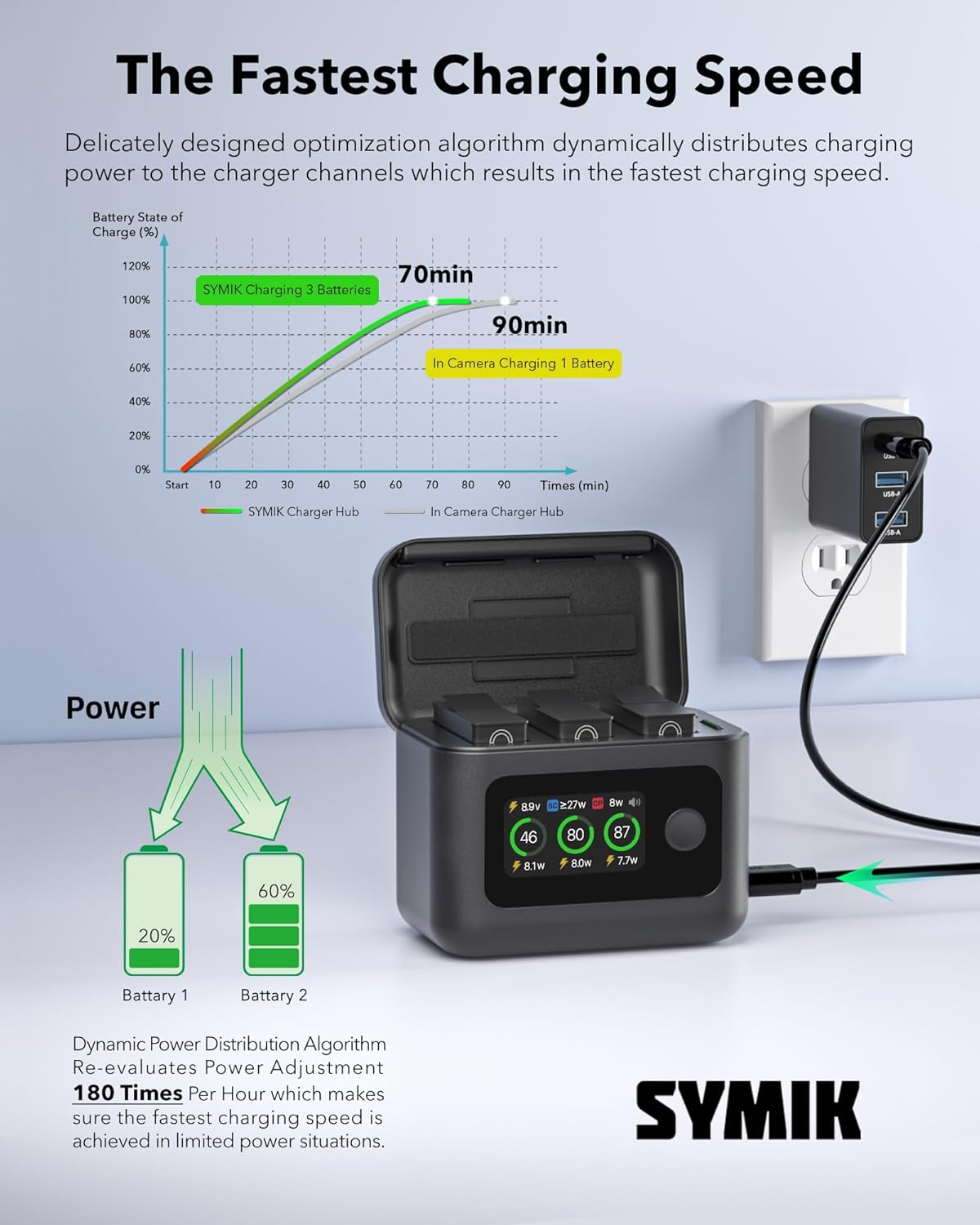
Image: Charger connected to a power source.
3.2 Inserting Batteries
Open the charger lid. Insert up to three GoPro Hero 13 batteries into the designated slots. Ensure proper orientation for connection.

Image: Batteries inserted into the charging slots.
3.3 Monitoring Charging Status
The 1.47-inch LCD screen will display the charging status for each battery, including its State of Charge (SOC), voltage, and charging power. This allows for real-time monitoring of the charging process.

Image: Detailed battery data displayed on the LCD screen.
3.4 Using as a Power Bank
To use the charger as a power bank, connect your mobile device to the charger's USB-C port (labeled IN/OUT) using a compatible USB-C cable. The charger will provide up to 10W (Max 5V 2.1A) output power.

Image: Charger functioning as a bi-directional power bank.
4. Charging Speed and Modes
4.1 Charging Speed
The charger offers intelligent charging options:
- 12W Boost Mode: Charges the first two batteries from 0% to 80% in approximately 35 minutes and to 100% in 60 minutes. The third battery reaches full capacity in 73 minutes.
- 8W Standard Mode (per channel): Charges all three batteries from 0% to 80% in 48 minutes and to 100% in 80 minutes at room temperature. This mode helps preserve long-term battery health.

Image: Comparison of charging speeds between the SYMIK charger and in-camera charging.
4.2 Smart Energy Management Modes
The charger includes specialized modes for battery management:
- Accumulation Mode: Intelligently combines two or three partial charges into one full battery, reducing the need to swap batteries mid-use.
- Even Out Mode: Actively transfers energy from batteries with a higher State of Charge (SOC) to those with a lower SOC, equalizing charge levels and extending battery lifespan for storage.

Image: Explanation of Accumulation and Even Out Modes.
5. Charging Accuracy
The charger is equipped with high-precision charging chips from Texas Instruments, achieving a charging voltage accuracy of ±8mV. This precision is crucial for battery life, safety, and consistent performance.
- If charging voltage is too high, the battery may be overcharged, potentially impacting lifespan and safety.
- If charging voltage is too low, the battery may not be fully charged, leading to inaccurate charge level readings.

Image: Illustration of charging accuracy and its importance.
6. Settings Menu
The charger features a customizable settings menu accessible via the control button. This menu allows adjustment of various parameters to suit user preferences.

Image: Customizable settings menu on the LCD screen.
7. Specifications
| Feature | Detail |
|---|---|
| Brand | SYMIK |
| Model Number | H13DC |
| Operating Temperature | 0° to 40° C (32° to 104° F) |
| Charger Mode USB-C Input | 5V 3A; 9V 3A; (27W Max) |
| Power Bank Mode USB-C Output | 5V 2.1A (10.5W) |
| Charge Power Limit (Each Channel) | Up to 12W Adjustable |
| Battery Charge Time (12W Boost Mode) | First two: 0-80% in 35 min, 100% in 60 min. Third: 100% in 73 min. |
| Battery Charge Time (8W Standard Mode) | All three: 0-80% in 48 min, 100% in 80 min (at room temperature). |
| Product Dimensions | 2.99"D x 1.89"W x 2.36"H (76x60x48 mm) |
| Item Weight | 4 Ounces / 115 grams |
| Color | High Tech Gray |

Image: Product dimensions and specifications overview.
8. Troubleshooting
If you encounter any issues during use, please refer to the following general troubleshooting tips:
- Charger not powering on: Ensure the USB-C cable is securely connected to both the charger and a functional power adapter. Verify the power adapter is supplying sufficient wattage (30W PD recommended).
- Batteries not charging: Check that batteries are correctly inserted into the slots. Ensure the charger is receiving power. The LCD screen should display charging indicators.
- Slow charging: Confirm you are using a 30W PD power adapter and a USB-C to USB-C cable. Check the charger's settings menu to ensure the charge power is set to your desired level (e.g., 12W Boost Mode).
- Display issues: If the LCD screen is unresponsive or displaying errors, try disconnecting and reconnecting the power source.
9. Warranty and Support
9.1 Warranty Information
This product comes with a 1 Year Warranty from the manufacturer.
9.2 Customer Support
Despite strict production testing, a certain failure rate is unavoidable for electronic products. If you encounter any issues during use or require further assistance, please feel free to contact SYMIK customer support via Amazon.
10. Product Video Overview
Watch this official product video for a visual guide to the SYMIK Intelligent Two Way Charger for GoPro Hero 13.
Video: SYMIK Intelligent Two Way Charger for GoPro Hero 13 overview.