
1. Introduction
This manual provides essential information for setting up, operating, maintaining, and troubleshooting your Lenovo Slim 7 14ILL10 2025 Laptop. Please read this guide thoroughly to ensure optimal performance and longevity of your device.
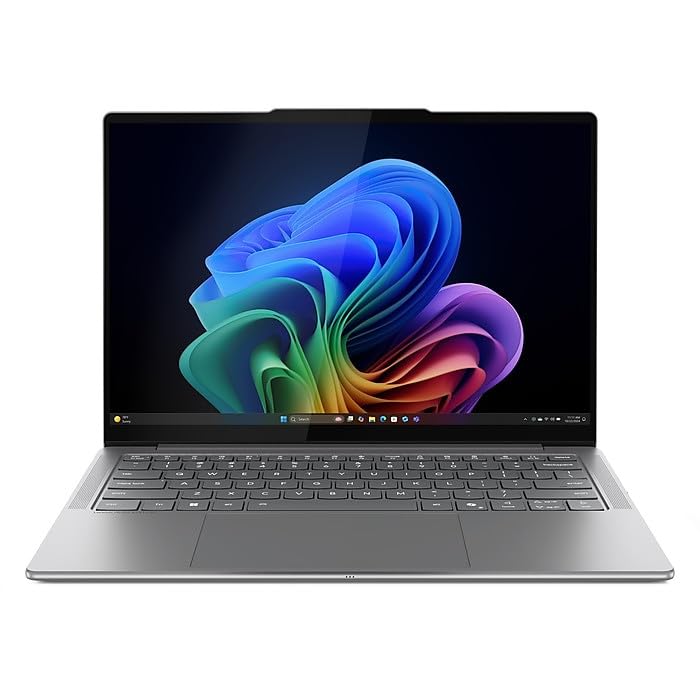
Figure 1.1: Lenovo Slim 7 14ILL10 2025 Laptop, angled view with screen slightly open.
2. What's in the Box
Verify that all items are present in the packaging:
- Lenovo Slim 7 14ILL10 2025 Laptop
- 65W AC Adapter
- ONT 32GB USB Drive
3. Setup
3.1 Initial Power-On
- Unpack the laptop and all accessories.
- Connect the 65W AC adapter to the laptop's USB-C power jack and then to a power outlet.
- Open the laptop lid. The laptop may power on automatically, or you may need to press the power button.
- Follow the on-screen instructions to complete the Windows 11 Home setup process. This includes selecting your region, connecting to a Wi-Fi network, and creating a user account.
3.2 Connecting Peripherals
Your laptop features various ports for connecting external devices:
- USB Thunderbolt 4 / USB4 40Gbps Type-C (x2): For high-speed data transfer, power delivery, and DisplayPort video output.
- USB 3.2 Gen 1 Type-A (x1): For standard USB devices.
- HDMI v2.1 (x1): For connecting to external displays or projectors.
- Headphone/Microphone Combo Jack (x1): For audio input/output.
- Card Reader (x1): For memory cards.

Figure 3.1: Left side ports including USB-A and headphone jack.
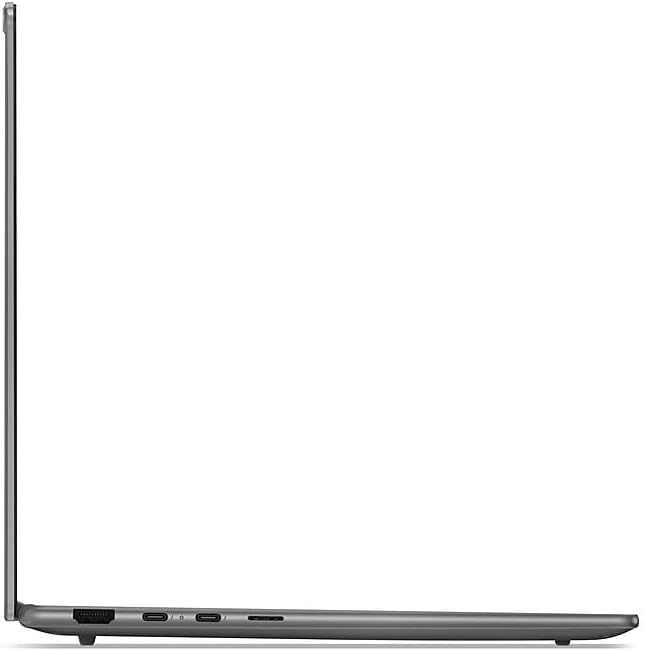
Figure 3.2: Right side ports including Thunderbolt 4 and HDMI.
4. Operating Instructions
4.1 Display and Input
- Touchscreen: The 14" WUXGA (1920 x 1200) display supports touch input. Use gestures similar to a smartphone or tablet.
- Backlit Keyboard: Adjust keyboard backlight brightness using the function keys (Fn + Spacebar, typically).
- Touchpad: Use the integrated touchpad for cursor control and multi-touch gestures.
4.2 Connectivity
- Wi-Fi: Connect to wireless networks using Intel Wi-Fi 7 BE201. Access Wi-Fi settings via the Windows taskbar.
- Bluetooth: Pair Bluetooth devices such as headphones or mice using Bluetooth 5.3. Manage Bluetooth settings in Windows.
4.3 Camera and Audio
- 5.0MP + IR Camera: Located at the top of the display, featuring an E-Shutter for privacy.
- Audio: The laptop is equipped with 4 stereo speakers (2W x2 woofers, 2W x2 tweeters) optimized with Dolby Atmos and Smart Amplifier.
4.4 Battery Management
The laptop features a 4-cell 70Wh battery, providing up to 8 hours of non-gaming battery life. To maximize battery lifespan:
- Avoid fully discharging the battery frequently.
- Store the laptop in a cool, dry place.
- Adjust power settings in Windows to optimize battery usage.
5. Maintenance
5.1 Cleaning
- Use a soft, lint-free cloth slightly dampened with water or a screen cleaner to clean the display.
- For the keyboard and chassis, use a soft cloth. Avoid harsh chemicals.
- Regularly clean dust from vents to ensure proper airflow.
5.2 Software Updates
Keep your operating system and drivers updated to ensure security and optimal performance. Windows Update will manage most system updates. Check the Lenovo support website for specific driver updates for your model.
6. Troubleshooting
This section addresses common issues. For more complex problems, refer to the Lenovo support website.
6.1 Power Issues
- Laptop not turning on: Ensure the AC adapter is securely connected and the power outlet is functional. Try holding the power button for 10-15 seconds.
- Battery not charging: Verify the AC adapter connection. Check for any visible damage to the adapter or charging port.
6.2 Display Issues
- No display: Connect an external monitor via HDMI to check if the issue is with the laptop's internal display.
- Flickering screen: Update your graphics drivers.
6.3 Connectivity Issues
- Wi-Fi not connecting: Restart your router and laptop. Ensure Wi-Fi is enabled in Windows settings.
- Bluetooth device not pairing: Ensure the device is in pairing mode and within range. Restart Bluetooth on your laptop.
7. Specifications
| Feature | Specification |
|---|---|
| Brand | Lenovo |
| Model Number | 83MC0009US-CTO |
| Processor | Intel Ultra 7 256V 8-Core (Up to 4.8 GHz) |
| Graphics | Intel Arc Graphics 140V |
| Display | 14" WUXGA (1920 x 1200) Touchscreen, 600 nits, 100% DCI-P3, 60Hz |
| Memory | 16GB LPDDR5 8533 MHz SDRAM |
| Storage | 1TB NVMe M.2 SSD |
| Operating System | Windows 11 Home |
| Wireless Connectivity | Intel Wi-Fi 7 BE201 (2x2), Bluetooth 5.3 |
| Ports | 2x USB Thunderbolt 4, 1x USB 3.2 Gen 1 Type-A, 1x HDMI v2.1, 1x Headphone/Microphone Combo Jack, 1x Card Reader |
| Camera | 5.0MP + IR Camera with E Shutter |
| Audio | 4 stereo speakers (2W x2 woofers, 2W x2 tweeters), Dolby Atmos |
| Battery | 4 Cell 70Wh |
| Dimensions (L x W x H) | 12.28 x 8.63 x 0.55 inches |
| Weight | 2.82 lbs |
| Color | Luna Grey |
8. Warranty and Support
Your Lenovo Slim 7 14ILL10 2025 Laptop comes with an On Site warranty. For detailed warranty terms, service requests, and technical support, please visit the official Lenovo support website:
You will need your laptop's model number (83MC0009US-CTO) and serial number (typically found on a sticker on the bottom of the laptop) when contacting support.