
1. Introduction
This manual provides detailed instructions for the installation, operation, and maintenance of your Uckazy 12.3 Inch Android 14 Car Radio. This system is specifically designed to upgrade the infotainment experience in Audi Q5 models manufactured between 2009 and 2017, particularly those equipped with the Concert or Symphony audio systems. It integrates advanced features such as Android 14, wireless CarPlay, and Android Auto, while retaining original vehicle functionalities.
2. Compatibility
This car radio is compatible with Audi Q5 models from 2009 to 2017 that feature either the Audi Concert or Audi Symphony system. Please verify your vehicle's current system before installation. It is not compatible with Audi Multimedia, Audi Chorus, or Audi CD Changer systems.
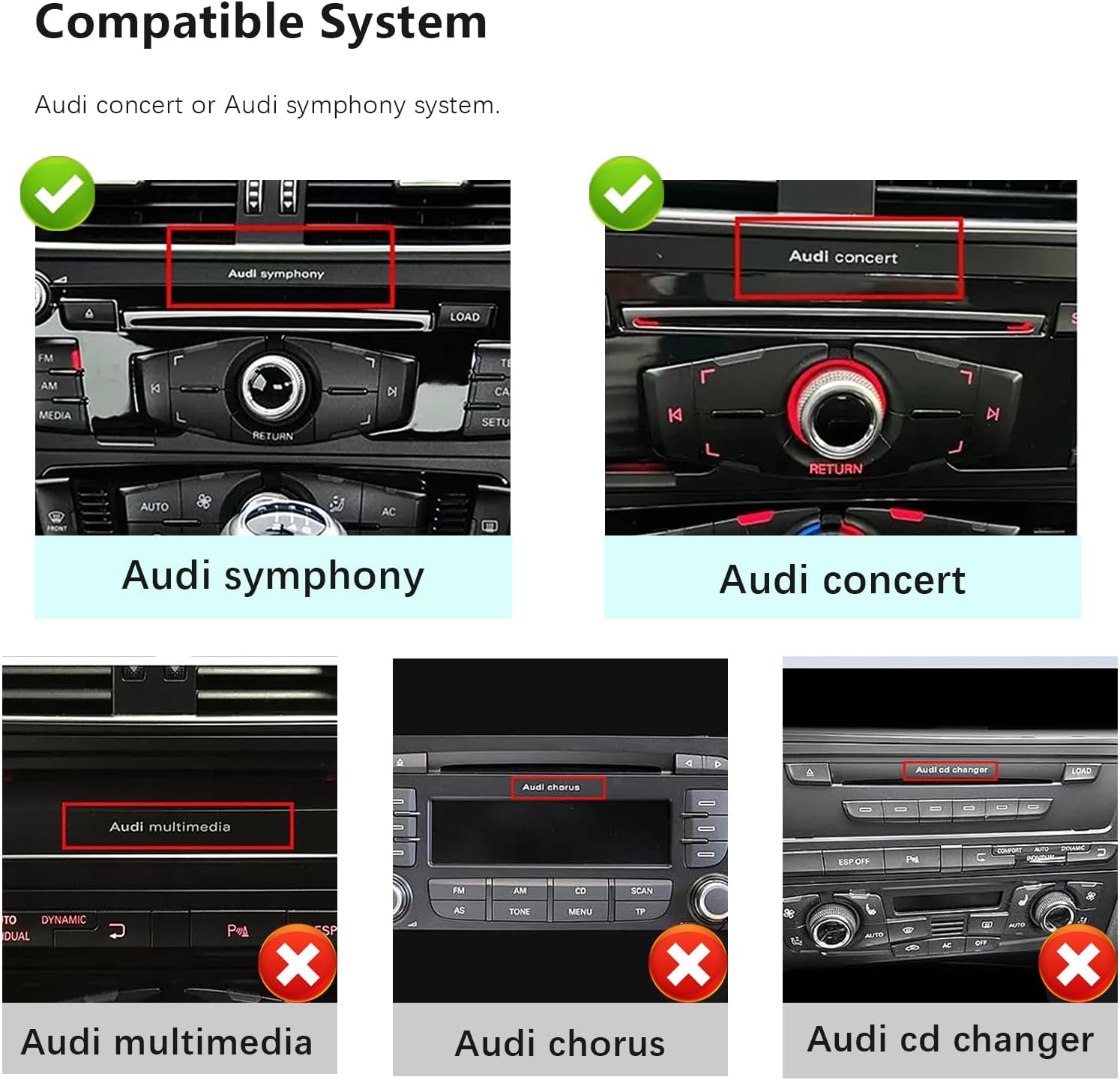
Figure 2.1: Compatible and Incompatible Audi Systems. Ensure your vehicle has an Audi Concert or Audi Symphony system for proper functionality.
The unit is designed for plug-and-play installation. If you are uncertain about your vehicle's compatibility, please contact Uckazy customer support with your vehicle's make, model, and year.
3. Installation Guide
Proper installation is crucial for optimal performance. It is recommended that installation be performed by a qualified professional. Always disconnect the vehicle's battery before beginning any electrical work.
3.1 Fiber Optic Cable Installation
This video demonstrates the process of transferring the fiber optic cable from the original wiring harness to the new power cable. This step is essential for maintaining audio functionality in some Audi systems.
Video 3.1: Instructions for transferring the fiber optic cable. This process involves carefully releasing the snap on the original connector and inserting the fiber optic cable into the new power cable connector.
3.2 Power Cable Connection
After transferring the fiber optic cable, connect the new power cable to the vehicle's original power cable. Ensure all connections are secure and correctly aligned to prevent electrical issues.
3.3 Essential Cable Connections (AMI/AUX/Airbag)
Certain vehicle configurations require specific cable connections for full functionality:
- AUX/AMI Output: Your car must have either an AUX or AMI output.
- AMI Cable: If your car has an AMI output but no AUX, you will need to install the provided AMI cable.
- Airbag Cable: If your car has the airbag button located under the hazard light button, it is necessary to install the airbag cable.

Figure 3.1: Important considerations for AMI, AUX, and Airbag cable connections during installation.
3.4 Product Components and Dimensions
The package includes the 12.3-inch display unit, a frame, USB cable, AMI cable, AUX cable, airbag cable (for Audi multimedia only), and the main power cable. The display measures approximately 310mm in width and 132mm in height.

Figure 3.2: Overview of included components and display dimensions.
4. Operating Instructions
The Uckazy car radio enhances your driving experience with a range of modern features.
4.1 Core System Features
This unit replaces the original car screen with a 12.3-inch IPS touch screen running on Android 14. It retains the original OEM system functionality and adds wireless CarPlay, wireless Android Auto, and wireless Mirrorlink features.

Figure 4.1: Main interface displaying various system features and applications.
4.2 Wireless CarPlay and Android Auto
The system supports wireless CarPlay and Android Auto, allowing seamless integration of your smartphone for navigation, music, calls, and messages. Access these features through voice commands (Siri or Google Voice Assistant) for safer driving.

Figure 4.2: Wireless CarPlay and Android Auto interfaces.
4.3 Navigation and Media Playback
Utilize third-party map applications for navigation and enjoy mobile music from various sources. Voice commands can be used to control navigation and media playback.

Figure 4.3: Navigation and media playback features with voice control.
4.4 Digital Sound Processor (DSP)
The built-in DSP features 16 EQ segments, allowing for detailed sound customization. Adjust the sound quality, speaker positioning (front, rear, left, right), and apply various tuning methods to enhance your audio experience.

Figure 4.4: DSP equalizer interface for audio customization.
4.5 Retained OEM Functions
The system is designed to retain essential original equipment manufacturer (OEM) functions, including steering wheel controls, compatibility with OEM reversing cameras and parking radar, and iDrive system control. The original car stereo sound output and CD player functionality are also preserved.

Figure 4.5: Overview of retained OEM system functionalities.
5. Specifications
| Feature | Description |
|---|---|
| Brand | Uckazy |
| Model | Concert/Symphony 8+128G |
| Screen Size | 12.3 inches |
| Display Resolution | HD 1920*720 (IN-CELL, Full Lamination) |
| Operating System | Android 14 |
| Processor | 13 NM MediaTek Octa-core (4*Cortex A72 2.2GHz + 4*Cortex A51 1.8GHz) |
| RAM | 8GB |
| ROM | 128GB |
| Connectivity | 2.4G & 5.0G WiFi, Bluetooth |
| Special Features | Touchscreen, Wireless CarPlay, Wireless Android Auto, Built-in DSP (16 EQ segments) |
| Compatible Devices | Smartphone |
| Controller Type | iPhone App (for CarPlay) |
| Connector Type | Stereo Audio |
6. Troubleshooting
If you encounter any issues with your Uckazy car radio, please refer to the following general troubleshooting steps:
- No Power: Check all power cable connections. Ensure the vehicle's battery is properly connected and charged.
- No Sound: Verify the fiber optic cable is correctly installed. Check all audio connections. Ensure the correct audio input source is selected on the unit.
- Display Issues: Restart the unit. Check cable connections to the display.
- CarPlay/Android Auto Not Connecting: Ensure Bluetooth and Wi-Fi are enabled on your smartphone and the car radio. Try forgetting and re-pairing the device.
- Intermittent Functionality: Recheck all wiring connections for looseness or damage.
For persistent issues, please contact Uckazy customer support.
7. Maintenance
To ensure the longevity and optimal performance of your car radio, follow these maintenance guidelines:
- Cleaning: Use a soft, dry cloth to clean the screen and exterior. Avoid abrasive cleaners or solvents that may damage the surface.
- Software Updates: Periodically check for and install software updates provided by Uckazy to ensure the system has the latest features and bug fixes.
- Environmental Conditions: Avoid exposing the unit to extreme temperatures, direct sunlight for prolonged periods, or excessive moisture.
8. Warranty & Support
8.1 Warranty Information
This Uckazy product comes with a 1-year manufacturer's warranty. Please retain your proof of purchase for warranty claims. The warranty covers defects in materials and workmanship under normal use.
8.2 Customer Support
For technical assistance, warranty inquiries, or any other questions regarding your Uckazy car radio, please contact Uckazy customer support through the retailer where the product was purchased or visit the official Uckazy website for contact information.