1. Introduction
This manual provides detailed instructions for the installation, configuration, and operation of your Mugatol AX3000 Outdoor WiFi 6 Extender. This device is designed to expand your wireless network coverage, offering high-speed, reliable internet access in both indoor and outdoor environments. Please read this manual thoroughly before using the product to ensure optimal performance and safety.

Image: The Mugatol AX3000 Outdoor WiFi 6 Extender, a white rectangular device with five external antennas, designed for robust outdoor connectivity.

Image: Illustrates diverse application scenarios for the extender, from residential outdoor spaces to commercial and educational environments.
2. Key Features
- WiFi 6 (802.11ax) Technology: Supports dual-band speeds up to 2402Mbps (5GHz) and 573Mbps (2.4GHz) for high-performance connectivity.
- Extended Coverage: Equipped with 5 high-gain omnidirectional antennas and 5 built-in power amplifiers, providing a coverage radius of 200-300 meters.
- High Device Capacity: Capable of connecting up to 128 devices simultaneously.
- Gigabit Ethernet Port: Includes a 1000/100/10Mbps Gigabit Ethernet port for wired connections.
- Outdoor Durability: IP67 waterproof casing, 15kV ESD protection, and 6kV lightning resistance ensure reliable operation in harsh weather conditions (-20°C to 50°C / -4°F to 122°F).
- Power over Ethernet (PoE): Simplifies installation by delivering both data and power through a single Ethernet cable.
- Multiple Operating Modes: Supports AP (Access Point), Router, Repeater, and Hybrid modes for versatile deployment.
- Starlink Compatibility: Fully compatible with Starlink routers and modems.
- Enhanced Security: Supports WPA2-PSK, WPA2, and WPA3-MIX encryption protocols.

Image: Visual representation of the extender's core technologies, including WiFi 6, five high-gain antennas, IP67 weatherproofing, advanced chip, and WPA2/WPA3 security.
3. What's in the Box
Upon opening the product packaging, verify that all items listed below are present and in good condition:
- Mugatol AX3000 Outdoor WiFi 6 Extender Unit
- 5 x Omnidirectional Antennas
- PoE Power Adapter
- Ethernet Cable
- Mounting Bracket
- Wall Plugs and Screws
- Metal Straps (for pole mounting)
- Installation Guide / Quick User Guide
- Small Wrench
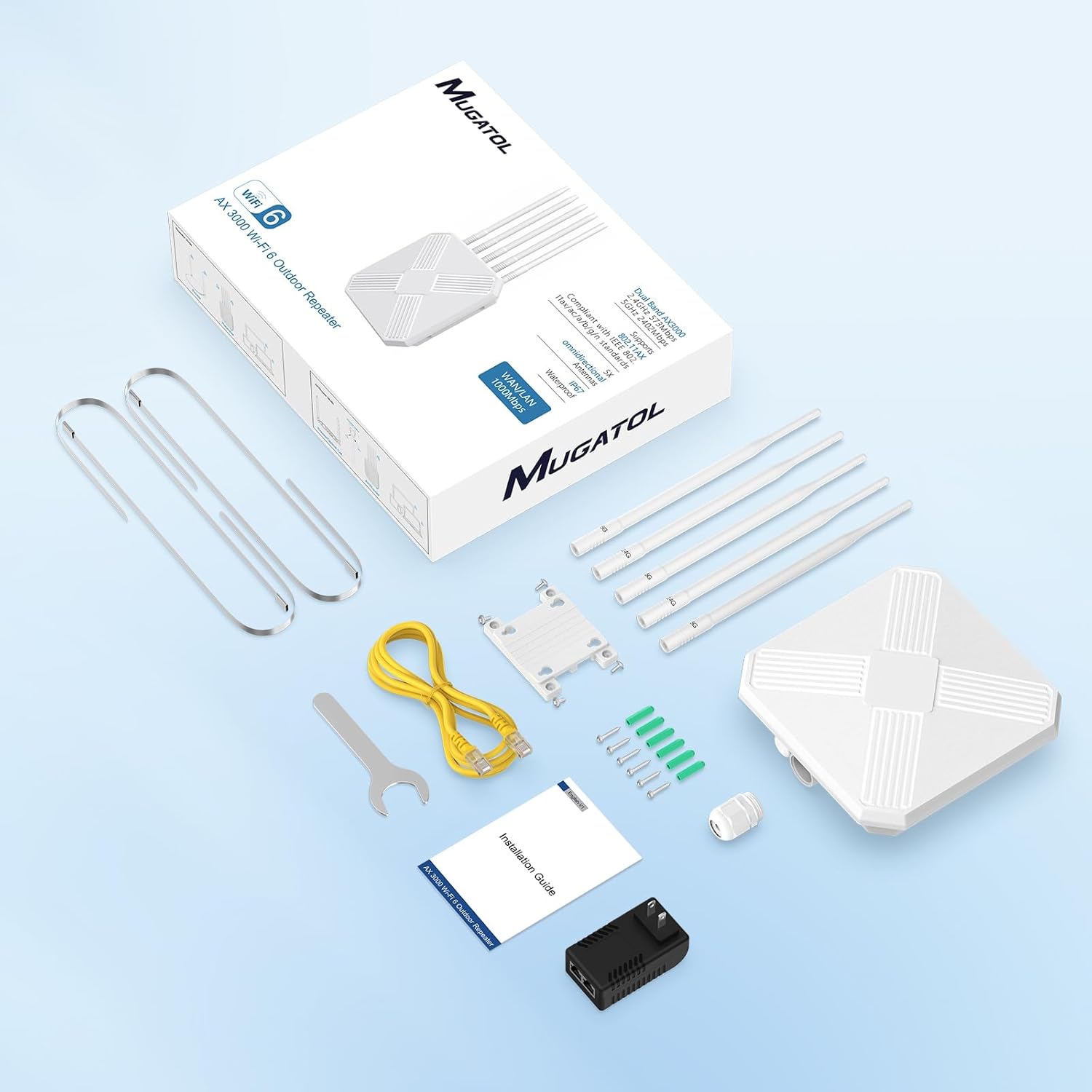
Image: All components included in the product package, neatly arranged, showing the extender, antennas, power adapter, cables, and mounting accessories.
4. Setup and Installation
4.1. Physical Installation
The Mugatol AX3000 Extender can be mounted on a wall or pole. Ensure the chosen location provides optimal signal coverage and is within reach of a power source (if not using PoE) and your main router (if using AP mode).
- Attach Antennas: Carefully screw the five omnidirectional antennas into their respective ports on the extender unit. Ensure they are finger-tight.
- Mounting:
Wall Mounting: Use the provided mounting bracket, screws, and wall plugs to securely attach the extender to a suitable wall surface. Ensure the surface is stable and can support the device's weight.
Pole Mounting: Utilize the metal straps to fasten the extender to a pole. Adjust the straps for a secure fit.
- Connect Ethernet Cable: Connect one end of the Ethernet cable to the LAN/WAN port on the extender. Secure the waterproof cap around the Ethernet connector.
- Connect PoE Adapter: Connect the other end of the Ethernet cable to the "PoE" port on the PoE adapter. Connect a second Ethernet cable from the "LAN" port on the PoE adapter to your router or network switch. Plug the PoE adapter into a power outlet. The extender will power on automatically.

Image: The extender unit with antennas attached and the Ethernet cable securely connected, illustrating the physical setup.

Image: A visual guide to the PoE connection, demonstrating how the extender receives both power and data via a single Ethernet cable from the PoE adapter.
4.2. Initial Configuration (Repeater Mode Example)
This device does not require a dedicated app for setup. Configuration is done via a web browser.
- Connect to Extender's WiFi: On your mobile device or computer, connect to the Wi-Fi network named "Repeater_XXXXXX" (where XXXXXX is the last six digits of the device's MAC address). This is an unsecured network for initial setup.
- Access Setup Page: Open a web browser and enter the default IP address (e.g., 192.168.11.1) in the address bar. The setup page should appear automatically.
- Select Operating Mode: Choose "Repeater Mode" from the available options.
- Scan for Networks: The extender will scan for available Wi-Fi networks. Select your existing home Wi-Fi network (SSID) from the list.
- Enter Password: Input the password for your existing Wi-Fi network.
- Configure Extender SSID (Optional): You can choose to keep the default extender SSID or create a new one. It is recommended to use a distinct name for the extended network (e.g., "YourNetworkName-EXT").
- Complete Setup: Click "Next" or "Apply" to save the settings. The extender will restart.
- Reconnect to New Network: Once the extender restarts, connect your devices to the newly configured extended Wi-Fi network.
Video: A demonstration of the Mugatol AX3000 Outdoor WiFi 6 Extender, showcasing its features and ease of setup.
5. Operating Modes
The Mugatol AX3000 offers multiple operating modes to suit various network requirements:
- AP (Access Point) Mode: Converts a wired network connection into a wireless one. Ideal for creating a new Wi-Fi hotspot in an area with Ethernet access.
- Router Mode: Functions as a primary router, connecting directly to your modem to create a new Wi-Fi network.
- Repeater Mode: Extends the range of an existing Wi-Fi network by receiving the signal and re-transmitting it. This is the most common mode for extending coverage.
- Hybrid Mode: Combines functionalities, such as extending a Wi-Fi signal while also providing wired access through its Gigabit Ethernet port.
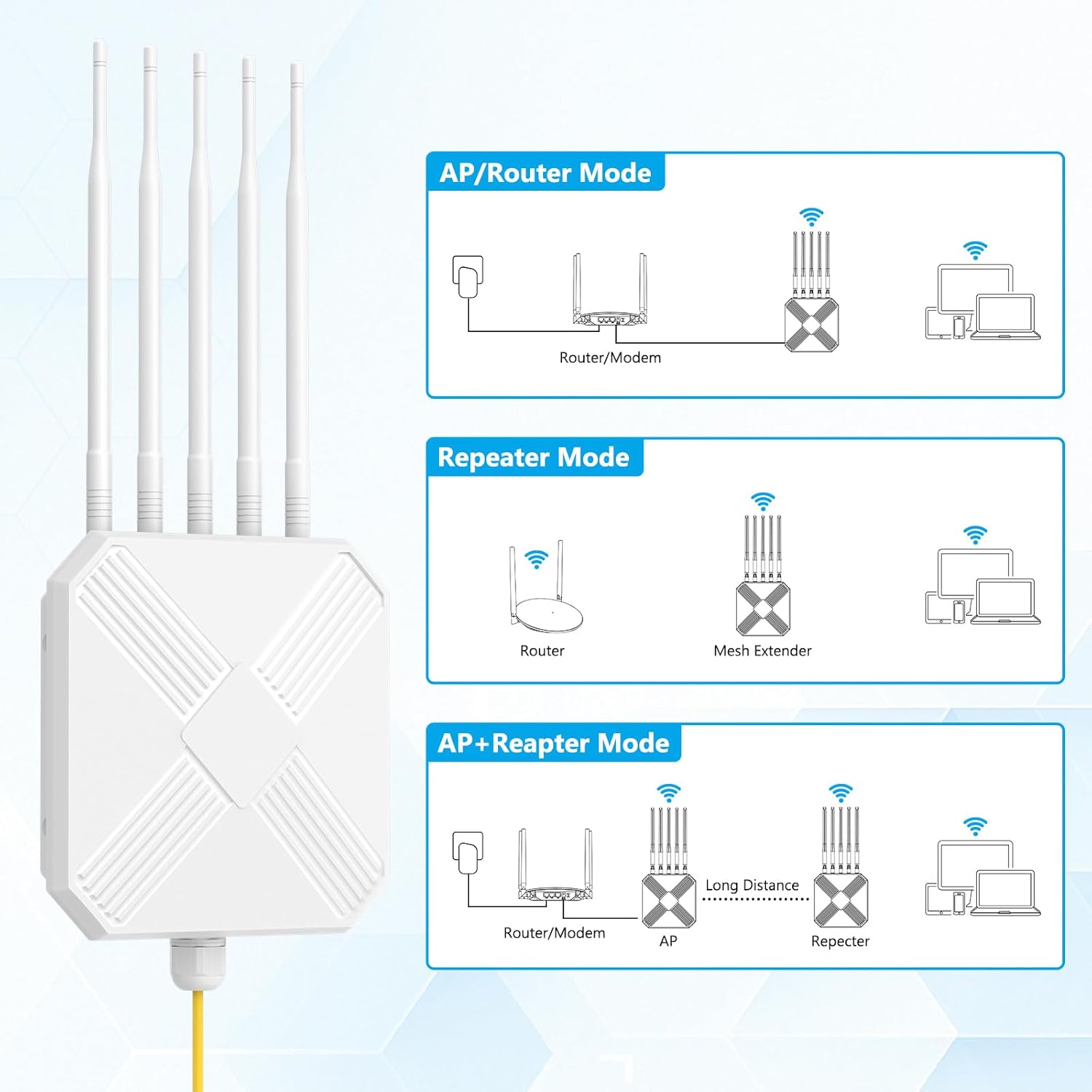
Image: A visual explanation of the various operational modes, detailing how the extender integrates into different network setups.
6. Durability and Environmental Resistance
Designed for robust outdoor use, the AX3000 Extender is built to withstand challenging environmental conditions:
- IP67 Waterproof Casing: Provides complete protection against dust ingress and immersion in water up to 1 meter for 30 minutes.
- 15kV ESD Protection: Safeguards the device against electrostatic discharge.
- 6kV Lightning Resistance: Offers protection against lightning strikes, ensuring continuous operation.
- Wide Temperature Range: Operates reliably in temperatures from -20°C to 50°C (-4°F to 122°F).
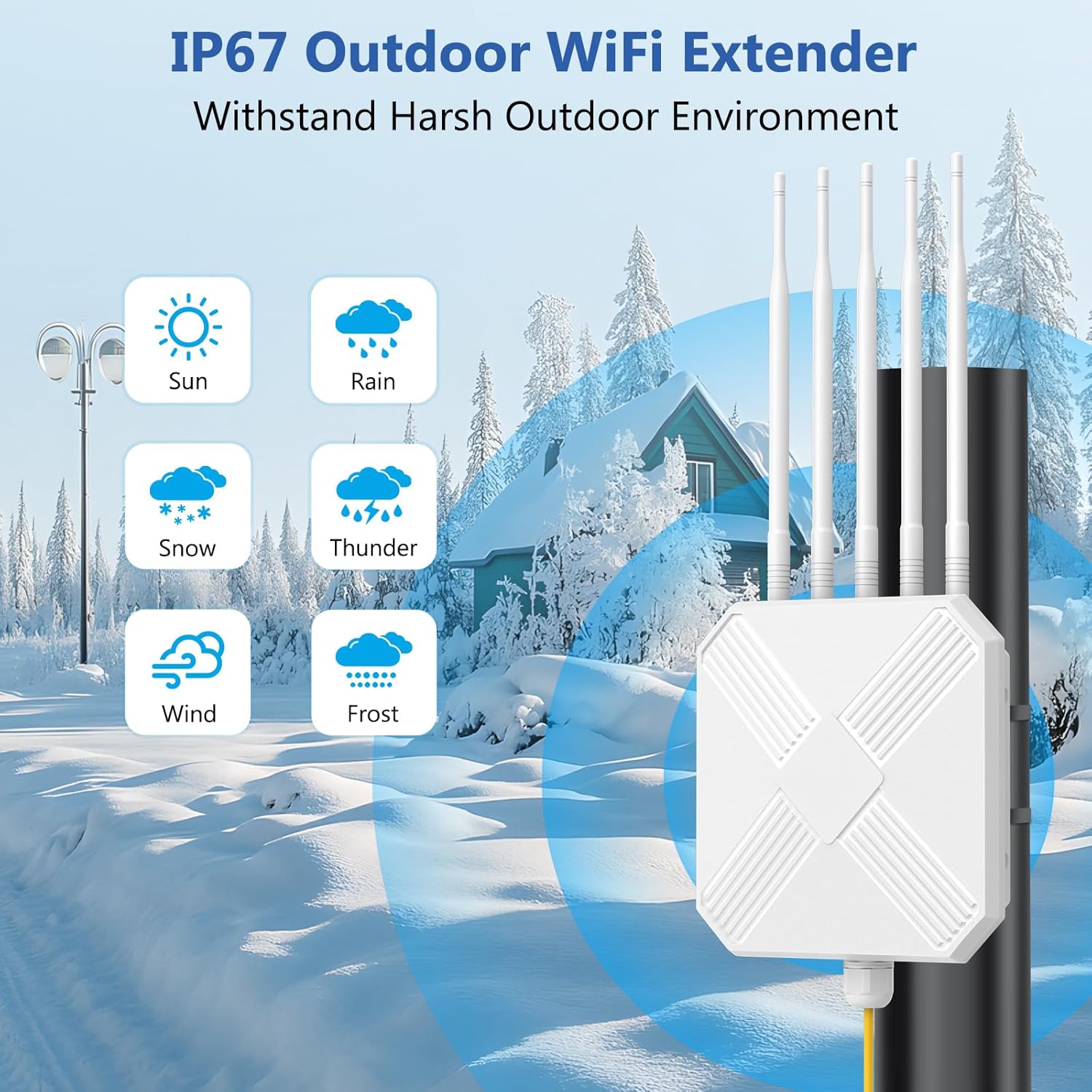
Image: The extender's resilience against diverse weather conditions, including sun, rain, snow, thunder, wind, and frost, emphasizing its IP67 rating.
7. Maintenance
- Regular Cleaning: Periodically wipe the exterior of the device with a soft, dry cloth to remove dust and debris. Ensure all ports and connections are free from obstructions.
- Firmware Updates: Check the manufacturer's website for any available firmware updates. Keeping the firmware updated ensures optimal performance, security, and access to new features.
- Cable Inspection: Regularly inspect the Ethernet cable and power connections for any signs of wear or damage. Replace damaged cables immediately.
- Antenna Position: Ensure antennas are securely attached and positioned for optimal signal reception and transmission.
8. Troubleshooting
- No Power:
- Verify the PoE adapter is correctly plugged into a working power outlet.
- Ensure the Ethernet cable is securely connected to both the extender's LAN/WAN port and the PoE adapter's PoE port.
- No Internet Connection:
- Check the connection between the PoE adapter's LAN port and your main router/switch.
- Confirm that your main router has an active internet connection.
- In Repeater Mode, ensure you have entered the correct password for your main Wi-Fi network during setup.
- Try restarting both the extender and your main router.
- Weak Signal/Poor Performance:
- Relocate the extender to a more central position between your router and the desired coverage area.
- Ensure there are no major obstructions (thick walls, metal objects) blocking the signal path.
- Adjust the orientation of the antennas for better signal strength.
- Verify that your devices are connected to the extended network (e.g., "YourNetworkName-EXT").
- Cannot Access Setup Page:
- Ensure your device is connected to the extender's default Wi-Fi network ("Repeater_XXXXXX").
- Double-check the IP address entered in the browser (e.g., 192.168.11.1).
- Try clearing your browser's cache or using a different browser.
9. Specifications
| Feature | Detail |
|---|---|
| Model Number | M-A18 |
| Wireless Standard | IEEE 802.11ax/ac/a/b/g/n |
| Data Transfer Rate | Up to 2402Mbps (5GHz), 573Mbps (2.4GHz) |
| Frequency Band Class | Dual-Band (2.4GHz & 5GHz) |
| Antennas | 5 x High-Gain Omnidirectional Antennas |
| Ethernet Port | 1 x Gigabit Ethernet (1000/100/10Mbps) |
| Waterproof Rating | IP67 |
| ESD Protection | 15kV |
| Lightning Resistance | 6kV |
| Operating Temperature | -20°C to 50°C (-4°F to 122°F) |
| Item Weight | 2.95 pounds |
| Package Dimensions | 14.8 x 11.61 x 3.23 inches |
10. Warranty and Support
Mugatol products are designed for reliability and performance. For warranty information, technical support, or to report any issues, please refer to the contact details provided in your product packaging or visit the official Mugatol website. Keep your purchase receipt for warranty claims.
For extended warranty or problems, please scan the QR code in the Quick User Guide or contact techhelp00@hotmail.com for instant support.