
Introduction
The Satechi OntheGo USB-C Lanyard Cable is designed to provide convenient carrying, charging, and data transfer capabilities for your USB-C compatible devices. This manual provides essential information for the proper setup, operation, and maintenance of your device.

The Satechi OntheGo USB-C Lanyard Cable provides a convenient way to carry and charge your USB-C compatible smartphone.
Package Contents
- Satechi OntheGo USB-C Lanyard Cable (1.5m / 4.9ft)
- Strap Card Connectors (1x Black, 1x Clear)
- User Manual
Setup Instructions
Follow these steps to properly attach the lanyard cable to your smartphone case. This product is compatible with most closed-bottom phone cases.
- Insert the Connector Card: Place one of the provided strap card connectors inside your phone case. Ensure the Satechi logo on the card is facing your phone. Thread the small loop of the connector card through the charging port opening of your phone case.
- Insert Your Phone: Carefully place your phone into the case, ensuring the connector card remains flat against the phone and the loop is securely positioned within the charging port opening.
- Attach to Carabiner: Secure the loop of the connector card to the carabiner clip located on the lanyard cable. Ensure the connection is firm before use.

Step-by-step visual guide for attaching the lanyard cable to a phone case using the provided connector card.
Operating Instructions
Wearing the Lanyard
The lanyard cable features an adjustable length of 1.5 meters (4.9 feet) to ensure a comfortable fit. Adjust the length by sliding the cord through the adjusters to wear it as a neck lanyard or a crossbody strap.

Shows the lanyard cable being worn crossbody, providing a hands-free and secure way to carry a smartphone.
Charging Your Device
The Satechi OntheGo USB-C Lanyard Cable supports up to 60W Power Delivery. To charge your device:
- Remove the aluminum cap from one of the USB-C connectors.
- Plug the exposed USB-C connector into a compatible USB-C power source (e.g., laptop, power bank, wall adapter).
- Remove the aluminum cap from the other USB-C connector and plug it into your smartphone's USB-C port.
- Ensure both connections are secure for optimal charging.

Illustrates the cable's ability to charge a phone from a portable power source, emphasizing its utility for on-the-go charging.
Data Transfer
The cable supports USB 2.0 data transfer speeds up to 480Mbps. To transfer data between your device and a computer:
- Connect one end of the USB-C lanyard cable to your smartphone.
- Connect the other end of the USB-C lanyard cable to a compatible USB-C port on your computer.
- Your device should appear as a connected storage device on your computer, allowing you to transfer files.

Demonstrates the cable's data transfer capabilities, showing how it can be used to sync devices and back up files quickly.
Maintenance
To ensure the longevity and optimal performance of your Satechi OntheGo USB-C Lanyard Cable:
- Always use the sturdy aluminum caps to protect the USB-C ports when the cable is not in use. This prevents dust and debris from entering the connectors.
- Avoid excessive bending or twisting of the braided cable to maintain its structural integrity and prevent internal damage.
- Clean the cable and connectors with a soft, dry cloth as needed. Do not use harsh chemicals or abrasive materials.
- Store the cable in a cool, dry place away from direct sunlight and extreme temperatures.
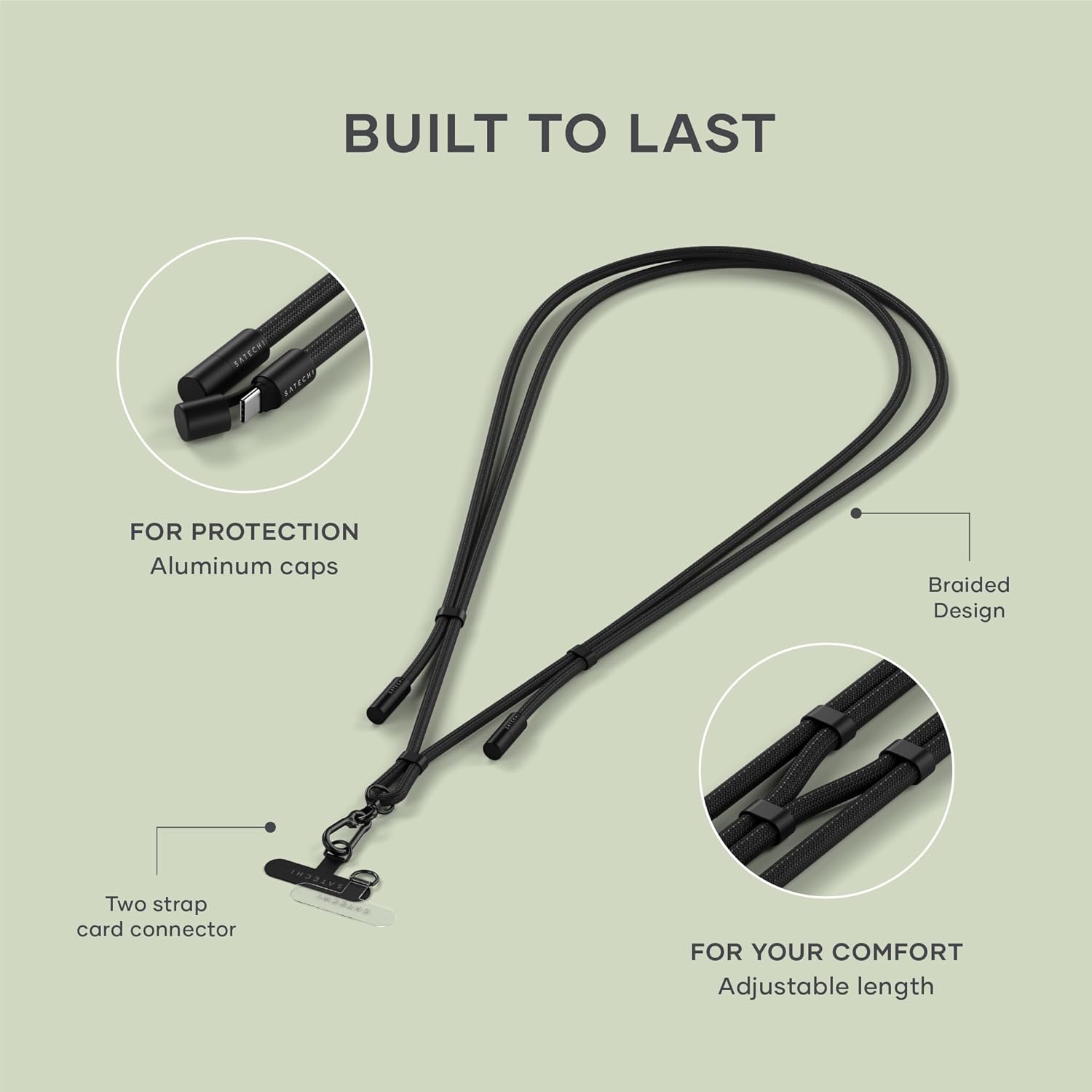
This image details the durable construction of the cable, including its braided material, protective aluminum caps, and the included strap card connectors.
Troubleshooting
If you encounter issues with your Satechi OntheGo USB-C Lanyard Cable, please refer to the following common solutions:
- Device Not Charging:
- Ensure both USB-C connectors are fully inserted into the power source and your device.
- Verify that the power source is active and providing sufficient power (e.g., wall adapter, charged power bank).
- Confirm your device is USB-C compatible and supports the charging wattage.
- Try using a different USB-C port or power source to rule out external issues.
- Data Transfer Not Working:
- Check that both ends of the cable are securely connected to your device and computer.
- Ensure your computer's USB-C port is functional and configured for data transfer.
- On your smartphone, check the USB connection settings (e.g., 'File Transfer' or 'PTP' mode).
- Lanyard Not Attaching Securely:
- Verify that your phone case has a closed bottom and a suitable opening for the connector card loop.
- Ensure the connector card is inserted correctly and the loop is fully threaded through the case's charging port opening.
- Confirm the carabiner is properly clipped to the connector card loop.
Specifications
| Feature | Specification |
|---|---|
| Model Number | ST-LOTGLK |
| Cable Length | 1.5m / 4.9ft |
| Connector Type | USB Type-C to USB Type-C |
| Power Delivery | Up to 60W |
| Data Transfer Speed | Up to 480Mbps (USB 2.0) |
| Special Features | Braided Cable, Adjustable Length, Built-in Crossbody Strap |
| Compatible Devices | USB-C enabled smartphones (e.g., iPhone 15 series, Android devices) with closed-bottom cases |
| Package Dimensions | 7.17 x 3.98 x 1.34 inches |
| Item Weight | 1.76 ounces |
| Manufacturer | Satechi |
Warranty and Support
Satechi products are backed by a 2-year limited warranty. This warranty covers defects in materials and workmanship under normal use. For warranty claims or customer support, please contact Satechi directly. Keep your proof of purchase for warranty validation.


