
Eonon X3U
Contents
Eonon X3U 6.36-inch Single DIN Linux Car Stereo User Manual
Model: X3U
1. Introduction
This manual provides detailed instructions for the installation, operation, and maintenance of your Eonon X3U 6.36-inch Single DIN Linux Car Stereo. Please read this manual thoroughly before using the product to ensure proper function and safety. Keep this manual for future reference.
2. Safety Information
To prevent injury or damage to the unit, observe the following precautions:
- Do not operate the unit in a way that distracts you from driving.
- Ensure all wiring is correctly connected before powering on the unit. Incorrect wiring can cause damage or fire.
- Avoid exposing the unit to extreme temperatures, direct sunlight, or moisture.
- Do not attempt to disassemble or modify the unit. Refer all servicing to qualified personnel.
- Use only the specified power supply and accessories.
- Always follow local traffic laws and regulations.
3. Package Contents
Verify that all items are present in the package:
- Eonon X3U Car Stereo Unit x1
- Power Cable x1
- Speaker Output Cable x1
- 15A Fuse x1
- External Microphone x1
- Instruction Manual x1
- Disassembly Keys x2
- Backup Camera x1
- Screws x2
4. Product Overview
The Eonon X3U is a 6.36-inch Single DIN Linux car stereo designed for enhanced in-car entertainment and connectivity. Key features include:
- Display: 6.36-inch IPS screen with 1280 x 480 resolution and capacitive multi-touch.
- Audio: Integrated ST TDA7851 amplifier, 4x48W stereo surround output, 10-band equalizer, RCA audio output.
- Connectivity: Wireless Apple CarPlay, Wireless Android Auto, Bluetooth 5.3, USB, Screen Mirroring.
- Control: Physical volume control knob, steering wheel control support.
- Inputs/Outputs: Radio antenna interface, USB interface, external microphone interface, CAM IN video input, VIDEO IN video input, VIDEO OUT (x2) video outputs, AUX audio input, RCA F/R audio output.
- Additional Features: Clock display, playback memory when powered off, rear camera support.

5. Installation (Setup)
The Eonon X3U is designed for ISO Single DIN vehicles. Before installation, ensure your car's dashboard panel size and shape are compatible. The installation size is 178mm x 50mm.

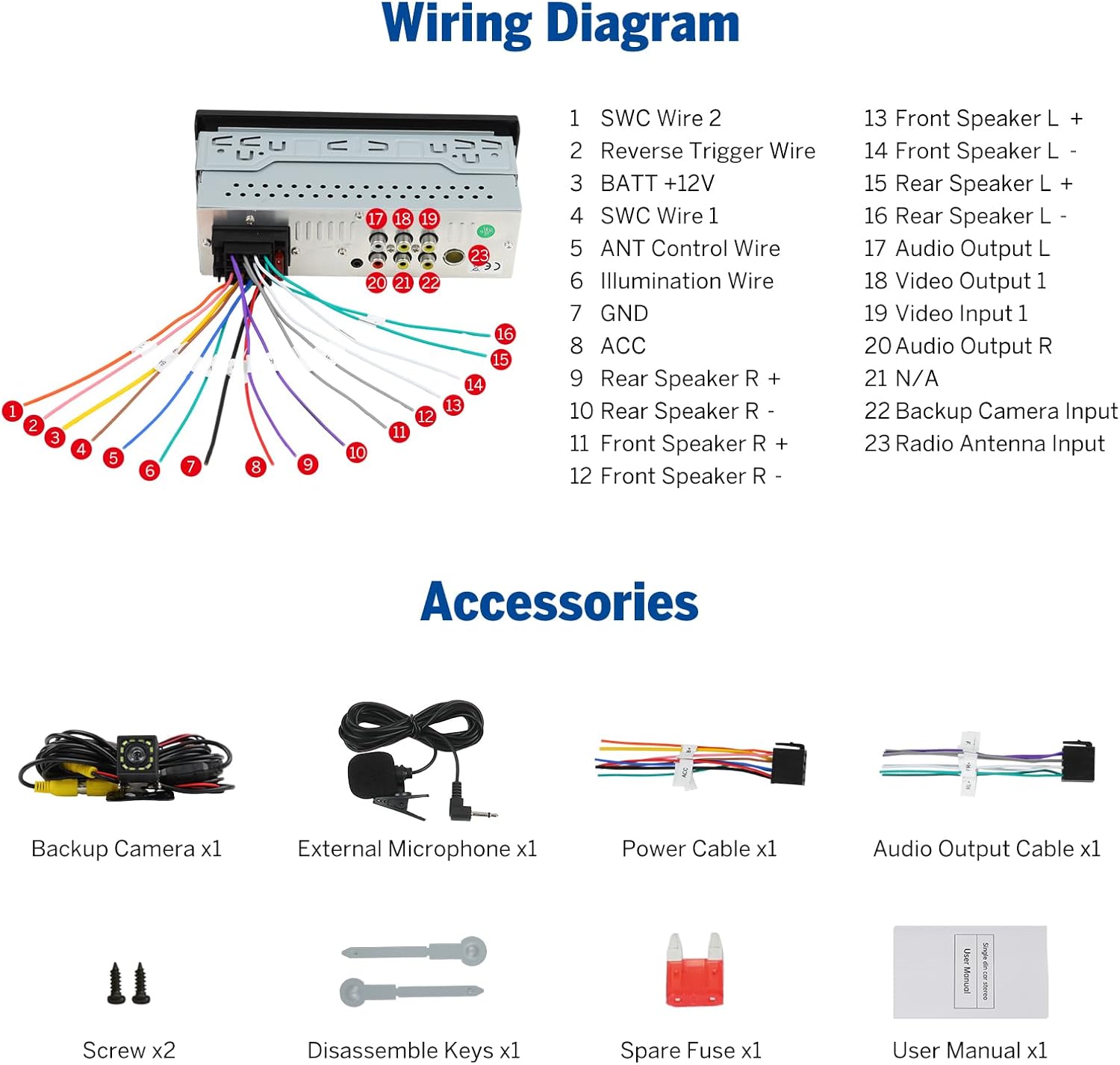
5.1 Wiring Diagram
Refer to the following diagram for correct wiring connections. Ensure all connections are secure to prevent malfunctions.

| Pin No. | Wire Function | Pin No. | Wire Function |
|---|---|---|---|
| 1 | SWC Wire 2 | 13 | Front Speaker L + |
| 2 | Reverse Trigger Wire | 14 | Front Speaker L - |
| 3 | BATT +12V | 15 | Rear Speaker L + |
| 4 | SWC Wire 1 | 16 | Rear Speaker L - |
| 5 | ANT Control Wire | 17 | Audio Output L |
| 6 | Illumination Wire | 18 | Video Output 1 |
| 7 | GND | 19 | Video Input 1 |
| 8 | ACC | 20 | Audio Output R |
| 9 | Rear Speaker R + | 21 | N/A |
| 10 | Rear Speaker R - | 22 | Backup Camera Input |
| 11 | Front Speaker R + | 23 | Radio Antenna Input |
| 12 | Front Speaker R - |
5.2 Short Chassis Design
The short chassis design provides more rear space for easier cable routing and improved heat dissipation during installation.

6. Operation
6.1 User Interface and Controls
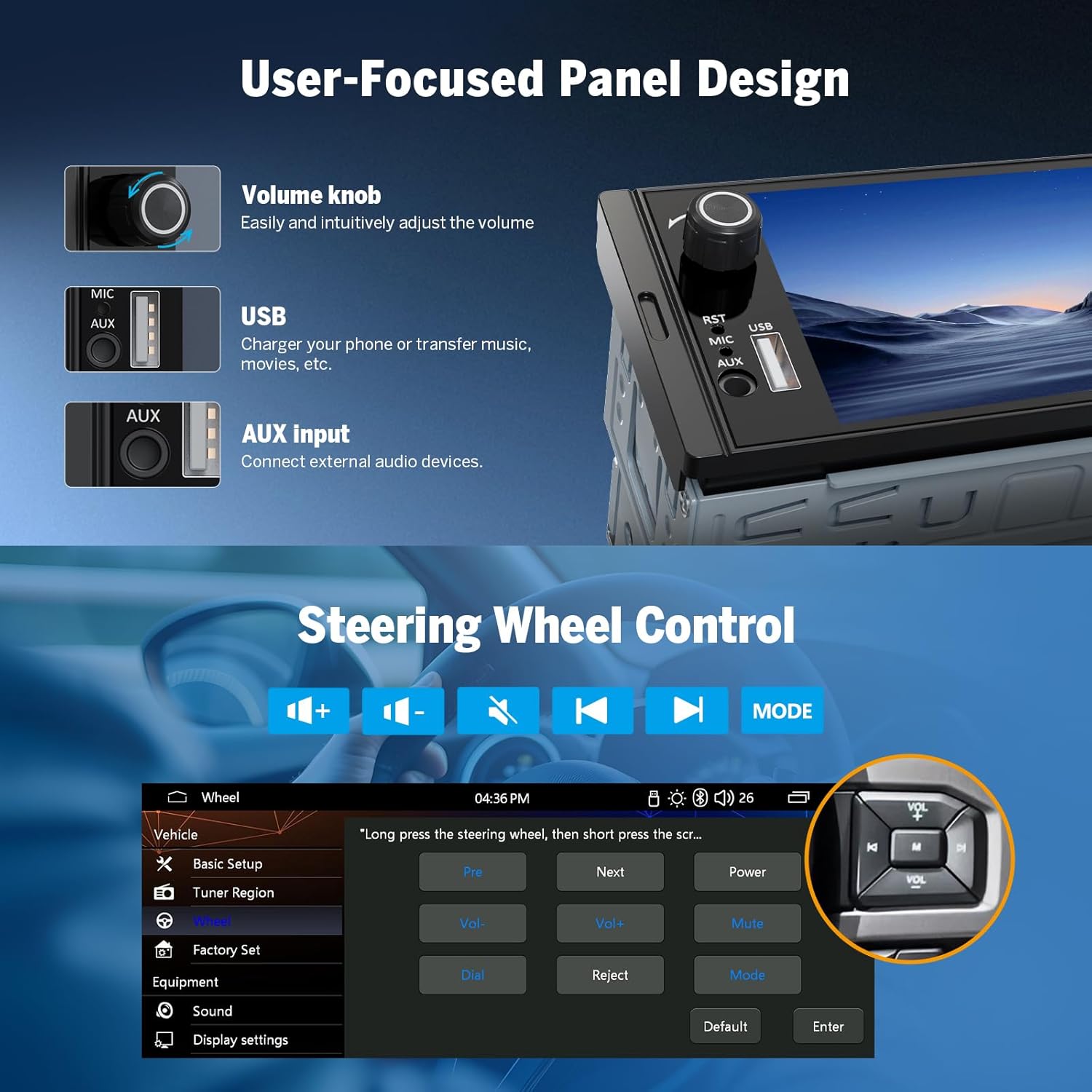
The unit features a user-focused panel design with a physical volume knob for easy adjustment, a USB port for charging and media transfer, and an AUX input for external audio devices.

The system offers 5 sets of UI themes to personalize your in-car experience.

6.2 Steering Wheel Control
The unit supports steering wheel controls, allowing you to manage audio and settings without taking your hands off the wheel. Access the 'Wheel' settings in the menu to configure.
7. Connectivity
7.1 Wireless Apple CarPlay Connection
- Click the 'Phonelink' icon on the car stereo.
- Turn on Wi-Fi and Bluetooth on your iPhone.
- Find 'CAR BT_XXXX' in your phone's Bluetooth device list and enter '0000' to pair.
- Once connected, tap 'Use CarPlay' and wait a few seconds for the connection to complete.

7.2 Wireless Android Auto Connection
- Click the 'Android Auto' icon on the car stereo.
- Turn on Wi-Fi and Bluetooth on your Android phone.
- Find 'CAR BT_XXXX' in your phone's Bluetooth device list, enter '0000' to pair, and click 'OK'.
- Wait a few seconds for the connection to complete.

7.3 Bluetooth 5.3
The unit features Bluetooth 5.3 for quick and stable connections, supporting hands-free calling and audio streaming.
7.4 Screen Mirroring for iOS
- On the car stereo, open 'Phonelink', select 'I PHONE', and tap 'AirPlay'.
- On your iPhone, connect to 'carplay_wifi_xxxx' via Wi-Fi (password: 12345678).
- Turn on the iPhone screen mirroring function and select 'car'.

7.5 Screen Mirroring for Android
- On the stereo, open 'Phonelink', select 'Android', and tap 'Wireless'.
- Scan the QR code to install the mirroring app. Connect your phone to 'CAR BT XXXX' via Bluetooth (PIN: 0000).
- Set your phone's hotspot name to 'CAR' (password: 12345678). Open the app and start screen mirroring.
Download the mirroring app from: http://dl.mirroring.app.sageres.com/jinzhuo/index.html

8. Audio Features
The Eonon X3U is equipped with a premium ST TDA7851 Class AB amplifier, delivering 4x48W of raw power for a clear and dynamic sound experience. It features a 10-band equalizer for precise audio customization and supports 2-channel F/R RCA audio output.
9. Video Output
The car stereo supports video output, allowing you to connect to external monitors, such as headrest displays, via an RCA cable (not included). This enables rear-seat passengers to watch videos from the unit.
10. Maintenance
Regular maintenance ensures the longevity and optimal performance of your car stereo.
- Cleaning the Screen: Use a soft, lint-free cloth to gently wipe the touchscreen. Do not use abrasive cleaners or solvents.
- Software Updates: Check the official Eonon website periodically for any available software updates to improve performance and add new features.
- Cable Connections: Periodically check all wiring connections to ensure they are secure and free from corrosion.
- Avoid Liquids: Keep liquids away from the unit to prevent damage.
11. Troubleshooting
If you encounter issues with your Eonon X3U, refer to the following common problems and solutions:
| Problem | Possible Cause | Solution |
|---|---|---|
| Unit does not power on. | Loose power connection, blown fuse, vehicle battery issue. | Check power cable connections. Inspect and replace the 15A fuse if blown. Verify vehicle battery voltage. |
| No sound or distorted sound. | Incorrect speaker wiring, volume too low, EQ settings. | Check speaker cable connections. Adjust volume. Reset EQ settings to default. |
| Wireless CarPlay/Android Auto not connecting. | Bluetooth/Wi-Fi off on phone, incorrect pairing, interference. | Ensure phone's Bluetooth/Wi-Fi is on. Re-pair the device. Try restarting both the phone and the car stereo. |
| Poor radio reception. | Antenna not connected, weak signal area. | Ensure the radio antenna is securely connected. Reception may vary based on location. |
| GPS guidance volume is too low. | Separate volume control for navigation. | Check the navigation app's internal volume settings. Some systems have independent volume controls for media and navigation prompts. |
| Screen mirroring issues. | Incorrect Wi-Fi/hotspot settings, app not installed. | Verify Wi-Fi and hotspot settings. Ensure the correct mirroring app is installed and configured on your phone. |
12. Specifications
| Feature | Specification |
|---|---|
| Brand | Eonon |
| Model Number | X3U |
| Connectivity Technology | Bluetooth, USB |
| Controller Type | Manual Control |
| Special Features | Android Auto, Apple CarPlay, Built-in Bluetooth, Touchscreen, Screen Mirroring, Rear Camera Support |
| Compatible Devices | Smartphone |
| Audio Output Mode | Surround |
| Surround Sound Channel Configuration | 4.0 |
| Video Encoding Support | MPG, DAT, TS, AVI, MP4, MOV, 3GP, ASF, VOB, MKV, FLV, RM, RMVB |
| Product Dimensions (DxWxH) | 7.5P x 17.8l x 5H cm (approx. 2.95 x 7.01 x 1.97 inches) |
| Number of Channels | 4 |
| Analog RGB Input | RCA, AUX, USB, FM/AM antenna |
| Output Power | 192 Watts (4x48W) |
| Internet Applications | Android Auto, Apple CarPlay |
| Control Method | Touch |
| Audio Output Type | RCA, Surround |
| Supported Formats | .jpg, AVI, Audio MP3, MPEG, DAT Tape, WAV |
| Wireless Technology | Bluetooth |
| Country of Origin | China |
13. Warranty and Support
The Eonon X3U comes with a warranty that includes a 30-day refund period for any reason and a 2-year warranty for quality-related issues.
For technical support or warranty claims, please contact Eonon customer service through their official website or the retailer where you purchased the product.
For more information, visit the Eonon Store on Amazon.
Documents and downloads
Ask a question about this manual
Ask about setup, troubleshooting, compatibility, parts, safety, or missing instructions. Manuals+ will review the question and use this page’s manual context to help answer it.