
Introduction
Thank you for choosing the K&F CONCEPT Auto Open & Close Phone Tripod Stand. This versatile device combines a selfie stick and a tripod, designed to enhance your mobile photography and videography experience. With features like automatic opening and closing, dual-axis adjustment, and a multi-function Bluetooth remote, capturing perfect shots has never been easier. Please read this manual carefully to ensure proper use and maintenance of your device.
What's in the Box
- Selfie Stick
- 9 Button Bluetooth Remote Control
- Remote Control Lanyard
- Charging Cable
- Manual
Setup Instructions
1. Unfolding the Tripod
The K&F CONCEPT selfie stick tripod features an automatic open and close mechanism. To deploy the tripod legs, gently tap the bottom of the device vertically from approximately 3.94 inches (10 cm) above the ground. The legs will automatically unfold and lock into position, providing a stable base.

Image: The selfie stick tripod with its legs automatically deploying after being tapped on a surface.
2. Extending the Selfie Stick
To extend the selfie stick, firmly grasp the base and pull the top section upwards. The aluminum alloy pole can be manually extended up to 68.9 inches (175 cm) for wide-angle shots and various perspectives.
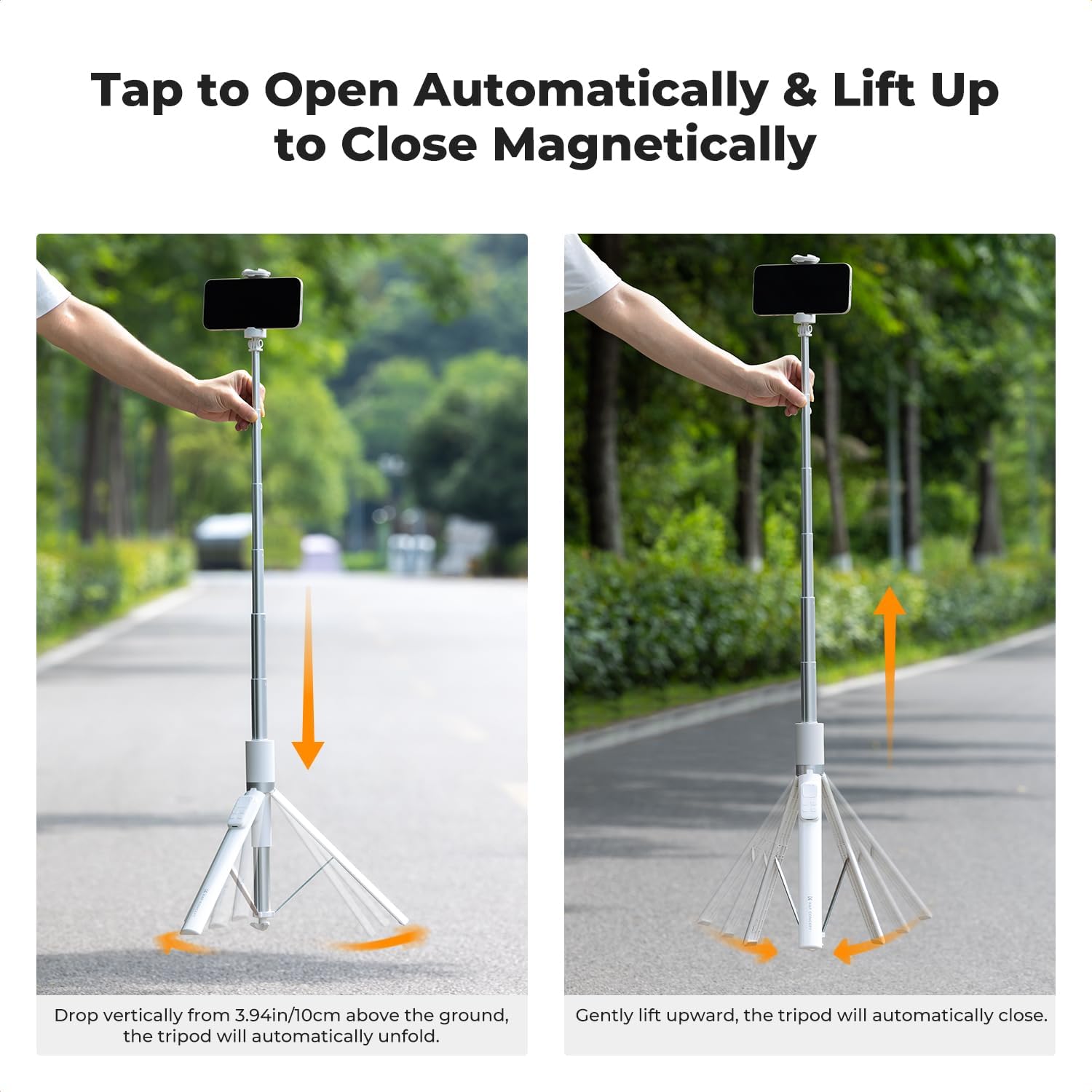
Image: A person extending the selfie stick to its full length.
3. Attaching Your Phone
The phone clamp is adjustable from 2.17 inches (5.5 cm) to 3.35 inches (8.5 cm), accommodating most smartphones. Gently pull the top part of the clamp upwards to open it, insert your phone, and release to secure it. Ensure your phone is centered and stable within the clamp.

Image: A smartphone being securely placed into the adjustable clamp of the selfie stick.
4. Pairing the Bluetooth Remote Control
- Remove the 9-button Bluetooth remote control from its magnetic housing on the selfie stick.
- Locate the power switch on the back of the remote and slide it to the 'ON' position. The indicator light will flash, indicating it's in pairing mode.
- On your smartphone, go to Bluetooth settings and search for available devices.
- Select "AB shutter3" (or similar name) from the list to pair. The indicator light on the remote will stop flashing once successfully paired.
- (Optional) Attach the remote control lanyard to prevent loss.
Video: Demonstrates the automatic opening and closing of the tripod, extension of the stick, and pairing of the Bluetooth remote control.
Operating Instructions
1. Adjusting the Shooting Angle
The selfie stick features a dual-axis design, allowing for flexible adjustments:
- 360° Horizontal Rotation: The phone clamp can rotate 360 degrees horizontally, enabling you to switch between landscape and portrait modes or capture panoramic views.
- 180° Vertical Rotation: The head articulates 180 degrees vertically, allowing for overhead, tilt, or low-angle shots.

Image: Illustrations demonstrating the 360-degree horizontal and 180-degree vertical rotation capabilities of the phone holder.
2. Using the 9-Button Bluetooth Remote Control
The rechargeable remote control offers multiple functions:
- Shutter Button: Press to take photos or start/stop video recording.
- Zoom In/Out: Use the '+' and '-' buttons to adjust the zoom level in your camera app.
- Camera Switch: The side button allows switching between front and rear cameras. NOTE: This function requires iOS version 18.7.2 or below. For iOS 18.7.3 and above, please use your phone's on-screen controls.
- Short Video Page Flip: Browse short videos and 'like' them using the remote.

Image: Detailed view of the 9-button Bluetooth remote control, highlighting its various functions for camera operation and video browsing.
3. Utilizing the Cold Shoe Interface
The top of the phone clamp features a cold shoe interface. This allows you to attach accessories such as microphones or lighting fixtures to enhance your audio or lighting for a more professional shooting experience, especially useful for live streaming or vlogging.
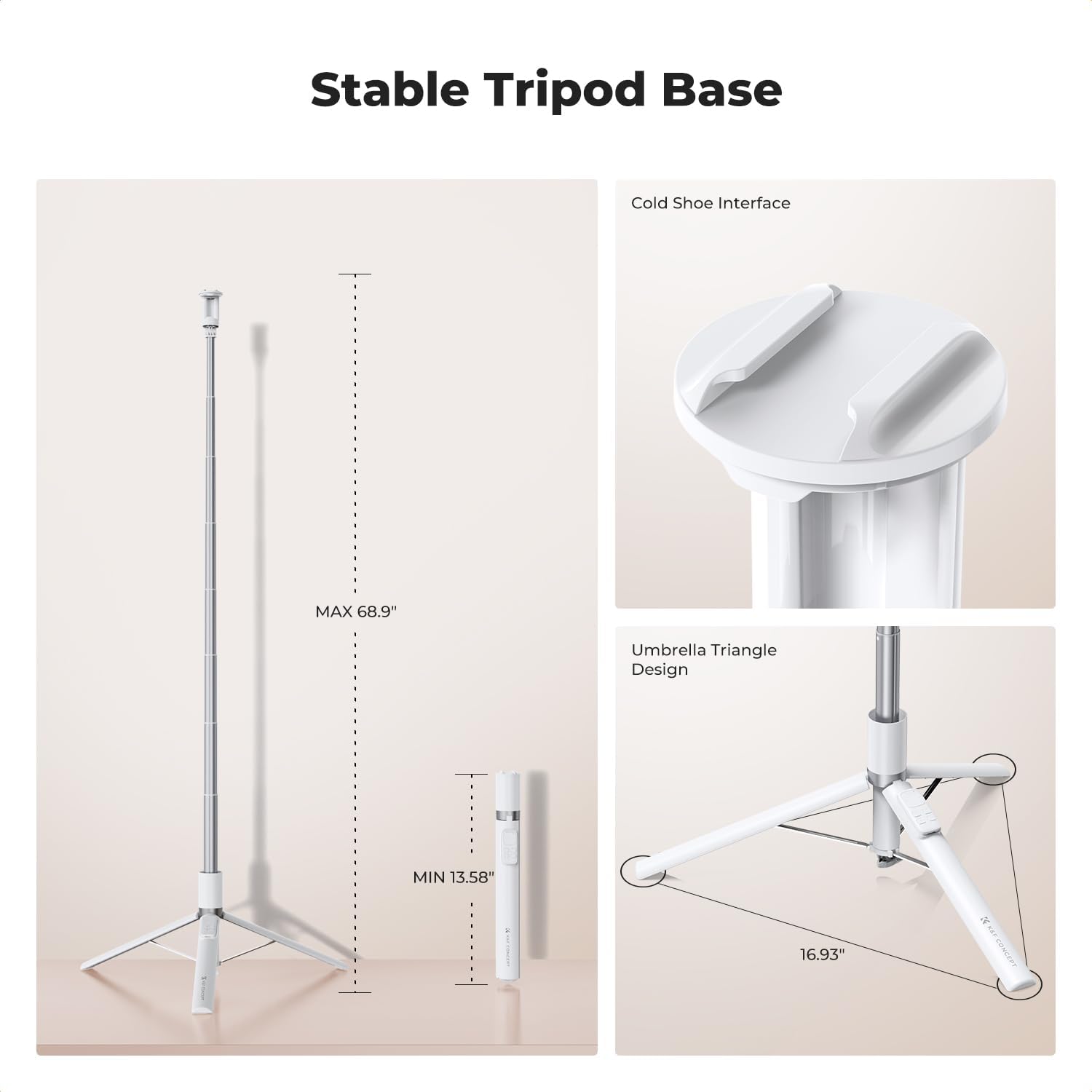
Image: A close-up of the cold shoe interface located on the top of the phone clamp, ready for accessory attachment.
Maintenance
- Cleaning: Wipe the selfie stick and remote control with a soft, dry cloth. Avoid using harsh chemicals or abrasive materials.
- Storage: When not in use, gently lift the selfie stick to automatically close the tripod legs and retract the extension pole. Store in a cool, dry place away from direct sunlight.
- Battery Care: Recharge the Bluetooth remote control regularly to maintain battery life. Avoid overcharging or completely draining the battery.
- Handle with Care: While durable, avoid excessive force when extending or retracting the pole, or when adjusting the phone clamp.

Image: A person demonstrating how to retract the selfie stick and store it in a bag, highlighting its portability.
Troubleshooting
1. Remote Control Not Pairing
- Ensure the remote control is charged.
- Verify Bluetooth is enabled on your smartphone.
- Make sure the remote is within range (up to 30 feet).
- Forget "AB shutter3" in your phone's Bluetooth settings and attempt to re-pair.
2. Camera Switch Button Not Working (iOS)
- The camera switch button on the remote is compatible with iOS versions 18.7.2 or below.
- For iOS 18.7.3 and above, please use the on-screen controls within your phone's camera application to switch between front and rear cameras.
3. Tripod Legs Not Opening/Closing Automatically
- Opening: Ensure you tap the bottom of the pole vertically from a height of at least 3.94 inches (10 cm) onto a firm surface.
- Closing: Gently lift the selfie stick upwards. The magnetic suction function should automatically retract the legs. If not, check for any obstructions.
4. Phone Not Fitting in Clamp
- Verify your phone's width is within the compatible range of 2.17 inches (5.5 cm) to 3.35 inches (8.5 cm).
- Ensure the clamp is fully extended before attempting to insert the phone.
Specifications
| Feature | Detail |
|---|---|
| Brand | K&F CONCEPT |
| Model Name | KF15.0001 |
| Color | White |
| Material | Aluminum |
| Maximum Height | 68.9 Inches (175 cm) |
| Minimum Height | 13.6 Inches (34 cm) |
| Folded Size | 13.58 Inches |
| Weight | 0.8 lbs (376g) |
| Compatible Devices | Android Phones, iPhone 17/16/15/14/13/12 Series (Phone clamp: 2.17-3.35 inches / 5.5-8.5 cm) |
| Special Features | Rotatable, Adjustable, Auto Open & Close Tripod, 9 Button Bluetooth Remote Control, Cold Shoe Interface |
| Tripod Head Type | Ball Heads |
| Water Resistance Level | Not Water Resistant |
Warranty and Support
This K&F CONCEPT Selfie Stick Tripod comes with a 1-Year Manufacturer's Warranty. For warranty claims, technical support, or any inquiries, please contact K&F CONCEPT customer service through their official website or the retailer where the product was purchased. Please retain your proof of purchase for warranty validation.