
1. Introduction
Thank you for purchasing the TEKXDD Ceiling Fan with LED Light. This product combines a silent fan with a dimmable LED light, offering comfort and illumination for various indoor spaces. This manual provides essential information for safe installation, operation, and maintenance of your new ceiling fan.
2. Safety Instructions
- Always disconnect power at the circuit breaker before installation or servicing.
- Installation must be performed by a qualified electrician or in accordance with local electrical codes.
- Ensure the mounting structure can support the weight of the fan.
- Do not connect the fan to a dimmer switch not specifically designed for ceiling fans with lights.
- Keep hands and objects clear of the fan blades during operation.
- This product is designed for indoor use only.
3. Package Contents
Verify that all components are present before beginning installation:
- Ceiling Fan with LED Light (1 unit)
- Remote Control (batteries not included) (1 unit)
- Instruction Manual (1 unit)
- Extension Rod (1 unit)
4. Product Overview
The TEKXDD Ceiling Fan with LED Light offers versatile lighting and air circulation. It features a quiet DC motor, adjustable light brightness and color temperature, and convenient control options.
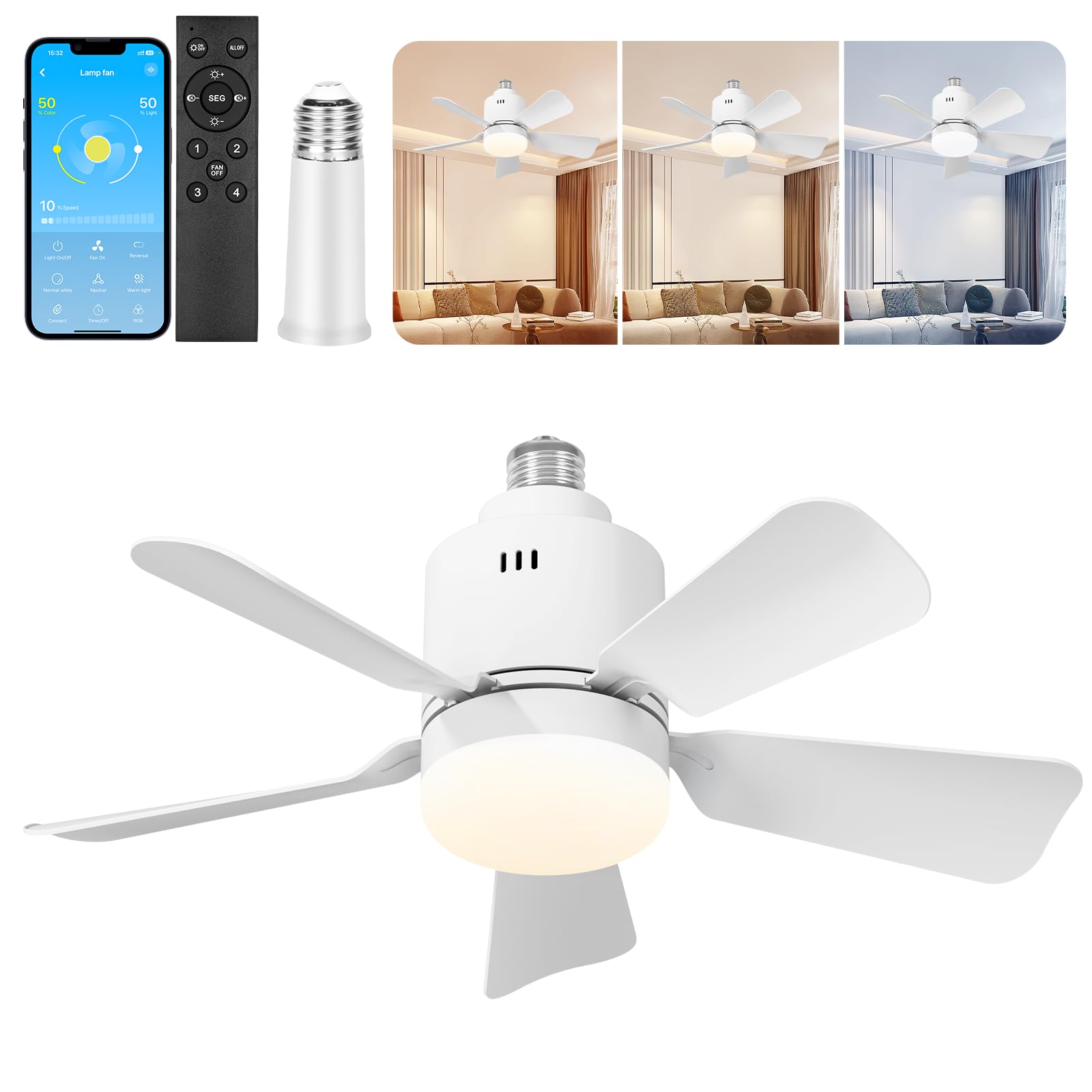
Figure 4.1: Product dimensions and key features. The fan measures approximately 16.93 inches in width and 8.27 inches in height. The light fixture is about 3.94 inches in diameter.

Figure 4.2: Detailed view of the ceiling fan with its dimensions, highlighting the compact design suitable for various rooms.

Figure 4.3: Illustration of the adjustable light color temperatures: 3000K (Warm Light), 4500K (Warm-White Blend), and 6500K (White Light). The dimming range is from 1% to 100%.
5. Setup and Installation
This ceiling fan is designed for easy installation, screwing directly into a standard light socket (E27 type). No complex wiring or special tools are typically required.
Installation Steps:
- Power Off: Before starting, ensure the power to the light fixture is turned off at the circuit breaker to prevent electrical shock.
- Prepare Socket: Remove any existing light bulb from the socket where the fan will be installed.
- Screw In: Carefully screw the TEKXDD Ceiling Fan into the standard light socket. Ensure it is securely tightened.
- Optional Extension Rod: If your ceiling is high or you prefer the fan to hang lower, attach the provided 4-inch extension rod between the fan and the socket.
- Power On: Restore power at the circuit breaker.
- Test: Use the remote control or app to test the fan and light functions.

Figure 5.1: The fan is designed for simple installation by screwing directly into a standard light socket, eliminating the need for complex wiring or specialized tools.
6. Operating Instructions
Your TEKXDD Ceiling Fan can be controlled via the included remote control or a dedicated smartphone application.

Figure 6.1: The remote control and smartphone app provide comprehensive control over the fan and light functions, including brightness, color temperature, and fan speed.
6.1 Remote Control Functions
- ON/OFF: Turns the fan and light on or off.
- ALL OFF: Turns off both the fan and light simultaneously.
- Light Brightness Adjustment (+/-): Increases or decreases the light brightness (1% to 100%).
- Color Temperature Adjustment (K+/-): Cycles through or adjusts the light color temperature (3000K Warm, 4500K Warm-White, 6500K Cool White).
- Fan Speed (1-4): Selects one of the four available fan speeds.
- FAN OFF: Turns off only the fan.
6.2 App Control Functions
Download the compatible app from your smartphone's app store. Follow the in-app instructions to pair your device with the fan. The app offers advanced control:
- Light On/Off: Toggles the light.
- Fan On/Off: Toggles the fan.
- Brightness Slider: Precise adjustment of light brightness (1% to 100%).
- Color Temperature Slider: Smooth adjustment of light color temperature (3000K to 6500K).
- Speed Control: Select from multiple fan speeds.
- Timer Setting: Set a timer for the fan or light to turn off automatically (1-24 hours).
- Reversal: Changes the direction of the fan blades (if applicable to model).
- Pre-set Modes: Often includes modes like 'Normal white', 'Neutral', 'Warm light' for quick selection.
7. Maintenance
Regular maintenance ensures optimal performance and longevity of your ceiling fan.
- Cleaning: Periodically wipe the fan blades and light fixture with a soft, damp cloth. Do not use abrasive cleaners or solvents. Ensure power is off before cleaning.
- Blade Balance: If the fan wobbles, check that all blade screws are tight.
- Light Source: The LED light source is integrated and not user-replaceable. If the light fails, contact customer support.
8. Troubleshooting
If you encounter issues with your fan, refer to the following common problems and solutions:
| Problem | Possible Cause | Solution |
|---|---|---|
| Fan does not turn on | No power supply; Remote control battery low/dead; Fan not securely screwed in. | Check circuit breaker; Replace remote control batteries; Ensure fan is tightly screwed into the socket. |
| Light does not turn on | No power supply; Remote control battery low/dead; Light function off. | Check circuit breaker; Replace remote control batteries; Ensure light is turned on via remote or app. |
| Fan wobbles | Loose blades or mounting; Uneven blade weight. | Ensure all screws are tightened; Check for any obstructions; If wobbling persists, contact support. |
| Remote control not working | Batteries dead/incorrectly inserted; Remote out of range; Interference. | Replace batteries, check polarity; Ensure you are within range; Minimize interference from other devices. |
| App control not working | Bluetooth/Wi-Fi disconnected; App not updated; Pairing issue. | Check phone's Bluetooth/Wi-Fi connection; Update app to latest version; Re-pair the device if necessary. |
9. Specifications
| Manufacturer | TEKXDD |
| Model Number | RW-E27F03-Y |
| Product Dimensions | 14 x 14 x 25 cm (approx. 5.5 x 5.5 x 9.8 inches) |
| Product Weight | 620 grams (approx. 1.37 pounds) |
| Brand | TEKXDD |
| Color | White - 0708 |
| Material | Plastic |
| Style | Modern |
| Light Fixture Form | Pendant |
| Room Type | Study Room, Bathroom, Library, Kitchen, Dining Room, Laundry Room, Children's Room, Bedroom, Entryway |
| Indoor/Outdoor Usage | Indoor |
| Power Source | Corded Electric |
| Control Method | Remote Control, App Control |
| LED Light Power | 24W (equivalent brightness) |
| Fan Motor Power | 30W DC Motor |
| Light Color Temperature | 3000K (Warm), 4500K (Warm-White), 6500K (Cool White) |
| Dimmable Range | 1% - 100% |
| Fan Speeds | 4 Speeds |
| Timer Function | 1-24 Hours |
| Suitable Room Size | 10-20 square meters |
| Sloped Ceiling Compatibility | Up to 18 degrees |
10. Warranty and Support
TEKXDD is committed to providing high-quality products. If you require any assistance with your ceiling fan, including troubleshooting or warranty claims, please contact our customer support. We aim to provide the best possible solution promptly.

Figure 10.1: The TEKXDD Ceiling Fan is suitable for various indoor environments such as living rooms, garages, kitchens, and checkrooms, providing both light and air circulation.