
1. Introduction
Welcome to the user manual for your new TCL 40T T608DL smartphone. This guide provides essential information on setting up, operating, maintaining, and troubleshooting your device. The TCL 40T T608DL runs on Android 13, featuring a 6.75-inch HD+ display, 32GB of internal storage, and 3GB of RAM, designed for a smooth and responsive user experience.
2. What's in the Box
Please check the package contents to ensure all items are present:
- TCL 40T T608DL Smartphone
- USB-C Cable
- SIM Ejector Tool
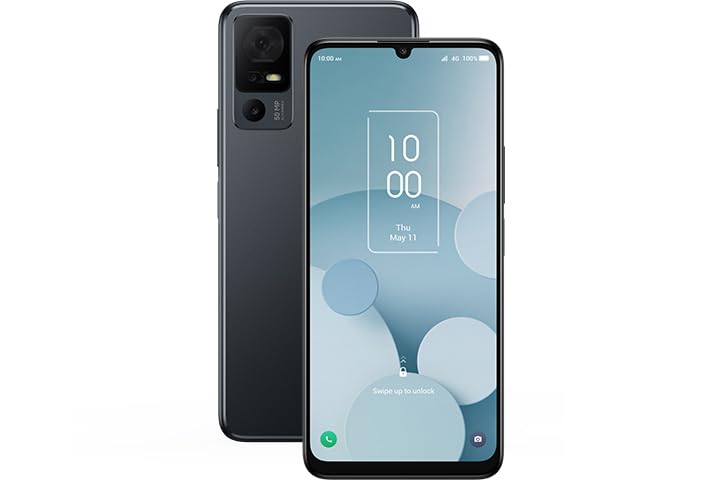
Image: The TCL 40T T608DL smartphone, showcasing its sleek black design and large display.
3. Setup
3.1. Inserting the SIM Card
- Locate the SIM card tray on the side of your phone.
- Insert the SIM ejector tool into the small hole next to the tray and press gently until the tray pops out.
- Place your Nano-SIM card into the tray with the gold contacts facing down. Ensure it is correctly oriented.
- Carefully push the tray back into the phone until it clicks into place.
3.2. Initial Power On and Setup
- Press and hold the Power button until the TCL logo appears.
- Follow the on-screen prompts to select your language, connect to a Wi-Fi network, and set up your Google account.
- You will also be guided through setting up security features like a PIN, pattern, or fingerprint.
4. Operating Your Device
4.1. Basic Navigation
The TCL 40T T608DL uses a touchscreen interface. Swipe up, down, left, or right to navigate through menus and home screens. Tap icons to open applications and use pinch-to-zoom gestures for images and web pages.
4.2. Android 13 Features
Your device runs on Android 13, offering enhanced privacy controls, improved notification management, and personalized themes. Explore the Settings menu to customize your experience.
4.3. App Management
Download new applications from the Google Play Store. To uninstall an app, press and hold its icon on the home screen or app drawer, then select "Uninstall" or drag it to the uninstall option.
5. Camera Features
The TCL 40T T608DL is equipped with AI-enhanced cameras designed to capture sharp photos and facilitate clear video chats. Open the Camera app to access various modes, including Photo, Video, Portrait, and more. Utilize the AI features for automatic scene detection and optimal image settings.
6. Battery Management
Your TCL 40T T608DL features a long-lasting 5000 mAh battery. To optimize battery life:
- Reduce screen brightness.
- Turn off Wi-Fi, Bluetooth, and GPS when not in use.
- Close background applications.
- Enable Battery Saver mode from the Settings menu.
The device supports USB-C fast charging. Use the provided USB-C cable and a compatible power adapter for efficient charging.
7. Maintenance
7.1. Cleaning Your Device
Use a soft, lint-free cloth to clean the screen and body of your phone. Avoid using harsh chemicals or abrasive materials. Do not expose the device to excessive moisture.
7.2. Software Updates
Regularly check for software updates to ensure your device has the latest features, security patches, and performance improvements. Go to Settings > System > System update to check for available updates.
8. Troubleshooting
8.1. Device Not Responding
If your phone becomes unresponsive, press and hold the Power button for approximately 10-15 seconds to force a restart.
8.2. Network Connectivity Issues
Ensure your SIM card is properly inserted. Try toggling Airplane Mode on and off. If issues persist, contact your service provider (Straight Talk).
8.3. Factory Reset
A factory reset will erase all data from your phone and restore it to its original settings. Backup your data before proceeding. Go to Settings > System > Reset options > Erase all data (factory reset).
9. Specifications
| Model Name | TCL 40T |
| Model Number | T608DL |
| Operating System | Android 13.0 |
| Display | 6.75" HD+ |
| Internal Storage | 32GB |
| RAM | 3GB |
| Battery Capacity | 5000 mAh |
| Wireless Carrier | Straight Talk |
| Cellular Technology | 4G |
| Connector Type | USB Type C |
10. Warranty and Support
For warranty information and technical support, please refer to the warranty card included with your product or visit the official TCL support website. You can typically find support resources, FAQs, and contact information for customer service there.
TCL Official Website: www.tcl.com


