1. Introduction
This manual provides essential instructions for the safe and effective use, installation, and maintenance of your Technical Precision OL-5 LENSOMETER Replacement Light Bulb. Please read this manual thoroughly before installation and retain it for future reference.
Product Overview
The Technical Precision OL-5 LENSOMETER Replacement Light Bulb is designed as a direct replacement for the original bulb in OL-5 LENSOMETER devices. It provides reliable illumination necessary for the accurate operation of the LENSOMETER.
What's in the Box
- 1 x Technical Precision OL-5 LENSOMETER Replacement Light Bulb
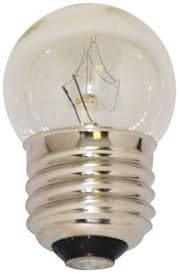
Image 1: The Technical Precision OL-5 LENSOMETER Replacement Light Bulb. This image displays the clear glass bulb with a standard screw-in base, designed for the OL-5 LENSOMETER.
2. Setup and Installation
Safety First: Before attempting any installation, ensure the LENSOMETER is completely powered off and unplugged from its power source to prevent electrical shock.
- Power Off: Disconnect the LENSOMETER from the main power supply.
- Access Bulb Compartment: Locate the bulb access panel or compartment on your OL-5 LENSOMETER. Refer to your LENSOMETER's specific manual if you are unsure.
- Remove Old Bulb: Carefully unscrew or unclip the old bulb. Allow it to cool if it was recently in use. Dispose of the old bulb responsibly.
- Install New Bulb: Gently screw the new Technical Precision OL-5 LENSOMETER Replacement Light Bulb into the socket. Do not overtighten. Ensure it is seated firmly.
- Secure Compartment: Close and secure the bulb access panel.
- Power On: Reconnect the LENSOMETER to the power supply and turn it on to test the new bulb.
3. Operation
Once installed, the replacement bulb operates as part of your OL-5 LENSOMETER's illumination system. Its function is to provide the necessary light for accurate measurements.
- Power On/Off: The bulb will illuminate when the LENSOMETER is powered on, and turn off when the device is powered off.
- Brightness: The brightness is controlled by the LENSOMETER's internal circuitry and is not adjustable directly from the bulb.
4. Maintenance
The Technical Precision OL-5 LENSOMETER Replacement Light Bulb requires minimal maintenance. Follow these guidelines to ensure optimal performance and longevity:
- Cleaning: If the bulb's glass surface becomes dusty or smudged, gently wipe it with a clean, dry, lint-free cloth. Avoid using abrasive cleaners or excessive moisture. Ensure the bulb is cool and the LENSOMETER is unplugged before cleaning.
- Replacement: Replace the bulb when it burns out or if its light output significantly diminishes. The average lifespan is approximately 500 hours.
- Handling: Always handle the bulb by its base to avoid transferring oils from your skin to the glass, which can reduce bulb life.
5. Troubleshooting
| Problem | Possible Cause | Solution |
|---|---|---|
| Bulb does not light up. | Bulb is burnt out. | Replace the bulb with a new one. |
| Bulb not properly seated. | Ensure the bulb is securely screwed into the socket. | |
| LENSOMETER not receiving power. | Check power cord connection and LENSOMETER's power switch. | |
| Light is dim or flickering. | Bulb is nearing end of life. | Replace the bulb. |
| Dirty bulb surface. | Clean the bulb surface as described in the Maintenance section. |
6. Specifications
| Brand | Technical Precision |
| Model Number | OL-5 LENSOMETER-AZ-3KT3-2 |
| Part Number | OL-5 LENSOMETER-AZ-3KT3-2 |
| Voltage | 120 Volts |
| Wattage | 15 Watts |
| Average Life | 500 Hours |
| Bulb Length | 2.25 Inches |
| Material | Glass |
| Included Components | Replacement Part |
| ASIN | B0FGYYDL86 |
7. Warranty and Support
For specific warranty information or technical support regarding your Technical Precision OL-5 LENSOMETER Replacement Light Bulb, please contact Technical Precision directly. Refer to the packaging or the official Technical Precision website for contact details.
Manufacturer: Technical Precision
Website: Technical Precision Store on Amazon


