
1. Introduction
This manual provides essential information for the safe and efficient operation of your Brio Bottleless Water Cooler Dispenser, Model CLPOU520UVF2BLK. This appliance delivers filtered water at three distinct temperatures: hot, room temperature, and cold. It features a 2-stage filtration system designed to reduce contaminants, including PFAS and microplastics, ensuring clean and refreshing drinking water. Please read this manual thoroughly before installation and use.
2. Safety Information
- Electrical Safety: Ensure the cooler is connected to a grounded wall outlet. Do not use extension cords.
- Placement: Position the cooler on a flat, shaded surface, at least 8 inches (20 cm) from any wall to allow for proper airflow and ventilation.
- Water Connection: Always turn off the cold water supply before connecting or disconnecting the water inlet line. Ensure all connections are secure to prevent leaks.
- Hot Water Safety: The hot water dispenser is equipped with a child safety lock. Always engage this lock when not in use, especially in households with children. Exercise caution when dispensing hot water to prevent burns.
- UL Certified: This product is UL Certified, indicating it meets specific safety standards.
- Maintenance: Unplug the unit before performing any maintenance or cleaning.
3. Product Overview
3.1 Key Features
- Advanced 2-Stage Filtration: Sediment and pre-carbon filters effectively remove contaminants, including PFAS and microplastics, for exceptionally clean water.
- Tri-Temperature Dispensing: Provides crisp cold, room-temperature, and piping hot water on demand.
- Child Safety Lock: A two-step dispensing mechanism on the hot water spout prevents accidental hot water dispensing.
- Digital Controls & LED Display: An illuminated panel displays operational status, including child lock, nightlight, and filter life indicators.
- Automatic UV Self-Cleaning: An automated UVC cycle sanitizes the cold water tank, eliminating contaminants and protecting against biofilms.
- Durable Construction: Features an elegant stainless steel design for modern aesthetics and durability.
3.2 Components Included
- Brio Bottleless 2-Stage Water Cooler Dispenser
- 2 Filters (pre-installed)
- Extra Set of Filters
- Installation Kit

Figure 1: Front view of the Brio Bottleless Water Cooler Dispenser.

Figure 2: Overview of the 2-Stage Bottleless Water Cooler highlighting Tri-Temp, UV Self-Cleaning, No Bottles Necessary, and Sediment + Carbon 2-Stage Filtration.

Figure 3: The Brio Water Cooler's elegant stainless steel design complements various interior decors.
4. Setup Instructions
Follow these steps to properly set up your Brio Bottleless Water Cooler Dispenser. For a visual guide, please refer to the setup video below.
4.1 Cooler Placement and Drip Tray Installation
- Unpack the water cooler from its box.
- Place the cooler on a flat, shaded surface, ensuring it is at least 8 inches (20 cm) from any wall to allow for adequate air circulation.
- Slide the drip tray and its grid into the designated slot below the dispensing area.
4.2 Connecting to a Cold Water Supply
- Turn off the cold water supply at the source and disconnect the existing pipe.
- Wrap plumber's tape around the threads of the cold water supply line and the feed water adapter.
- Connect the feed water adapter to the cold water supply line.
- Insert the water inlet tube into the quick connector of the feed water adapter and tighten it securely.
4.3 Flushing and Installing Filters
- Connect the filter housing to each filter by twisting clockwise.
- Connect the water inlet tube to the left side of the filter housing and the filter flushing tube to the right.
- Place the open end of the flushing tube over a sink or bucket and turn on the water supply. Flush until the water runs clear. Repeat for all filters.
- Open the cabinet door on the cooler, locate the filter housings, and twist each flushed filter into place.
4.4 Final Steps
- On the back of your cooler, locate and remove the safety plug.
- Insert the water inlet tube into the quick connector on the back of the cooler.
- Turn on the main water supply.
- Plug the cooler into a grounded wall outlet.
- Place a cup under the tap and dispense hot and cold water until the flow is steady and consistent.
- Locate the red heating and green cooling control switches on the back of your cooler and switch both to the 'ON' position.
Video 1: A step-by-step guide on setting up the Brio Bottleless 2-Stage Water Cooler Dispenser, covering placement, water connection, and filter installation.
5. Operating Instructions
5.1 Dispensing Water
Your Brio water cooler offers three temperature options: hot, room temperature, and cold.
- Hot Water: Press the hot water button and engage the child safety lock simultaneously to dispense hot water.
- Room Temperature Water: Press the room temperature button to dispense water at ambient temperature.
- Cold Water: Press the cold water button to dispense chilled water.

Figure 4: The water cooler provides three distinct water temperatures: hot, room, and cold.
5.2 LED Indicator Lights
The illuminated panel on the dispenser provides visual feedback on the unit's status:
- Power/UV Self-cleaning: Indicates the unit is powered on and when the UV self-cleaning cycle is active.
- Hot Water: Illuminates when the hot water function is active.
- Cold Water: Illuminates when the cold water function is active.
- Filter Life: Indicates the status of the water filters, typically turning red when replacement is needed.
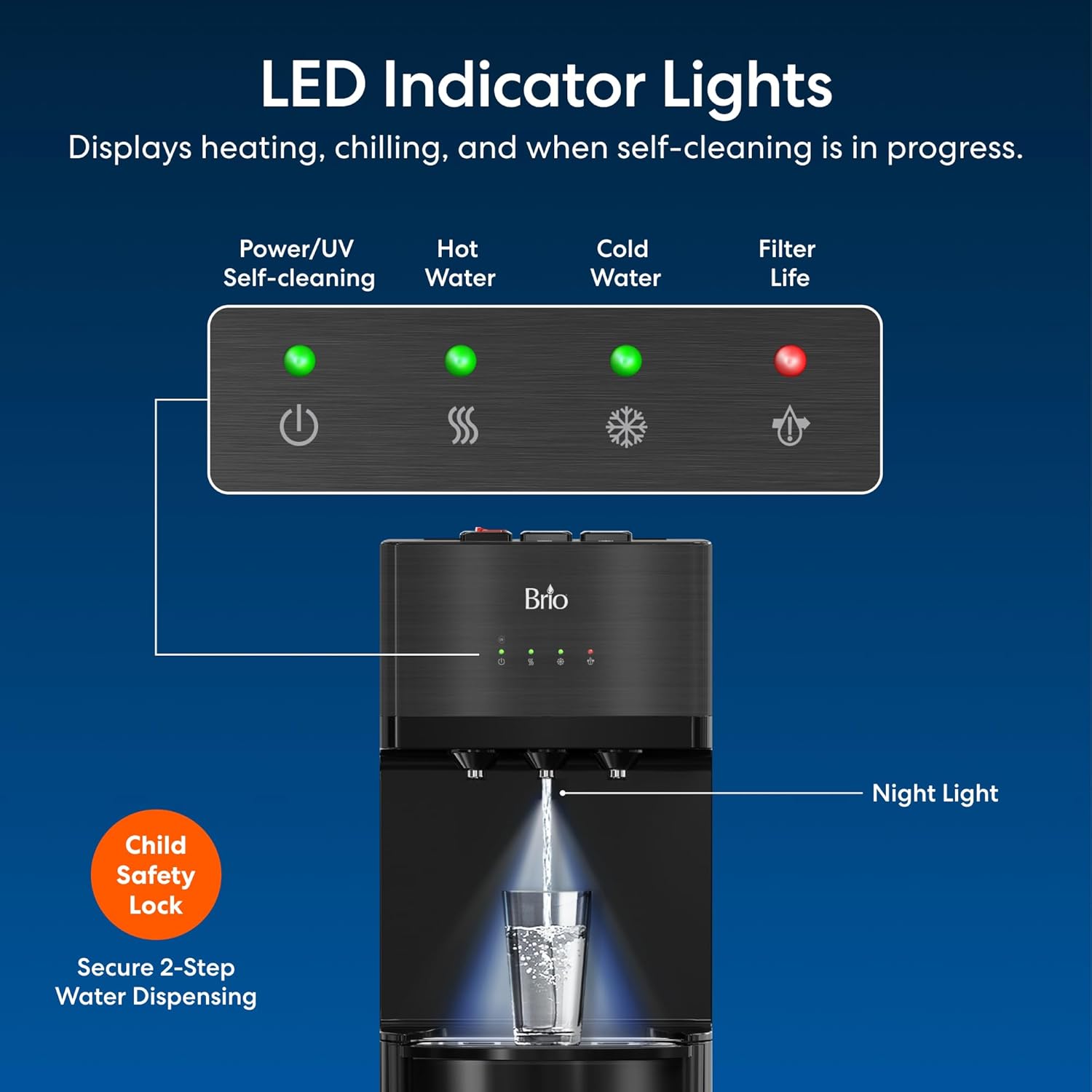
Figure 5: The LED panel displays heating, chilling, self-cleaning, and filter life status, along with a night light and child safety lock indicator.
6. Maintenance
6.1 Automatic UV Self-Cleaning
The Brio water cooler features an automatic UV self-cleaning system. This UVC cycle sanitizes the cold water tank, eliminating contaminants and protecting against biofilms. This process is automated and requires no user intervention.

Figure 6: The automatic UV self-cleaning system eradicates bio-contaminants, improves water taste, and is 100% chemical-free.
Video 2: Demonstration of the Brio Self Cleaning Bottleless Water Cooler with Filtration, highlighting its automated cleaning process.
6.2 Filter Replacement
The 2-stage filtration system includes a sediment filter and a carbon block filter. The Filter Life LED indicator will signal when it's time for replacement. For replacement filters, search for “Brio MIB200PKF” 2-Stage Filter Replacement Kit.

Figure 7: Diagram illustrating the two stages of filtration: Stage 1 Sediment filter (removes coarse particles) and Stage 2 Carbon Block filter (removes chlorine, tastes, odors, VOCs, pesticides, and herbicides).
6.3 Drip Tray Cleaning
The drip tray should be regularly emptied and cleaned to maintain hygiene. Simply slide out the tray, dispose of any collected water, wash with mild soap and water, and then reinsert.
7. Troubleshooting
If you encounter any issues with your Brio water cooler, please refer to the common problems and solutions below. If the problem persists, contact Brio customer support.
- No Water Dispensing:
- Ensure the main water supply is turned on.
- Check that the water inlet tube is securely connected.
- Verify that the filters are correctly installed and not clogged. Replace filters if the filter life indicator is red.
- For cold water, check if the cold water tank is frozen. Unplug the unit for several hours to allow it to thaw, then plug it back in.
- Water Not Hot/Cold Enough:
- Ensure the hot and cold control switches on the back of the unit are in the 'ON' position.
- Allow sufficient time for the unit to reach the desired temperature after initial setup or power cycling.
- Unusual Taste or Odor:
- Flush the filters thoroughly as described in the setup section.
- Ensure filters are not expired and replace them if necessary.
- Allow the self-cleaning UV cycle to complete.
8. Specifications
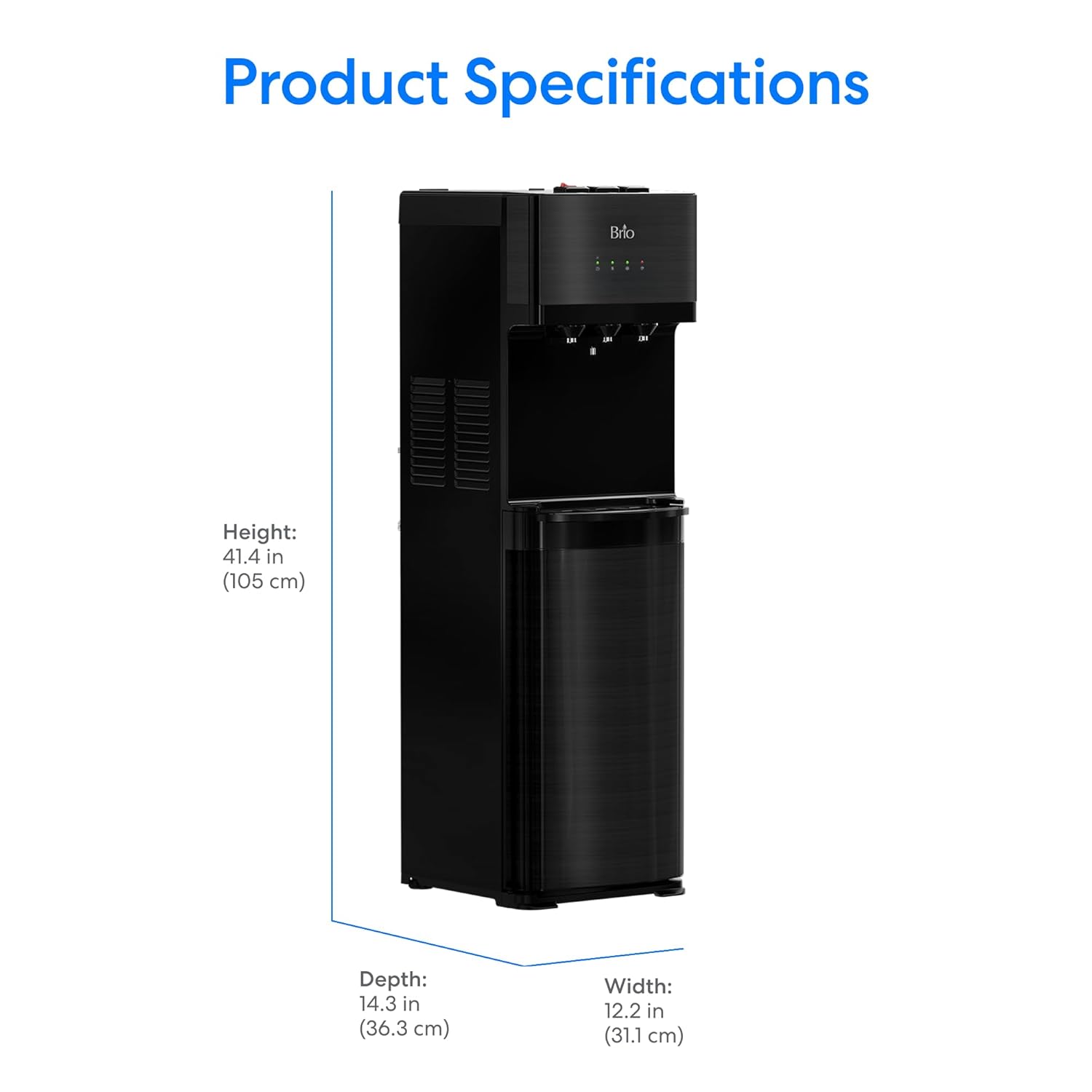
Figure 8: Product dimensions: Height 41.4 in (105 cm), Depth 14.3 in (36.3 cm), Width 12.2 in (31.1 cm).
| Attribute | Detail |
|---|---|
| Model Number | CLPOU520UVF2BLK |
| Brand | Brio |
| Product Dimensions | 13.5"D x 12"W x 40.5"H (34.3 cm D x 30.5 cm W x 102.9 cm H) |
| Material | Stainless Steel |
| Capacity (Filter Life) | 1500 Gallons |
| Color | Black |
| Manufacturer | Brio |
| First Available Date | August 8, 2020 |
9. Warranty and Support
For warranty information, product support, or to purchase replacement parts and filters, please contact Brio customer service. While a standard warranty period typically applies, Brio is known for standing behind its products. Refer to your purchase documentation for specific warranty terms or visit the official Brio website for assistance.
You can find more information about Brio products and support on their official store page: Brio Store.


