
1. Introduction
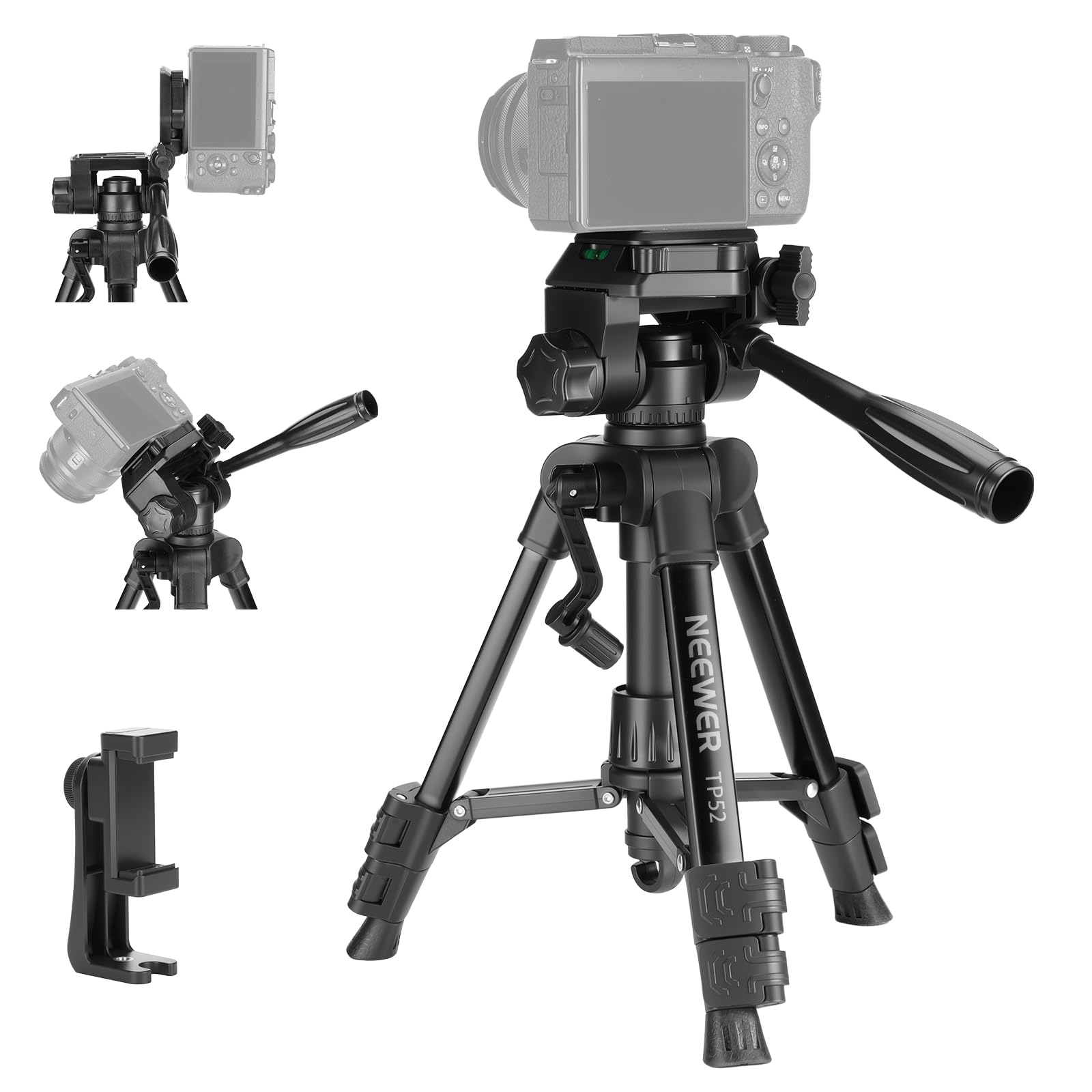
The NEEWER TP52 Mini Desk Tripod is designed for ultimate simplicity and affordability, ideal for beginners requiring essential functions without complexity. This compact and portable tripod is suitable for various devices, including DSLRs, mirrorless cameras, smartphones, camcorders, and webcams.

2. Setup
2.1 Package Contents
Your NEEWER TP52 Mini Desk Tripod package includes:
- 1 x Mini Tripod
- 1 x Phone Holder
- 1 x Quick Release Plate
- 1 x Carrying Bag

2.2 Attaching Your Device
The tripod features a standard 1/4" screw for direct attachment of cameras. For smartphones, use the included phone holder.
- For Cameras: Align the 1/4" screw on the quick release plate with the tripod mount on your camera. Securely tighten the screw. Then, slide the quick release plate with your camera onto the tripod head until it locks into place.
- For Smartphones: Attach the phone holder to the quick release plate using the 1/4" screw. Securely tighten. Then, expand the phone holder to fit your smartphone and place it in the holder. Slide the quick release plate with the phone holder onto the tripod head until it locks.

2.3 Initial Stability Check
Ensure all quick flip leg locks are securely fastened and the device is firmly mounted before use. The tripod features 360° rotating feet and non-slip rubber pads for enhanced stability.

2.4 Unboxing and Setup Video
Watch this video for a detailed guide on unboxing and setting up your NEEWER Mini Desk Tripod.
3. Operating Instructions
3.1 Adjusting Height
The tripod's height can be adjusted from 11.4" (29 cm) to 24.8" (63 cm).
- Leg Extension: Flip open the quick flip leg locks on each leg to extend them to your desired length. Securely close the locks.
- Central Axis Adjustment: Use the hand crank to precisely adjust the central axis height by up to 4.3" (11 cm).

3.2 Using the 3-Way Pan Tilt Head
The integrated 3-way pan tilt head allows for flexible shooting angles.
- Panoramic Shots: Rotate the head 360° for sweeping panoramic views.
- Vertical Captures: Adjust for 90° vertical shooting.
- Tilt Movements: Utilize 180° tilt movements for various perspectives, including horizontal, overhead, and macro photography.
- Leveling: Use the two built-in bubble levels to ensure your setup is perfectly aligned.


3.3 Enhancing Stability
For added stability, especially with heavier equipment or in windy conditions, utilize the counterweight hook located at the bottom of the central axis. Attach a weight (e.g., a bag filled with sand or rocks) to this hook.

3.4 Product Demonstration Video
See the NEEWER Entry Level Version Mini Desk Phone Tripod in action, demonstrating its features and ease of use.
4. Maintenance
To ensure the longevity and optimal performance of your NEEWER TP52 Mini Desk Tripod, follow these simple maintenance guidelines:
- Cleaning: Wipe down the tripod with a soft, dry cloth after each use to remove dust, dirt, or moisture. For stubborn grime, use a slightly damp cloth and then dry thoroughly. Avoid harsh chemicals or abrasive cleaners.
- Storage: Store the tripod in its included carrying bag in a cool, dry place away from direct sunlight and extreme temperatures.
- Inspection: Periodically check all screws, locks, and moving parts for any signs of wear or looseness. Tighten as necessary.
- Lubrication: Moving parts generally do not require lubrication. If any part feels stiff, consult professional advice before applying any lubricants.
5. Troubleshooting
If you encounter any issues with your NEEWER TP52 Mini Desk Tripod, consider the following common solutions:
- Device Instability:
- Ensure the quick release plate is fully engaged and locked into the tripod head.
- Verify that all leg locks are securely closed after extending the legs.
- Check that the device (camera/phone) is properly mounted and tightened onto the quick release plate.
- If using a heavy device, attach a counterweight to the bottom hook for added stability.
- Difficulty Adjusting Height/Angle:
- Ensure all locking knobs for the pan/tilt head and central axis are loosened before attempting to adjust.
- Check for any obstructions or debris in the moving parts.
- Tripod Sliding:
- Ensure the non-slip rubber pads on the feet are clean and free of oil or dirt.
- Place the tripod on a flat, stable surface whenever possible.
If the issue persists, please refer to the support section for further assistance.
6. Specifications
| Feature | Detail |
|---|---|
| Model Name | TP52 |
| Brand | NEEWER |
| Material | Metal, Plastic |
| Item Weight | 0.77 Kilograms (1.7 lbs) |
| Weight Limit | 4.4 Pounds (2 kg) |
| Maximum Height | 24.8 Inches (63 cm) |
| Minimum Height | 11.4 Inches (29 cm) |
| Folded Size | 12.2 Inches (31 cm) |
| Tripod Head Type | 3-Way Pan Tilt Head |
| Compatible Devices | Camera, Smartphone, Camcorder, Action Camera |
| Special Features | Lightweight, Portable, Rotatable, Adjustable, Compact, Hand Crank, Counterweight Hook, Bubble Levels |
| UPC | 191073113497 |
7. Warranty
The NEEWER TP52 Mini Desk Tripod comes with a 1 Year Manufacturer Warranty. Please retain your proof of purchase for any warranty claims.
8. Support
For further assistance, technical support, or inquiries regarding your NEEWER TP52 Mini Desk Tripod, please visit the official NEEWER website or contact their customer service department.
You can also visit the NEEWER Store on Amazon for more product information and resources.


