
Introduction
The HeadRush VX5 is an intuitive vocal effects pedal featuring industry-standard Antares AutoTune technology. Designed for real-world performance and real-time vocal processing, the VX5 provides vocalists with confidence and creative control through a wide range of pro-level audio effects in a compact package. At its heart is the iconic AutoTune algorithm, expanding the scope of effects available to vocalists for both live stage performance and studio sets. This manual provides comprehensive instructions for setting up, operating, and maintaining your VX5 Vocal Effects Processor.
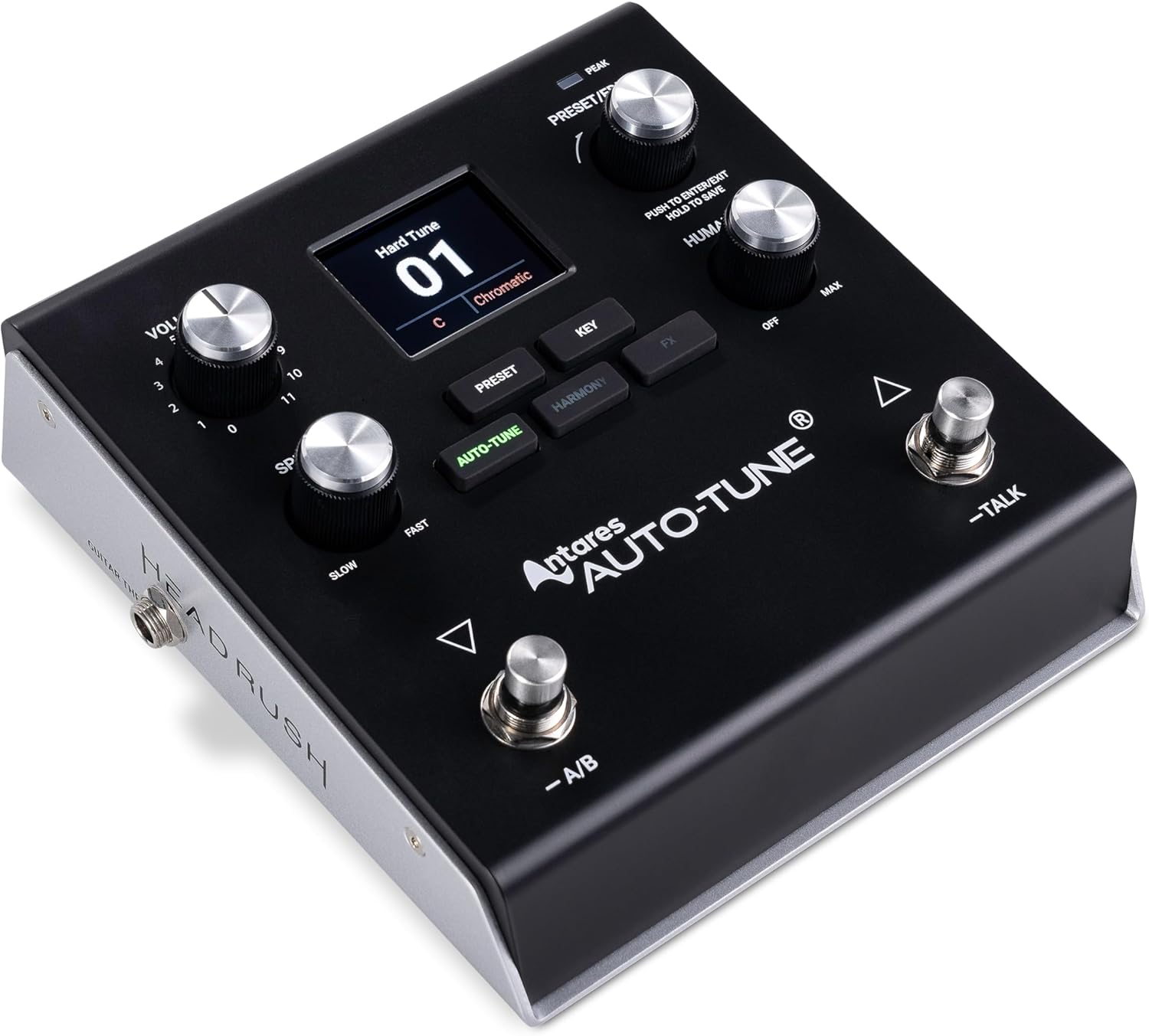
Figure 1: HeadRush VX5 Vocal Effects Processor. This image shows the compact design of the pedal with its display screen, control knobs, and footswitches.
Setup
Unboxing and Initial Inspection
Carefully remove your HeadRush VX5 from its packaging. Ensure all components are present, including the VX5 unit and the power adapter. Inspect the unit for any signs of damage during transit. If any components are missing or damaged, please contact customer support immediately.
Connecting Your VX5
The VX5 offers versatile connectivity options for various setups:
- Microphone In (XLR, Mono, Balanced): Connect your microphone here. The VX5 features a premium XLR mic preamp with switchable +48V phantom power for condenser microphones.
- Main Out (XLR, Balanced): Connect this output to your mixer, audio interface, or PA system. Includes a ground lift switch to eliminate unwanted noise issues caused by ground loops.
- 1/8" Stereo Phones Out: For connecting headphones for monitoring or silent practice.
- 1/4" TS Mono Guitar In: Connect your guitar or other instrument here for the Intelligent Harmonizer feature.
- 1/4" TS Mono Guitar Thru: Passes the dry guitar signal directly through to an amplifier or other processing.
- USB-B Port: Connect to a computer for 24-bit/48kHz USB audio interface functionality (recording vocals directly) and USB MIDI connectivity for automating preset changes.
- Power In (Adapter Included): Connect the provided 9V DC, 1.0A power adapter.

Figure 2: Rear panel of the HeadRush VX5, illustrating all input and output ports including XLR microphone input, XLR main output, 1/8" headphone jack, 1/4" guitar input and thru, USB-B port, and power input.
Operating Instructions
Powering On/Off
To power on the VX5, connect the provided power adapter to the Power In port and then to a power outlet. The unit will automatically power on. To power off, simply disconnect the power adapter.
Antares AutoTune Functionality
The VX5 features integrated Antares AutoTune for real-time pitch correction. Use the dedicated Retune Speed knob to adjust the speed at which pitch correction is applied, from subtle to a hard AutoTune effect. The Humanize knob allows you to control the naturalness of the pitch correction, making it sound more human or more robotic. You can also select the key and scale for AutoTune via the display and dedicated buttons.

Figure 3: A close-up view of the VX5's display, showing the 'Hard Tune' preset with chromatic key selected, and the Retune Speed and Humanize knobs.
Intelligent Harmonizer Mode
The Intelligent Harmonizer mode automatically generates vocal harmonies. These harmonies can be based on your selected key and scale, or on chords from a connected instrument (guitar or keyboard). This feature is ideal for solo performers or for adding depth to your vocal arrangements.

Figure 4: The VX5 display showing the Intelligent Harmonizer mode, indicating options for generating vocal harmonies based on the vocalist's selected key/scale or connected instrument chords.
Effects Chain and Presets
The VX5 allows you to chain up to five studio-quality effects simultaneously, including compression, reverb, delay, chorus, and various flavor FX. It comes with 99 factory presets and can store up to 250 total user presets. Presets can be easily adjusted and recalled for seamless transitions during live performances or studio sessions.

Figure 5: The HeadRush VX5 in a studio setting with a microphone, highlighting its real-time performance capabilities and studio-grade effects.
Footswitch Control (A/B & Talk Mode)
The two footswitches provide hands-free control:
- A/B Mode: Toggle individual effects on/off within a preset, allowing for dynamic changes during a song.
- Talk Mode: Instantly bypasses all effects, allowing you to speak to the audience or band members without any processing on your voice. Press again to re-engage effects.

Figure 6: A foot engaging one of the footswitches on the HeadRush VX5, demonstrating its hands-free control for live performance versatility.
Maintenance
To ensure the longevity and optimal performance of your HeadRush VX5, follow these maintenance guidelines:
- Cleaning: Use a soft, dry cloth to wipe down the unit. Avoid abrasive cleaners, solvents, or waxes.
- Storage: Store the unit in a cool, dry place away from direct sunlight and extreme temperatures.
- Handling: Handle the unit with care. Avoid dropping it or subjecting it to strong impacts.
- Firmware Updates: Periodically check the official HeadRush website for firmware updates to ensure you have the latest features and bug fixes.
Troubleshooting
If you encounter any issues with your HeadRush VX5, refer to the table below for common problems and their solutions:
| Problem | Possible Cause | Solution |
|---|---|---|
| No Sound Output | Incorrect cable connections, low volume settings, effects bypassed. | Check all audio cables and ensure they are securely connected. Increase the Volume knob on the VX5. Ensure Talk Mode is disengaged and relevant effects are active. |
| Unwanted Noise/Hum | Ground loop interference, faulty cable. | Engage the Ground Lift switch on the rear panel. Try using different audio cables. Ensure power connections are secure. |
| AutoTune Not Engaging/Incorrect Pitch | Incorrect key/scale setting, AutoTune effect bypassed or set to a very slow retune speed. | Verify that the correct key and scale are selected for your performance. Ensure the AutoTune effect is enabled within the current preset and adjust Retune Speed as desired. |
| Unit Not Powering On | Power adapter not connected, faulty power outlet. | Ensure the power adapter is correctly connected to the VX5 and a working power outlet. Try a different power outlet. |
Specifications
- Item Weight: 2.64 pounds (1.2 Kilograms)
- Product Dimensions: 5.9"L x 6.5"W x 2.7"H
- Color: Black
- Style: VX5 Vocal Effects Processor
- Brand: HEADRUSH
- Voltage: 9 Volts
- Power Source: Corded Electric
- Hardware Interface: 1/4-inch Audio, 3.5mm Audio, USB-B
- Model Number: AUTOTUNE
- Presets: 99 Factory, up to 250 User Presets
- Audio Interface: Stereo 24-bit/48kHz USB
- Phantom Power: +48V Switchable
Warranty and Support
For detailed warranty information and technical support, please visit the official HEADRUSH website or contact their customer service department. It is recommended to keep your proof of purchase for any warranty claims.
You can find more products and information by visiting the HEADRUSH Store.