
Introduction
This manual provides detailed instructions for the safe and effective use of your EINSEO EAGLE-FX Male Masturbator. Please read all instructions carefully before initial use and retain this manual for future reference. This device is designed for personal use and offers a range of customizable features to enhance your experience.
Package Contents
- 1 x EINSEO EAGLE-FX Male Masturbator Device
- 1 x Phone Holder
- 1 x USB-C Charging Cable
- 2 x Interchangeable Sleeves (Pass-through & Closed Channel)
- 1 x User Manual

Product Overview
The EINSEO EAGLE-FX is designed for a customizable experience with advanced features. It includes an adjustable stroke length, multiple thrusting speeds, and interchangeable sleeves.
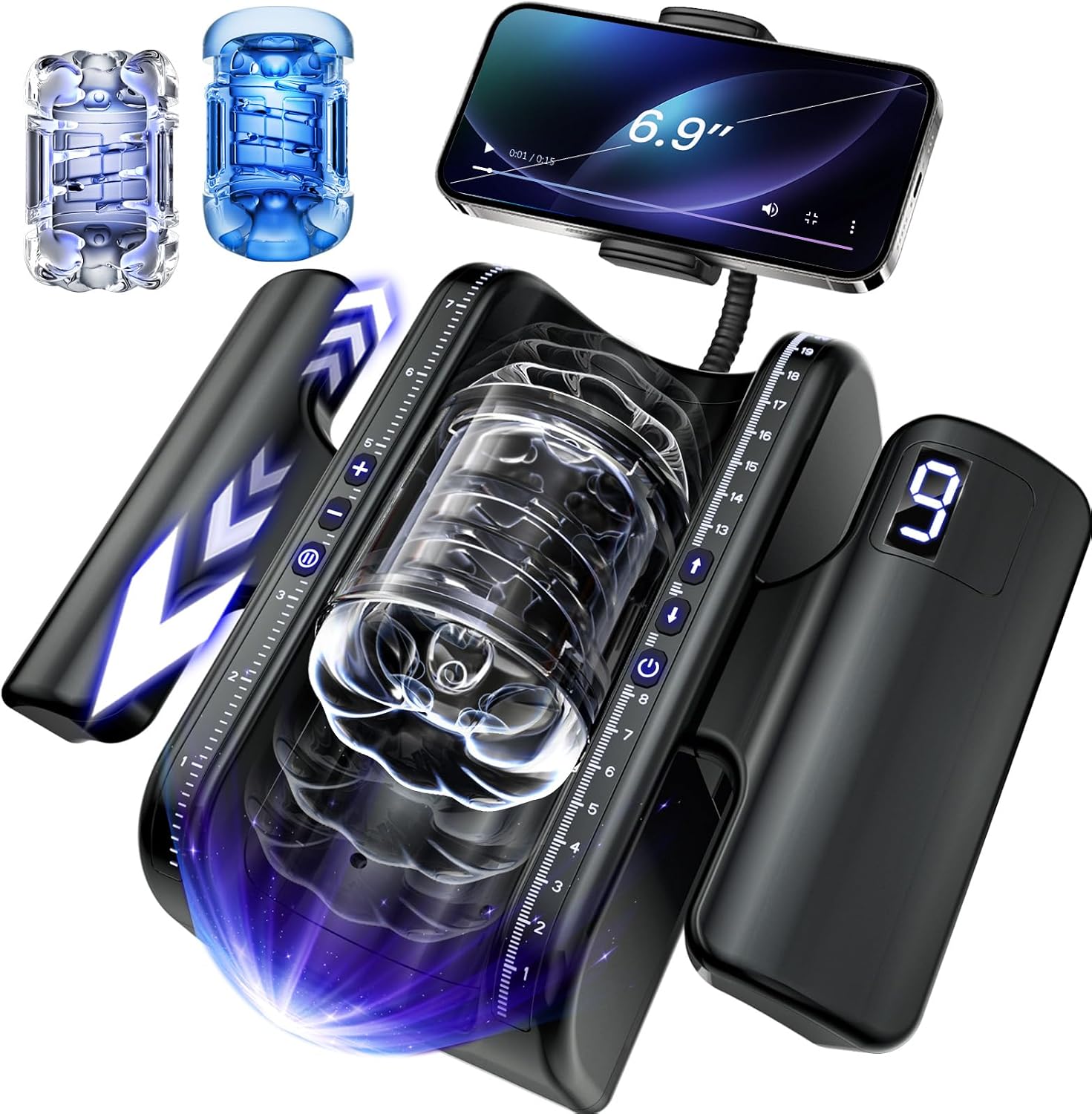
Key Features:
- Adjustable Stroke Length: Features an industry-leading 20cm adjustable thrusting stroke length for customized stimulation depth.
- 9 Thrusting Speeds: Offers 9 adjustable thrusting speeds, from gentle to rapid, for varied sensory experiences.
- Dual Interchangeable Sleeves: Includes a pass-through channel for continuous stimulation and a closed channel for intense suction. Both sleeves have a 4 cm inner diameter and are made from ultra-soft, lifelike materials.
- Ergonomic Grip: Designed with an ergonomic handle for stability and precise control during use.
- Built-in Phone Holder: A sturdy phone holder allows for hands-free viewing of videos or interactive experiences.
- Whisper-Quiet Operation & LCD Display: Operates with low noise for discretion and features an LCD display for easy mode and speed adjustments.
- USB Rechargeable: Fast USB-C charging, fully powered in approximately 3.5 hours.
- Detachable Design: Allows for quick and effortless cleaning.

Setup
Charging the Device:
- Locate the USB-C charging port on the device.
- Connect the provided USB-C cable to the device and a compatible 5V USB power supply (not included).
- The LCD display will indicate charging status. A full charge takes approximately 3.5 hours.

Attaching Accessories:
- Handles: Secure the ergonomic handles to the sides of the device using the integrated straps. Ensure they are tightly fastened for stability.
- Phone Holder: Attach the flexible phone holder to the designated port on the device. Adjust the angle and tightness as desired. Insert your smartphone into the holder.

Operating Instructions
- Power On/Off: Long press the Power Button (U) for 2 seconds to turn the device on or off.
- Reset Position: Short press the Power Button (U) to reset the sleeve to its initial position.
- Adjust Thrusting Speed: Use the Speed Adjustment Buttons (+/-) to gradually increase or decrease the thrusting speed (9 levels available).
- Adjust Stroke Length: Use the Extension Adjustment Buttons (up/down arrows) to increase or decrease the thrusting range (3 levels available).
- Pause/Resume: Short press the Pause Button (II) to pause the device. Press any button to resume.
- Mode Selection: The device offers various modes that alter the movement pattern of the sleeve. Experiment with different modes to find your preference. The lights on the device will indicate the current mode.


Maintenance & Cleaning
To ensure hygiene and prolong the lifespan of your device, regular cleaning is essential. The detachable design makes cleaning easy.
- Disassemble: Carefully detach the sleeve from the main device body.
- Clean Sleeve: Wash the silicone sleeve thoroughly with mild soap and warm water. You can flip the sleeve inside out for a more complete clean. Rinse completely.
- Dry Sleeve: Allow the sleeve to air dry completely in a cool, well-ventilated area before reassembly.
- Clean Device Body: Wipe the main device body with a damp cloth. Do not wash the device directly with water to prevent water ingress and damage to electronic components.
- Reassemble: Once all parts are dry, carefully reassemble the device.

Troubleshooting
- Device not turning on: Ensure the device is fully charged. If the issue persists, perform a full recharge before resuming regular usage.
- Weak thrusting/vibration: Check battery level. Recharge if low. Ensure the sleeve is correctly installed.
- Unusual noise: Disassemble and reassemble the sleeve to ensure proper fit. If noise continues, discontinue use and contact support.
- App connectivity issues: Ensure Bluetooth is enabled on your smartphone and the device is powered on. Follow the app's instructions for adding the device.
Specifications
| Feature | Detail |
|---|---|
| Model Number | EAGLE-FX |
| Brand | EINSEO |
| Material | Silicone |
| Color | Black |
| Package Dimensions | 11.46 x 10.47 x 6.26 inches |
| Weight | 4.61 Pounds |
| Batteries | 1 x 9V batteries (included) |
| Charging Time | Approx. 3.5 hours |
| Water Resistance Level | Water Resistant |
Warranty & Support
For warranty information or technical support, please refer to the contact details provided in the original product packaging or visit the official EINSEO website. Keep your purchase receipt for warranty claims.