
1. Product Overview
The ASMAX Mini Bike Pump T30 is a compact and portable electric air pump designed for inflating bicycle tires, sports balls, and other inflatables. It features a high-pressure output, a rechargeable battery, and a clear LCD display for real-time pressure monitoring.

Image 1.1: ASMAX Mini Bike Pump T30 and included accessories.
2. Package Contents
Carefully unbox your ASMAX Mini Bike Pump T30 and verify that all components are present:

Image 2.1: All items included in the ASMAX Mini Bike Pump T30 package.
- 1 x ASMAX Mini Smart Air Pump (T30)
- 1 x Ball Needle
- 1 x Dunlop Valve Adapter
- 1 x Schrader Valve Adapter
- 1 x Presta Valve Adapter
- 1 x Threaded Schrader Valve Hose (12 cm)
- 1 x Type-C Charging Cable
- 1 x User Manual
- 1 x Cloth Bag
- 1 x Lanyard
3. Setup and Charging
3.1 Initial Charge
Before first use, fully charge the pump. Connect the provided Type-C charging cable to the pump's charging port and to a USB power source. The battery indicator on the LCD display will show charging status. A full charge typically takes approximately 1.5 hours.

Image 3.1: The pump features a 500mAh battery, capable of inflating multiple tires on a single charge.
3.2 Attaching the Air Hose and Adapters
The pump comes with various adapters to suit different valve types:
- Schrader Valve: Use the threaded Schrader valve hose directly.
- Presta Valve: Attach the Presta valve adapter to the Schrader hose.
- Dunlop Valve: Attach the Dunlop valve adapter to the Schrader hose.
- Ball Needle: Attach the ball needle to the Schrader hose for sports balls.

Image 3.2: The pump is compatible with Presta, Schrader, and Dunlop valves, as well as ball needles.
4. Operating Instructions
4.1 Powering On/Off
- To power on, press and hold the power button (usually the 'O' button) for a few seconds.
- To power off, press and hold the power button again. The pump will also automatically power off after a period of inactivity.
4.2 Checking Tire Pressure
Once the pump is connected to the valve, the LCD display will show the current tire pressure in real-time. You can switch between PSI and BAR units using the mode button (refer to the specific button layout on your device).

Image 4.1: The bright LCD display provides instant pressure readings and battery status.
4.3 Setting Desired Pressure and Inflation
- Connect the appropriate adapter and hose to the tire valve.
- Power on the pump. The display will show the current pressure.
- Use the '+' and '-' buttons to set your desired target pressure.
- Press the power/start button to begin inflation. The pump will automatically stop once the target pressure is reached.
- Disconnect the hose from the valve.

Image 4.2: The pump inflates quickly and stops automatically at the set pressure.
4.4 Additional Functions (4-in-1)
The ASMAX T30 serves multiple purposes:
- Tire Pump: For bicycles, motorcycles, and other small tires.
- Ball Pump: Use the ball needle adapter for sports balls.
- Tire Pressure Gauge: Provides real-time pressure readings without inflation.
- LED Light: Integrated LED light for visibility during night use or in low-light conditions.

Image 4.3: The ASMAX T30 offers four distinct functions in one compact device.
5. Maintenance
5.1 Cleaning
Wipe the pump's exterior with a soft, dry cloth. Do not use harsh chemicals or abrasive cleaners. Ensure no moisture enters the charging port or air outlet.
5.2 Storage
Store the pump in a cool, dry place, away from direct sunlight and extreme temperatures. Keep it out of reach of children. For long-term storage, ensure the battery is partially charged (around 50%) to prolong its lifespan.
5.3 Battery Care
To maintain battery health, avoid fully discharging the pump frequently. Recharge the pump when the battery indicator is low. If not used for extended periods, charge the pump every 3-6 months.
6. Troubleshooting
- Pump does not turn on: Ensure the battery is charged. Connect the pump to a power source using the Type-C cable and try again.
- Pump does not inflate: Check that the air hose and adapters are securely connected to both the pump and the valve. Ensure the valve is not obstructed. Verify that the desired pressure is set above the current pressure.
- Inaccurate pressure reading: Ensure the connection to the valve is tight and there are no air leaks. Recalibrate if necessary (refer to specific instructions in the included user manual for calibration steps, if any).
- Pump is noisy: A certain level of operating noise is normal for air pumps. If the noise is excessive or unusual, ensure the pump is on a stable surface and not obstructed.
- Battery drains quickly: Ensure the pump is fully charged before use. Battery performance can be affected by extreme temperatures.
If issues persist, please refer to the warranty and support section for assistance.
7. Specifications
| Feature | Specification |
|---|---|
| Model Number | T30 |
| Dimensions (L x W x H) | 7.6 x 4.6 x 3.5 cm (2.99 x 1.81 x 1.37 inches) |
| Weight | 123 grams (0.27 lbs) |
| Maximum Pressure | 120 PSI |
| Airflow Capacity | 14 Liters per minute |
| Battery Capacity | 500 mAh |
| Charging Time | Approx. 1.5 hours |
| Operating Temperature | -10°C to 45°C |
| Noise Level | ≤ 80 dB (at 1.5m) |
| Material | Plastic |
| Power Source | Battery Powered |
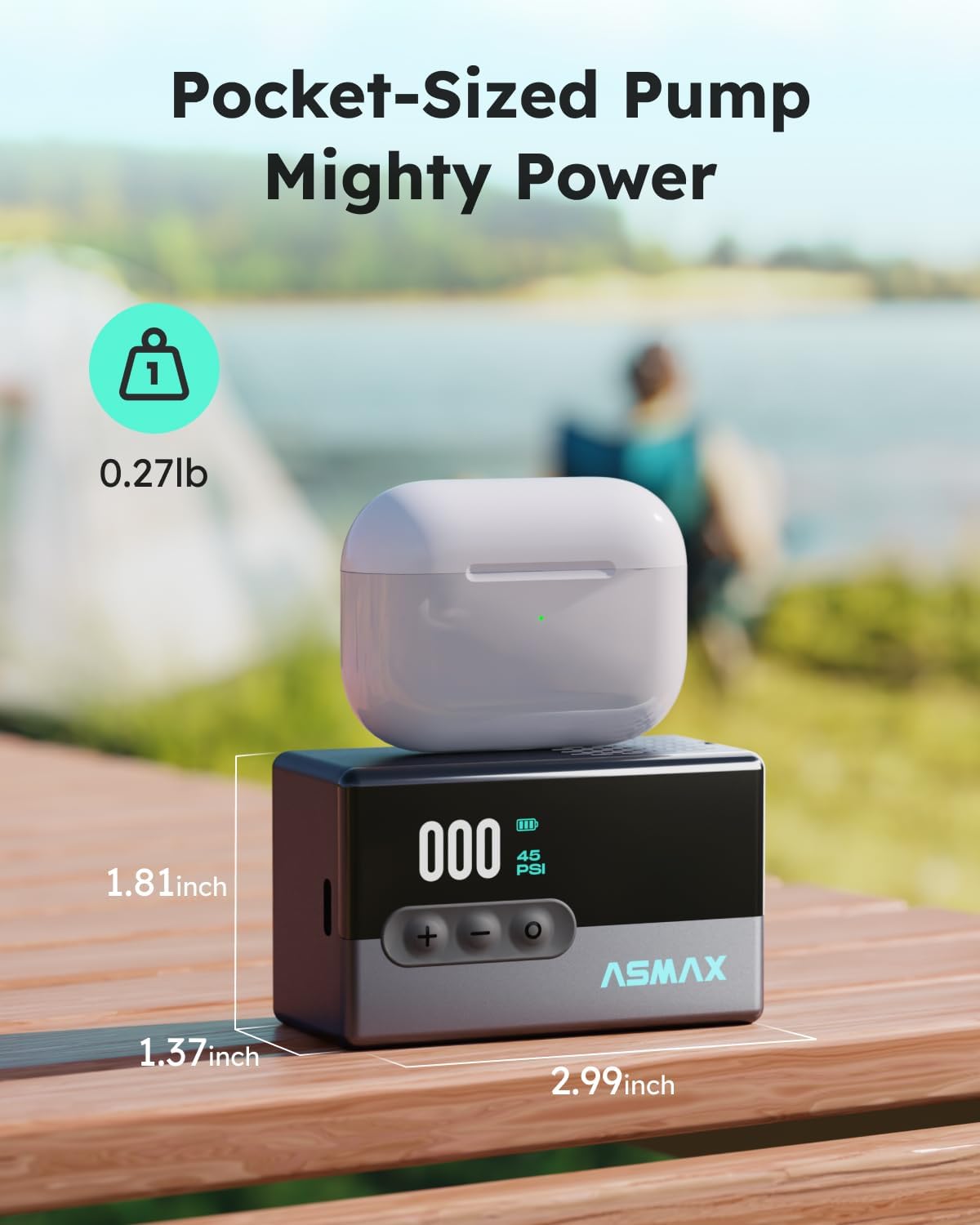
Image 7.1: The compact size of the ASMAX T30, measuring 2.99 x 1.81 x 1.37 inches.
8. Warranty and Support
ASMAX is committed to providing quality products and customer satisfaction.
- Warranty: This product comes with a 24-month warranty from the date of purchase, covering manufacturing defects.
- Return Guarantee: Enjoy a 30-day unconditional return guarantee.
- Customer Support: We offer 24/7 customer support to assist with any inquiries or issues.
- Technical Support: Lifetime customer and technical support are provided for your ASMAX T30 pump.
For warranty claims or technical assistance, please contact ASMAX customer service through the retailer's platform or the contact information provided in your product packaging.