Introduction
This manual provides comprehensive instructions for the setup, operation, and maintenance of your PZL RF396C Replacement Remote Control. This remote is specifically designed for use with JLDK.111.17.01 adjustable bed bases, offering a seamless replacement experience.
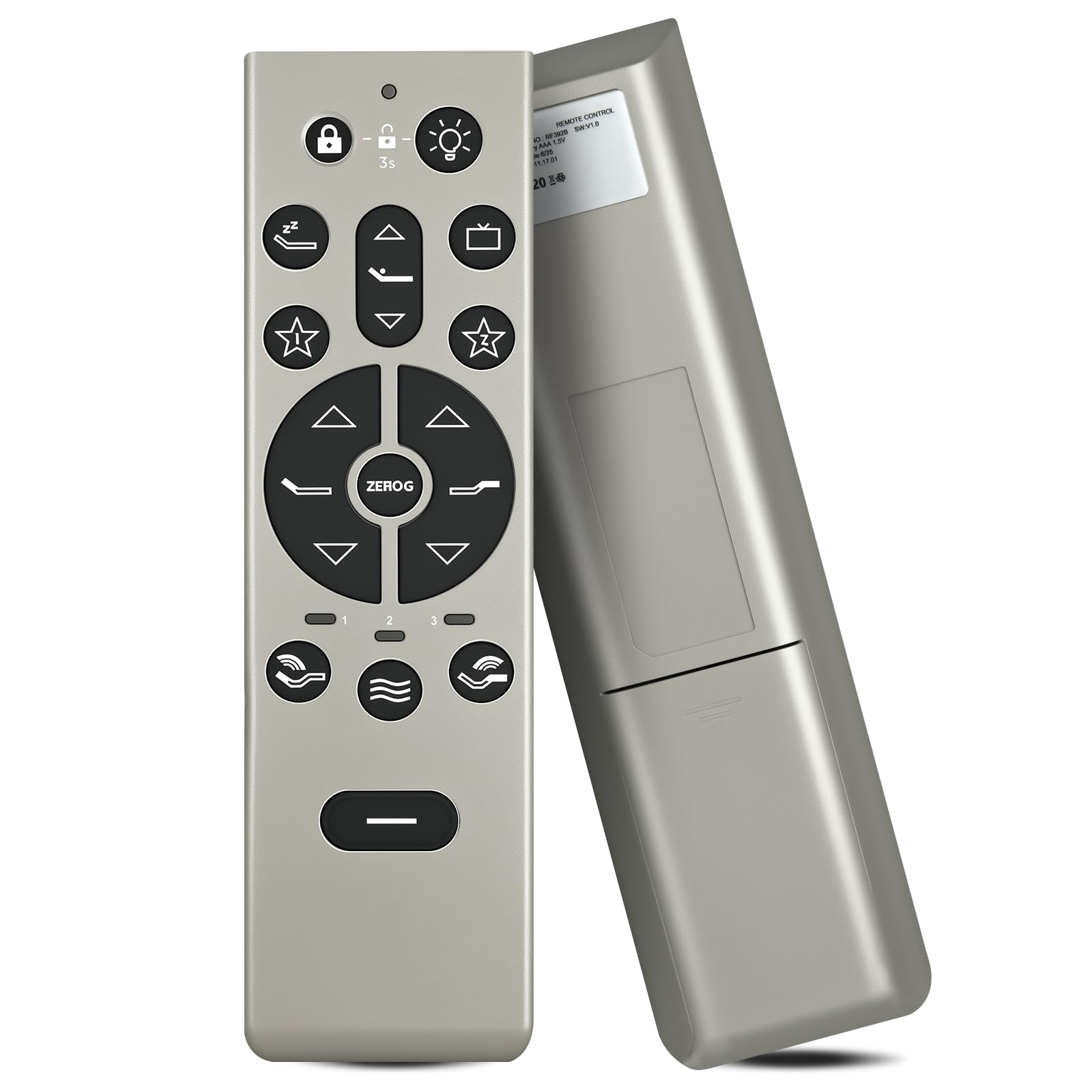
Image 1: The PZL RF396C remote control in use, demonstrating its ergonomic design.
Setup
1. Battery Installation
- The remote control requires batteries (not included) for operation.
- Locate the battery compartment on the back of the remote control.
- Open the battery compartment cover.
- Insert the correct type and number of batteries, observing the polarity (+/-) markings inside the compartment.
- Close the battery compartment cover securely.

Image 2: The back of the RF396C remote control, indicating the battery compartment location.
2. Initial Use and Pairing
This remote control is designed for immediate use and typically does not require programming or pairing. Once batteries are correctly installed, it should be ready to operate your compatible adjustable bed base.
Operating Instructions
General Operation Guidelines
- The RF396C remote control utilizes infrared (IR) technology for signal transmission, ensuring a strong and fast response.
- For optimal performance, maintain a clear line of sight between the remote control and the adjustable bed base's receiver.
- The effective operational distance is over 26 feet (8 meters), with a control angle of more than 120 degrees.

Image 3: Illustration of the remote control's operational range of 8 meters.
Button Functions
Familiarize yourself with the buttons on your remote control:

Image 4: Detailed view of the RF396C remote control's button layout.
- Lock/Unlock Button: (Padlock icon) Press to lock or unlock the remote control to prevent accidental adjustments.
- Light Button: (Light bulb icon) Activates or deactivates the bed's under-bed lighting or a built-in flashlight feature.
- Head Up/Down: (Up/Down triangle arrows for head section) Adjusts the head section of the bed upwards or downwards.
- Foot Up/Down: (Up/Down triangle arrows for foot section) Adjusts the foot section of the bed upwards or downwards.
- Zero Gravity (ZEROG): (Central button with 'ZEROG' text) Activates the pre-programmed Zero Gravity position, which elevates the head and foot to a position that may relieve pressure on the back.
- Memory Presets: (Star icons, 1, 2, 3) These buttons allow you to save and recall your favorite bed positions. Consult your bed base manual for specific programming instructions if needed.
- Massage Functions: (Wave icons) Activates and adjusts the intensity or pattern of the bed's massage features.
- Flat Button: (Long horizontal bar button) Returns the bed to a completely flat position.
- TV/Monitor Preset: (TV screen icon) Activates a pre-programmed position optimized for watching television.
- Sleep/Snore Preset: (Zz icon) Activates a pre-programmed position designed to reduce snoring or improve sleep comfort.

Image 5: Close-up on the massage, memory, and flat buttons.

Image 6: Focus on the central control area, including the Zero Gravity button and material composition.
Maintenance
Cleaning
To clean your remote control, gently wipe it with a soft, dry cloth. Avoid using liquid cleaners, abrasive materials, or chemical solvents, as these can damage the remote's surface or internal components.
Battery Replacement
Replace the batteries when the remote control's response becomes slow, inconsistent, or stops functioning. Always use new batteries of the specified type and ensure correct polarity during installation.
Storage
Store the remote control in a dry place, away from direct sunlight, high humidity, and extreme temperatures, to prolong its lifespan.
Troubleshooting
Remote Not Responding
- Check Batteries: Ensure batteries are correctly installed with the proper polarity (+/-).
- Replace Batteries: If batteries are old or depleted, replace them with a fresh set.
- Clear Obstructions: Verify that there are no objects blocking the signal path between the remote control and the bed base's receiver.
- Check Range: Ensure you are within the operational range (approximately 26 feet or 8 meters) and pointing the remote towards the bed base.
Specific Functions Not Working
- Button Check: Inspect the unresponsive button to ensure it is not stuck or physically damaged.
- Battery Power: Re-check battery power, as low battery levels can sometimes affect specific functions before total failure.
Specifications
| Model Number | RF396C |
| Brand | PZL |
| Compatibility | JLDK.111.17.01 Adjustable Bed Base |
| Material | ABS (Environmental Protection Material), Soft Silicon Buttons |
| Operational Distance | Over 26 feet (8 meters) |
| Control Angle | More than 120 degrees |
| Dimensions | 1.5 x 1 x 0.6 inches |
| Item Weight | 1.92 ounces |
| Power Source | Batteries (Not Included) |
| Special Feature | Ergonomic Design |
Warranty and Support
Warranty Information
Specific product warranty details are not included in this manual. Please refer to the product packaging or contact the manufacturer directly for comprehensive warranty information.
Customer Support
For any questions regarding your order, product model, or technical assistance, please contact PZL customer service. They are committed to providing timely support within 24 hours.


