1. Introduction
This user manual provides detailed instructions for the EZON T037 Heart Rate Monitor Chest Strap and Digital Watch. It covers product features, setup, operation, maintenance, and troubleshooting to ensure optimal performance and longevity of your device. Please read this manual thoroughly before using the product.
2. Package Contents
Upon unpacking, please verify that all the following items are included:
- EZON T037 Digital Watch
- HRM Chest Strap
- Watch Band (pre-installed or included separately)
- User Manual (this document)

Image: The EZON T037 Digital Watch, its accompanying HRM Chest Strap, and an additional watch band.
3. Product Overview
The EZON T037 is a comprehensive fitness tracking system designed for precise heart rate monitoring and workout analysis. It consists of a digital watch and a chest strap heart rate monitor.
3.1 Key Features
- Precise Heart Rate Monitoring
- Workout Calorie Estimation
- Easy-to-Use Display Watch
- Built-in Stopwatch and Hourly Chime
- Personalized Settings for Heart Rate Zones
- 5ATM Waterproof Durability
- Ultra-Long Battery Life (CR2032)

Image: Overview of the EZON T037 kit highlighting its main functions and features.
4. Getting Started (Setup)
4.1 Initial Startup
For first-time use, the watch may be in a power-saving state. To activate it:
- Locate the four side buttons on your watch.
- Simultaneously press and hold all four buttons.
- Continue holding until the screen illuminates.
- Release the buttons to complete the startup process.
4.2 Wearing the Heart Rate Chest Strap
Proper placement of the chest strap is crucial for accurate heart rate readings.
- Connect the elastic chest strap and belt: Attach the sensor module to the elastic strap.
- Adjust the length of the strap: Ensure the strap fits snugly but comfortably around your chest, just below your pectoral muscles. It should not be too tight or too loose.
- Wet the rubber pads: Moisten the two electrode areas on the back of the chest strap with water or electrode gel to ensure good conductivity.
- Wear the heart rate belt: Position the sensor module centrally on your chest.
- Final adjustment: Make any final adjustments to the strap length for comfort and secure fit.

Image: Step-by-step guide on how to correctly wear the heart rate chest strap.
4.3 Personalized Settings
To optimize heart rate monitoring and calorie calculation, configure your personal data:
- Enter your gender, age, and weight into the watch settings. Refer to the watch's on-screen menu for navigation.
- Customize your heart rate safety zone. This allows the watch to alert you if your heart rate exceeds or falls below your predefined safe range.
5. Operating Instructions
5.1 Basic Watch Functions
- Time and Date Display: The watch displays current time and date. Use the 'MODE' button to cycle through display modes.
- Stopwatch: The built-in stopwatch can track workout durations up to 100 hours. Press 'ST/STP' to start/stop and 'RESET' to clear.
- Hourly Chime: An optional feature that provides an audible alert every hour. This can be enabled or disabled in the watch settings.
- Backlight: Press the 'LIGHT' button to illuminate the display for better visibility in low-light conditions.
5.2 Heart Rate Monitoring
Once the chest strap is worn correctly and the watch is activated, the watch will automatically display your real-time heart rate.

Image: Real-time heart rate displayed on the watch during exercise.
5.3 Heart Rate Zones and Alerts
The EZON T037 helps you train effectively by indicating your heart rate zone. Your maximum heart rate is generally estimated as 220 minus your age.
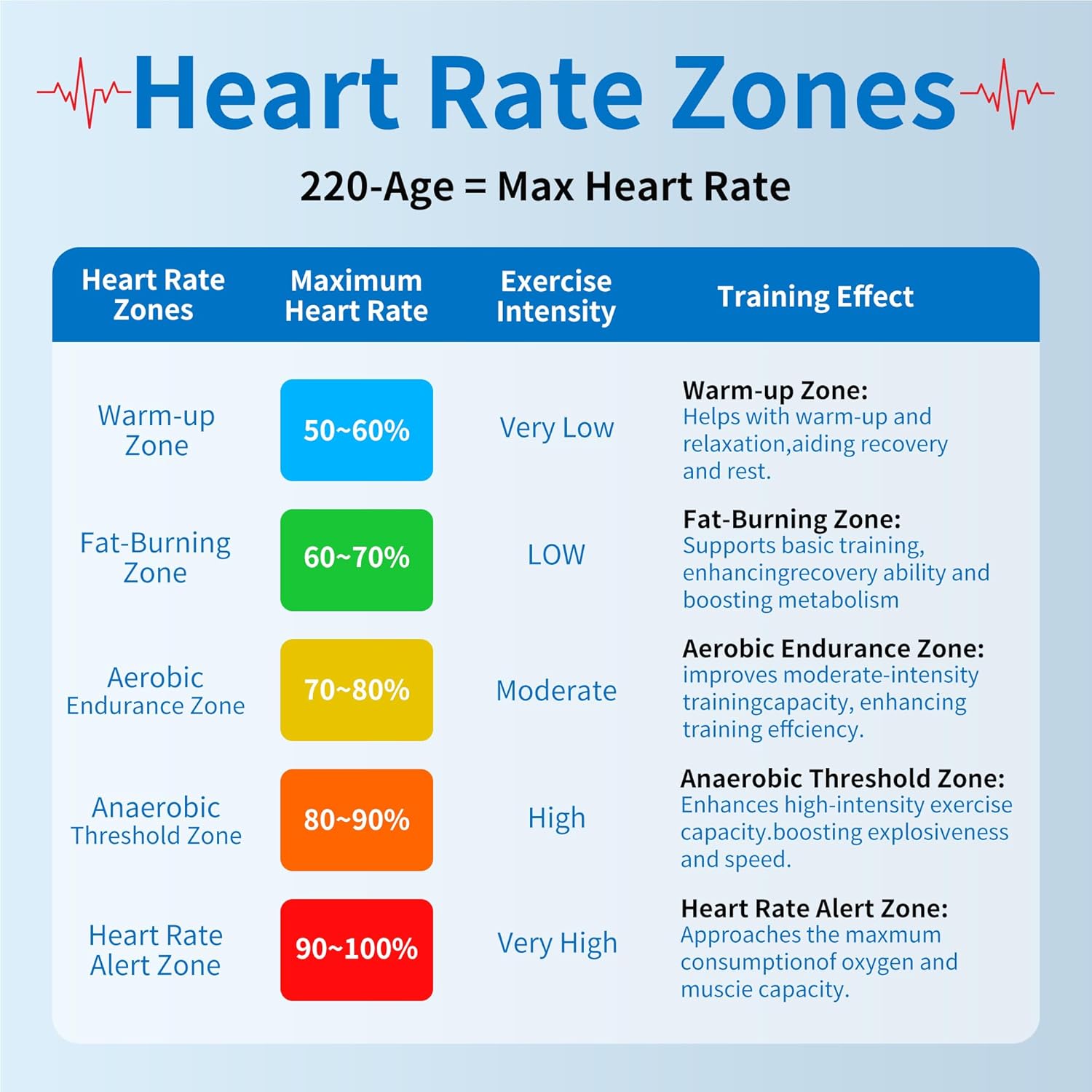
Image: Guide to understanding different heart rate training zones.
If your heart rate exceeds or falls below your personalized safety zone, the watch will emit a beep every 10 seconds as a reminder. This helps prevent overexertion or inefficient training.

Image: Visual representation of the heart rate zone alarm feature.
5.4 Calorie Tracking
When paired with the heart rate chest strap, the watch provides an estimate of calories burned during your workout sessions. This feature helps you evaluate the effectiveness of your physical activity.

Image: Estimated calorie burn displayed on the watch.
5.5 Water Resistance Guidelines
The EZON T037 watch is rated 5ATM waterproof, meaning it can withstand pressures equivalent to a depth of 50 meters. This makes it suitable for daily use and various outdoor activities.
- It is fine for handwashing and exposure to rain.
- For best care, avoid pressing buttons underwater.
- It is recommended to remove the watch before showering or swimming to prolong its lifespan, as hot water and steam can affect seals over time.

Image: The watch demonstrating its water resistance.
6. Maintenance
6.1 Cleaning
- Watch: Wipe the watch with a soft, damp cloth. Avoid using harsh chemicals or abrasive cleaners.
- Chest Strap: After each use, rinse the chest strap with clean water and hang it to dry. Do not machine wash or tumble dry.
6.2 Battery Replacement
Both the watch and the chest strap use CR2032 batteries, offering an ultra-long battery life of up to 365 days. When the battery is low, the display may dim or the device may stop functioning.
- Watch Battery: Use a small Phillips screwdriver to open the battery compartment on the back of the watch. Replace the old CR2032 battery with a new one, ensuring correct polarity. Securely close the compartment.
- Chest Strap Sensor Battery: Use a coin to twist open the battery cover on the back of the heart rate sensor module. Replace the old CR2032 battery with a new one, ensuring correct polarity. Securely close the cover.
Dispose of used batteries responsibly according to local regulations.
7. Troubleshooting
If you encounter issues with your EZON T037, refer to the following common problems and solutions:
| Problem | Possible Cause | Solution |
|---|---|---|
| Watch screen is blank after initial setup. | Watch not properly activated. | Press and hold all four side buttons simultaneously until the screen lights up. |
| No heart rate reading. | Chest strap not worn correctly; electrodes dry; battery low in chest strap. | Ensure chest strap is snug and electrodes are moistened. Check and replace chest strap battery if necessary. |
| Inaccurate heart rate readings. | Poor contact with skin; interference from other devices. | Re-moisten electrodes and adjust strap position. Move away from strong electromagnetic fields. |
| Watch display is dim or flickering. | Low watch battery. | Replace the CR2032 battery in the watch. |
| Heart rate alert beeps constantly. | Heart rate is outside the set safety zone. | Adjust your exercise intensity or reconfigure your personalized heart rate safety zone settings. |
If the problem persists, please contact customer support.
8. Technical Specifications
| Feature | Detail |
|---|---|
| Model Name | T037 |
| Brand | EZON |
| Material | Resin |
| Color | Black |
| Screen Size | 1.2 Inches |
| Item Weight | 2.12 Ounces |
| Water Resistance | 5ATM (50 meters) |
| Battery Type | CR2032 (Watch & Chest Strap) |
| Battery Life | Up to 365 days |
| Included Components | Digital Watch, HRM Chest Strap, User Manual, Watch Band |
9. Warranty and Customer Support
9.1 Warranty Information
EZON products are manufactured to high-quality standards. This product comes with a standard manufacturer's warranty against defects in materials and workmanship. Please retain your proof of purchase for warranty claims. Specific warranty duration may vary by region; refer to your purchase documentation for details.
9.2 Customer Support
For any questions, technical assistance, or warranty inquiries, please contact EZON customer support through the retailer where you purchased the product or visit the official EZON website for contact information.


