
Introduction
Welcome to the DOGNESS 9L Automatic Pet Feeder F09. This device is designed to provide scheduled and portion-controlled meals for your large dog, ensuring consistent feeding habits. Please read this manual thoroughly before use to ensure proper operation and maintenance.
Package Contents
- DOGNESS F09 Automatic Pet Feeder Unit
- Food Container (9L capacity)
- Food Bowl
- Power Adapter
- User Manual
Safety Information
Important Safety Instructions
- Use indoors only.
- Do not immerse the main unit in water.
- Use only dry pet food with kibble sizes between 0.2 and 0.6 inches (0.5 to 1.5 cm).
- Keep out of reach of children and pets when not in use or during cleaning.
- Ensure the power adapter is compatible with your local power supply.
- Do not attempt to disassemble or repair the unit yourself. Contact customer support.
- Always unplug the device before cleaning.
Product Overview
The DOGNESS F09 Automatic Pet Feeder consists of several key parts designed for ease of use and functionality.
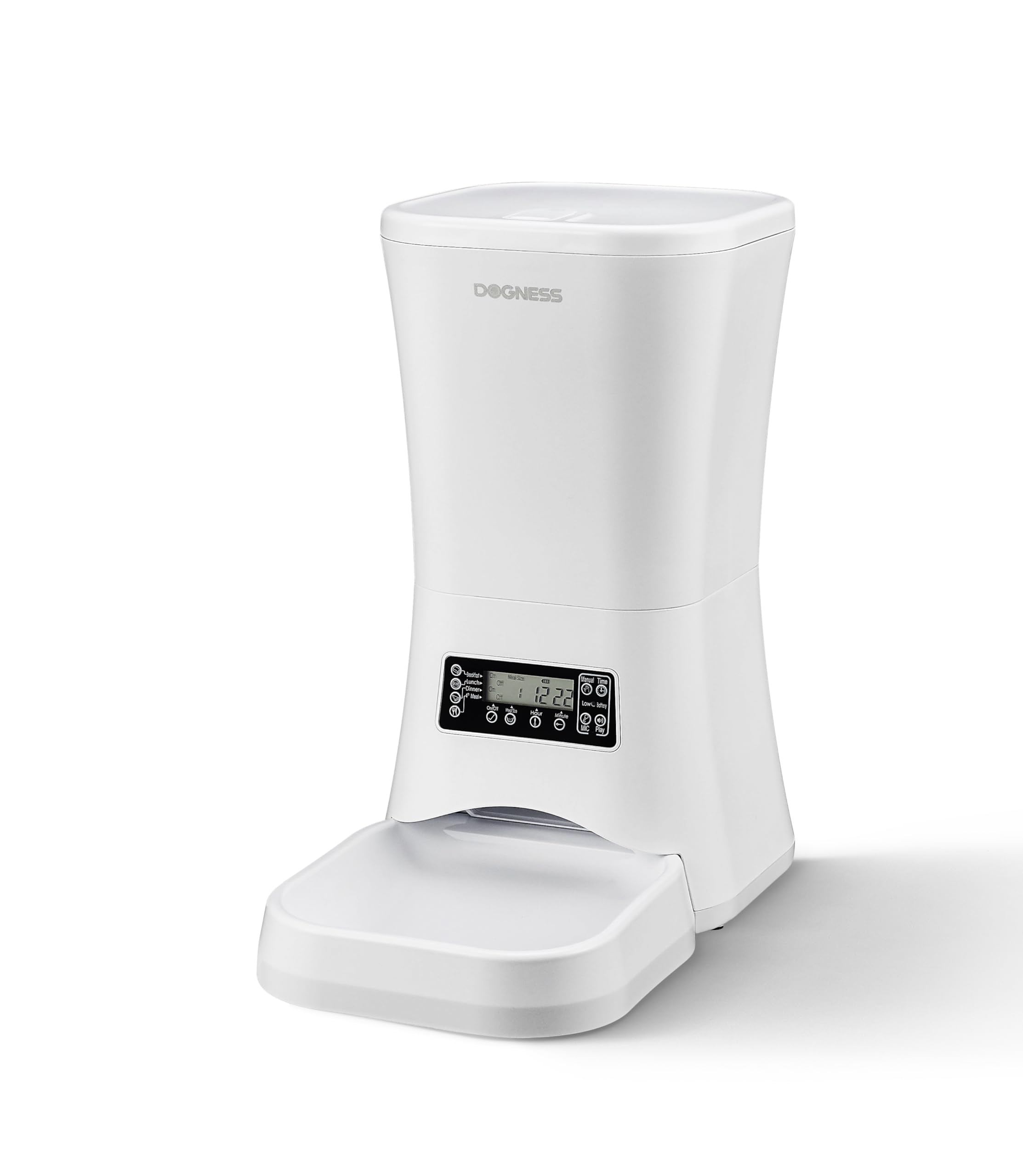
Image: The DOGNESS F09 Automatic Pet Feeder, showing the main unit, transparent food container, and feeding bowl. This image illustrates the overall design and primary components of the feeder.
Components
- Food Container: Large 9-liter capacity for dry kibble.
- Lid: Secures the food container, keeping food fresh.
- Control Panel: Features an LCD screen and buttons for programming.
- Food Outlet: Dispenses food into the bowl.
- Food Bowl: Removable for easy cleaning.
- Power Port: For connecting the AC adapter.
- Battery Compartment: For backup power (requires 3 D-cell batteries, not included).
- Built-in Speaker: For voice recording and playback during meal times.
Setup
Initial Setup
- Unpack: Carefully remove all components from the packaging.
- Assemble: Place the food container onto the main unit. Ensure it is securely seated. Attach the food bowl to the front of the unit.
- Power Connection:
- Connect the AC power adapter to the feeder's power port and then to a wall outlet.
- For battery backup, open the battery compartment and insert 3 D-cell batteries (not included). This ensures the feeder operates during power outages.
- Fill Food Container: Open the lid and fill the container with dry pet food. Ensure kibble size is between 0.2 and 0.6 inches (0.5 to 1.5 cm) to prevent jamming. Do not overfill.
- Close Lid: Securely close the lid to keep food fresh.
Operating Instructions
Programming Meals
The feeder allows for flexible meal scheduling with up to 4 meals per day and customizable portion sizes.
- Set Current Time: Access the settings menu on the LCD screen to set the current time.
- Program Meal Times: Select the "Meal Time" option. You can set up to 4 distinct meal times.
- Set Portion Sizes: For each programmed meal time, specify the number of portions to dispense. Each portion is a fixed amount of kibble. Refer to your pet's dietary needs and the feeder's portion calibration.
- Save Settings: Confirm and save your meal schedule.
Voice Recording
Record a personalized message to call your pet at meal times.
- Access Recording Function: Locate the "Record" button on the control panel.
- Record Message: Press and hold the "Record" button. Speak clearly into the microphone. The recording duration is typically up to 10 seconds.
- Playback: Release the button. The feeder will play back your recording. You can re-record if needed.
- Activation: The recorded message will play automatically at each scheduled meal time.
Maintenance
Cleaning Your Feeder
Regular cleaning ensures hygiene and proper functioning of your pet feeder.
- Disconnect Power: Always unplug the feeder from the power outlet and remove backup batteries before cleaning.
- Remove Components: Detach the food bowl and food container from the main unit.
- Clean Food Bowl and Container: Wash the food bowl and food container with mild soap and water. Rinse thoroughly and dry completely before reassembling.
- Clean Main Unit: Wipe the main unit with a soft, damp cloth. Do not use abrasive cleaners or immerse the main unit in water.
- Reassemble: Once all parts are dry, reassemble the feeder.
Troubleshooting
Common Issues and Solutions
| Problem | Possible Cause | Solution |
|---|---|---|
| Feeder not dispensing food | Food jammed; low food level; power issue | Check kibble size and clear any blockages; refill food container; check power connection and batteries. |
| Display not working | No power; faulty unit | Ensure power adapter is connected and working; check backup batteries. If problem persists, contact support. |
| Voice recording not playing | No recording saved; volume too low | Re-record your message; check volume settings. |
| Incorrect meal times/portions | Incorrect programming | Review and re-program meal times and portion sizes using the LCD control panel. |
Specifications
Technical Specifications
- Model: F09
- Brand: DOGNESS
- Capacity: 9 Liters (for dry food)
- Dimensions (L x W x H): 23.6 cm x 40.6 cm x 38.2 cm (approx. 9.3 x 16 x 15 inches)
- Weight: 3 kg (approx. 6.6 lbs)
- Power Source: AC Adapter (included), 3 x D-cell batteries (not included) for backup
- Target Species: Dog
- Recommended Kibble Size: 0.2 - 0.6 inches (0.5 - 1.5 cm)
- Meals per Day: Up to 4 programmable meals
- Special Features: Portion control, voice recording, dual power supply
Warranty and Support
Warranty Information
This DOGNESS F09 Automatic Pet Feeder comes with a standard manufacturer's warranty. Please refer to the warranty card included in your package for specific terms and conditions. Keep your purchase receipt as proof of purchase.
Customer Support
For technical assistance, troubleshooting, or warranty claims, please contact DOGNESS customer support. Contact details can typically be found on the official DOGNESS website or on the product packaging.
