
1. Product Overview
This manual provides instructions for the PERLESMITH Rolling TV Stand (PSTVMC04) and the Perlegear Floor TV Stand (PGFS21B). These products are designed to provide versatile and stable mounting solutions for various television sizes and types.

Image: The PERLESMITH Rolling TV Stand (left) and the Perlegear Floor TV Stand (right) are shown together, illustrating their distinct designs and functionalities.
2. Key Features
2.1 PERLESMITH Rolling TV Stand (PSTVMC04)
- Universal Compatibility: Fits most 23" to 60" LCD, LED, flat screen, and curved TVs.
- Weight Capacity: Supports TVs weighing up to 55 lbs.
- VESA Compliance: Compatible with VESA patterns including 100x100, 200x100, 200x200, 300x200, 300x300, 400x200, 400x300, and 400x400mm.
- Height Adjustable Tray: Includes a sturdy media shelf for laptops, DVD players, or gaming devices. The shelf height is adjustable from 12" to 24" from the floor.
- Adjustable Wall Mount Plate: Allows for easy customization of viewing height.
- Mobile Design: Equipped with wheels for easy relocation.

Image: The PERLESMITH Rolling TV Stand (PSTVMC04) is shown with a television mounted and a laptop placed on its adjustable media shelf, highlighting its mobile and versatile design.
2.2 Perlegear Floor TV Stand (PGFS21B)
- Integrated LED Light: Features modern, adjustable RGB LED ambient lighting for immersive viewing.
- Control Options: LED lights can be controlled via a mobile app, remote, or wired switch.
- Customizable Lighting: Offers 16 million colors, adjustable brightness, speeds, modes, and a timer function. Lights can sync with sound or rhythm.
- 12-Level Height Adjustment: Provides 12 adjustable height settings, including adjustments for the pillar, panel, and mounting brackets, to achieve optimal viewing angles.
- Ergonomic Design: Helps reduce neck and back strain during extended viewing sessions.

Image: The Perlegear Floor TV Stand (PGFS21B) is displayed, emphasizing its customizable RGB LED lighting and the three control options: app, remote, and in-line switch.
3. Setup & Assembly
Before beginning assembly, ensure all parts are present and undamaged. Refer to the included hardware list for specific components. Assembly typically requires basic hand tools (e.g., Phillips head screwdriver, wrench). Follow the step-by-step diagrams provided in the separate assembly guide for your specific model (PSTVMC04 or PGFS21B).
3.1 General Assembly Tips
- Lay out all components on a soft, clean surface to prevent scratches.
- Do not overtighten screws during initial assembly; tighten fully once all components are aligned.
- Ensure the TV stand is placed on a level surface for stability.
- For the PSTVMC04, ensure the X-shaped base is securely assembled for optimal stability.

Image: A close-up view of the stable X-shaped base of the PERLESMITH Rolling TV Stand (PSTVMC04), highlighting its robust construction for secure mobility.
4. Operating Instructions
4.1 Adjusting TV Height (PSTVMC04 & PGFS21B)
Both TV stands offer height adjustment. For the PSTVMC04, the wall mount plate can be adjusted along the main pole. For the PGFS21B, utilize the 12-level height adjustment points on the pillar, panel, and mounting brackets to find your optimal viewing angle. Always ensure the TV is securely mounted before making adjustments.

Image: The Perlegear Floor TV Stand (PGFS21B) demonstrates its ergonomic height adjustment capabilities, illustrating how different viewing heights can reduce neck and back strain.
4.2 Swivel and Tilt (PGFS21B)
The Perlegear Floor TV Stand (PGFS21B) allows for swivel and tilt adjustments to customize your viewing comfort. Gently adjust the TV panel to the desired swivel angle (up to ±35°) or tilt angle (up to 5° tilt up, 10° tilt down). Do not force the movement beyond its designed range.
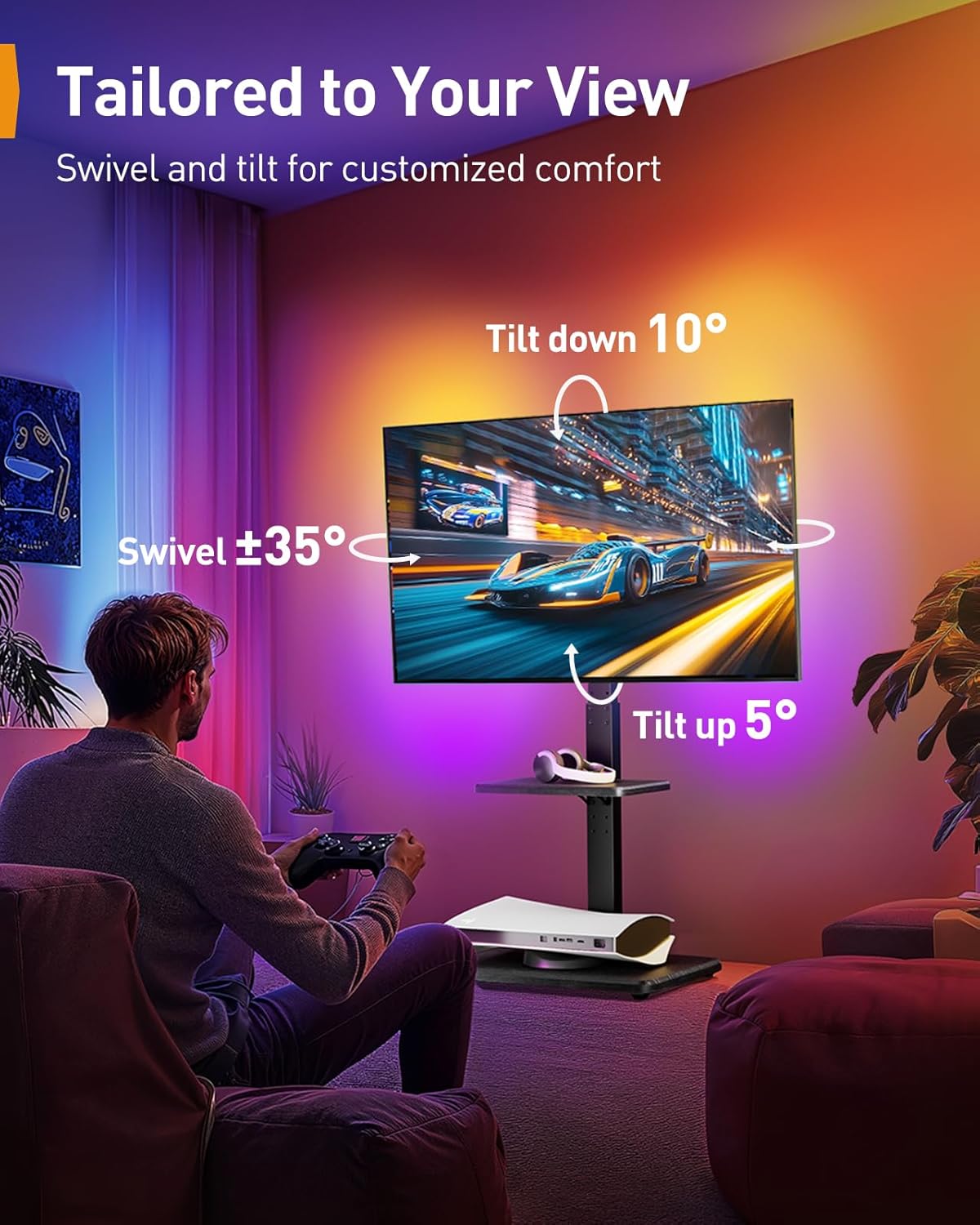
Image: The Perlegear Floor TV Stand (PGFS21B) illustrates its swivel (±35°) and tilt (up 5°, down 10°) capabilities, allowing users to tailor their view for customized comfort.
4.3 Using LED Lights (PGFS21B)
The PGFS21B features integrated RGB LED lighting. Control options include a dedicated mobile application, a remote control, or a wired switch. Refer to the separate LED lighting guide for detailed instructions on pairing with the app, selecting colors, modes, and setting timers. The lights can also sync with audio for an enhanced experience.

Image: The Perlegear Floor TV Stand (PGFS21B) is shown with its LED lights active, alongside the remote control and a smartphone displaying the control app interface, demonstrating the multiple ways to manage the lighting.
4.4 Moving the Rolling TV Stand (PSTVMC04)
To move the PSTVMC04, ensure the TV is securely mounted and any cables are managed to prevent snagging. Unlock the casters by flipping their levers. Gently push the stand to the desired location. Once in position, lock the casters to prevent accidental movement.
5. Maintenance
- Cleaning: Use a soft, dry cloth to wipe down the stand. For stubborn marks, a slightly damp cloth with mild soap can be used, followed by drying. Avoid abrasive cleaners or solvents.
- Check Connections: Periodically check all screws and bolts to ensure they remain tight and secure, especially after moving the PSTVMC04 or adjusting the height of either stand.
- Cable Management: Ensure cables are neatly routed and not under tension to prevent damage.
6. Troubleshooting
6.1 Stand Stability Issues
- Issue: Stand feels wobbly or unstable.
- Solution: Ensure all assembly bolts are fully tightened. Verify the stand is on a flat, level surface. For PSTVMC04, ensure casters are locked when stationary.
6.2 Difficulty Adjusting Height
- Issue: TV mount or shelf is difficult to move up or down.
- Solution: Ensure any locking mechanisms or knobs are fully loosened before attempting adjustment. Do not force movement. Check for any obstructions.
6.3 LED Lights Not Working (PGFS21B)
- Issue: LED lights do not turn on or respond to controls.
- Solution: Check power connection to the LED strip. Ensure the remote control has working batteries and is pointed correctly. If using the app, verify Bluetooth connection and app settings.
7. Specifications
| Feature | PSTVMC04 Rolling TV Stand | PGFS21B Floor TV Stand |
|---|---|---|
| Brand | PERLESMITH | |
| Compatible TV Sizes | 23" - 60" | Most flat/curved TVs (size not specified, refer to VESA) |
| Weight Capacity | Up to 55 lbs | Up to 110 lbs (as per image) |
| VESA Compatibility | 100x100, 200x100, 200x200, 300x200, 300x300, 400x200, 400x300, 400x400mm | Standard VESA patterns (specifics not provided, refer to product details) |
| Height Adjustment | Adjustable wall mount plate, AV shelf 12"-24" from floor | 12-level adjustment (pillar, panel, brackets) |
| Mobility | Rolling casters (lockable) | Stationary floor stand |
| Special Features | Media shelf, X-shaped stable base | RGB LED ambient lighting, Swivel (±35°), Tilt (up 5°, down 10°) |
| ASIN | B0FGVLZD8L | |
| Date First Available | June 20, 2025 | |
8. Warranty & Support
For information regarding product warranty, please refer to the documentation included with your purchase or visit the official PERLESMITH website. If you encounter any issues not covered in this manual or require further assistance, please contact PERLESMITH customer support.
PERLESMITH Customer Support: Please refer to the contact information provided on the product packaging or the official PERLESMITH website for the most current support channels.


