1. Product Overview
The CypBed King Size Upholstered Bed Frame (Model SYPBF01) is designed for comfort and functionality. It features an upholstered headboard with integrated storage and charging ports, a sturdy metal frame, and solid wood slats that eliminate the need for a box spring. Four spacious storage drawers are included for convenient organization.
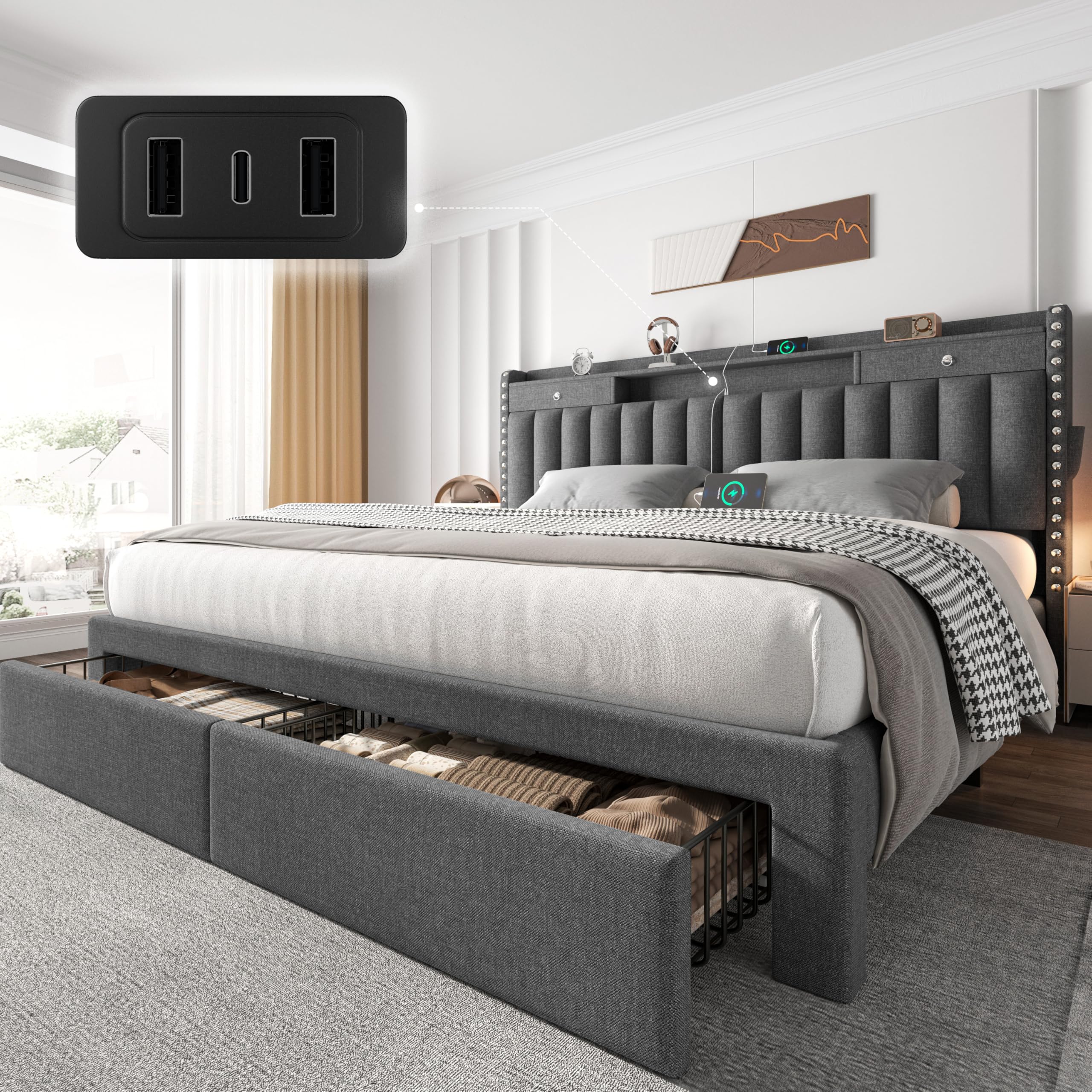
Image: CypBed King Size Bed Frame, illustrating overall dimensions (86"L x 77.5"W x 45"H) and key features like storage drawers and headboard design.
Key Features:
- Integrated Storage: Features two spacious storage drawers at the footboard and two hidden headboard drawers with side pockets for organizing various items.
- Charging Station: Modern headboard includes built-in USB and Type-C charging ports for electronic devices.
- Robust Construction: Heavy-duty metal frame with 12 support slats and 9 support legs ensures stability and supports up to 900 lbs.
- Noise-Free Design: Reinforced structure and solid wood slats prevent noise and wobbling for an undisturbed sleep environment.
- Upholstered Finish: Stylish fabric-wrapped design with exquisite stitching and button accents.
Video: A brief display of the CypBed Frame, showcasing its design and features. (Duration: 0:31)
Video: Overview of the sturdy bed frame with ample storage space. (Duration: 0:54)
2. Setup Instructions
Assembly is required for this bed frame. Please follow these steps carefully. It is recommended to have two people for assembly. Ensure all parts are present before beginning.
Important Safety Note:
Ensure the bed frame is assembled according to the instructions to prevent instability or collapse.
Assembly Steps:
- Unpack and Identify Parts: Carefully unpack all components and lay them out. Refer to the parts list (not provided in this manual, typically found in the included physical manual) to identify each piece and hardware.
- Assemble Headboard Base: Attach the headboard side panels to the main headboard section using the provided hardware. Ensure all connections are secure.
- Install Charging Ports: Secure the USB and Type-C charging port unit into the designated slot on the headboard.
- Assemble Bed Frame Sides: Connect the side rails of the bed frame. Ensure the central support beam is correctly aligned and secured.
- Attach Headboard to Bed Frame: Carefully align and attach the assembled headboard to the bed frame side rails. Tighten all bolts securely.
- Place Wood Slats: Lay the solid wood slats across the bed frame. The slats are designed to be placed directly on the frame, eliminating the need for a box spring. Ensure they are evenly spaced and secured if applicable.
- Assemble Storage Drawers: Assemble the four storage drawers. Attach the wheels to the bottom of each drawer for smooth operation.
- Insert Drawers: Slide the assembled storage drawers into their designated compartments under the bed frame.
Video: Detailed bed frame installation guide. (Duration: 4:04)

Image: Considered details design, showing 12 sturdy wooden slats, 8 rollers for storage drawers, 8 strong metal support feet, and a heavy-duty metal frame.
3. Operation
Using Storage Drawers:
The bed frame includes four storage drawers: two large drawers at the footboard and two hidden drawers within the headboard. The footboard drawers are ideal for bedding, seasonal clothing, or larger items, while the headboard drawers and side pockets are perfect for smaller items like books, glasses, remotes, and electronic devices.

Image: Modern storage headboard with hidden drawers and side pockets for convenient bedside organization.
Charging Electronic Devices:
The headboard is equipped with 3 charging ports (2 USB and 1 Type-C). To use, simply plug your device's charging cable into the appropriate port. This allows for convenient overnight charging without the need for additional power strips or outlets.

Image: Three charging ports (2 USB, 1 Type-C) integrated into the headboard, allowing simultaneous charging of multiple devices.
4. Maintenance
To maintain the appearance and longevity of your CypBed frame, follow these care instructions:
- Cleaning: Wipe the upholstered surfaces with a dry cloth. Avoid using harsh chemicals or abrasive cleaners, as these may damage the fabric.
- Spills: For spills, blot immediately with a clean, dry cloth. Do not rub.
- Hardware Check: Periodically check all bolts and screws to ensure they remain tight. Re-tighten if necessary to maintain stability and prevent noise.
- Drawer Care: Keep the drawer tracks clean and free of debris to ensure smooth operation.
5. Troubleshooting
If you encounter any issues with your bed frame, refer to the following common solutions:
| Problem | Possible Cause | Solution |
|---|---|---|
| Bed frame is wobbly or noisy. | Loose connections or uneven assembly. | Ensure all bolts and screws are fully tightened. Check that the bed frame is on a level surface. |
| Storage drawers do not slide smoothly. | Debris in tracks or misaligned wheels. | Clean any debris from the drawer tracks. Verify that the wheels are securely attached and properly aligned. |
| Charging ports are not working. | Power cable disconnected or faulty device. | Check that the power cable for the charging station is securely plugged into a working wall outlet. Test with a different device and cable. |
6. Specifications
| Feature | Detail |
|---|---|
| Model Number | SYPBF01 |
| Size | King |
| Product Dimensions | 86"L x 77.5"W x 45"H |
| Color | Grey |
| Material | Wood, Metal, Fabric |
| Weight Capacity | Approximately 900 lbs |
| Charging Ports | 2 USB, 1 Type-C |
| Storage | 4 Drawers (2 footboard, 2 headboard) + Side Pockets |
| Box Spring Required | No |
| Assembly Required | Yes |
| Ground to Item Distance | 6 Inches |
7. Warranty and Support
For specific warranty information regarding your CypBed frame, please refer to the documentation included with your purchase or contact the retailer directly. Keep your proof of purchase for any warranty claims.
For technical support, missing parts, or further assistance, please contact CypBed customer service through the retailer's platform or the official CypBed website (if available).