
Introduction
Thank you for choosing the VATOS Smart Electronic Shooting Game Set. This manual provides essential information for the safe and proper use of your new game set. Please read it thoroughly before use and retain it for future reference.
Safety Information
- This product is designed for users aged 10 and up. Adult supervision is recommended for younger users.
- Do not aim the shooting gun at people or animals. While it does not use projectiles, direct aiming can be startling.
- Keep the product away from water and excessive moisture to prevent electrical damage.
- Do not attempt to modify or disassemble the product. This may void the warranty and cause malfunction.
- Ensure proper battery installation and disposal according to local regulations.
- Use only the provided USB charging cable for the shooting gun.
Package Contents
Verify that all items are present in your package:
- Smart Scoring Base ×1
- Rechargeable Shooting Gun ×1
- Paper Target Ring ×1
- USB Charging Cable ×1
- User Manual ×1
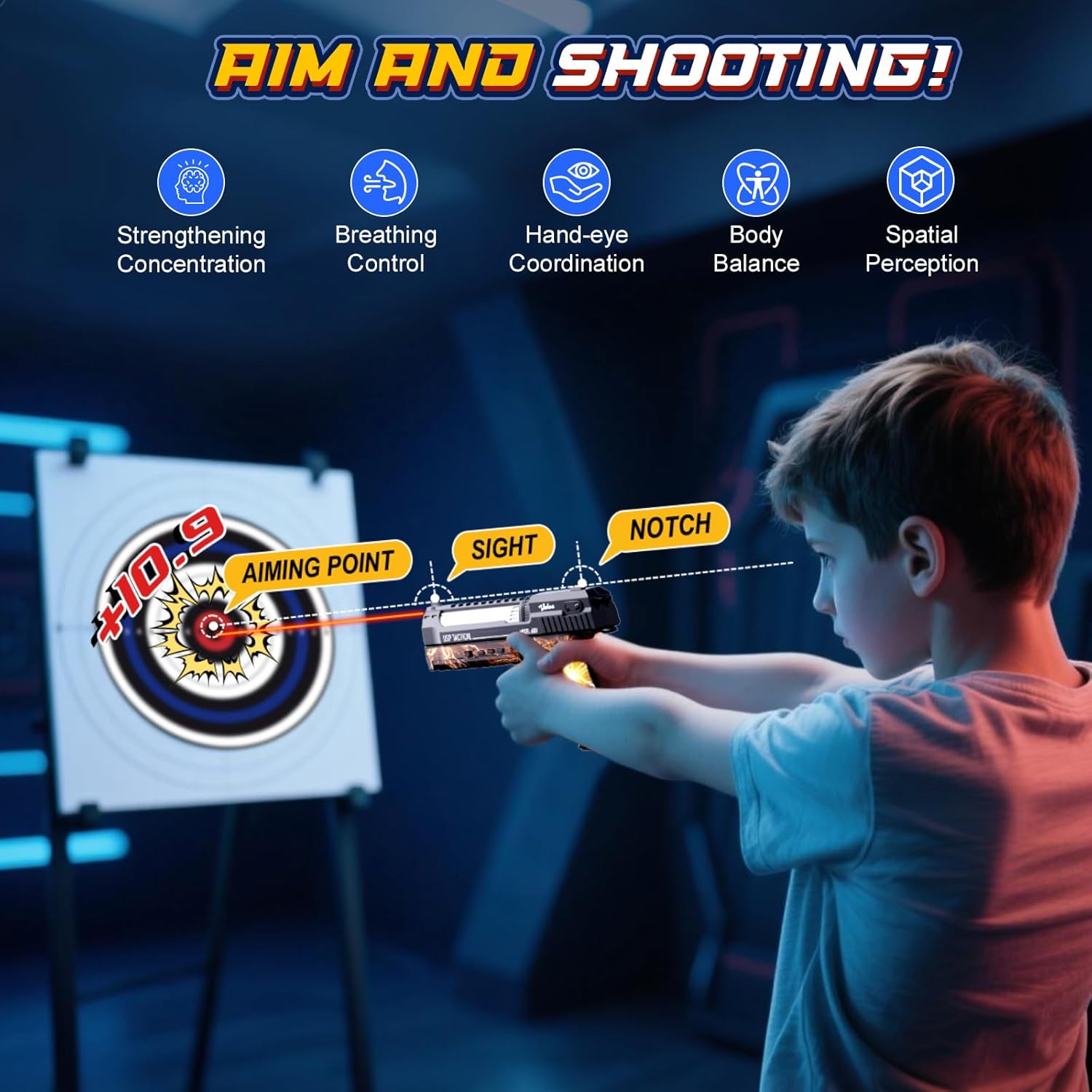
Figure 1: Package Contents
Setup
1. Smart Scoring Base Battery Installation
- Locate the battery compartment on the underside of the Smart Scoring Base.
- Using a screwdriver, open the battery compartment cover.
- Insert 3 AA batteries (not included), ensuring correct polarity (+/-).
- Replace the battery compartment cover and secure it with the screw.

Figure 2: Smart Scoring Base Battery Installation
2. Shooting Gun Charging
- The shooting gun has a built-in lithium battery. Locate the Type-C charging port on the gun.
- Connect the provided USB charging cable to the gun and a suitable USB power source (e.g., computer, wall adapter).
- An indicator light will illuminate during charging. It will turn off when the gun is fully charged (approximately 2 hours for a full charge). A full charge provides up to 4 hours of continuous play.

Figure 3: Shooting Gun Charging
3. Power On and Pairing
- Turn on both the Smart Scoring Base and the Shooting Gun using their respective ON/OFF buttons.
- The devices will automatically pair using 2.4G auto-pairing technology. A successful connection will be indicated by lights and voice feedback.
4. Target Placement
The paper target can be placed in two ways:
- On the Smart Base: Securely attach the paper target ring to the designated slots on the Smart Scoring Base.
- Wall/Tree Hanging: The target can also be hung on a wall or tree trunk for flexible outdoor play. The toy gun can be used independently without the base, automatically recognizing and announcing scores for any targets with assigned values.

Figure 4: Flexible Target Setup
Operating Instructions
1. Controls Overview
Familiarize yourself with the controls on the shooting gun and smart base:
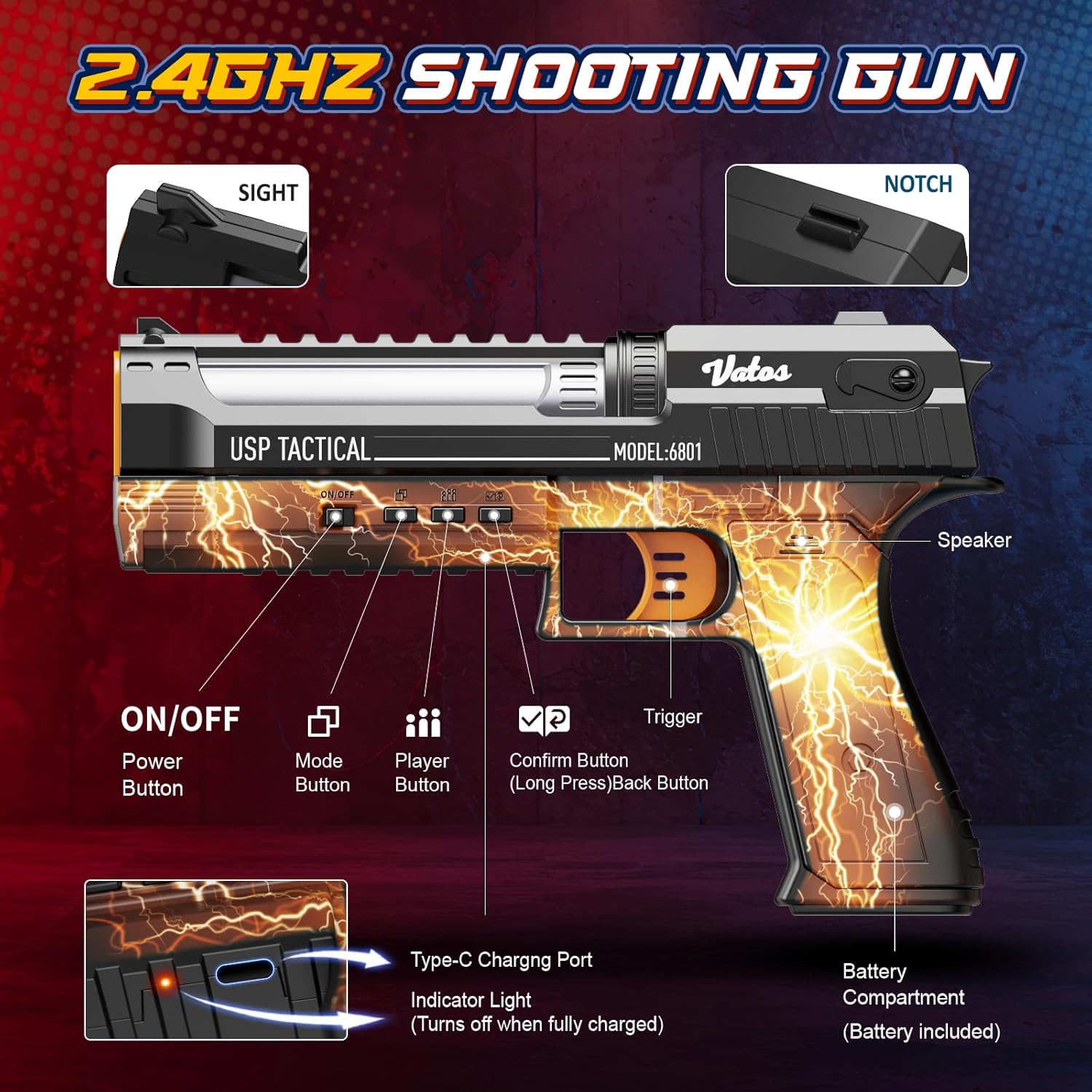
Figure 5: Shooting Gun Controls

Figure 6: Smart Scoring Base Features
2. Selecting Modes and Players
- Press the Mode Button on the shooting gun to cycle through the four available shooting modes: Practice, PK, Challenge, and Time Attack. The Smart Base's Mode Indicator Lights will change color to reflect the selected mode (Blue for Practice, Red for PK, Green for Challenge, White for Time Attack).
- Press the Player Button to select the number of players (up to 4). The Player Indicator Lights on the Smart Base will show the active players.
- The Confirm Button (also the Back Button with a long press) is used to confirm selections or navigate menus.
3. Real-Time Feedback and Scoring
- The Smart Scoring Base features a digital display screen that shows real-time scores.
- Both the Smart Base and the Shooting Gun provide clear voice feedback with every shot, announcing scores and game status.
- The optimal shooting distance for accurate recognition and rapid response is 6.5–13 feet (2–4 meters).
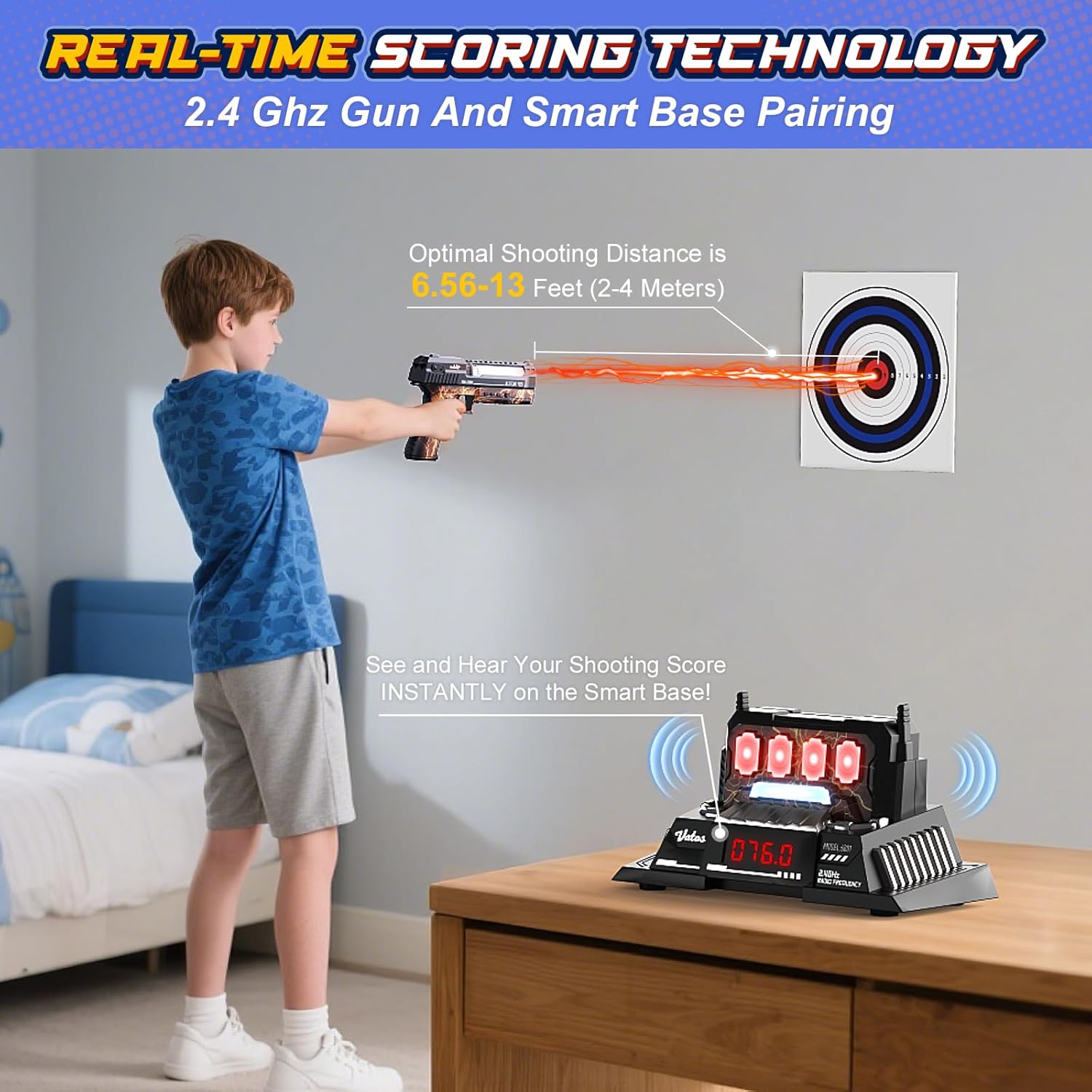
Figure 7: Real-Time Scoring in Action
4. Shooting Modes Details
- Practice Mode (Blue Light): Focus on improving your shooting accuracy. Scores are displayed instantly.
- PK Mode (Red Light): A 10-shot shootout competition. Compete against other players to achieve the highest score within 10 shots.
- Challenge Mode (Green Light): Complete tactical missions. This mode may involve specific target sequences or conditions to increase difficulty.
- Time Attack Mode (White Light): A 5-second showdown. Test your speed and accuracy by hitting as many targets as possible within a short time limit.

Figure 8: Four Shooting Challenge Modes

Figure 9: Multi-Player Gameplay
5. Aiming Technique
The shooting gun features a sight and a notch to assist with aiming. Align the sight with the notch and the aiming point on the target for improved accuracy.
Figure 10: Aiming and Shooting
6. Official Product Videos
Video 1: VATOS Smart Electronic Shooting Game Set Overview. This video demonstrates the various features and gameplay modes of the shooting game set.
Video 2: Rechargeable Smart Electronic Shooting Gun. This video illustrates the charging process and battery installation for the shooting gun and target base.
Video 3: VATOS Smart Electronic Shooting Gun and Target. This video provides a detailed look at the gun and target components and their interaction during gameplay.
Maintenance
- Cleaning: Wipe the Smart Scoring Base and Shooting Gun with a soft, dry cloth. Do not use harsh chemicals or abrasive cleaners.
- Battery Care: Remove AA batteries from the Smart Scoring Base if the product will not be used for an extended period to prevent leakage. Ensure the shooting gun is fully charged before storage to maintain battery health.
- Storage: Store the game set in a cool, dry place away from direct sunlight and extreme temperatures.
Troubleshooting
| Problem | Possible Cause | Solution |
|---|---|---|
| Devices not pairing | Low battery, devices too far apart, interference | Ensure both devices are charged/have fresh batteries. Bring devices closer. Restart both devices. |
| Inaccurate scoring | Incorrect shooting distance, target not properly aligned, environmental factors (e.g., strong light) | Maintain optimal shooting distance (6.5-13 feet). Ensure target is stable and facing the shooter. Adjust lighting conditions if necessary. |
| No voice feedback | Volume too low, speaker malfunction | Check volume settings on the gun/base (if applicable). Ensure batteries are sufficient. |
| Shooting gun not charging | Faulty cable, power source issue, damaged charging port | Try a different USB cable and power source. Ensure the cable is securely connected. Contact support if the issue persists. |
Specifications
| Feature | Detail |
|---|---|
| Brand | VATOS |
| Model Number | VL-BB6801A |
| Material Type | Plastic |
| Number of Players | Up to 4 |
| Power Source (Base) | 3 AA batteries (not included) |
| Power Source (Gun) | Built-in rechargeable lithium-ion battery |
| Charging Time (Gun) | Approx. 2 hours |
| Play Time (Gun) | Up to 4 hours (continuous) |
| Optimal Shooting Distance | 6.5–13 feet (2–4 meters) |
| Connectivity | 2.4G Auto-pairing |
| Item Dimensions | 9 x 1.5 x 6 inches (Gun) |
| Age Range Description | Kid (Manufacturer Minimum Age: 120 months) |
Warranty and Support
VATOS products are manufactured to high-quality standards. For warranty information, please refer to the packaging or contact your retailer. If you encounter any issues or require technical assistance, please contact VATOS customer support through the retailer's platform or the official VATOS website. Please have your model number (VL-BB6801A) and purchase details ready when contacting support.