
1. Product Overview
This manual provides detailed instructions for the installation, operation, and maintenance of your Uckazy 12.3 Inch Android 14 Car Radio. This advanced car stereo system is designed to enhance your driving experience with its large IPS touch screen, powerful Android 14 operating system, and seamless integration with your vehicle's existing features.
Key Features:
- 12.3-inch HD (1920*720) IN-CELL Screen: Features full lamination technology for enhanced clarity and reduced reflection.
- Android 14 System: Powered by a 13 NM MediaTek Octa-core processor (4*Cortex A72 2.2GHz + 4*Cortex A51 1.8GHz) with 8GB RAM and 128GB ROM.
- Wireless CarPlay & Android Auto: Seamless integration with your smartphone for navigation, music, and communication.
- Built-in DSP: 16 EQ segments for advanced audio tuning and sound customization.
- Retains Original iDrive System: Maintains full functionality of your vehicle's iDrive control, steering wheel controls, OEM reversing camera, and original car stereo.
- Connectivity: Supports 2.4G and 5.0G WiFi, Bluetooth.

Image 1.1: Overview of the Uckazy 12.3 Inch Android 14 Car Radio highlighting its core specifications like Octa-core processor, 8GB RAM, 128GB ROM, and HD IPS screen.
2. Compatibility
This Uckazy car radio is specifically designed for BMW X1 F48 models from 2018 onwards that are equipped with the NBT EVO System. It is crucial to verify your vehicle's system type before installation to ensure proper functionality.

Image 2.1: Visual guide for identifying compatible BMW X1 F48 EVO systems by checking the 6-pin LVDS port.
If you are uncertain about your car's system, please consult a professional or contact Uckazy customer support with details of your vehicle's make, model, and year.
3. Setup and Installation
Professional installation is recommended for this product. Ensure the vehicle's power is disconnected before beginning any installation steps. Refer to your vehicle's service manual for specific panel removal instructions.
3.1 Wiring and Connections
The unit is designed for plug-and-play installation, integrating with your existing wiring harness. Special attention is required for the fiber optic cable and power connections.
Video 3.1: Demonstration of how to transfer fiber optic cables during the installation process. This step is crucial for maintaining audio functionality.
- Fiber Optic Cable Transfer: Carefully cock the snap on the original connector and pull out the fiber optic cable.
- Power Cord Connection: Locate the power cord from the new unit and plug it into the appropriate interface on the vehicle's wiring harness. Ensure the connection is secure and correctly oriented.
- Main Unit Connection: Connect the main power cable from the new unit to the original power cable of the vehicle. Pay close attention to the correct interface to avoid damage.
After all connections are made, ensure they are secure before reassembling the dashboard components. The new unit should seamlessly integrate with the existing vehicle system, as shown in the comparison below.
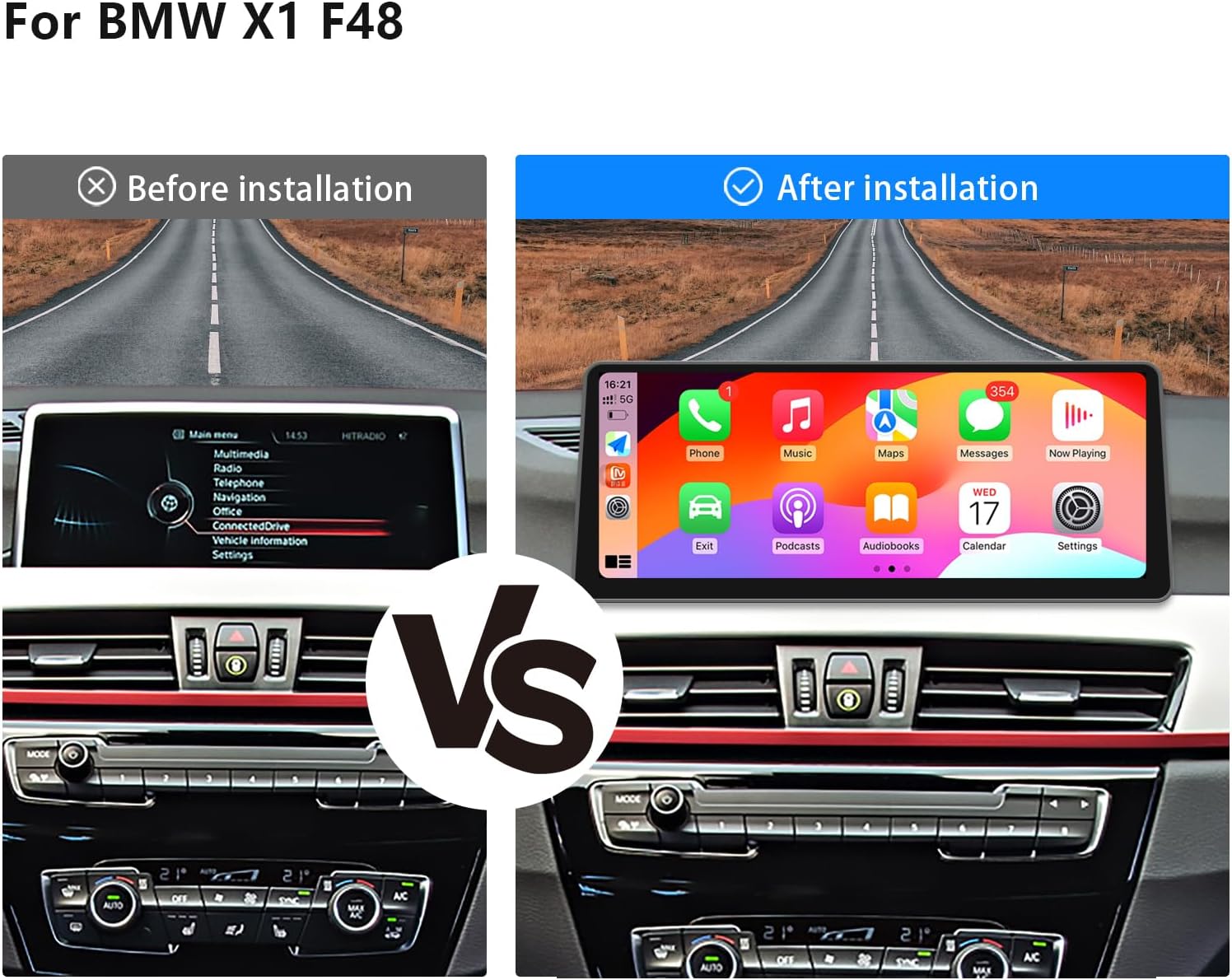
Image 3.2: Visual comparison of the car dashboard before and after the installation of the Uckazy 12.3 Inch Android 14 Car Radio.
4. Operating Instructions
Your Uckazy car radio operates on the Android 14 system, providing a familiar and intuitive user experience. The 12.3-inch IPS touch screen offers clear visuals and responsive interaction.
4.1 Wireless CarPlay and Android Auto
The unit supports wireless CarPlay and Android Auto, allowing you to access your smartphone's features directly on the car radio display. This includes navigation, music playback, messaging, and voice assistant functions.
Video 4.1: Product overview demonstrating the user interface and features, including wireless CarPlay connection for the Linux system variant.

Image 4.2: Examples of the wireless CarPlay and Android Auto interfaces, displaying navigation, music, and communication apps.
4.2 Voice Control (Siri/Google Voice Assistant)
Utilize voice commands for hands-free operation, enhancing safety while driving. You can access map navigation, make calls, send messages, and control music through Siri or Google Voice Assistant.

Image 4.3: Illustration of voice command functionality within CarPlay, showing prompts for navigation and messaging.
4.3 Digital Sound Processor (DSP)
The integrated DSP with 16 EQ segments allows for precise audio customization. You can adjust sound quality, speaker positioning, and apply various tuning methods to achieve your preferred audio experience.

Image 4.4: Display of the DSP interface with 16 EQ segments for detailed audio adjustments.
4.4 Integration with Original OEM System
This unit is designed to retain and support your vehicle's original features, ensuring a seamless upgrade without losing functionality.
- iDrive System Control: Full range of iDrive functions and navigation are supported in both the original and Android systems.
- Steering Wheel Control: Original steering wheel buttons remain functional for audio and system control.
- OEM Reversing Camera & Parking Radar: Compatibility with existing parking assistance systems.
- Original Car Stereo & CD: Sound output from the original car stereo is maintained, and the original CD player remains functional.

Image 4.5: Visual representation of the Uckazy unit's compatibility with various original BMW OEM features.
5. Maintenance
To ensure the longevity and optimal performance of your Uckazy car radio, follow these maintenance guidelines:
- Screen Cleaning: Use a soft, lint-free cloth to gently wipe the screen. For stubborn smudges, slightly dampen the cloth with water or a screen-safe cleaner. Avoid harsh chemicals or abrasive materials.
- Software Updates: Periodically check for software updates provided by Uckazy to ensure you have the latest features and performance enhancements. Follow the on-screen instructions for safe updates.
- Environmental Conditions: Avoid exposing the unit to extreme temperatures, direct sunlight for prolonged periods, or excessive moisture.
- Connection Checks: If experiencing intermittent issues, ensure all cables are securely connected. Avoid pulling on cables forcefully.
6. Troubleshooting
This section addresses common issues you might encounter with your Uckazy car radio. If you experience problems not covered here, please contact customer support.
Common Issues and Solutions:
- No Power:
- Check all power connections to ensure they are firmly seated.
- Verify the vehicle's fuse for the car stereo is intact.
- No Sound:
- Ensure the fiber optic cable is correctly transferred and connected (refer to Video 3.1).
- Check volume settings on both the car radio and your connected device (if using CarPlay/Android Auto).
- Verify the audio output settings are correctly configured to use the original car stereo.
- CarPlay/Android Auto Not Connecting:
- Ensure Bluetooth is enabled on both your smartphone and the car radio.
- For CarPlay, ensure Siri is enabled on your iPhone.
- Try restarting both your phone and the car radio.
- Touch Screen Unresponsive:
- Perform a soft reset of the unit (refer to the device settings for reset options).
- Ensure the screen is clean and free of debris.
7. Specifications
| Feature | Specification |
|---|---|
| Screen Size | 12.3 inches |
| Display Resolution | 1920 x 720 (HD IPS) |
| Operating System | Android 14 |
| Processor | MediaTek Octa-core (4*Cortex A72 2.2GHz + 4*Cortex A51 1.8GHz) |
| RAM | 8GB |
| ROM | 128GB |
| Connectivity | Bluetooth, 2.4G/5.0G WiFi |
| Special Features | Touchscreen, Wireless CarPlay, Android Auto, Built-in DSP (16 EQ segments) |
| Compatible Devices | Smartphone |
| Item Weight | 3.4 pounds |
| Package Dimensions | 22 x 20 x 16 inches |

Image 7.1: Visual comparison illustrating the enhanced clarity and resolution of the 1920x720 IPS screen compared to older displays.

Image 7.2: Comparison highlighting the narrow bezel design and full lamination technology of the Uckazy unit, reducing reflections by 75%.
8. Warranty and Support
Uckazy is committed to providing high-quality products and customer satisfaction. For warranty information, technical support, or any inquiries regarding your car radio, please refer to the following:
- Warranty: Please consult your purchase documentation or the Uckazy official website for detailed warranty terms and conditions.
- Customer Support: For technical assistance, troubleshooting, or installation guidance, please contact Uckazy customer service through the retailer where you purchased the product or visit the official Uckazy support channels.
- Online Resources: Check the Uckazy brand store on Amazon for additional product information, FAQs, and potential video tutorials.