
1. Introduction
This manual provides detailed instructions for the installation, operation, and maintenance of your Uckazy 12.3 Inch Android 14 Car Radio. This unit is specifically designed for BMW E60 and E61 models manufactured between 2005 and 2008, equipped with the CCC (Car Communication Computer) system. It features a 12.3-inch IPS touch screen, Android 14 operating system, 4GB RAM, 64GB ROM, and supports wireless CarPlay and Android Auto.
Before proceeding with installation or operation, please read this manual thoroughly to ensure proper usage and to maximize your product experience.
2. Setup and Installation
The Uckazy 12.3 Inch Android 14 Car Radio is designed for plug-and-play installation in compatible BMW E60/E61 CCC systems. It is crucial to verify your vehicle's system type before installation. If you are uncertain about compatibility, please consult with a professional or contact customer support.
2.1. Compatibility Check
Ensure your BMW 5 Series E60 or E61 (2005-2008) has a CCC system. The CCC system typically features a 10-pin LVDS port. Vehicles with a CIC system (4-pin LVDS port) are not compatible with this specific model.
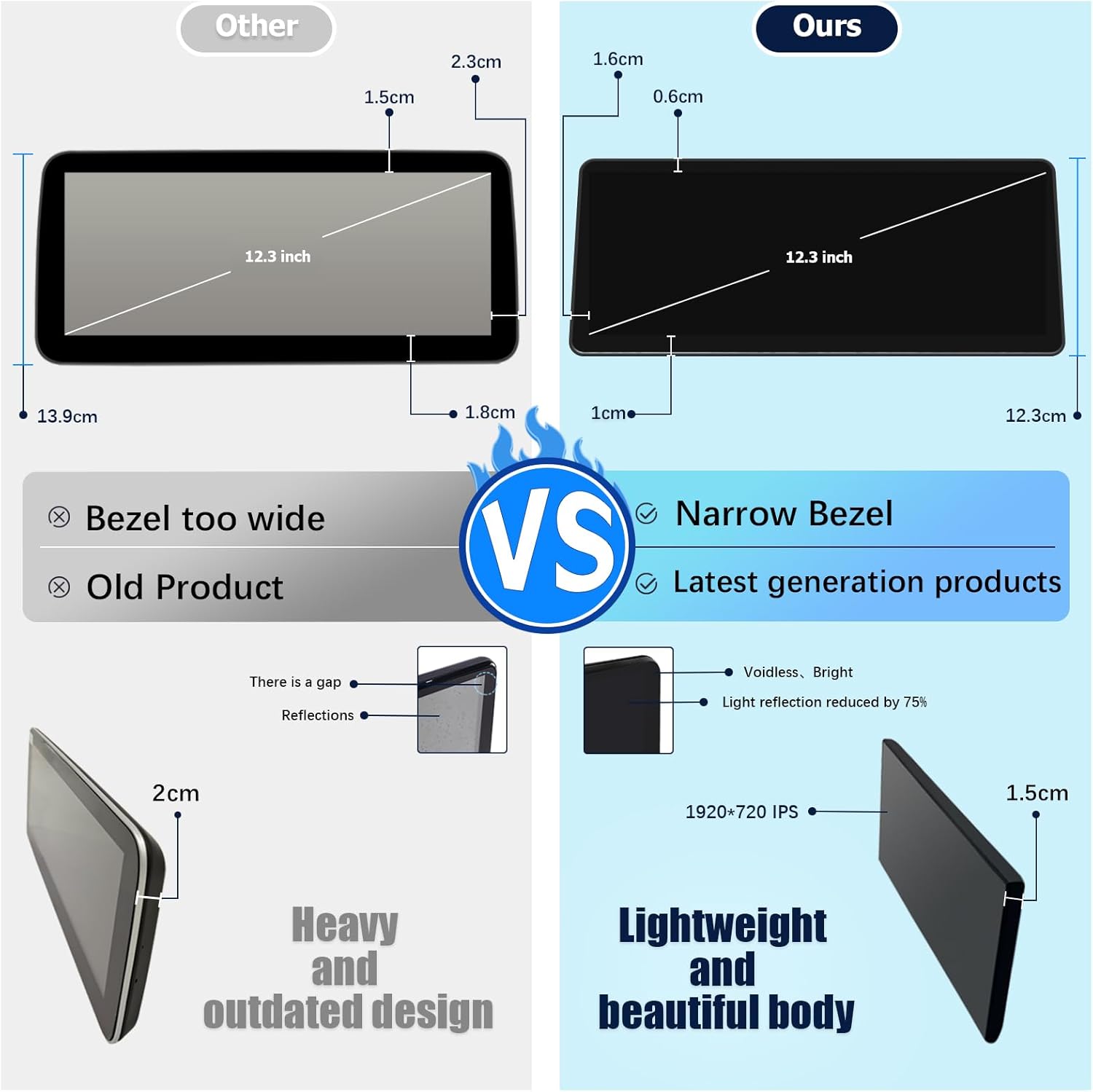
Image Description: This image illustrates the difference between a compatible CCC system (top, showing a 10-pin LVDS port) and an incompatible CIC system (bottom, showing a 4-pin LVDS port) in a BMW E60/E61 dashboard. It highlights the visual cues for identifying your car's system type.
2.2. Wiring and Connections
Carefully follow the wiring instructions provided. Proper connection of the fiber optic cables and power cables is essential for the unit's functionality and to retain original vehicle features.
Video Description: This video demonstrates the process of transferring fiber optic cables and connecting the power cable during the installation of the car radio. It shows how to release the snap, pull out the fiber optic cable, locate the power cord, and correctly snap the new power cable into the original interface. Pay close attention to the correct interface for connection.
The unit supports original OEM systems, including steering wheel controls, OEM reversing camera parking radar, and iDrive control. Ensure all connections are secure to maintain these functionalities.
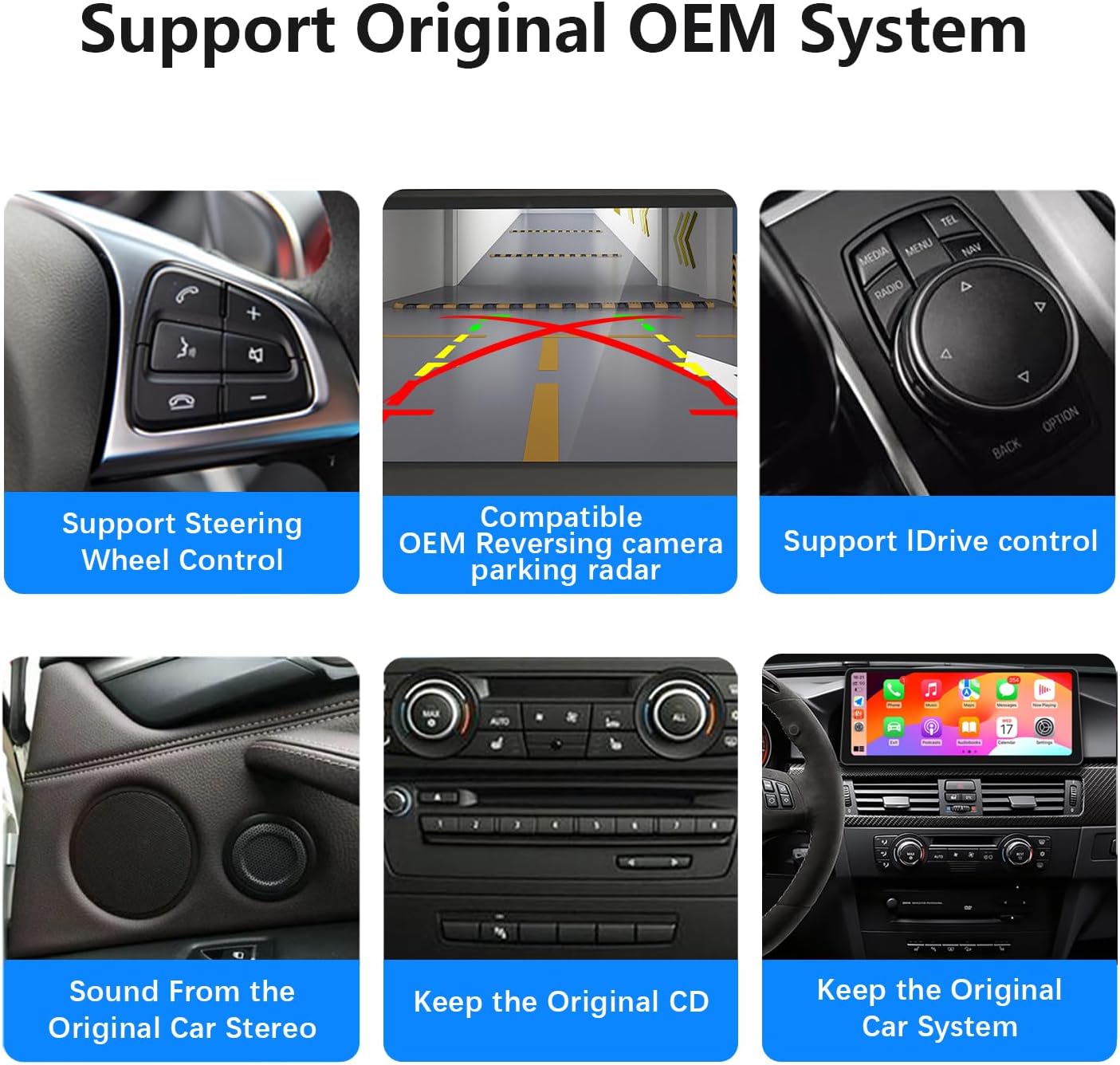
Image Description: This image highlights the integration capabilities of the car radio with the original BMW OEM system. It shows icons and text indicating support for steering wheel control, OEM reversing camera parking radar, iDrive control, sound from the original car stereo, and retention of the original CD player and car system.
3. Operating Instructions
Your Uckazy car radio runs on Android 14, offering a wide range of features and a user-friendly interface. The 12.3-inch HD (1920*720) IN-CELL screen with full lamination technology provides a clear and vibrant display, reducing reflections by 75% compared to older screens.
3.1. Wireless CarPlay and Android Auto
The unit supports wireless CarPlay and Android Auto, allowing seamless integration with your smartphone for navigation, music, calls, and messaging. To connect, first ensure Bluetooth is enabled on your phone and the car radio. Pair your phone with the car radio via Bluetooth, then follow the on-screen prompts to activate CarPlay or Android Auto.

Image Description: This image displays the car radio's capability to support both Wireless CarPlay and Wireless Android Auto. The top section shows the respective interfaces for each system, while the bottom section illustrates a smartphone connected to each, demonstrating navigation and media applications.
Video Description: This video provides a product overview for the 12.3-inch screen, specifically demonstrating the wireless CarPlay connection process for a Linux system. It shows how to enable Bluetooth, find the device, and activate CarPlay, showcasing navigation, music playback, and other functions.
3.2. Digital Sound Processor (DSP)
The built-in DSP features 16 EQ segments, allowing for precise audio tuning. You can adjust the sound quality to your preference, enhance bass, treble, and customize the soundstage. Various preset EQ modes are available for quick selection.

Image Description: This image shows the car radio's interface for the Built-in DSP (Digital Sound Processor). It displays a graphic equalizer with 16 adjustable segments, allowing users to fine-tune audio output for a personalized listening experience.
3.3. iDrive System Retention
The unit is designed to retain the functionality of your original BMW iDrive system. You can switch between the original iDrive interface and the Android system, ensuring access to all original vehicle functions and navigation.

Image Description: This image provides a side-by-side comparison of a BMW E60/E61 dashboard. The 'Before installation' view shows the original smaller screen, while the 'After installation' view displays the larger 12.3-inch Android screen seamlessly integrated, running CarPlay.
3.4. Camera Functionality
The unit supports both compatible OEM reversing camera parking radar and aftermarket reverse cameras. It also supports front view camera DVR (CVBS input) for enhanced driving safety.
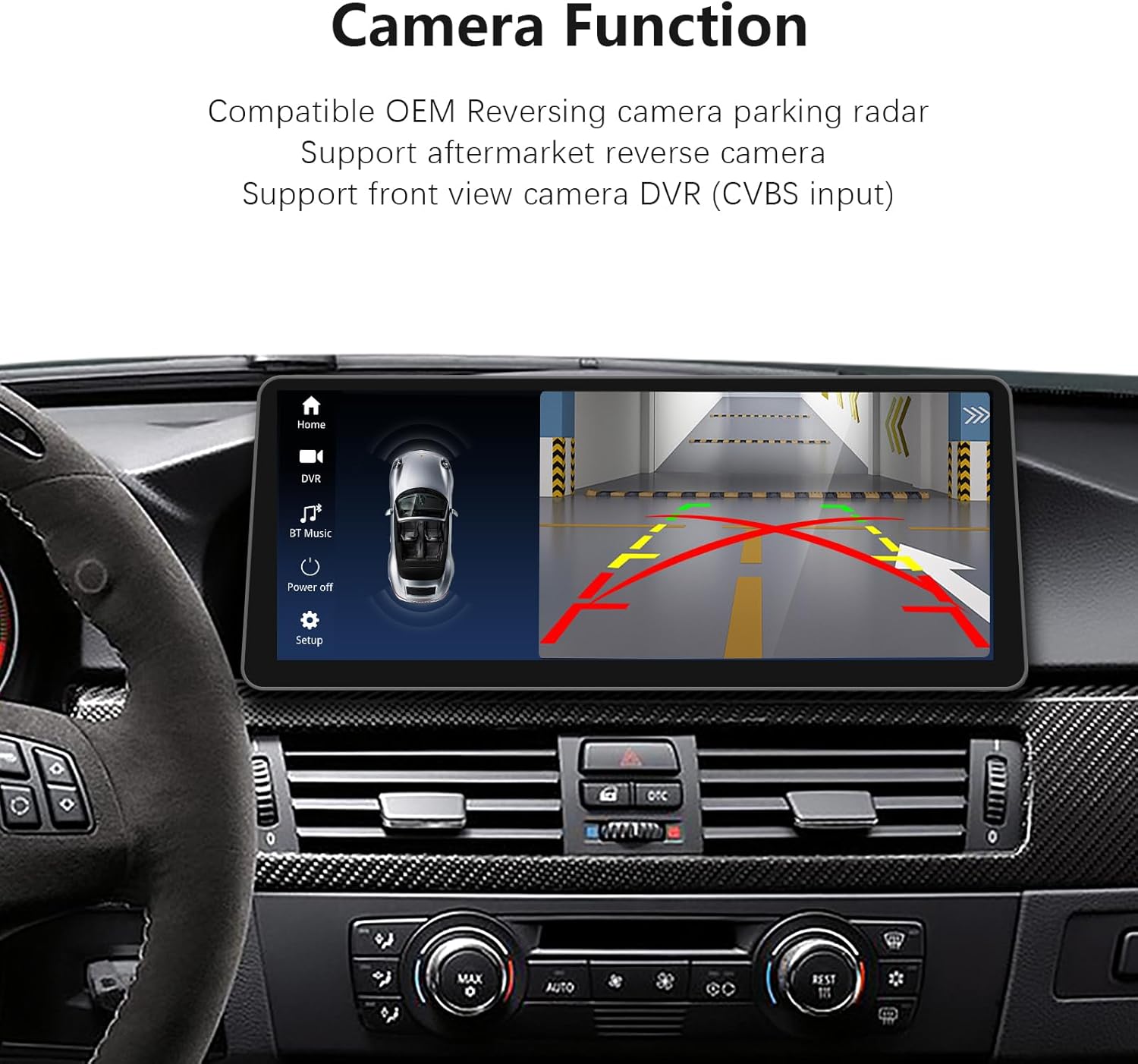
Image Description: This image shows the car radio screen displaying a reverse camera feed, complete with dynamic parking guidelines. It illustrates the unit's support for both OEM reversing camera parking radar and aftermarket reverse cameras, as well as front view camera DVR (CVBS input).
4. Maintenance
To ensure the longevity and optimal performance of your Uckazy car radio, follow these maintenance guidelines:
- Screen Cleaning: Use a soft, lint-free cloth, slightly dampened with water or a screen-safe cleaner, to gently wipe the touch screen. Avoid abrasive materials or harsh chemicals.
- Software Updates: Periodically check for available software updates to ensure you have the latest features and security enhancements. Follow the on-screen instructions for updating.
- Temperature Control: Avoid exposing the unit to extreme temperatures. While designed for automotive use, prolonged exposure to direct sunlight or freezing conditions can affect performance.
- Cable Connections: Ensure all cables remain securely connected. Loose connections can lead to intermittent issues.
5. Troubleshooting
If you encounter issues with your Uckazy car radio, refer to the following common problems and solutions:
- No Power:
- Check all power cable connections to ensure they are securely plugged in.
- Verify the vehicle's fuse related to the car radio.
- No Sound:
- Ensure the volume is not muted or set too low.
- Check fiber optic cable connections, as these are crucial for audio transfer in BMW CCC systems.
- Verify the audio output settings in the unit's menu.
- CarPlay/Android Auto Not Connecting:
- Ensure Bluetooth is enabled on both your phone and the car radio.
- Restart both your phone and the car radio.
- Check if Siri (for CarPlay) or Google Assistant (for Android Auto) is enabled on your phone.
- Touch Screen Unresponsive:
- Perform a soft reset of the unit (refer to the device settings for reset options).
- Ensure the screen is clean and free of debris.
- System Lag or Freezing:
- Close unnecessary background applications.
- Clear cache from applications if possible.
- Consider a factory reset if issues persist (note: this will erase all user data).
If these steps do not resolve the issue, please contact customer support for further assistance.
6. Specifications
| Feature | Detail |
|---|---|
| Model | 12.3' CCC 4+64G |
| Operating System | Android 14 |
| Processor | MediaTek Octa-core (4*Cortex A72 2.2GHz + 4*Cortex A51 1.8GHz) |
| RAM | 4GB |
| ROM | 64GB |
| Screen Size | 12.3 inches |
| Screen Resolution | HD 1920x720 IPS |
| Connectivity | 2.4G & 5.0G WiFi, Bluetooth |
| Special Features | Wireless CarPlay, Wireless Android Auto, Built-in DSP (16 EQ segments), iDrive System Retention, Touchscreen |
| Compatible Devices | Smartphone |
| Compatible Car Models | BMW E60 E61 (2005-2008) with CCC System |
| Item Weight | 3.4 pounds |
| Package Dimensions | 22 x 20 x 16 inches |

Image Description: This image visually compares a standard 1280x480 resolution screen with the 1920x720 IPS screen of the Uckazy unit. It emphasizes the significantly clearer picture, higher color brightness, and improved visual experience offered by the higher resolution screen, noting an approximate 120% increase in pixels.

Image Description: This image presents a comparison between a generic car screen ('Other') and the Uckazy unit ('Ours'). It highlights the Uckazy unit's narrow bezel, lightweight design, and advanced full lamination technology that reduces light reflection by 75%, contrasting it with the wider bezels, older design, and potential reflections of other products.
7. Warranty Information
Your Uckazy 12.3 Inch Android 14 Car Radio comes with a standard manufacturer's warranty. Please refer to the warranty card included in your product packaging for specific terms, conditions, and duration. Keep your proof of purchase for any warranty claims.
8. Customer Support
For technical assistance, troubleshooting, or any questions regarding your Uckazy car radio, please contact our customer support team. Contact information can typically be found on our official website or on the product packaging.
When contacting support, please have your product model number (12.3' CCC 4+64G) and purchase details ready to help us assist you more efficiently.