
1. Getting Started
1.1 Unboxing Your DOOGEE U11 Pro Tablet
Upon opening the package, you will find the DOOGEE U11 Pro Tablet, along with essential accessories designed to enhance your user experience. These typically include a protective case, a pre-applied screen protector, a USB-C charging cable, and a power adapter.
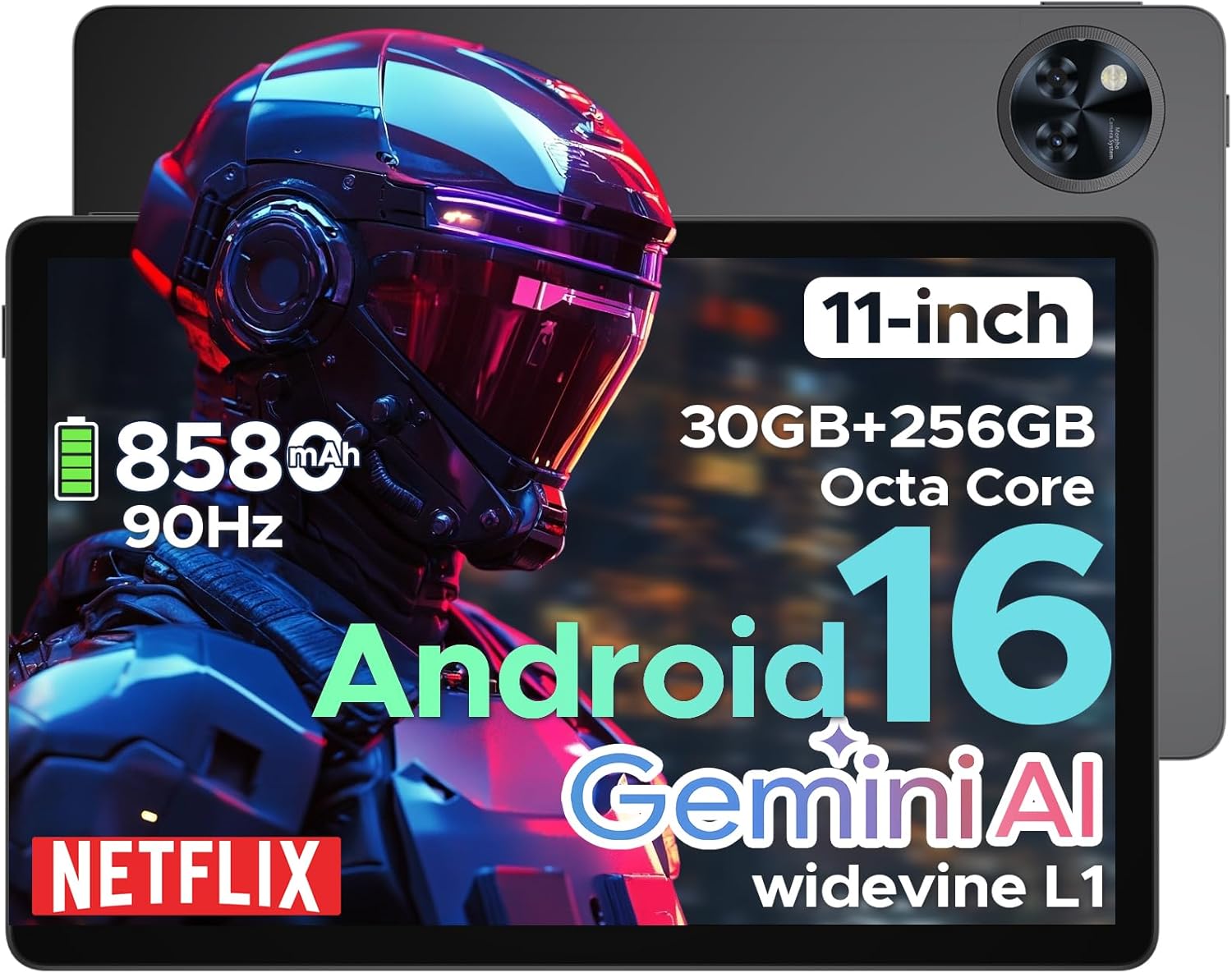
Figure 1: DOOGEE U11 Pro Android 16 Tablet with included accessories.
1.2 Initial Power On and Setup
To power on your tablet, press and hold the power button located on the side until the DOOGEE logo appears. Follow the on-screen prompts to complete the initial setup, which includes selecting your language, connecting to a Wi-Fi network, and signing in with your Google account. The tablet runs on the Android 16 operating system, offering enhanced app permission control and upgraded privacy protection.
2. Key Features Overview
The DOOGEE U11 Pro Tablet is equipped with advanced hardware and software to deliver a responsive and efficient experience.
- Processor: MediaTek Unisoc T7200 Octa-Core Processor with Gemini AI.
- Memory & Storage: 30GB RAM (6GB physical + 24GB expansion) and 256GB internal storage, expandable up to 2TB via MicroSD/TF card.
- Display: 11-inch 90Hz Ultra-clear IPS Display with 1280x800 pixel resolution.
- Battery: 8580mAh large capacity battery with AI battery management and OTG reverse charging support.
- Cameras: 13MP rear camera and 5MP front camera with AI optimization.
- Operating System: Android 16.

Figure 2: Internal components of the DOOGEE U11 Pro Tablet, highlighting the Unisoc T7200 processor, 30GB RAM, and 256GB ROM.
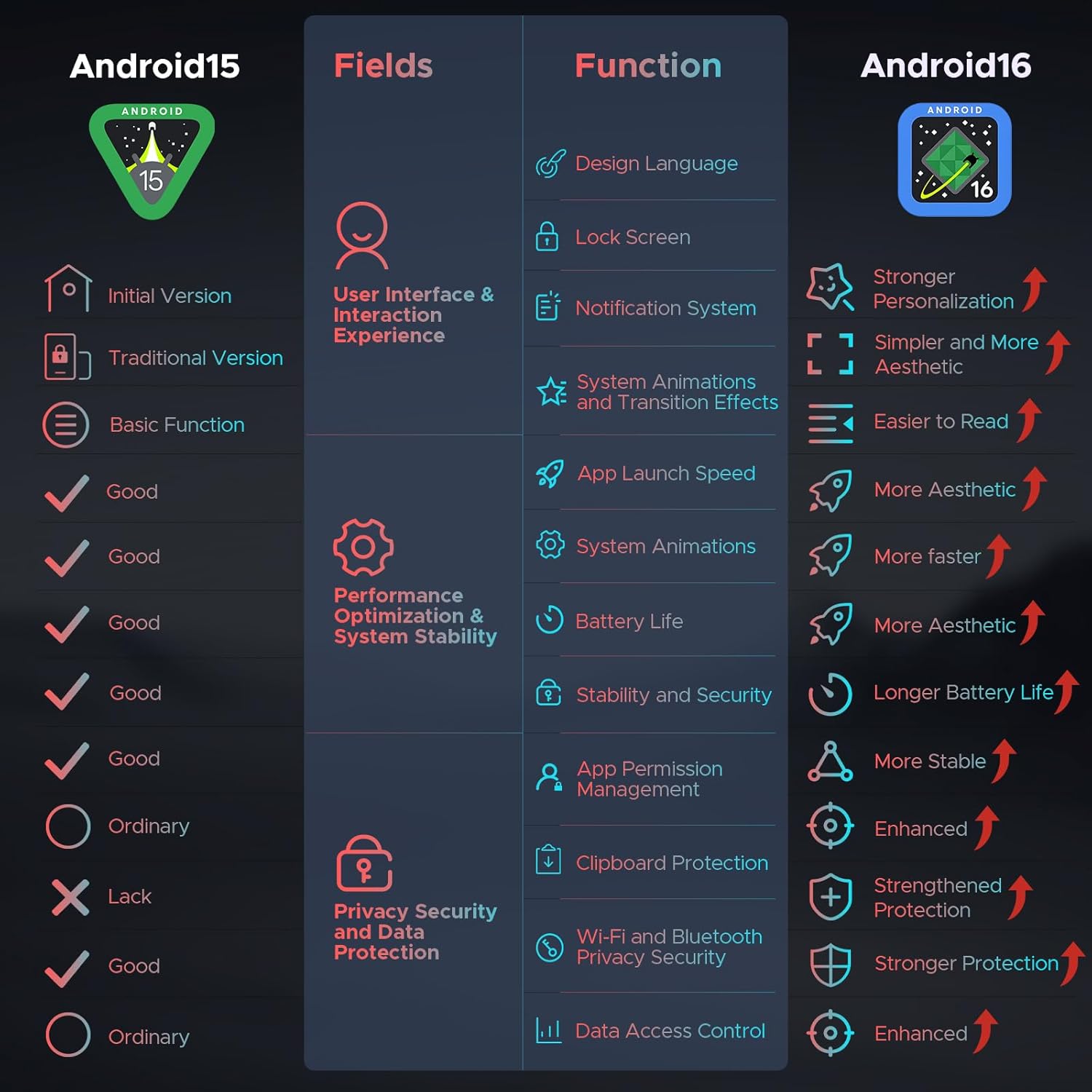
Figure 3: The Android 16 operating system interface on the DOOGEE U11 Pro Tablet.
2.1 Performance and Operating System
The MediaTek Unisoc T7200 octa-core processor ensures smooth multitasking and efficient operation. The integrated Gemini AI intelligently allocates system resources for tasks like photo editing and real-time translation. The Android 16 system provides a smarter, smoother, and safer user experience with enhanced privacy controls.
Video 1: This video demonstrates the smooth and responsive performance of the DOOGEE U11 Pro Tablet running on the Android 16 operating system, showcasing its smart features and user interface.
3. Operating Your Tablet
3.1 Basic Navigation
Navigate the tablet using intuitive touch gestures. Swipe up from the bottom to access the app drawer, swipe down from the top for notifications and quick settings, and tap icons to open applications.
3.2 Media Consumption
The 11-inch 90Hz Ultra-clear IPS Display provides vibrant colors and smooth visuals, ideal for streaming and gaming. With Widevine L1 certification, you can enjoy 1080p HD content from platforms like Prime Video and Netflix.

Figure 4: The 11-inch 90Hz display of the DOOGEE U11 Pro Tablet, illustrating smooth visuals.

Figure 5: The DOOGEE U11 Pro Tablet displaying content with Widevine L1 support for high-definition streaming.
Video 2: This video highlights the immersive visual experience offered by the DOOGEE U11 Pro's 11-inch display, showcasing its clarity and vibrant colors for media consumption.
4. Battery and Charging
The tablet features a large 8580mAh battery, providing extended usage times. AI battery management optimizes power consumption, reducing standby drain. The tablet also supports OTG reverse charging, allowing it to function as a power bank for other devices.

Figure 6: Visual representation of the 8580mAh battery capacity in the DOOGEE U11 Pro Tablet.
Video 3: This video demonstrates the extended battery life and charging capabilities of the DOOGEE U11 Pro Tablet, including its 8580mAh battery and reverse charging feature.
5. Camera Functions
The DOOGEE U11 Pro features a 13MP rear camera for capturing documents and photos, and a 5MP front camera optimized with AI for clear video calls and selfies, even in low-light conditions. Face Unlock provides quick and secure access to your device.

Figure 7: Rear camera module of the DOOGEE U11 Pro Tablet.
6. Connectivity and Audio
The tablet supports Bluetooth 5.0 for wireless accessory connections and 5G Wi-Fi for fast internet access. Experience rich, clear sound through the high-fidelity dual speakers, or use the 3.5mm headphone jack for private listening. Built-in GPS provides accurate navigation.
7. Maintenance and Care
- Cleaning: Use a soft, lint-free cloth to clean the screen and body. Avoid harsh chemicals.
- Software Updates: Regularly check for and install system updates to ensure optimal performance and security.
- Battery Care: To prolong battery life, avoid extreme temperatures and fully discharging the battery frequently.
- Storage Management: Utilize the built-in Memory Manager to clear junk files and unused downloads, keeping your tablet running efficiently.
8. Troubleshooting
- Device Not Turning On: Ensure the battery is charged. Connect the tablet to the charger and wait a few minutes before attempting to power on again.
- Wi-Fi Connection Issues: Restart your Wi-Fi router and the tablet. Check if other devices can connect to the network.
- Slow Performance: Close unnecessary background applications. Clear cache from apps and consider freeing up storage space.
- Factory Reset: As a last resort, if software issues persist, you may perform a factory reset. Warning: This will erase all data on your tablet. Back up important information before proceeding.
9. Specifications
| Feature | Specification |
|---|---|
| Model | DOOGEE U11 Pro |
| Operating System | Android 16 |
| Processor | Unisoc T7200 Octa-Core |
| RAM | 30GB (6GB physical + 24GB expansion) |
| Internal Storage | 256GB |
| Expandable Storage | Up to 2TB via MicroSD/TF card |
| Screen Size | 11 Inches |
| Screen Resolution | 1280 x 800 pixels |
| Refresh Rate | 90Hz |
| Rear Camera | 13MP |
| Front Camera | 5MP |
| Battery Capacity | 8580mAh |
| Wireless Connectivity | Bluetooth 5.0, 5G WiFi (802.11ax) |
| Dimensions (LxWxH) | 10.1 x 6.68 x 0.31 inches |
| Item Weight | 1.96 pounds |
10. Warranty and Support
DOOGEE is committed to providing quality products and customer satisfaction.
- 30-Day Money Back Guarantee and Free Return: If you are not satisfied with your purchase, you may return it within 30 days for a full refund.
- 2-Year Limited Warranty: The DOOGEE U11 Pro Tablet comes with a 2-year limited warranty covering manufacturing defects.
- 24/7 One-on-One Online Support: For any technical assistance or inquiries, please contact our customer support team available 24/7.
For further assistance, please visit the official DOOGEE support page: DOOGEE Support


