Important Safety Instructions
Please read all instructions carefully before using your new refrigerator to ensure safe and efficient operation. Keep this manual for future reference.
- Electrical Safety: Ensure the refrigerator is connected to a dedicated, grounded power outlet. Do not use extension cords or adapters.
- Ventilation: Maintain adequate space around the refrigerator for proper ventilation. Blocked vents can lead to overheating and reduced efficiency.
- Flammable Materials: Do not store explosive substances or highly flammable materials inside or near the refrigerator.
- Children Safety: Supervise children to ensure they do not play with the appliance. Keep packaging materials out of reach of children.
- Heavy Appliance: The refrigerator is heavy. Use caution and proper lifting techniques when moving it to prevent injury.
Product Overview
The MITSUBISHI MR-JW55M-W is a 547-liter, 6-door French door refrigerator designed for optimal food preservation and convenience. It features advanced technologies to keep your food fresh longer and simplify meal preparation.
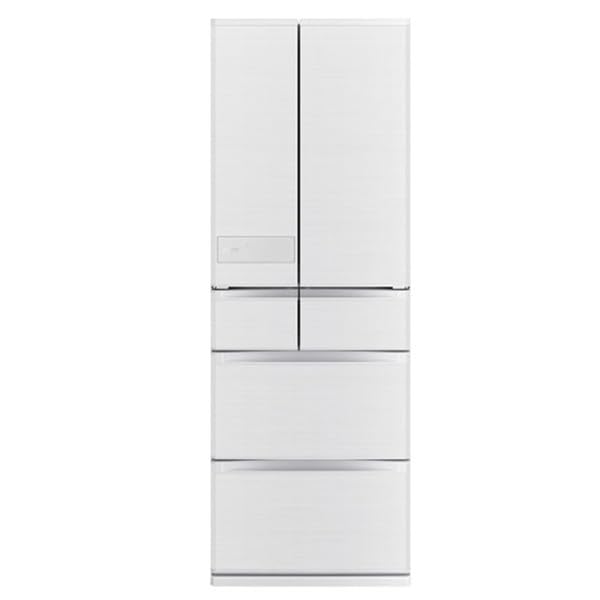
Image: Front view of the MITSUBISHI MR-JW55M-W refrigerator, showcasing its sleek design and French door configuration.
Key Features:
- Instant Freezing A.I.: Allows immediate use of food without the need for defrosting, preserving freshness and flavor.
- Wide Sub-zero Stocker D A.I.: Maintains a sub-zero temperature range to extend the freshness of meat, fish, and dairy products.
- V-Freezing: A specialized freezing function that makes frozen vegetables easier to process and prepare.
- French Door Design: Offers wide access to the refrigerator compartment and efficient organization.
- Non-CFC Refrigerant: Environmentally friendly design.
Setup
1. Unpacking
- Carefully remove all packaging materials, including tape and protective films.
- Inspect the refrigerator for any shipping damage. If damaged, contact your retailer immediately.
2. Placement
- Place the refrigerator on a firm, level floor. Use the adjustable leveling feet to ensure stability.
- Allow at least 5 cm (2 inches) of space at the back and sides, and 10 cm (4 inches) at the top for proper air circulation.
- Avoid direct sunlight or heat sources (e.g., stoves, radiators) as this can affect cooling performance and energy consumption.
3. Electrical Connection
- Plug the power cord into a dedicated 100V, 50/60Hz grounded electrical outlet.
- Do not share the outlet with other appliances.
4. Initial Operation
- After plugging in, allow the refrigerator to run for at least 4-6 hours before storing food. This allows the internal temperature to stabilize.
- Perform an initial cleaning of the interior before first use.
Operating Instructions
1. Control Panel
The control panel is typically located on the front of the refrigerator or inside the fresh food compartment. It allows you to adjust temperature settings for different compartments and activate special features.
- Temperature Adjustment: Use the 'Fridge Temp' and 'Freezer Temp' buttons to set desired temperatures. Refer to the display for current settings.
- Special Modes: Buttons for 'Instant Freezing A.I.', 'Wide Sub-zero Stocker D A.I.', and 'V-Freezing' activate these specific functions. Consult the display for mode indicators.
2. Food Storage
- Refrigerator Compartment (298L): Ideal for fresh foods, beverages, and dairy. Arrange shelves to suit your needs.
- Vegetable Compartment (100L): Designed to maintain optimal humidity for fruits and vegetables.
- Freezer Compartment (99L): For long-term storage of frozen foods. Ensure packages are sealed to prevent freezer burn.
- Ice Making Compartment (21L): For automatic ice production. Ensure the water tank is filled (if applicable).
- Convertible Compartment (29L): This compartment can often be adjusted to function as either a chiller, soft freezer, or additional refrigerator space depending on your model's specific settings. Refer to the control panel for options.
3. Using Special Features
- Instant Freezing A.I.: Place items in the designated Instant Freezing zone. This feature rapidly freezes food, allowing it to be cut or used immediately without full defrosting.
- Wide Sub-zero Stocker D A.I.: Store fresh meat, fish, and dairy in this compartment for extended freshness at temperatures just below freezing.
- V-Freezing: Utilize this mode for vegetables you intend to process later. It freezes them in a way that makes them easier to chop or blend directly from frozen.
Maintenance
1. Cleaning the Interior
- Unplug the refrigerator before cleaning.
- Wipe interior surfaces with a soft cloth dampened with a mild detergent solution.
- Remove shelves and drawers for thorough cleaning. Rinse with clean water and dry completely before returning.
- Clean door gaskets regularly to ensure a tight seal.
2. Cleaning the Exterior
- Wipe the exterior with a soft, damp cloth. For stubborn stains, use a mild, non-abrasive cleaner.
- Avoid using harsh chemicals or abrasive cleaning pads, which can damage the finish.
3. Power Outage
- During a power outage, keep the refrigerator doors closed as much as possible to maintain internal temperatures.
- Food can remain safely stored for several hours depending on the duration of the outage and how often doors are opened.
4. Long-Term Storage
- If the refrigerator will not be used for an extended period, unplug it, empty all food, and clean the interior thoroughly.
- Leave the doors slightly ajar to prevent odors and mold growth.
Troubleshooting
Before contacting service, please check the following common issues and solutions:
| Problem | Possible Cause | Solution |
|---|---|---|
| Refrigerator is not cooling | Power cord unplugged; temperature setting too high; door not closed properly; poor ventilation. | Check power connection; adjust temperature; ensure doors are sealed; clear obstructions around vents. |
| Unusual noises | Refrigerator not level; items vibrating inside; normal operating sounds (compressor, fan). | Level the appliance; rearrange items; normal sounds are expected. |
| Water leakage inside/outside | Drain hose clogged; door gasket not sealing; excessive humidity. | Clean drain hose; check door seal; avoid opening doors frequently in humid conditions. |
| Doors do not close completely | Food packages blocking; door gasket dirty or damaged; refrigerator not level. | Rearrange food; clean/inspect gasket; level the appliance. |
If the problem persists after attempting these solutions, please contact customer service.
Specifications
| Feature | Specification |
|---|---|
| Brand Name | MITSUBISHI ELECTRIC |
| Product Model Number | MR-JW55M-W |
| Door Type | French Door |
| Number of Doors | 6 |
| Total Rated Capacity | 547 Liters |
| Refrigerator Compartment Capacity | 298 Liters |
| Freezer Compartment Capacity | 99 Liters |
| Ice Making Compartment Capacity | 21 Liters |
| Convertible Compartment Capacity | 29 Liters |
| Vegetable Compartment Capacity | 100 Liters |
| External Dimensions (H x W x D) | 1833 mm x 650 mm x 699 mm |
| Required Installation Depth | 709 mm |
| Weight | 119 kg |
| Annual Power Consumption | 293 kWh/year (Based on JIS C 9801-3:2015) |
| Rated Power Consumption (Motor) | 82 W |
| Rated Power Consumption (Electric Heater) | 246 W |
| Refrigerant Type | Non-CFC |
Warranty and Support
This MITSUBISHI ELECTRIC refrigerator comes with a standard manufacturer's warranty. Please refer to the warranty card included with your purchase for specific terms and conditions, including coverage period and limitations.
For technical assistance, service requests, or to inquire about replacement parts, please contact MITSUBISHI ELECTRIC customer support. Contact information can typically be found on the manufacturer's official website or on your warranty documentation.
When contacting support, please have your model number (MR-JW55M-W) and purchase date readily available.


