
1. Introduction
Thank you for choosing the Bestier 47-inch Computer Desk with Drawers. This manual provides detailed instructions for assembly, operation, maintenance, and troubleshooting to ensure you get the most out of your new desk. Designed for home offices and studios, this desk features efficient storage solutions, a user-friendly design, and a durable construction.
2. Safety Information
Important Safety Warnings:
- Ensure not to exceed the maximum weight capacity of 150 pounds for the desktop.
- Each side shelf can bear up to 25 pounds.
- The file drawer has a maximum weight capacity of 20 pounds.
- Always follow assembly instructions carefully to ensure stability and safety.
- Keep small parts away from children during assembly.
3. Package Contents
Before beginning assembly, please verify that all parts and hardware are present and undamaged. Refer to the included manual for a complete list of numbered parts and hardware. If any components are missing or damaged, please contact customer support.
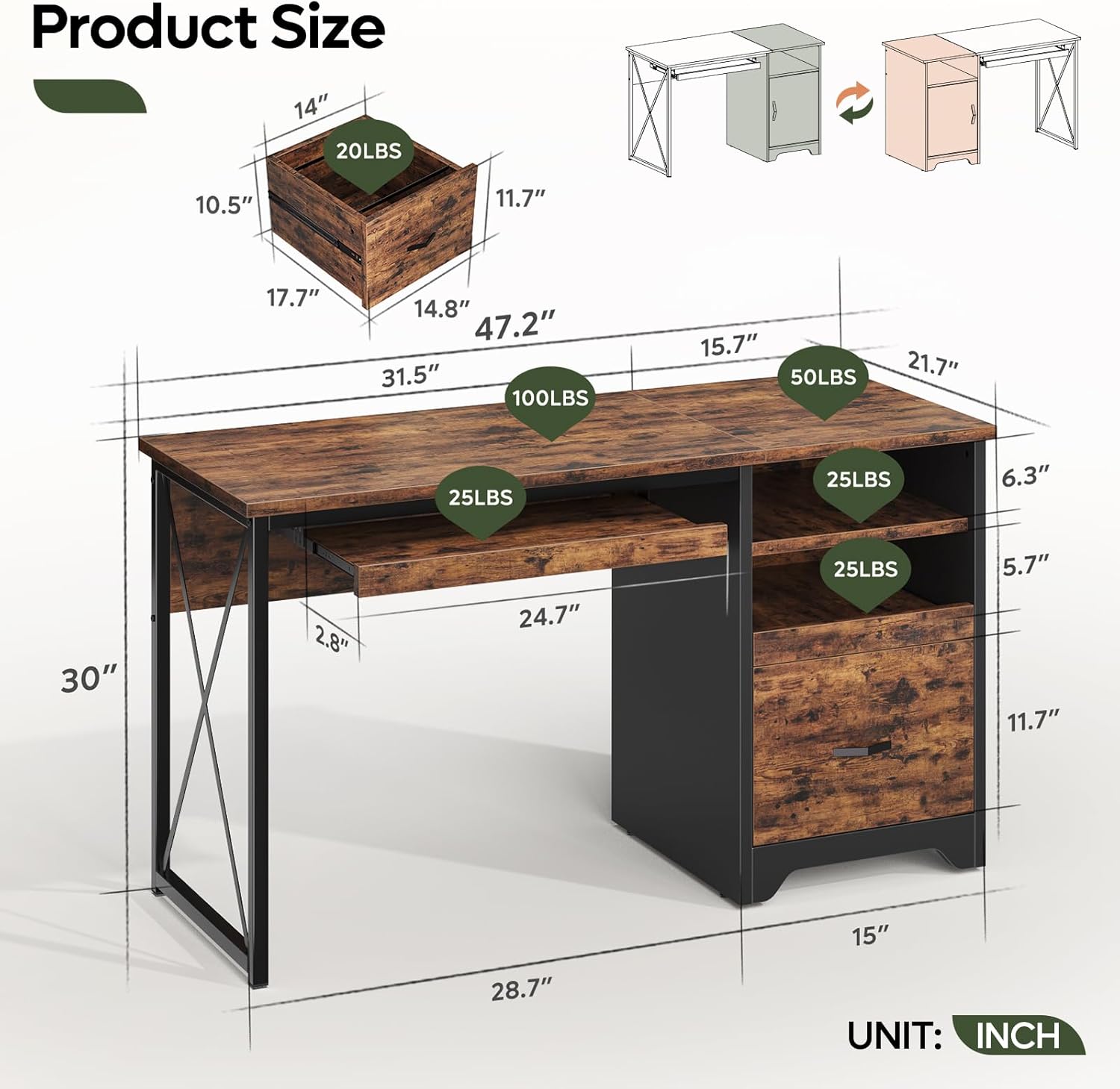
Figure 1: Overview of the Bestier 47-inch Computer Desk with key dimensions and weight capacities for various sections.
4. Setup and Assembly
Assembly is required for this desk. An illustrated manual with numbered parts is included in your package. For a visual guide, please refer to the assembly video below, which demonstrates the process for a similar Bestier desk model.
Assembly Video Guide
Video 1: This video provides a step-by-step visual guide for assembling a Bestier computer desk, demonstrating the process for a similar 55-inch model. It covers attaching components, securing hardware, and installing drawers and the keyboard tray.
General Assembly Steps:
- Prepare Components: Lay out all numbered parts and hardware on a clean, soft surface to prevent scratches.
- Assemble Drawers: Construct the small and large drawers according to the instructions, ensuring all slides are correctly oriented.
- Attach Side Panels: Secure the side panels to the base and top sections using the provided hardware.
- Install Keyboard Tray: Mount the keyboard tray slides and attach the tray to the designated area.
- Connect Desktop: Secure the main desktop surface to the assembled frame.
- Final Adjustments: Ensure all screws are tightened and the desk is stable.
For detailed, step-by-step instructions, please consult the included paper manual or the assembly video.
5. Operating Instructions
The Bestier Computer Desk is designed for optimal functionality and organization.
Key Features:
- Keyboard Tray: Utilize the flexible pull-out keyboard tray for comfortable typing and to save desktop space.
- Storage Drawers: The desk includes an open storage compartment, a small storage drawer, and a file drawer. The file drawer is designed to accommodate letter, A4, and legal-size hanging file folders, helping to keep your workspace organized.
- Cable Management: Use the integrated cable management holes to route and organize your wires, maintaining a tidy and clutter-free desktop.
- Reversible Design: The storage cabinet can be assembled on either the left or right side of the desk, allowing for flexible placement options to suit your space and preferences.

Figure 2: Detailed view of the desk's storage features, including the integrated keyboard tray, open storage space, and file drawer.
Product Feature Video:
Video 2: This video highlights the key features of the Bestier Computer Desk, including the keyboard tray, storage drawers, and overall design, for a 55-inch model.
6. Maintenance
To maintain the appearance and longevity of your Bestier Computer Desk, follow these simple care instructions:
- Cleaning: Wipe the desk surfaces with a damp cloth, then immediately dry with a clean, dry cloth. Avoid abrasive cleaners or harsh chemicals that may damage the finish.
- Spills: Promptly clean up any spills to prevent staining or damage to the engineered wood.
- Heat and Moisture: Avoid placing hot items directly on the desktop. Use coasters for beverages to protect against moisture rings.
- Regular Checks: Periodically check and tighten all screws and fasteners to ensure the desk remains stable and secure.
7. Troubleshooting
If you encounter any issues with your Bestier Computer Desk, please refer to the following common solutions:
- Wobbly Desk: Ensure all screws and bolts are securely tightened. Check that the desk is placed on a level surface. Adjust any leveling feet if present.
- Drawers Not Sliding Smoothly: Verify that the drawer slides are correctly installed and aligned. Ensure no obstructions are in the drawer tracks. Lubricate slides with a silicone-based spray if necessary.
- Missing Parts: If any parts were missing upon delivery, please contact Bestier customer support immediately with your product model number and a description of the missing part.
- Assembly Difficulties: Review the assembly video and the step-by-step manual. If issues persist, contact customer support for assistance.
8. Specifications
| Feature | Detail |
|---|---|
| Model Number | H107012B |
| Dimensions (L x W x H) | 47.2" x 21.7" x 30" |
| Color | Rustic Brown |
| Material | Engineered Wood, Metal |
| Desktop Weight Capacity | 150 lbs |
| Side Shelf Weight Capacity | 25 lbs (each) |
| File Drawer Weight Capacity | 20 lbs |
| Number of Drawers | 2 (1 storage, 1 file) |
| Special Features | Cable Management, Keyboard Tray, Reversible Design, Scratch Resistant |
9. Warranty and Support
Bestier is committed to providing quality products and customer satisfaction. For any product issues or support needs, please contact Bestier customer service.
Customer Support Contact Information:
| Region | Contact Details |
|---|---|
| North American | Phone: 888-666-1086 Email: Service.US@bestier.net |
| Europe | Email: Service.UK@bestier.net, Service.DE@bestier.net, Service.FR@bestier.net, Service.IT@bestier.net, Service.ES@bestier.net |
| Asia | Phone: 04-8888-0283 Email: Service.JP@bestier.net |
| Global | Email: Service@bestier.net |
Bestier offers lifetime customer service to ensure satisfactory solutions for all customers.


