1. Introduction
The JRD Portable Evaporative Air Cooler, Model FKT007R, is a versatile 3-in-1 appliance designed to provide cooling, fan, and humidification functions for your home or office. This unit utilizes evaporative cooling technology to deliver a comfortable environment without excessive drying. It features multiple fan speeds, operating modes, and a timer function for personalized comfort. Its portable design, complete with universal wheels and a built-in handle, allows for easy relocation.

Image 1.1: The JRD Portable Evaporative Air Cooler providing cooling in a room.
2. Important Safety Information
Please read all instructions carefully before using this appliance. Failure to follow these instructions may result in electric shock, fire, or serious injury.
- Always place the unit on a stable, level surface to prevent tipping.
- Do not immerse the appliance, cord, or plug in water or other liquids.
- Ensure the power supply matches the voltage specified on the rating label.
- Unplug the unit from the power outlet when not in use, before cleaning, or when moving.
- Keep children and pets away from the appliance during operation.
- Do not block air inlets or outlets. Maintain adequate clearance around the unit for proper airflow.
- Do not operate the unit with a damaged cord or plug, or if it malfunctions or has been damaged in any manner.
- Use only manufacturer-recommended attachments.
- Do not use outdoors. This appliance is intended for residential indoor use only.
- Avoid placing the unit near heat sources or in direct sunlight for extended periods.
- Do not overfill the water tank.
3. Package Contents
Verify that all items are present in your package:
- JRD Portable Evaporative Air Cooler (Model FKT007R)
- Remote Control (with pre-installed battery)
- User Manual
- 4 Universal Wheels
- 6 Ice Packs
Video 3.1: Unboxing and overview of the JRD Portable Evaporative Air Cooler, showing the main unit, remote control, user manual, wheels, and ice packs.
4. Setup
4.1 Attaching the Universal Wheels
The JRD Air Cooler comes with four universal wheels for easy mobility. To attach them:
- Carefully turn the air cooler upside down or tilt it to access the bottom.
- Align each wheel with the designated slots on the bottom corners of the unit.
- Press firmly until each wheel snaps securely into place. Ensure all four wheels are properly installed before placing the unit upright.
Video 4.1: Demonstration of attaching the universal wheels to the base of the air cooler for enhanced mobility.
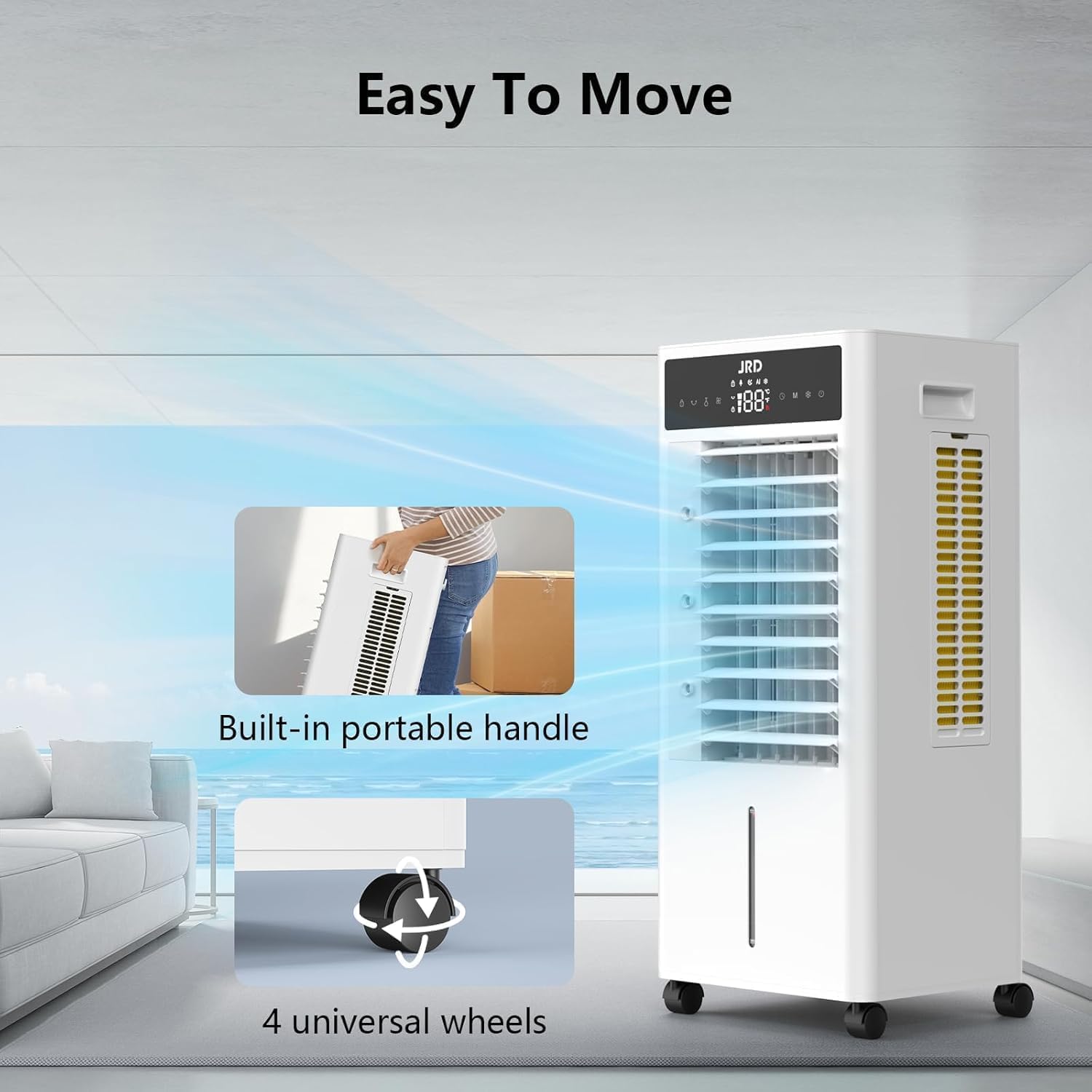
Image 4.1: The air cooler featuring a built-in portable handle and four universal wheels for effortless relocation.
4.2 Filling the Water Tank and Using Ice Packs
For optimal cooling and humidification, fill the water tank and utilize the provided ice packs.
- Open the water tank cover located on the top of the unit.
- Carefully pour clean water into the tank. The unit has a visible water level indicator on the front. Do not exceed the "MAX" fill line. The tank capacity is approximately 2.4 gallons (9 liters).
- For enhanced cooling, place the provided ice packs in a freezer for at least 6 hours until completely frozen.
- Open the rear access panel at the bottom of the unit.
- Place the frozen ice packs into the designated compartment within the water tank.
- Close the rear access panel and the water tank cover securely.

Image 4.2: Visual guide for filling the 2.4-gallon water tank and inserting ice packs for improved cooling performance.
Video 4.2: Detailed instructions on how to fill the water tank and insert the ice packs into the air cooler.
5. Operating Instructions
The JRD Air Cooler can be operated using the control panel on top of the unit or the included remote control.
5.1 Control Panel Overview
Video 5.1: A close-up demonstration of the control panel buttons and their functions, including power, speed, timer, mode, cool, and swing.
5.2 Power On/Off
- Press the POWER button () to turn the unit on or off.
5.3 Adjusting Fan Speed
The unit offers three fan speeds: Low, Medium, and High.
- Press the SPEED button repeatedly to cycle through the available speeds (1, 2, 3).

Image 5.1: Illustration of the three fan speeds and four operating modes for customized airflow.
5.4 Setting the Timer
Set the timer for automatic shut-off.
- Press the TIMER button to select desired operating duration (2h, 3h, 4h, 6h).
5.5 Selecting Operating Mode
Choose from various modes to suit your comfort needs.
- Press the MODE button to cycle through Normal, Natural, Sleep, and AI modes.
- Normal Mode: Standard fan operation for daily use.
- Natural Mode: Simulates natural breeze by varying fan speed.
- Sleep Mode: Operates at a lower, quieter speed for undisturbed rest.
- AI Mode: Automatically adjusts settings based on ambient conditions.
5.6 Activating Cooling Function
Engage the evaporative cooling function for maximum cooling effect.
- Press the COOL button to activate or deactivate the cooling function. Ensure the water tank is filled for this mode.
5.7 Air Oscillation (Swing)
Distribute cool air evenly across the room.
- Press the SWING button to activate automatic horizontal oscillation (80° left and right).
- Vertical airflow (110° up and down) can be adjusted manually.

Image 5.2: The air cooler's wide-angle oscillation feature, showing both manual vertical and automatic horizontal adjustments.
Video 5.2: Demonstration of the air cooler's oscillation feature, showing the automatic horizontal swing.
5.8 Remote Control Operation
The remote control provides convenient access to all functions from a distance.
- Point the remote control directly at the unit's receiver.
- All functions available on the control panel can be activated via the remote control.
Video 5.3: Using the remote control to adjust the air cooler's settings, including power, speed, timer, mode, cool, and swing.
6. Maintenance
Regular maintenance ensures optimal performance and longevity of your JRD Air Cooler.
6.1 Cleaning the Exterior
- Always unplug the unit before cleaning.
- Wipe the exterior surfaces with a soft, damp cloth. Do not use abrasive cleaners or solvents.
6.2 Water Tank Cleaning
- Empty the water tank regularly, especially if the unit will not be used for an extended period.
- Remove the water tank (if detachable) or access the interior through the top opening.
- Clean the tank with mild soap and water, then rinse thoroughly.
- Allow the tank to air dry completely before reassembling or refilling.
6.3 Air Filter Cleaning
The air filter should be cleaned periodically to maintain efficient airflow.
- Unplug the unit.
- Locate and remove the air filter from the rear of the unit.
- Gently rinse the filter under running water to remove dust and debris. For heavier buildup, use a soft brush.
- Allow the filter to dry completely before reinserting it into the unit.
7. Troubleshooting
If you encounter issues with your JRD Air Cooler, refer to the following common problems and solutions:
| Problem | Possible Cause | Solution |
|---|---|---|
| Unit does not power on. | No power supply; power button not pressed. | Ensure the unit is plugged into a working outlet. Press the POWER button. |
| No cooling effect. | Water tank empty; COOL function not activated; ice packs not frozen. | Fill the water tank. Activate the COOL function. Ensure ice packs are frozen and placed correctly. |
| Water leakage. | Water tank overfilled; unit not level; drain plug loose. | Do not overfill the water tank. Place the unit on a level surface. Check and secure the drain plug. |
| Weak airflow. | Air filter dirty; air inlets/outlets blocked. | Clean the air filter. Ensure no obstructions block airflow. |
| Remote control not working. | Battery depleted; remote not pointed at receiver. | Replace the battery. Ensure direct line of sight to the unit. |
If the problem persists after attempting these solutions, please contact customer support.
8. Specifications
| Feature | Detail |
|---|---|
| Brand | JRD |
| Model Name | FKT007R |
| Product Dimensions | 10"D x 8"W x 28"H (25.4cm D x 20.3cm W x 71.1cm H) |
| Item Weight | 15.92 pounds (7.22 kg) |
| Material | Plastic |
| Color | White |
| Mounting Type | Floor Mount |
| Special Feature | Multifunctional Cooling (Fan, Air Cooler, Humidifier) |
| Reservoir Capacity | Approx. 2.4 Gallons (9 Liters) |
| Included Components | Portable Air Cooler, Remote Control, User Manual, 4 Universal Wheels, 6 Ice Packs |
| Operation Mode | Automatic, Normal, Natural, Sleep |
| Fan Speeds | 3 (Low, Medium, High) |
| Oscillation | 80° Automatic Horizontal Swing, 110° Manual Vertical Adjustment |
| Timer Settings | 2h, 3h, 4h, 6h |
| Recommended Use | Residential |
9. Warranty & Support
9.1 Warranty Information
This JRD Portable Evaporative Air Cooler (Model FKT007R) comes with a 1-year limited warranty from the date of purchase. This warranty covers defects in materials and workmanship under normal use. It does not cover damage resulting from misuse, accident, alteration, neglect, or unauthorized repair.
Please retain your proof of purchase for warranty claims.
9.2 Customer Support
For technical assistance, troubleshooting beyond this manual, or warranty inquiries, please contact JRD Customer Support:
- Website: Visit the JRD Store on Amazon
- Email: support@jrd.com (example email, replace with actual if available)
- Phone: 1-800-XXX-XXXX (example phone, replace with actual if available)
Our customer service team is available to assist you during business hours.